Windows 7 shuts down slow

junjuramesh

New member
Local time
4:22 PM
Messages
13
Location
Andhra pradesh, India
Hi,
I am using windows 7 ultimate. I am using NOrton 360 on my PC. It's startup is very fine, less than a minute, performance is good, Not having any virus at all (fully protected and updated). But it is taking long time to shut down, more than 3 minutes. I googled for the solution to quick shut down the PC. I followed the methods given.
1. By enabling the "turn off automatic termination of applications that block or cancel shut down" in group policy editor.

2.By chnaging the registy value of "wait to kill service timeout" from 12000 to 3000 in HKEY_LOCAL_MACHINE\System\CurrentControlSet\Control.

3.Defragment the disk.( ofcourse NORTON 360 done that.)

I followed the three steps given above, but didn't get the result. It is taking long time to shutdown.

Can anyone suggest me with a solution to quick shutdown of PC ?

Thanking you..
 

My Computer My Computer

At a glance

windows 7 ultimateINTEL(R) CORE(TM)2 DUO CPU E7300 @ 2.66 GHz2.0 GB RAM
Computer Manufacturer/Model Number
INTEL DG31GL
OS
windows 7 ultimate
CPU
INTEL(R) CORE(TM)2 DUO CPU E7300 @ 2.66 GHz
Motherboard
INTEL DG31GL
Memory
2.0 GB RAM
Monitor(s) Displays
Samsung SyncMaster 632 NW
Screen Resolution
1360*768
Hard Drives
320 GB hard drive partitioned into five
Keyboard
microsoft
Mouse
microsoft
Internet Speed
100 Mbps buffering

My Computer My Computer

At a glance

Windows 10, Home Clean InstallIntel Core2 processsor Q8200(2.33Ghz 1333FSB)...6 gbATI Radeon 256MB HD3650
Computer type
PC/Desktop
Computer Manufacturer/Model Number
Dell XPS 420
OS
Windows 10, Home Clean Install
CPU
Intel Core2 processsor Q8200(2.33Ghz 1333FSB) Quad Core Tech
Motherboard
Dell
Memory
6 gb
Graphics Card(s)
ATI Radeon 256MB HD3650
Sound Card
Intergrated 7.1 Channel Audio
Monitor(s) Displays
Dell SP2009W 20"
Hard Drives
640 GB Serial ATA Hard drive
Cooling
Fan
Keyboard
Dell USB Keyboard
Mouse
Dell Premium Optical USB
Internet Speed
DSL 2.85
Running Norton is like paying to bloat your computer. May I suggest you use Norton Removal tool to remove it, then install the expert's favorite, free lightweight Microsoft Security Essentials, let it update and run its first scan after which it will disappear unless you ever have a threat.

Norton is such a monstrous bloatware infection that other special steps are required to cleanly remove it. Install free Revo uninstaller and set to Advanced mode, then start the uninstall, ignoring prompt to restart after Window-uninstaller runs so you can click Next to have Revo cue up all the leftover Registry listings and Files for you to check and delete.

Finally, run sfc /scannow as Admin to see if removal damaged System files which might require a Repair Install.

If the shutdown lag continues after this, check the Performance-Diagnostics log for what is hanging shutdown, and post back for further steps.
 
Thanks Richc46 for responding me. I visited the link which you have given and followed the procedure given there for clean boot. But there is no result. The problem persists. Any more suggestions plzzzz.


And more over Mr.Gregrocker, I dont think Norton a monstrous bloatware, I am using norton since 2 yrs, My PC didn't get infected by any virus. It is running smoothly and well. My problem arises last three weeks ago.
 

My Computer My Computer

At a glance

windows 7 ultimateINTEL(R) CORE(TM)2 DUO CPU E7300 @ 2.66 GHz2.0 GB RAM
Computer Manufacturer/Model Number
INTEL DG31GL
OS
windows 7 ultimate
CPU
INTEL(R) CORE(TM)2 DUO CPU E7300 @ 2.66 GHz
Motherboard
INTEL DG31GL
Memory
2.0 GB RAM
Monitor(s) Displays
Samsung SyncMaster 632 NW
Screen Resolution
1360*768
Hard Drives
320 GB hard drive partitioned into five
Keyboard
microsoft
Mouse
microsoft
Internet Speed
100 Mbps buffering
Glad Norton works for you. I have never met any expert who thinks that Norton is anything other than bloatware, paying for bloatware to slow down your computer.

I only bother to suggest this because many who I have removed Norton for had no idea that their computer had the ability to respond instantaneously, since they had been paying hundreds of dollars for Norton to slow it down.

With almost any computer maintained well, Win7 has the ability to run instantaneously with no hang by default unless you are running bloatware like Norton. I hope you are getting this kind of fast performance.

Enjoy.
 
Fast Shutdown

For fast shutdown no need to tweak the registry:

Open Task Manager (ctrl + alt + del)
Click the SHUTDOWN tab
Hold CTRL on the keyboard & click TURN OFF
 

My Computer My Computer

At a glance

Windows 7 Ultimate 64-bitIntel P4 Quad Core 2.83Ghz4 GB DDR21GB Nvidia GeForce
Computer Manufacturer/Model Number
Custom Built
OS
Windows 7 Ultimate 64-bit
CPU
Intel P4 Quad Core 2.83Ghz
Motherboard
Gigabyte
Memory
4 GB DDR2
Graphics Card(s)
1GB Nvidia GeForce
Sound Card
Creative SB Audigy 4
Monitor(s) Displays
LG 20" LCD
Hard Drives
1x1TB SATA
1x160GB SATA
Norton

@ gregrocker

I'm not in any way connected to Symantec company. Ever since I trust only Norton as my PC security, experience proven that it is the best defence against all kind of PC threat, had tried other anti-virus and sorry to say all others failed on my requirement. The popular Kaspersky & NOD 32 failed to detect and prevent the virus attacked that caused the reformatting of all PC in my previous company on different occasion, except my system & my buddy who are both using Norton Systemworks that time. (1st company IT recommends & used NOD32, 2nd company IT used Kaspersky IS. I have the privilege to to put whatever I want in my PC so I am using Norton which proved to be better that the latter). True that previously It will really bog down your PC's performance, but I can guarantee you that Norton's bad reputation of slowing your system down is history. They successfully fixed it since the release of their 2009 products. I am now using Norton 360 v4.0 (v3.0 last year) and never had any problem in computer performance. I am a designer and I am running graphics & memory hungry programs at least 3 open at the same time (Maya, 3D Studio Max, Photoshop, Illustrator to name some).
 

My Computer My Computer

At a glance

Windows 7 Ultimate 64-bitIntel P4 Quad Core 2.83Ghz4 GB DDR21GB Nvidia GeForce
Computer Manufacturer/Model Number
Custom Built
OS
Windows 7 Ultimate 64-bit
CPU
Intel P4 Quad Core 2.83Ghz
Motherboard
Gigabyte
Memory
4 GB DDR2
Graphics Card(s)
1GB Nvidia GeForce
Sound Card
Creative SB Audigy 4
Monitor(s) Displays
LG 20" LCD
Hard Drives
1x1TB SATA
1x160GB SATA
Sobber thank you for sharing your experience with Norton.
 
Last edited:
I think that whatever software is used, common is sense is an important component.
 

My Computer My Computer

At a glance

Windows 10, Home Clean InstallIntel Core2 processsor Q8200(2.33Ghz 1333FSB)...6 gbATI Radeon 256MB HD3650
Computer type
PC/Desktop
Computer Manufacturer/Model Number
Dell XPS 420
OS
Windows 10, Home Clean Install
CPU
Intel Core2 processsor Q8200(2.33Ghz 1333FSB) Quad Core Tech
Motherboard
Dell
Memory
6 gb
Graphics Card(s)
ATI Radeon 256MB HD3650
Sound Card
Intergrated 7.1 Channel Audio
Monitor(s) Displays
Dell SP2009W 20"
Hard Drives
640 GB Serial ATA Hard drive
Cooling
Fan
Keyboard
Dell USB Keyboard
Mouse
Dell Premium Optical USB
Internet Speed
DSL 2.85
Thanks for ur suggestions mates. Finally I found the solution for my problem by making some tweaks to my registry.

What you want to do is go to the registry and change a couple values. Open the registry and locate the key{ \HKEY_LOCAL_MACHINE\SYSTEM\CurrentControlSet\Control\Session Manager\Memory Management}, then change the value of ClearPageFile at Shutdown to a 0 IF the value is 1. If the value is 1, it will take longer for your computer to shutdown..this fix cured it all for me.

Thanks very much for sharing your time to solve my problem.
 

My Computer My Computer

At a glance

windows 7 ultimateINTEL(R) CORE(TM)2 DUO CPU E7300 @ 2.66 GHz2.0 GB RAM
Computer Manufacturer/Model Number
INTEL DG31GL
OS
windows 7 ultimate
CPU
INTEL(R) CORE(TM)2 DUO CPU E7300 @ 2.66 GHz
Motherboard
INTEL DG31GL
Memory
2.0 GB RAM
Monitor(s) Displays
Samsung SyncMaster 632 NW
Screen Resolution
1360*768
Hard Drives
320 GB hard drive partitioned into five
Keyboard
microsoft
Mouse
microsoft
Internet Speed
100 Mbps buffering
Thanks for the fix! ;)
 

My Computer My Computer

At a glance

64-bit Windows 8.1 ProCore(TM) i5 CPU 4330 Haswell @ 3.20GHz12.00 GBIntel(R) HD Graphics
Computer type
PC/Desktop
Computer Manufacturer/Model Number
LENOVO K450 @3.0GHZ
OS
64-bit Windows 8.1 Pro
CPU
Core(TM) i5 CPU 4330 Haswell @ 3.20GHz
Motherboard
LENOVO
Memory
12.00 GB
Graphics Card(s)
Intel(R) HD Graphics
Sound Card
Intel HD integtrated
Monitor(s) Displays
HP 25' ISP Monitor
Screen Resolution
1900/1020
Hard Drives
(1) ST1000DM003-1CH162 (2) Generic STORAGE DEVICE USB Device (3) Generic STORAGE DEVICE USB Device
Internet Speed
100mb down/10mb up
@ gregrocker

I'm not in any way connected to Symantec company. Ever since I trust only Norton as my PC security, experience proven that it is the best defence against all kind of PC threat, had tried other anti-virus and sorry to say all others failed on my requirement. The popular Kaspersky & NOD 32 failed to detect and prevent the virus attacked that caused the reformatting of all PC in my previous company on different occasion, except my system & my buddy who are both using Norton Systemworks that time. (1st company IT recommends & used NOD32, 2nd company IT used Kaspersky IS. I have the privilege to to put whatever I want in my PC so I am using Norton which proved to be better that the latter). True that previously It will really bog down your PC's performance, but I can guarantee you that Norton's bad reputation of slowing your system down is history. They successfully fixed it since the release of their 2009 products. I am now using Norton 360 v4.0 (v3.0 last year) and never had any problem in computer performance. I am a designer and I am running graphics & memory hungry programs at least 3 open at the same time (Maya, 3D Studio Max, Photoshop, Illustrator to name some).


I'd like to chime in on this comment.

I have been using Norton 360 since v1. Even then it was a step in the right direction for Norton. With each release since, It keeps getting better and better.

I know Norton had it's dark period, and it's very hard to break yourself away from a bad reputation. But all software goes through it. Even Windows went through it with Vista. Try explaining to people that have heard all of the horror stories of how horrible Vista was, that it is now a stable and reputable OS.

Norton does not dig it's claws of death into your OS anymore than other AV suites. In fact, most uninstalled software leaves traces behind somewhere.

I have no affiliation with Symantec in any way shape or form. I'm just a user. If someone is having issues with their PC, The AV is the easiest component to blame.
As the OP has resolved his problem without getting rid of Norton.

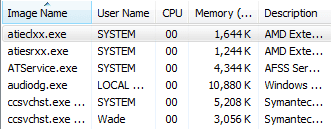
I'm just gonna post a screen shot just to show how light weight Norton has become. You don't have to like Norton or even suggest it to anyone, I just think it needs to be said that this is not 2003 anymore. Norton has gotten to the bottom of it's past issues, and over time have ironed out all of the kinks.

I don't mean this post to be disrespectful in any way shape or form Greg.. I admire and agree with 99.9% of the advice that you give on these forums. I just wanted to make that clear.
 

Attachments

  • Capture 2.PNG
    Capture 2.PNG
    4.6 KB · Views: 3

My Computer My Computer

At a glance

Windows 8 ProIntel Centrino Dual Core P7450 2.13GHz4gbATI Mobility Raedon HD3650
Computer Manufacturer/Model Number
Toshiba P300
OS
Windows 8 Pro
CPU
Intel Centrino Dual Core P7450 2.13GHz
Memory
4gb
Graphics Card(s)
ATI Mobility Raedon HD3650
Hard Drives
Toshiba MK3252GSX ATA
Internet Speed
Wish it were faster
Thanks guys. Points well taken.

My stereotypes of bloatware have been updated accordingly, as they seem to be out of date given the experiences here of those who I trust. .
 
Back
Top