- Local time
- 8:33 PM
- Messages
- 44
Hello,
I am not sure as to why my computer is so slow all the time. Specially when it boots up. Here are some details I have gathered for anyone who wishes to help me out:
OS: Windows 7 Professional (64 bit)
Processor: Intel Core i7-2720QM CPU @ 2.20 GHz 2.20GHz
RAM: 16.0 GB (14.9 GB usable)
Hard Drive: Seagate 465.8 GB (7200 RPM)
Video Card: Intel HD Graphics Family (3.27 GB)
The following is about my boot time from Event Viewer:
===================================
+ System
- Provider
[ Name] Microsoft-Windows-Diagnostics-Performance
[ Guid] {CFC18EC0-96B1-4EBA-961B-622CAEE05B0A}
EventID 100
Version 2
Level 1
Task 4002
Opcode 34
Keywords 0x8000000000010000
- TimeCreated
[ SystemTime] 2012-12-06T23:56:47.104580100Z
EventRecordID 939
- Correlation
[ ActivityID] {03114A60-F800-0004-0815-D7C20CD4CD01}
- Execution
[ ProcessID] 2692
[ ThreadID] 3468
Channel Microsoft-Windows-Diagnostics-Performance/Operational
Computer KHAN
- Security
[ UserID] S-1-5-19
- EventData
BootTsVersion 2
BootStartTime 2012-12-06T23:52:33.718400400Z
BootEndTime 2012-12-06T23:56:43.407368600Z
SystemBootInstance 181
UserBootInstance 152
BootTime 207267
MainPathBootTime 181967
BootKernelInitTime 27
BootDriverInitTime 7318
BootDevicesInitTime 892
BootPrefetchInitTime 0
BootPrefetchBytes 0
BootAutoChkTime 0
BootSmssInitTime 31220
BootCriticalServicesInitTime 6074
BootUserProfileProcessingTime 949
BootMachineProfileProcessingTime 0
BootExplorerInitTime 134170
BootNumStartupApps 19
BootPostBootTime 25300
BootIsRebootAfterInstall false
BootRootCauseStepImprovementBits 0
BootRootCauseGradualImprovementBits 0
BootRootCauseStepDegradationBits 0
BootRootCauseGradualDegradationBits 0
BootIsDegradation false
BootIsStepDegradation false
BootIsGradualDegradation false
BootImprovementDelta 0
BootDegradationDelta 0
BootIsRootCauseIdentified false
OSLoaderDuration 2975
BootPNPInitStartTimeMS 27
BootPNPInitDuration 1600
OtherKernelInitDuration 3110
SystemPNPInitStartTimeMS 4583
SystemPNPInitDuration 6609
SessionInitStartTimeMS 11321
Session0InitDuration 5706
Session1InitDuration 691
SessionInitOtherDuration 24822
WinLogonStartTimeMS 42541
OtherLogonInitActivityDuration 4305
UserLogonWaitDuration 6434
==========================================
So it took me 207.267 seconds to boot up. Almost 3 minutes 27 seconds.
Here are some screenshots from msconfig (Startup):


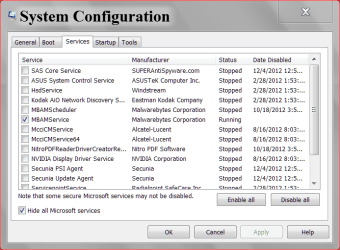
Here are some screen shots of msconfig (Services):


My guess is that I have too many services running. I don't know. Is there someone who can help me out ?
Thanks in advance, I will provide more details if necessary.
Khan
I am not sure as to why my computer is so slow all the time. Specially when it boots up. Here are some details I have gathered for anyone who wishes to help me out:
OS: Windows 7 Professional (64 bit)
Processor: Intel Core i7-2720QM CPU @ 2.20 GHz 2.20GHz
RAM: 16.0 GB (14.9 GB usable)
Hard Drive: Seagate 465.8 GB (7200 RPM)
Video Card: Intel HD Graphics Family (3.27 GB)
The following is about my boot time from Event Viewer:
===================================
+ System
- Provider
[ Name] Microsoft-Windows-Diagnostics-Performance
[ Guid] {CFC18EC0-96B1-4EBA-961B-622CAEE05B0A}
EventID 100
Version 2
Level 1
Task 4002
Opcode 34
Keywords 0x8000000000010000
- TimeCreated
[ SystemTime] 2012-12-06T23:56:47.104580100Z
EventRecordID 939
- Correlation
[ ActivityID] {03114A60-F800-0004-0815-D7C20CD4CD01}
- Execution
[ ProcessID] 2692
[ ThreadID] 3468
Channel Microsoft-Windows-Diagnostics-Performance/Operational
Computer KHAN
- Security
[ UserID] S-1-5-19
- EventData
BootTsVersion 2
BootStartTime 2012-12-06T23:52:33.718400400Z
BootEndTime 2012-12-06T23:56:43.407368600Z
SystemBootInstance 181
UserBootInstance 152
BootTime 207267
MainPathBootTime 181967
BootKernelInitTime 27
BootDriverInitTime 7318
BootDevicesInitTime 892
BootPrefetchInitTime 0
BootPrefetchBytes 0
BootAutoChkTime 0
BootSmssInitTime 31220
BootCriticalServicesInitTime 6074
BootUserProfileProcessingTime 949
BootMachineProfileProcessingTime 0
BootExplorerInitTime 134170
BootNumStartupApps 19
BootPostBootTime 25300
BootIsRebootAfterInstall false
BootRootCauseStepImprovementBits 0
BootRootCauseGradualImprovementBits 0
BootRootCauseStepDegradationBits 0
BootRootCauseGradualDegradationBits 0
BootIsDegradation false
BootIsStepDegradation false
BootIsGradualDegradation false
BootImprovementDelta 0
BootDegradationDelta 0
BootIsRootCauseIdentified false
OSLoaderDuration 2975
BootPNPInitStartTimeMS 27
BootPNPInitDuration 1600
OtherKernelInitDuration 3110
SystemPNPInitStartTimeMS 4583
SystemPNPInitDuration 6609
SessionInitStartTimeMS 11321
Session0InitDuration 5706
Session1InitDuration 691
SessionInitOtherDuration 24822
WinLogonStartTimeMS 42541
OtherLogonInitActivityDuration 4305
UserLogonWaitDuration 6434
==========================================
So it took me 207.267 seconds to boot up. Almost 3 minutes 27 seconds.
Here are some screenshots from msconfig (Startup):
Here are some screen shots of msconfig (Services):
My guess is that I have too many services running. I don't know. Is there someone who can help me out ?
Thanks in advance, I will provide more details if necessary.
Khan
My Computer
- Computer type
- Laptop
- OS
- Microsoft Windows 7 Enterprise 64-bit Service Pack 1
- Screen Resolution
- 0 x 0 x 0 bits (0 colors) @ 0 Hz