Windows 7 & Soundmax

mzee 80

New member
Local time
6:46 PM
Messages
12
My Windows XP installation has a Soundmax audio driver. Having now the ability to dual boot my computer to Windows 7 I have since learned that there is little likelihood of Soundmax producing a driver compatible with Windows 7. Windows 7 Device Manager indicates under Sound Controller what it refers to as a High Definition Audio Device and that the drivers installed are working properly but still no sound. Attempts to update these drivers report that the drivers in question are up to date.There is no indication by yellow exclamation marks that anything isnot as it shoud be in Device Manager.
Any suggestions for restoring sound would be appreciated
 

My Computer

Computer Manufacturer/Model Number
Mesh
OS
Windows XP & Windows 7
CPU
1.8gigaherz Intel Cire 2 Duo
Motherboard
AsusTek P5L-MX Rev 1xx
Memory
4Gb
Graphics Card(s)
Nvidia GeForce 7300 GS
Sound Card
AoundMax Integrated Gigital HD Audio
Monitor(s) Displays
22" Acer
Hard Drives
500 GB
Case
Mini tower
Right click the speaker icon in the system tray, near the time. Choose playback devices. Choose the correct one here. If you don't see it, right click in the middle and choose "Show Disabled Devices."
 

My Computer

Computer Manufacturer/Model Number
self built
OS
7600.20510 x86
CPU
P4 550 3.4 GHz HT running at 3.5 GHz
Motherboard
MSI PM8M3-V (MS-7211 v1.x) Micro-ATX mainboard
Memory
OCZ 2 GB(2x1GB) DDR400mHz running @ 414 mHz
Graphics Card(s)
HIS Radeon HD 3850 IceQ 3 Turbo HDMI Dual DL-DVI AGP
Sound Card
MOTU Traveler firewire studio interface 192 kHz 24 bit
Monitor(s) Displays
22" widescreen Acer X223W LCD, 17" Compaq P75 CRT
Screen Resolution
1680x1050 and 1280x1024
Hard Drives
SATA I x2 WD, 400 GB and 120 GB, SATA 2 WD Caviar Black 1 TB
PSU
350W generic
Case
Cybertronpc, it glows blue
Cooling
stock cpu fan, Ice-Q 3 gpu and system, many case fans
Keyboard
Logitch Classical Keyboard 200
Mouse
Logitech Mediaplay cordless
Internet Speed
1792/448 kbits/sec
Other Info
SATA II PCI fake RAID adapter, 1 GB Readyboost, original ATI Remote Wonder (even works with WMC perfectly), Logitech Rumblepad 2 game controller x2
My Windows XP installation has a Soundmax audio driver. Having now the ability to dual boot my computer to Windows 7 I have since learned that there is little likelihood of Soundmax producing a driver compatible with Windows 7. Windows 7 Device Manager indicates under Sound Controller what it refers to as a High Definition Audio Device and that the drivers installed are working properly but still no sound. Attempts to update these drivers report that the drivers in question are up to date.There is no indication by yellow exclamation marks that anything isnot as it shoud be in Device Manager.
Any suggestions for restoring sound would be appreciated

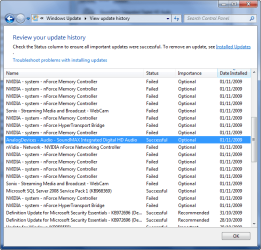
I have a SoundMAX Integrated Digital HD Audio card, working. An update was released not long ago that addressed some issues i was having with it.
Did you install it?

1.png

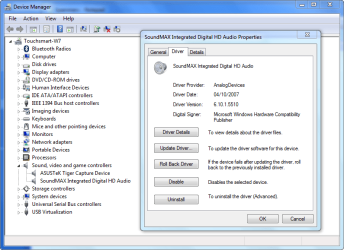
Here's my driver details if it helps.

2.png

Also type troubleshooting into the start menu, click on Troubleshooting > Hardware & Sound > Play Sound.
 

My Computer

Computer Manufacturer/Model Number
HP Touchsmart IQ771.uk
OS
Windows 7 Ultimate x64
CPU
AMD Turion(tm) 64 X2 Mobile Technology TL-56
Motherboard
ASUS Pheonix
Memory
3GB Nanya PC2-6400 DDR2-SDRAM SO-DIM (400MHz)
Graphics Card(s)
NVIDIA GeForce Go 7600 256MB GDDR3 SDRAM
Sound Card
High Definition Intergrated NVIDIA MCP51
Monitor(s) Displays
46" Sony Bravia HDTV
Screen Resolution
1600x1200
Hard Drives
1.5TB Samsug
320GB Seagate ST3320820AS - SATA 3Gb/s 8MB
500GB Maxtor Basics STM305003EHD301-RK
Internet Speed
↓6.32 Mb/s ↑0.35 Mb/s ↔26ms
Other Info
BIOS - American Megatrends Inc. 5.07
Ethernet Port - NVIDIA nForce 10/100/1000 Mbps
DVD Drive - TSSTcorp DVDR/RW TS-T632L
Torrentg,
Thanks for your suggestion but acting on it produced a window referring to Digital Audio S/PDOF followed by a reference to the High Definition Audio Device referred to in my initial post. Further delving came up with a facility to test this device but to no apparent effect. If Soundmax cannot be made to work can this Microsoft audio device installed by Windows 7 take it's place?. Device Manager indicates it is working properly although clearly it is'nt.0-
 

My Computer

Computer Manufacturer/Model Number
Mesh
OS
Windows XP & Windows 7
CPU
1.8gigaherz Intel Cire 2 Duo
Motherboard
AsusTek P5L-MX Rev 1xx
Memory
4Gb
Graphics Card(s)
Nvidia GeForce 7300 GS
Sound Card
AoundMax Integrated Gigital HD Audio
Monitor(s) Displays
22" Acer
Hard Drives
500 GB
Case
Mini tower
mzee80, Your problem described exactly what I'd experienced. Search for the "SoundMAXAD1988B_Audio_V610X6585_Win7" on the web. Asus siteshould have it. Other posts in this forum also mention of it. Unzip and install, you will hear the sound from the speakers right away. Good luck!
 

My Computer

OS
Windows XP
marcgarr
My apologies for not responding earlier but I have only just got around to downloading the file you refer to - and it works ! Many thanks for pointing the way to a solution which I had been seeking since first installing Window 7. I now feel much happier about migrating from Wondows XP particularly as I can now get ther full benefit of Media Cener.
 

My Computer

Computer Manufacturer/Model Number
Mesh
OS
Windows XP & Windows 7
CPU
1.8gigaherz Intel Cire 2 Duo
Motherboard
AsusTek P5L-MX Rev 1xx
Memory
4Gb
Graphics Card(s)
Nvidia GeForce 7300 GS
Sound Card
AoundMax Integrated Gigital HD Audio
Monitor(s) Displays
22" Acer
Hard Drives
500 GB
Case
Mini tower
Back
Top