Solved Windows 7 SP1 beta uninstall Help

Paul1360

New member
Power User
Local time
5:07 PM
Messages
191
Location
Brynna-Wales
Hiya All,
Sorry not been around for a while.
Gents when I try to uninstall Win 7 SP1 Beta, I'm getting no joy from Programs and Features (Uninstall options N/A).
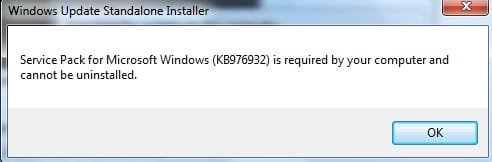
  1. When I try using the command Prompt and type in wusa.exe /uninstall /kb:976932 I keep getting this box.
All help would be grat please.
cheers
 

Attachments

  • sp1 beta.jpg
    sp1 beta.jpg
    19.9 KB · Views: 16

My Computer

Computer type
PC/Desktop
Computer Manufacturer/Model Number
Advent & Acer
OS
Win 8.1 Ultimate and Home Premium x64 bit
Hiya All,
Sorry not been around for a while.
Gents when I try to uninstall Win 7 SP1 Beta, I'm getting no joy from Programs and Features (Uninstall options N/A).
  1. When I try using the command Prompt and type in wusa.exe /uninstall /kb:976932 I keep getting this box.
All help would be grat please.
cheers


1. Click the Start button. In the search box, type System Restore, and then, in the list of results, click System Restore.

2. Click Next.

3. Choose a restore point that matches the installation date for the service pack. The restore point will be labeled either Install: Windows Update or Install: Windows 7 Service Pack 1.

Hope it helps!!!
;)
 

My Computer

Computer Manufacturer/Model Number
WALLONN7 / LIN BLACK SERIES II
OS
Windows 7 Ultimate x64 SP1
CPU
AMD PHENOM II X6 1090T 3.2GHz
Motherboard
GIGABYTE GA-890FXA-UD7
Memory
8GB G.SKILL RIPJAWS - F3-10666CL7D
Graphics Card(s)
SAPPHIRE ATI RADEON HD 5870 VAPOR X OC
Sound Card
REALTEK DOLBY HOME THEATER
Monitor(s) Displays
LED LG W2486L
Screen Resolution
1080p
Hard Drives
SEAGATE 1TB -ST31000528AS - AHCI MODE - AS SATA
PSU
ZALMAN ZM1000-HP 1000W
Case
THERMALTAKE XASER VI VG4000SWA
Cooling
140MM x3 / 120MM x1 AIR COOLING - THERMALTAKE
Keyboard
MICROSOFT DIGITAL MEDIA KEYBOARD 3000 - USB
Mouse
MICROSOFT BASIC OPTICAL MOUSE 2.0 - USB
Internet Speed
600KBPS
Other Info
MICROSOFT XBOX 360 CONTROLLER
Hi Wallonn7,
Nope not able to do it that way either, so you have to uninstall SP1 beta before installing SP1 RTM and you can't install over the top??????.
Just seems very very odd that the beta can't be uninstalled and I know I'm not the only 1 who has this problem.
cheers
 

My Computer

Computer type
PC/Desktop
Computer Manufacturer/Model Number
Advent & Acer
OS
Win 8.1 Ultimate and Home Premium x64 bit
Hi Wallonn7,
Nope not able to do it that way either, so you have to uninstall SP1 beta before installing SP1 RTM and you can't install over the top??????.
Just seems very very odd that the beta can't be uninstalled and I know I'm not the only 1 who has this problem.
cheers

Looks like you removed the backup data. Now you can't remove the Sp1. You have to make a clean installation with your Windows 7 DVD to go back to RTM.
:(
 

My Computer

Computer Manufacturer/Model Number
WALLONN7 / LIN BLACK SERIES II
OS
Windows 7 Ultimate x64 SP1
CPU
AMD PHENOM II X6 1090T 3.2GHz
Motherboard
GIGABYTE GA-890FXA-UD7
Memory
8GB G.SKILL RIPJAWS - F3-10666CL7D
Graphics Card(s)
SAPPHIRE ATI RADEON HD 5870 VAPOR X OC
Sound Card
REALTEK DOLBY HOME THEATER
Monitor(s) Displays
LED LG W2486L
Screen Resolution
1080p
Hard Drives
SEAGATE 1TB -ST31000528AS - AHCI MODE - AS SATA
PSU
ZALMAN ZM1000-HP 1000W
Case
THERMALTAKE XASER VI VG4000SWA
Cooling
140MM x3 / 120MM x1 AIR COOLING - THERMALTAKE
Keyboard
MICROSOFT DIGITAL MEDIA KEYBOARD 3000 - USB
Mouse
MICROSOFT BASIC OPTICAL MOUSE 2.0 - USB
Internet Speed
600KBPS
Other Info
MICROSOFT XBOX 360 CONTROLLER
OMG you're not joking are???????. I have to reset my PC back to when I bought it????????
If that is the case I may leave the beta on and 4get about the RTM, I've got way to much stuff on here and it's set up 4 me as I'm disabled. it took me along time to get it right:(:sick::shock:
 

My Computer

Computer type
PC/Desktop
Computer Manufacturer/Model Number
Advent & Acer
OS
Win 8.1 Ultimate and Home Premium x64 bit

My Computer

Computer Manufacturer/Model Number
Dell XPS 420
OS
Vista Home Premium x86 SP2
CPU
Intel Core 2 Quad Q9300 2.50GHz
Motherboard
Stock Dell 0TP406
Memory
4 gb (DDR2 800) 400MHz
Graphics Card(s)
ATI Radeon HD 3870 (512 MBytes)
Monitor(s) Displays
1 x Dell 2007FP and 1 x (old) Sonic flat screen
Screen Resolution
1600 x 1200 and 1280 x 1204
Hard Drives
1 x 640Gb (SATA 300) Western Digital: WDC WD6400AAKS-75A7B0 1 x 1Tb (SATA 600) Western Digital: Caviar Black, SATA 6GB/S, 64Mb cache, 8ms Western Digital: WDC WD1002FAEX-00Z3A0 ATA Device
Case
Dell XPS 420
Cooling
Stock Fan
Keyboard
Dell Bluetooth
Mouse
Advent Optical ADE-WG01 (colour change light up)
Internet Speed
Varies from 10kb/s to 170kb/s. So unreliable it is not funny
Other Info
ASUS USB 3.0 5Gbps/SATA 6Gbps - PCI-Express Combo Controller Card (U3S6)
No I'm not jokin'... sorry.:( The information I transmit to you is the result of research conducted in several places, including Microsoft's own forum, where I found reports severely equal to yours, which senior members concluded in their responses to thread starters, that the only thing to do would be to back up files and after... formatting. Anyway, follow the niemiro's guidelines, maybe they save all their work!!!:)
Good luck and keeps us informed!!;)

"Hi

There are some recent Blog posts that describe a command that will completely remove all of the uninstall information for the Service Pack 1 Beta to free up some disk space. Some of these blog posts do not go far enough when describing the consequences of using this procedure.

Please remember that if you have the Service Pack 1 Beta installed on Windows 7/Server 2008 R2, that you will be Required to uninstall the SP1 Beta before you can install the Final (RTM) version of SP1 when it is released.

Just to be perfectly clear, if you use that command to remove the SP1 Beta Uninstall information, you will be required to completely reinstall Windows 7 or Server 2008 R2, or use a complete System Image Backup, created prior to installing the SP1 Beta, before you can install the Final (RTM) version.

Please consider this information carefully before using that command.

Regards,


Ronnie Vernon
MVP, Moderator - Windows Server Forum" -WARNING about removing the SP1 Beta uninstall Information to free up disk space!
[FONT=&quot] [/FONT]
 

My Computer

Computer Manufacturer/Model Number
WALLONN7 / LIN BLACK SERIES II
OS
Windows 7 Ultimate x64 SP1
CPU
AMD PHENOM II X6 1090T 3.2GHz
Motherboard
GIGABYTE GA-890FXA-UD7
Memory
8GB G.SKILL RIPJAWS - F3-10666CL7D
Graphics Card(s)
SAPPHIRE ATI RADEON HD 5870 VAPOR X OC
Sound Card
REALTEK DOLBY HOME THEATER
Monitor(s) Displays
LED LG W2486L
Screen Resolution
1080p
Hard Drives
SEAGATE 1TB -ST31000528AS - AHCI MODE - AS SATA
PSU
ZALMAN ZM1000-HP 1000W
Case
THERMALTAKE XASER VI VG4000SWA
Cooling
140MM x3 / 120MM x1 AIR COOLING - THERMALTAKE
Keyboard
MICROSOFT DIGITAL MEDIA KEYBOARD 3000 - USB
Mouse
MICROSOFT BASIC OPTICAL MOUSE 2.0 - USB
Internet Speed
600KBPS
Other Info
MICROSOFT XBOX 360 CONTROLLER
Hello Paul,

If you used the SP1 Disk Cleanup Tool , then you will not be able to uninstall the SP1 Beta. Instead, you will have to do a clean reinstall of Windows 7 again, then install the new SP1 RTM afterwards. :(
 

My Computer

Computer type
PC/Desktop
Computer Manufacturer/Model Number
Self built custom
OS
64-bit Windows 11 Pro for Workstations
CPU
Intel i7-8700K OC'd to 5 GHz
Motherboard
ASUS ROG Maximus XI Formula Z390
Memory
64 GB (4x16GB) G.SKILL TridentZ RGB DDR4 3600 MHz
Graphics Card(s)
ASUS ROG-STRIX-GTX1080TI-O11G-GAMING
Sound Card
Integrated
Monitor(s) Displays
2 x Samsung Odyssey G7 27"
Screen Resolution
2560x1440
Hard Drives
1TB Samsung 990 PRO M.2,
4TB Samsung 990 PRO PRO M.2,
TerraMaster F8 SSD Plus NAS
PSU
Seasonic Prime Titanium 850W
Case
Thermaltake Core P3
Cooling
Corsair Hydro H115i
Keyboard
Logitech wireless K800
Mouse
Logitech MX Master 4
Internet Speed
2 Gb/s Download and 100 Mb/s Upload
Antivirus
Malwarebyte Anti-Malware Premium
Browser
Google Chrome
Other Info
Logitech Z625 speaker system,
Logitech BRIO 4K Pro webcam,
HP Color LaserJet Pro MFP M477fdn,
APC SMART-UPS RT 1000 XL - SURT1000XLI,
Galaxy S23 Plus phone
No I never used the cleanup tool. Sorry Wallonn7 I never meant any disrespect to you,It's just the way we speak here in the caves in Wales. Mae'n flin 'da fi.
I've had SP1 installed since Sept last year and I use Disk Cleanup once a month so thats how I've lost the files. I would have tho MS would have a work around for this (Yes I understand that you use Beta at your own risk but still) This being the case MS may now find that people will no longer be prepared to to help them by using their Beta's.
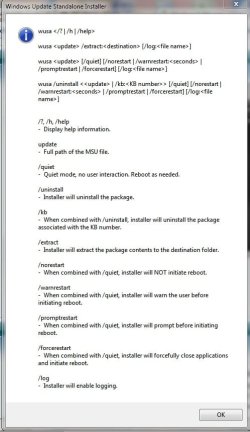
Any way I tried niemiro's guidelines and this box popped up. I've not done anything with it yet any ideas?
cheers
Sorry again I some how put the wrong KBxxxxxxx number in so please ignore the above box
Iechyd Da
 

Attachments

  • sp1.sai.jpg
    sp1.sai.jpg
    113 KB · Views: 66
Last edited:

My Computer

Computer type
PC/Desktop
Computer Manufacturer/Model Number
Advent & Acer
OS
Win 8.1 Ultimate and Home Premium x64 bit
Me Again,
Ok just got off the phone from a very nice MS Tech who was very helpfull indeed but alas as we all know this problem is not going away, I even gave him control of my PC but still the same problem but he has a work around that my work and I'm going to try later 2day and if it works I'll let you all know.
Iechyd Da (cheers)
 

My Computer

Computer type
PC/Desktop
Computer Manufacturer/Model Number
Advent & Acer
OS
Win 8.1 Ultimate and Home Premium x64 bit
( ... ) Sorry Wallonn7 I never meant any disrespect to you,It's just the way we speak here in the caves in Wales. Mae'n flin 'da fi. ( ... )

Hey buddy, relax!
biggrin.gif
Nothing you said was lacking with respect! I did not feel disrespected at any time! Feel comfortable with me, okay?!
wink.gif


Me Again,
Ok just got off the phone from a very nice MS Tech who was very helpfull indeed but alas as we all know this problem is not going away, I even gave him control of my PC but still the same problem but he has a work around that my work and I'm going to try later 2day and if it works I'll let you all know.
Iechyd Da (cheers)

Until you complete the Microsoft' Tech suggested, keep calm and let us know the result! Good luck!
:)
 

My Computer

Computer Manufacturer/Model Number
WALLONN7 / LIN BLACK SERIES II
OS
Windows 7 Ultimate x64 SP1
CPU
AMD PHENOM II X6 1090T 3.2GHz
Motherboard
GIGABYTE GA-890FXA-UD7
Memory
8GB G.SKILL RIPJAWS - F3-10666CL7D
Graphics Card(s)
SAPPHIRE ATI RADEON HD 5870 VAPOR X OC
Sound Card
REALTEK DOLBY HOME THEATER
Monitor(s) Displays
LED LG W2486L
Screen Resolution
1080p
Hard Drives
SEAGATE 1TB -ST31000528AS - AHCI MODE - AS SATA
PSU
ZALMAN ZM1000-HP 1000W
Case
THERMALTAKE XASER VI VG4000SWA
Cooling
140MM x3 / 120MM x1 AIR COOLING - THERMALTAKE
Keyboard
MICROSOFT DIGITAL MEDIA KEYBOARD 3000 - USB
Mouse
MICROSOFT BASIC OPTICAL MOUSE 2.0 - USB
Internet Speed
600KBPS
Other Info
MICROSOFT XBOX 360 CONTROLLER
Hi, Well that work around never worked and I've just got back to MS Tech and informed him as he asked me to do.
This was what I was told to do, I downloaded the SP1 Beta onto my Grandson's laptop and installed it, Then I copied the %temp% folder over to my PC and he said that would work as I was putting back the uninstall stuff but it never did. Also tried all the ways niemiro's said but no go either. Will wait to hear back and let you know
Iechyd Da
 

My Computer

Computer type
PC/Desktop
Computer Manufacturer/Model Number
Advent & Acer
OS
Win 8.1 Ultimate and Home Premium x64 bit
UPDATE:- Just got off the phone with MS Tech after he read my email soaying the work around was a no no.
He was very helpfull but alas the only way around this problem is a complete reformat back to Factory settings:mad::mad:.
As my laptop is only used as a mess around I reset it back this morning and got it back up and running and then I installed the SP1 Beta and then checked all the information that came with it and was not able to find anything tell me not to remove the temp files!!!!!!!!!. I then tried to uninstall the update and it worked a treat.
We all understand the risk's when you Beta test software but I've never known before the uninstall files being placed in a temp folder. This could very well backfire on MS if a lot of people have to reformat thier PC's.
I just can't understand how MS can't get this sorted out.
Iechyd Da
 

My Computer

Computer type
PC/Desktop
Computer Manufacturer/Model Number
Advent & Acer
OS
Win 8.1 Ultimate and Home Premium x64 bit
UPDATE:- Just got off the phone with MS Tech after he read my email soaying the work around was a no no.
He was very helpfull but alas the only way around this problem is a complete reformat back to Factory settings:mad::mad:.
As my laptop is only used as a mess around I reset it back this morning and got it back up and running and then I installed the SP1 Beta and then checked all the information that came with it and was not able to find anything tell me not to remove the temp files!!!!!!!!!. I then tried to uninstall the update and it worked a treat.
We all understand the risk's when you Beta test software but I've never known before the uninstall files being placed in a temp folder. This could very well backfire on MS if a lot of people have to reformat thier PC's.
I just can't understand how MS can't get this sorted out.
Iechyd Da

The question applies not only to use the Windows Disk Cleanup ... If you do use apps like CCleaner, for example, which possesses a specific tool for cleaning temporary files, you may have deleted the files necessary to uninstall the Service Pack Beta without having been aware.:( I agree with you: Microsoft should have thought of a solution similar to what occurs with drivers from Nvidia and AMD - ATI old - whose installers create a temporary folder on the root of the Windows partition. But ... you got the knowledge to deal with future endeavors in the world of "beta", didn't you?!:) Dying and learning, "as I always say!;)
 

My Computer

Computer Manufacturer/Model Number
WALLONN7 / LIN BLACK SERIES II
OS
Windows 7 Ultimate x64 SP1
CPU
AMD PHENOM II X6 1090T 3.2GHz
Motherboard
GIGABYTE GA-890FXA-UD7
Memory
8GB G.SKILL RIPJAWS - F3-10666CL7D
Graphics Card(s)
SAPPHIRE ATI RADEON HD 5870 VAPOR X OC
Sound Card
REALTEK DOLBY HOME THEATER
Monitor(s) Displays
LED LG W2486L
Screen Resolution
1080p
Hard Drives
SEAGATE 1TB -ST31000528AS - AHCI MODE - AS SATA
PSU
ZALMAN ZM1000-HP 1000W
Case
THERMALTAKE XASER VI VG4000SWA
Cooling
140MM x3 / 120MM x1 AIR COOLING - THERMALTAKE
Keyboard
MICROSOFT DIGITAL MEDIA KEYBOARD 3000 - USB
Mouse
MICROSOFT BASIC OPTICAL MOUSE 2.0 - USB
Internet Speed
600KBPS
Other Info
MICROSOFT XBOX 360 CONTROLLER
UPDATE:- Just got off the phone with MS Tech after he read my email soaying the work around was a no no.
He was very helpfull but alas the only way around this problem is a complete reformat back to Factory settings:mad::mad:.
As my laptop is only used as a mess around I reset it back this morning and got it back up and running and then I installed the SP1 Beta and then checked all the information that came with it and was not able to find anything tell me not to remove the temp files!!!!!!!!!. I then tried to uninstall the update and it worked a treat.
We all understand the risk's when you Beta test software but I've never known before the uninstall files being placed in a temp folder. This could very well backfire on MS if a lot of people have to reformat thier PC's.
I just can't understand how MS can't get this sorted out.
Iechyd Da

The question applies not only to use the Windows Disk Cleanup ... If you do use apps like CCleaner, for example, which possesses a specific tool for cleaning temporary files, you may have deleted the files necessary to uninstall the Service Pack Beta without having been aware.:( I agree with you: Microsoft should have thought of a solution similar to what occurs with drivers from Nvidia and AMD - ATI old - whose installers create a temporary folder on the root of the Windows partition. But ... you got the knowledge to deal with future endeavors in the world of "beta", didn't you?!:) Dying and learning, "as I always say!;)
Yes you are correct no more beta testing for MS, I've already removed IE9 and a few other things that I was trying. It's true if you used cleanup program no matter what it removed the uninstall files as they were placed in a temp folder.
I ready do hope MS comes up with something. No more Beta from MS for me now
Iechyd Da
 

My Computer

Computer type
PC/Desktop
Computer Manufacturer/Model Number
Advent & Acer
OS
Win 8.1 Ultimate and Home Premium x64 bit
Back
Top