Windows 7 SP1 DVD ISO Image Writer Makes Bad Disks

mbratch

New member
Local time
10:37 PM
Messages
27
Hello

Under Windows 7 SP1, I attempt to burn an ISO image to a DVD-R by right clicking the ISO image file and telling it to burn the image. I also ask it to verify the image. It does this without errors and pops open the drive. If I reinsert the disk, Windows 7 can't recognize it. If I go to my Linux box and write the exact same ISO image to a DVD-R using Linux tools, I can read that one on my Windows 7 machine. So there's something wrong with the way it's writing ISO images.

[edit] I wrote the same ISO image using another program (BurnAware free version) on Windows 7 and that one seemed to work. So the problem appears to specifically be with the ISO writer included with Windows 7.

Anyone else encounter this? I would suspect the drive, but the verify gives no errors, so that's surprising.

Thanks
 

My Computer My Computer

At a glance

Windows 7 Pro 64-bitIntel i5-m5204GB
Computer Manufacturer/Model Number
Lenovo T510
OS
Windows 7 Pro 64-bit
CPU
Intel i5-m520
Memory
4GB
Hard Drives
250G
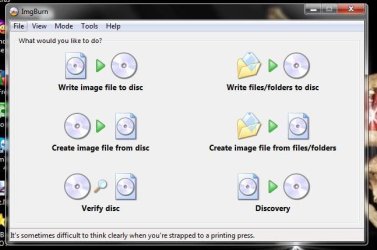
Have you tried ImgBurn (Freeware)? Could you have a bad .iso file ?
 

Attachments

  • ImgBurn.JPG
    ImgBurn.JPG
    40.3 KB · Views: 6
  • ImgBurn_Verify.JPG
    ImgBurn_Verify.JPG
    54.5 KB · Views: 7

My Computer My Computer

At a glance

Win7 Enterprise, Win7 x86 (Ult 7600), Win7 x6...AMD fx8350 4ghz, AMD-32 2400mhz, AMD-64 3200m...2gb, 4gb on the Ult 7600, 4gb on Technet RTM,...Draw my own Graphics, several nVidia cards
Computer type
PC/Desktop
Computer Manufacturer/Model Number
Built them myself, Science Experiments !
OS
Win7 Enterprise, Win7 x86 (Ult 7600), Win7 x64 Ult 7600, TechNet RTM on AMD x64 (2.8Ghz)
CPU
AMD fx8350 4ghz, AMD-32 2400mhz, AMD-64 3200mhz, AMDx64 2.8G
Motherboard
SIS 755, ECS-K8M890M-M (Ult 7600), GigaByte & others
Memory
2gb, 4gb on the Ult 7600, 4gb on Technet RTM, 32gb on FX8350
Graphics Card(s)
Draw my own Graphics, several nVidia cards
Sound Card
on motherboard
Monitor(s) Displays
19" flat scr, 28" I-Inc widescr,22" Emprex Widescr, 23" Acer
Screen Resolution
1280 x 1024, 1440 x 900, 1920 x 1080
Hard Drives
6 pata Ide HD's & 2 Sata HD's
added 80gb external on Ult 7600 computer,
numerous extra 1tb, 2TB, 3Tb SATA HD's
A collection of ext HD Docks w/ HDs
PSU
430w, 550w, 600w, 700, 800, etc
Case
All Generic Full Towers
Cooling
Open Air & a few fans, some w/ colored LEDs
Keyboard
Compaq & Dell recycled from GoodWill
Mouse
Made in China Optical Wired Mouse
Internet Speed
Fast Cable InterNet
Antivirus
AVG Free on 24 different Desktops, NO Problems!
Browser
IE 8 is preferred, but use FireFox sometimes
Other Info
Linksys Routers, switches, & Hubs
Too Many USB Flash Drives to count, Biggest is 64GB !
Eight computers in my home network.
Sixteen computers at my business network.
Linked via TeamViewer !
Lots of old used spare computer parts everywhere!
ISO image is good. As I said in my original post, I burned that same image on another machine (Linux) and that one I can read on my Windows 7 box.

The DVD that I just burned using BurnAware (free version) I was able to read on Windows 7, but still not able to read it on the other system I've been trying to use it on (that system was able to read the Linux-burned ISO). So I'm suspecting maybe it's one of those flukey "the drives just don't align" issues...
 

My Computer My Computer

At a glance

Windows 7 Pro 64-bitIntel i5-m5204GB
Computer Manufacturer/Model Number
Lenovo T510
OS
Windows 7 Pro 64-bit
CPU
Intel i5-m520
Memory
4GB
Hard Drives
250G
Maybe the DVD is DVD-r when the drive can only read DVD+r?
 

My Computer My Computer

At a glance

Windows 8 Pro (32-bit)1.83GHz Intel Core Duo2GB 667MHz DDR2 SDRAM (PC2-5300) (upgrade)ATI Radeon X1600 with 128MB GDDR3 memory
Computer type
PC/Desktop
Computer Manufacturer/Model Number
Apple 17" iMac MA199LL (Early 2006)
OS
Windows 8 Pro (32-bit)
CPU
1.83GHz Intel Core Duo
Memory
2GB 667MHz DDR2 SDRAM (PC2-5300) (upgrade)
Graphics Card(s)
ATI Radeon X1600 with 128MB GDDR3 memory
Monitor(s) Displays
17-inch TFT active-matrix LCD, millions of colors
Screen Resolution
1440 x 900
Hard Drives
Hitachi 320GB HDT721032SLA360 7200RPM SATA II (upgrade)
Keyboard
Microsoft Wired Keyboard 600
Mouse
Microsoft Basic Optical Mouse v2.0
Internet Speed
4 Mbps
Antivirus
Microsoft Security Essentials
Browser
Google Chrome
Other Info
WEI:
Base Score: 3.9 Processor: 4.4 Memory 4.7
Graphics: 3.9 Gaming Graphics: 4.1 Primary HD: 5.9
OK so here's a summary of the situation. I have a single ISO image which is a bootable Linux Mint install (ISO file is a little over 900MB), standard ISO 9660 format. I have 3 DVD-R disks (all from the same lot) written with this image:

1) Written on Windows 7 SP1 laptop using the built-in ISO image writer
2) Written on Windows 7 SP1 laptop using BurnAware
3) Written on a Linux Fedora 15 system (system B below), using Gnome Baker or something like that...

I have 4 computer systems
A) Windows 7 S1 laptop
B) Linux Fedora 15 system
C) A blank system (we'll call System C) which doesn't have an OS on it yet but has a USB connected DVD-RW drive
D) Another blank system (we'll call System D) which doesn't have an OS on it yet, but has a built in DVD-RW.

System A can read disks 2 & 3, but not 1.
System B can read disk 3 only
System C can read (boot and install from) disk 3 only
System D can read (boot and install from) disks 1, 2, or 3.

Interesting... I'd be convinced it is a difference in disk alignment, except the very system that wrote disk 1 can't read disk 1.
 

My Computer My Computer

At a glance

Windows 7 Pro 64-bitIntel i5-m5204GB
Computer Manufacturer/Model Number
Lenovo T510
OS
Windows 7 Pro 64-bit
CPU
Intel i5-m520
Memory
4GB
Hard Drives
250G
Did you verify disks?
 

My Computer My Computer

At a glance

Windows 8 Pro (32-bit)1.83GHz Intel Core Duo2GB 667MHz DDR2 SDRAM (PC2-5300) (upgrade)ATI Radeon X1600 with 128MB GDDR3 memory
Computer type
PC/Desktop
Computer Manufacturer/Model Number
Apple 17" iMac MA199LL (Early 2006)
OS
Windows 8 Pro (32-bit)
CPU
1.83GHz Intel Core Duo
Memory
2GB 667MHz DDR2 SDRAM (PC2-5300) (upgrade)
Graphics Card(s)
ATI Radeon X1600 with 128MB GDDR3 memory
Monitor(s) Displays
17-inch TFT active-matrix LCD, millions of colors
Screen Resolution
1440 x 900
Hard Drives
Hitachi 320GB HDT721032SLA360 7200RPM SATA II (upgrade)
Keyboard
Microsoft Wired Keyboard 600
Mouse
Microsoft Basic Optical Mouse v2.0
Internet Speed
4 Mbps
Antivirus
Microsoft Security Essentials
Browser
Google Chrome
Other Info
WEI:
Base Score: 3.9 Processor: 4.4 Memory 4.7
Graphics: 3.9 Gaming Graphics: 4.1 Primary HD: 5.9
Did you verify disks?
Yes. See my prior post. When I wrote using the Windows 7 ISO burn, I checked the "verify disk" option. No errors on the verify. Disk automatically ejected.
 

My Computer My Computer

At a glance

Windows 7 Pro 64-bitIntel i5-m5204GB
Computer Manufacturer/Model Number
Lenovo T510
OS
Windows 7 Pro 64-bit
CPU
Intel i5-m520
Memory
4GB
Hard Drives
250G
What media are you using?

There is a great deal of crap and brand name knockoffs out there for sale. Never buy from Staples, Office Depot, Best Buy.

I strongly recommend using only JVC (Taiyo Yuden) or Verbatim (Mitsubishi) discs purchased from a reputable house:
Amazon, Newegg, or SuperMediaStore.

Since I started following this protocol 7 years ago, I've had only two coasters
 

My Computer My Computer

At a glance

W7 Home Premium 32bit
Computer Manufacturer/Model Number
8 home-builds from the 80's into 2004
OS
W7 Home Premium 32bit
I'm using Sony media, which I didn't think would be too shabby. Never had a problem with them under any other circumstances until now.

I think my next step will be to sacrifice a number of DVD-Rs to experiment with a wider sample size.
 
Last edited:

My Computer My Computer

At a glance

Windows 7 Pro 64-bitIntel i5-m5204GB
Computer Manufacturer/Model Number
Lenovo T510
OS
Windows 7 Pro 64-bit
CPU
Intel i5-m520
Memory
4GB
Hard Drives
250G
Back
Top