Windows 7 SP1 successfully installed!

sreedhav

Seasonal Bird
Guru
Local time
2:17 AM
Messages
612
Location
Seasonal Bird
Dear friends,
I wish to share with you a good news! Windows 7 SP1 has been released to the public and i have just finished downloading and configuring the SP1 pack!


The download to my desktop was via Windows Update.

Kindly read the following article before download: It is important!


http://support.microsoft.com/kb/2505743/en-us?sd=rss&spid=14498


Regards,
Sreedhav:)
 

My Computer

Computer Manufacturer/Model Number
Sony Vaio C series VPCCB35FN laptop
OS
MS Windows 7 Home Premium 64-bit SP1
CPU
IntelCore [email protected]; Sandy Bridge 32nm Tech.
Motherboard
Sony Vaio Version:C609NJYJ
Memory
4096Mb RAM; Single ChannelDDR3@665MHz; DRAM Freq:662MHz
Graphics Card(s)
AMD Radeon HD 6630M; GPU:Whistler;BIOS Core&mem Clock:123.36
Sound Card
REALTEK High Definition Audio Device; INTEL Display Card
Monitor(s) Displays
Generic PnP Intel HD;Resolution:1920*1040 Pixels; BPP:32bits
Screen Resolution
Current Resolution:1920*1080 Pixels; Monitor Frequency:60Hz
Hard Drives
Internal HD:TOSHIBA MK5061GSY; Real Size:488 GB;NTFS; 3 Partitions; SATA; HEADS:16

External HDD: WD Elements 1023 PORTABLE; Estimated Size: 1TB; NTFS; 3 Partitions
Cooling
Lateral Exhaust with a Cooling Pad Placed Beneath.
Keyboard
Logitech Bluetooth+ Generic Integrated K-B
Mouse
Logitech Bluetooth
Internet Speed
2MBPS
Other Info
1)Trend Micro Titanium Maximum Security Suite Version:3
2)SAS-PRO

3)MBAM--PRO


4)WATERFOX+IE9 +WOT+LINKEXTEND+ DRWEBCUREIT LINK CHECKER

5)SPYWAREBLASTER

6) WINPATROL PLUS

7) SANDBOXIE and
8) A BIT OF COMMON SENSE.
  • Like
Reactions: JMH
I installed SP1 from Windows Update last night....Went without a hitch.
 

My Computer

Computer Manufacturer/Model Number
Acer Aspire AX3910-U3012 PT
OS
Windows 7 Home Premium 64 bit
CPU
Intel Pentium E5700
Memory
640GB HDD
Graphics Card(s)
Integrated Graphics
Sound Card
Integrated Audio
Monitor(s) Displays
Acer
Dear Ambimom,
Congrats mate! Just see this forum, filled with some problem or the other! Downloading sp1 via the Win.Update route (for a single home pc) is ideal! Downloading via the microsoft update center is altogether a different kettle of fishes!

How to confirm that sp1 is on the system is START--->COMPUTER----->RIGHT CLICK---> PROPERTIES----> SEE THE SNAP BELOW:
 

Attachments

  • SP1.png
    SP1.png
    68.4 KB · Views: 76

My Computer

Computer Manufacturer/Model Number
Sony Vaio C series VPCCB35FN laptop
OS
MS Windows 7 Home Premium 64-bit SP1
CPU
IntelCore [email protected]; Sandy Bridge 32nm Tech.
Motherboard
Sony Vaio Version:C609NJYJ
Memory
4096Mb RAM; Single ChannelDDR3@665MHz; DRAM Freq:662MHz
Graphics Card(s)
AMD Radeon HD 6630M; GPU:Whistler;BIOS Core&mem Clock:123.36
Sound Card
REALTEK High Definition Audio Device; INTEL Display Card
Monitor(s) Displays
Generic PnP Intel HD;Resolution:1920*1040 Pixels; BPP:32bits
Screen Resolution
Current Resolution:1920*1080 Pixels; Monitor Frequency:60Hz
Hard Drives
Internal HD:TOSHIBA MK5061GSY; Real Size:488 GB;NTFS; 3 Partitions; SATA; HEADS:16

External HDD: WD Elements 1023 PORTABLE; Estimated Size: 1TB; NTFS; 3 Partitions
Cooling
Lateral Exhaust with a Cooling Pad Placed Beneath.
Keyboard
Logitech Bluetooth+ Generic Integrated K-B
Mouse
Logitech Bluetooth
Internet Speed
2MBPS
Other Info
1)Trend Micro Titanium Maximum Security Suite Version:3
2)SAS-PRO

3)MBAM--PRO


4)WATERFOX+IE9 +WOT+LINKEXTEND+ DRWEBCUREIT LINK CHECKER

5)SPYWAREBLASTER

6) WINPATROL PLUS

7) SANDBOXIE and
8) A BIT OF COMMON SENSE.
I started the 73.6 MB Win 7 SP1 update at 3:16 am west coast time through Windows Update and it downloaded in about 5 minutes, then the installation took another 5 minutes and restarting the computer plus configuring the Service Pack took the final 5 minutes and my desktop was back up and running 15 minutes later at 3:31 am.

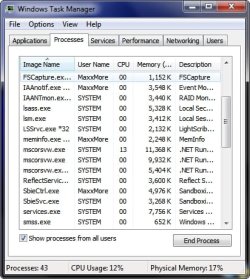
There was about 13-14% CPU usage for a few minutes but at 3:36 am mscorsvw.exe phoned Redmond and CPU usage dropped back to 0% as it normally is.

I have yet to notice any irregularities as a result of installing Win 7 SP1, but I will post any problems should they arise.

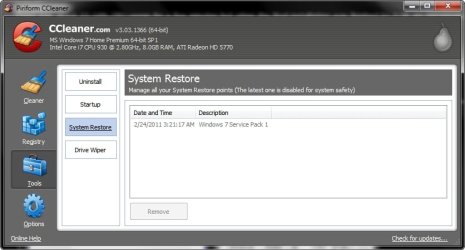
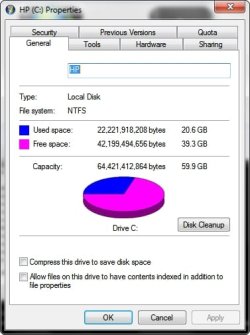
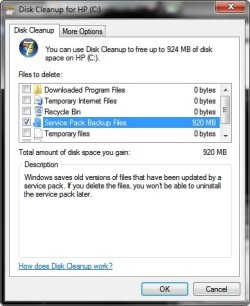
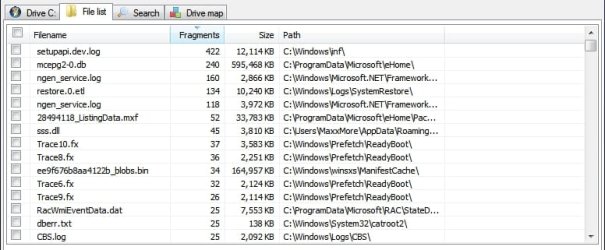
The SP1 installation left 1 restore point and an additional 1.6 GB more data on the C partition than the 19 GB that were present just prior to SP1 with 920 MB of the increased amount being Service Pack backup files which can eventually be deleted. I have also included a screen capture of the extent of the highest amount of defragmentation within certain files on the C partition after the successful installation of Win 7 SP1.

~Maxx~
.
Win7_50.png
 

Attachments

  • Service Pack 1 2011-02-24_033115.jpg
    Service Pack 1 2011-02-24_033115.jpg
    11.8 KB · Views: 6
  • SP1 2011-02-24_033625.jpg
    SP1 2011-02-24_033625.jpg
    45 KB · Views: 10
  • SP1 Leaves 1 Restore Point.jpg
    SP1 Leaves 1 Restore Point.jpg
    39.4 KB · Views: 17
  • After SP1 20.6 GB on C Partition.jpg
    After SP1 20.6 GB on C Partition.jpg
    27.5 KB · Views: 7
  • 920 MB SP1 Backup Files_.jpg
    920 MB SP1 Backup Files_.jpg
    30.6 KB · Views: 13
  • SP1 Defragmentation.jpg
    SP1 Defragmentation.jpg
    48 KB · Views: 16
Last edited:

My Computer

Computer Manufacturer/Model Number
HP HPE 270f
OS
Windows 7 x64 Home Premium
CPU
Intel Core i7 930 @ 2.8 Ghz Socket 1366 LGA
Motherboard
Pegatron Truckee v1.04E41
Memory
8 GB 1366 Mhz DDR3 (PC3-10700) RAM
Graphics Card(s)
ATI Radeon 5770 1 GB DDR5 RAM
Sound Card
Realtech High Definition
Monitor(s) Displays
32" Sony Bravia
Screen Resolution
1366 X 768
Hard Drives
Intel 25nm 120 GB Series 320 SSD HD Tune- 265 MBps Read/ 130 MBps Write

LaCie 1TB + 1TB RAID 0 eSATA Drive HD Tune- 160 MBps Read/ 90 MBps Write
Keyboard
Logitech Illuminated
Mouse
Logitech MX Revolution
Internet Speed
36.4 Mbps Maximum on a 37 Mbps Motorola SB501 Modem
Congrats!
The one I downloaded from Microsoft (it wasn't listed in my Windows Updates yet) has given me a very tough time when I first tried to install it (it refused to install for several times), but I eventually managed to get out of trouble with some sideways thinking. It took a good half of an hour to install though :'(
 

My Computer

Computer type
PC/Desktop
Computer Manufacturer/Model Number
I've made it myself :)
OS
Windows 10 1703
CPU
intel Core i7 920
Motherboard
ASUS P6T
Memory
12GB DDR3 Corsair XMS3
Graphics Card(s)
Sapphire AMD R9 270X
Sound Card
onboard
Monitor(s) Displays
My living room TV
Screen Resolution
Too high for that card
Hard Drives
If they're that hard, why do they break so often?
PSU
LC Power GP3 650W
Case
CoolerMaster Centurion
Cooling
Still lots of fans :(
Keyboard
Logitech K400r
Mouse
Mice are overrated
Internet Speed
I'd rather use travelling pigeons
Dear MAXXWIRE and Julio Cortez,
Congrats to both of you! MAXX needs a special thanks for the info' about deleting the backed up sp1 files and the excellent snapshots!

Dear Cortez, it is always tough for early dayers like us and you can help out folks who are not offered sp1 thru' windows update and have to go to windows download center! Alls well that ends well!!

Regards,
Sreedhav:)
 

My Computer

Computer Manufacturer/Model Number
Sony Vaio C series VPCCB35FN laptop
OS
MS Windows 7 Home Premium 64-bit SP1
CPU
IntelCore [email protected]; Sandy Bridge 32nm Tech.
Motherboard
Sony Vaio Version:C609NJYJ
Memory
4096Mb RAM; Single ChannelDDR3@665MHz; DRAM Freq:662MHz
Graphics Card(s)
AMD Radeon HD 6630M; GPU:Whistler;BIOS Core&mem Clock:123.36
Sound Card
REALTEK High Definition Audio Device; INTEL Display Card
Monitor(s) Displays
Generic PnP Intel HD;Resolution:1920*1040 Pixels; BPP:32bits
Screen Resolution
Current Resolution:1920*1080 Pixels; Monitor Frequency:60Hz
Hard Drives
Internal HD:TOSHIBA MK5061GSY; Real Size:488 GB;NTFS; 3 Partitions; SATA; HEADS:16

External HDD: WD Elements 1023 PORTABLE; Estimated Size: 1TB; NTFS; 3 Partitions
Cooling
Lateral Exhaust with a Cooling Pad Placed Beneath.
Keyboard
Logitech Bluetooth+ Generic Integrated K-B
Mouse
Logitech Bluetooth
Internet Speed
2MBPS
Other Info
1)Trend Micro Titanium Maximum Security Suite Version:3
2)SAS-PRO

3)MBAM--PRO


4)WATERFOX+IE9 +WOT+LINKEXTEND+ DRWEBCUREIT LINK CHECKER

5)SPYWAREBLASTER

6) WINPATROL PLUS

7) SANDBOXIE and
8) A BIT OF COMMON SENSE.
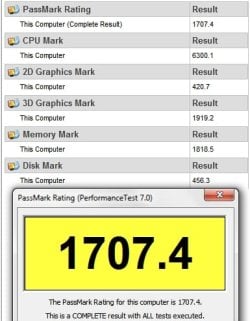
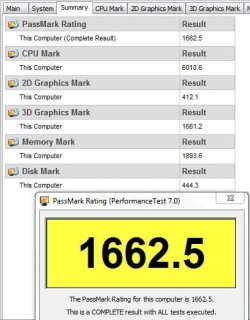
I did the first post SP1 Passmark Benchtest on my Win 7 x64 computer and it was better than some previous benchmarks, but not quite as good as the all time best. Nevertheless the Intel Core i7 930's CPU mark is 6301 compared with 6010.6 when the computer was new so I have no complaints in that SP1 does not seem to be slowing anything down especially since the 2D Graphics Mark, 3D Graphics Mark and Disc Mark for Win 7 SP1 are all also substantially higher than when the computer was benchmarked when it was new last July.

~Maxx~
.
Win7_50.png
 

Attachments

  • SP1_1 2011-02-24.jpg
    SP1_1 2011-02-24.jpg
    31.3 KB · Views: 12
  • 7-7-2010 Passmark Bench 1662.jpg
    7-7-2010 Passmark Bench 1662.jpg
    35.2 KB · Views: 8

My Computer

Computer Manufacturer/Model Number
HP HPE 270f
OS
Windows 7 x64 Home Premium
CPU
Intel Core i7 930 @ 2.8 Ghz Socket 1366 LGA
Motherboard
Pegatron Truckee v1.04E41
Memory
8 GB 1366 Mhz DDR3 (PC3-10700) RAM
Graphics Card(s)
ATI Radeon 5770 1 GB DDR5 RAM
Sound Card
Realtech High Definition
Monitor(s) Displays
32" Sony Bravia
Screen Resolution
1366 X 768
Hard Drives
Intel 25nm 120 GB Series 320 SSD HD Tune- 265 MBps Read/ 130 MBps Write

LaCie 1TB + 1TB RAID 0 eSATA Drive HD Tune- 160 MBps Read/ 90 MBps Write
Keyboard
Logitech Illuminated
Mouse
Logitech MX Revolution
Internet Speed
36.4 Mbps Maximum on a 37 Mbps Motorola SB501 Modem
Dear Maxx,
Your machine is an absolute freakout one, man! I haven't even heard of the MoBo you've got and how many 32inch bravias have you got out there? Too Good! My Avant Browser's been naughty since i hour and am not able to see the snapshot!

Is it the Win.XP SP2 which was the best service pack you've come across or have i mixed it all up?

Regards,
Sreedhav
 

My Computer

Computer Manufacturer/Model Number
Sony Vaio C series VPCCB35FN laptop
OS
MS Windows 7 Home Premium 64-bit SP1
CPU
IntelCore [email protected]; Sandy Bridge 32nm Tech.
Motherboard
Sony Vaio Version:C609NJYJ
Memory
4096Mb RAM; Single ChannelDDR3@665MHz; DRAM Freq:662MHz
Graphics Card(s)
AMD Radeon HD 6630M; GPU:Whistler;BIOS Core&mem Clock:123.36
Sound Card
REALTEK High Definition Audio Device; INTEL Display Card
Monitor(s) Displays
Generic PnP Intel HD;Resolution:1920*1040 Pixels; BPP:32bits
Screen Resolution
Current Resolution:1920*1080 Pixels; Monitor Frequency:60Hz
Hard Drives
Internal HD:TOSHIBA MK5061GSY; Real Size:488 GB;NTFS; 3 Partitions; SATA; HEADS:16

External HDD: WD Elements 1023 PORTABLE; Estimated Size: 1TB; NTFS; 3 Partitions
Cooling
Lateral Exhaust with a Cooling Pad Placed Beneath.
Keyboard
Logitech Bluetooth+ Generic Integrated K-B
Mouse
Logitech Bluetooth
Internet Speed
2MBPS
Other Info
1)Trend Micro Titanium Maximum Security Suite Version:3
2)SAS-PRO

3)MBAM--PRO


4)WATERFOX+IE9 +WOT+LINKEXTEND+ DRWEBCUREIT LINK CHECKER

5)SPYWAREBLASTER

6) WINPATROL PLUS

7) SANDBOXIE and
8) A BIT OF COMMON SENSE.
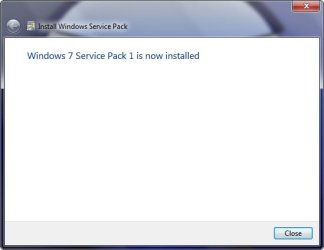
I installed SP1 over the weekend. I had not problems.

SP1 did break the sidebar hack (using the vista sidebar in win 7) which I didn't notice for a couple of days. Just needed to re-apply the sidebar hack. Other than that, no problems at all.
 

My Computer

OS
Windows 7 Professional
barryware,
If you could download SP1 via Windows update and could install it without much trouble,that in a way, indicates that your machine is in good shape,1) drivers are mostly up to date,

2) No malware glitches,

3) You are up to date with Windows updates and

4) You "must" have opted for "download all important updates",b'cause (it's a guess) MS allowed downloading of SP1 via windows updates to those that enabled the function!

My re-start or reboot times have stretched a bit after SP1, but did not lower my "satisfaction"index with Win.7 Ult. I was just making a point!

Regards,
Sreedhav
 

My Computer

Computer Manufacturer/Model Number
Sony Vaio C series VPCCB35FN laptop
OS
MS Windows 7 Home Premium 64-bit SP1
CPU
IntelCore [email protected]; Sandy Bridge 32nm Tech.
Motherboard
Sony Vaio Version:C609NJYJ
Memory
4096Mb RAM; Single ChannelDDR3@665MHz; DRAM Freq:662MHz
Graphics Card(s)
AMD Radeon HD 6630M; GPU:Whistler;BIOS Core&mem Clock:123.36
Sound Card
REALTEK High Definition Audio Device; INTEL Display Card
Monitor(s) Displays
Generic PnP Intel HD;Resolution:1920*1040 Pixels; BPP:32bits
Screen Resolution
Current Resolution:1920*1080 Pixels; Monitor Frequency:60Hz
Hard Drives
Internal HD:TOSHIBA MK5061GSY; Real Size:488 GB;NTFS; 3 Partitions; SATA; HEADS:16

External HDD: WD Elements 1023 PORTABLE; Estimated Size: 1TB; NTFS; 3 Partitions
Cooling
Lateral Exhaust with a Cooling Pad Placed Beneath.
Keyboard
Logitech Bluetooth+ Generic Integrated K-B
Mouse
Logitech Bluetooth
Internet Speed
2MBPS
Other Info
1)Trend Micro Titanium Maximum Security Suite Version:3
2)SAS-PRO

3)MBAM--PRO


4)WATERFOX+IE9 +WOT+LINKEXTEND+ DRWEBCUREIT LINK CHECKER

5)SPYWAREBLASTER

6) WINPATROL PLUS

7) SANDBOXIE and
8) A BIT OF COMMON SENSE.
Back
Top