
You are using an out of date browser. It may not display this or other websites correctly.
You should upgrade or use an alternative browser.
You should upgrade or use an alternative browser.
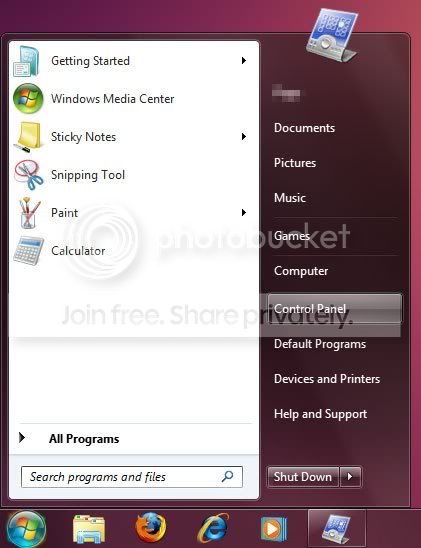
Windows 7 Start Menu dark pane
- Thread starter jwest
- Start date

EPurpl3
New member
- Local time
- 10:47 PM
- Messages
- 11
You can only add predefined menu items, you cant add custom folders. 
My Computer
- Computer Manufacturer/Model Number
- Acer Aspire 7720G
- OS
- Dual boot - Windows 7 & Linux Mint 9
- CPU
- Core 2 Duo T7500 2.2 GHz
- Memory
- 4 GB
- Graphics Card(s)
- ATI Radeon HD 2600
- Sound Card
- Realtek HD Audio
- Monitor(s) Displays
- Laptop LCD 17''
- Screen Resolution
- 1440x900
- Hard Drives
- 2x160 GB
1x650 GB External
- Mouse
- A4 Tech

After some looking, it appears epurple is right. Otherwise, I'd check out the customization part of the site. The guys over there know how to do stuff I never even dreamed of before.
My Computer
- Computer type
- Laptop
- Computer Manufacturer/Model Number
- Toshiba P775-S7100
- OS
- Windows 7 Professional SP1 64-bit
- CPU
- Intel Core i5-2450M @2.5 GHz
- Memory
- 6 GB DDR3 1333MHz
- Graphics Card(s)
- Intel HD 3000
- Monitor(s) Displays
- Built-in 17.3" LED; 22" Insignia NS-L22Q-10A
- Screen Resolution
- 1600x900; 1360x768
- Hard Drives
- 750 GB Hitachi
1TB Seagate FreeAgent External
- Internet Speed
- Verizon DSL Speed(Down/Up): 3360 Kbps / 800 Kbps
- Antivirus
- MSE and MBAM Pro
- Browser
- IE10

Hello Jwest,
If you like, this will show you how to pin a folder to the left white side (Pin to area) of the Start Menu instead.
http://www.sevenforums.com/tutorials/8964-start-menu-pin-unpin-folder.html
Hope this helps,
Shawn
If you like, this will show you how to pin a folder to the left white side (Pin to area) of the Start Menu instead.
http://www.sevenforums.com/tutorials/8964-start-menu-pin-unpin-folder.html
Hope this helps,
Shawn
My Computer
- Computer type
- PC/Desktop
- Computer Manufacturer/Model Number
- Self built custom
- OS
- 64-bit Windows 11 Pro for Workstations
- CPU
- Intel i7-8700K OC'd to 5 GHz
- Motherboard
- ASUS ROG Maximus XI Formula Z390
- Memory
- 64 GB (4x16GB) G.SKILL TridentZ RGB DDR4 3600 MHz
- Graphics Card(s)
- ASUS ROG-STRIX-GTX1080TI-O11G-GAMING
- Sound Card
- Integrated
- Monitor(s) Displays
- 2 x Samsung Odyssey G7 27"
- Screen Resolution
- 2560x1440
- Hard Drives
- 1TB Samsung 990 PRO M.2,
4TB Samsung 990 PRO PRO M.2,
TerraMaster F8 SSD Plus NAS
- PSU
- Seasonic Prime Titanium 850W
- Case
- Thermaltake Core P3
- Cooling
- Corsair Hydro H115i
- Keyboard
- Logitech wireless K800
- Mouse
- Logitech MX Master 4
- Internet Speed
- 2 Gb/s Download and 100 Mb/s Upload
- Antivirus
- Malwarebyte Anti-Malware Premium
- Browser
- Google Chrome
- Other Info
- Logitech Z625 speaker system,
Logitech BRIO 4K Pro webcam,
HP Color LaserJet Pro MFP M477fdn,
APC SMART-UPS RT 1000 XL - SURT1000XLI,
Galaxy S23 Plus phone

Hello jwest.
It's no help, just a by-gone fact; this was possible in Vista, I used to 'play' around with it but with the addition of Library's that function has been lost.
click to enlarge
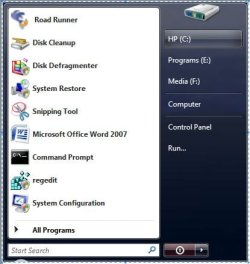
It's no help, just a by-gone fact; this was possible in Vista, I used to 'play' around with it but with the addition of Library's that function has been lost.
click to enlarge
My Computer
- Computer Manufacturer/Model Number
- * BFK Customs *
- OS
- W 7 64-bit Ultimate
- CPU
- Intel Q9550 Yorkfield
- Motherboard
- ASUS P5Q Pro
- Memory
- 8GB Dominator 8500C5D
- Graphics Card(s)
- ATI : XFX 5870
- Sound Card
- Realtek HD Audio 7-1
- Monitor(s) Displays
- 1x 47" LCD HDMI & 3x 26" LCD HDMI
- Screen Resolution
- 1920x1080P & 1920x1200
- Hard Drives
- 1x 80GB Intel X25-M G2 SSD : 1x 500GB & 1x 640GB WD Caviar Black(s)
- PSU
- Corsair 620HX
- Case
- Cooler Master RC-690
- Cooling
- Tuniq Tower 120, 2x 140mm and 3x 120mm case fans
- Keyboard
- Microsoft 500
- Mouse
- Razer Diamondback 3G
- Internet Speed
- 14 Mb/s
- Other Info
- 1x Koutech 3Gb/s SATA HDD Hot Swap Rack