
Solved Windows 7 Start Menu too big

mk10

New member
Member
Local time
3:32 PM
Messages
35
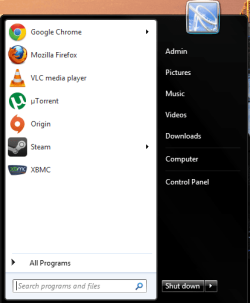
My start menu is just too big in relation with pinned programs. There's just too much empty space.
 

Attachments

  • Capture.PNG
    Capture.PNG
    15.4 KB · Views: 11

My Computer

OS
Microsoft Windows 7 Home Premium , Service Pack 1, 64 bit
CPU
Intel(R) Core(TM) i7 CPU 860 @ 2.80GHz
Motherboard
Acer, H57M01, , U01L101701309
Memory
8.0GB Dual-Channel DDR3 @ 659MHz (9-9-9-24)
Graphics Card(s)
ATI Radeon HD 5700 Series, 1024 Mb
Hard Drives
C: Total - 468941 MB, Free - 269855 MB; D: Total - 469464 MB, Free - 282338 MB;
click on task bar properties then start menu tab and untick "use large icons"
 

Attachments

  • Capture.PNG
    Capture.PNG
    24.7 KB · Views: 41

My Computer

Computer type
PC/Desktop
Computer Manufacturer/Model Number
Self assembled
OS
Windows 10 Home 64Bit
CPU
Intel Core i5 10400 @ 2.90GHz
Motherboard
Intel Corporation DG41WV (PROCESSOR)
Memory
8.00GB Single-Channel Unknown @ 1329MHz (16-20-20-38)
Sound Card
Realtek High Definition Audio
Monitor(s) Displays
DELL E170S
Screen Resolution
1280x1024 pixels
Hard Drives
931GB TOSHIBA DT01ACA100 (SATA)
238GB TEAM TM8PS7256G (SATA SSD)
Case
Nothing Fancy
Cooling
Fans
Keyboard
A4 Tech Co LTD
Mouse
A4 Tech Co Ltd/Logitech
Internet Speed
25 Mbps
Why can't I use large icons. It didn't have this much space before.
 

My Computer

OS
Microsoft Windows 7 Home Premium , Service Pack 1, 64 bit
CPU
Intel(R) Core(TM) i7 CPU 860 @ 2.80GHz
Motherboard
Acer, H57M01, , U01L101701309
Memory
8.0GB Dual-Channel DDR3 @ 659MHz (9-9-9-24)
Graphics Card(s)
ATI Radeon HD 5700 Series, 1024 Mb
Hard Drives
C: Total - 468941 MB, Free - 269855 MB; D: Total - 469464 MB, Free - 282338 MB;
its because you have unticked the options for "run, device and printers, help and support, default programs" etc...
 

My Computer

Computer type
PC/Desktop
Computer Manufacturer/Model Number
Self assembled
OS
Windows 10 Home 64Bit
CPU
Intel Core i5 10400 @ 2.90GHz
Motherboard
Intel Corporation DG41WV (PROCESSOR)
Memory
8.00GB Single-Channel Unknown @ 1329MHz (16-20-20-38)
Sound Card
Realtek High Definition Audio
Monitor(s) Displays
DELL E170S
Screen Resolution
1280x1024 pixels
Hard Drives
931GB TOSHIBA DT01ACA100 (SATA)
238GB TEAM TM8PS7256G (SATA SSD)
Case
Nothing Fancy
Cooling
Fans
Keyboard
A4 Tech Co LTD
Mouse
A4 Tech Co Ltd/Logitech
Internet Speed
25 Mbps
My start menu is just too big in relation with pinned programs. There's just too much empty space.
You have to eradicate those in the second column (ie Computer, Control Panel,Devices and Printers), you can do that by going to [start menu tab :ar: customize :ar: Don't Display This Item]. If you want to add items to fill the space, make sure you've configured it to at least the number of items you're gonna put [start menu tab :ar: customize].
 

My Computer

OS
Win7 Ultimate x64 SP1 / WCP x64 / Ubuntu 11 x64

My Computer

Computer type
PC/Desktop
Computer Manufacturer/Model Number
Self built custom
OS
64-bit Windows 11 Pro for Workstations
CPU
Intel i7-8700K OC'd to 5 GHz
Motherboard
ASUS ROG Maximus XI Formula Z390
Memory
64 GB (4x16GB) G.SKILL TridentZ RGB DDR4 3600 MHz
Graphics Card(s)
ASUS ROG-STRIX-GTX1080TI-O11G-GAMING
Sound Card
Integrated
Monitor(s) Displays
2 x Samsung Odyssey G7 27"
Screen Resolution
2560x1440
Hard Drives
1TB Samsung 990 PRO M.2,
4TB Samsung 990 PRO PRO M.2,
TerraMaster F8 SSD Plus NAS
PSU
Seasonic Prime Titanium 850W
Case
Thermaltake Core P3
Cooling
Corsair Hydro H115i
Keyboard
Logitech wireless K800
Mouse
Logitech MX Master 4
Internet Speed
2 Gb/s Download and 100 Mb/s Upload
Antivirus
Malwarebyte Anti-Malware Premium
Browser
Google Chrome
Other Info
Logitech Z625 speaker system,
Logitech BRIO 4K Pro webcam,
HP Color LaserJet Pro MFP M477fdn,
APC SMART-UPS RT 1000 XL - SURT1000XLI,
Galaxy S23 Plus phone
Back
Top