JavaScript is disabled. For a better experience, please enable JavaScript in your browser before proceeding.
You are using an out of date browser. It may not display this or other websites correctly.
You should upgrade or use an
alternative browser .
Solved Windows 7 Start Orb Changer reverts each time I boot into OS
Hello. This is kinda a blast from the past question i would think but...
I am having trouble with the Windows 7 Start orb changer.Every time i boot the start orb reverts to Windows default. Not sure exactly what I am doing wrong or if perhaps I am wiping some setting each time i run CCleaner and that is the culprit. Thanks for any help you can give
I am using this version:
Windows 7 Start Orb Changer: Ultimate Tool To Change Your Start Orb - door2windows
7 Ultimate 64 bit Service Pack 1 Intel Core 2 Duo P9500 @ 2.53GHz (lower watta... 4.0GB Dual-Channel DDR 2 @ 398MHz (5-5-5-18) 512MB GeForce 9600M GT Sager NP2096 7 Ultimate 64 bit Service Pack 1 Intel Core 2 Duo P9500 @ 2.53GHz (lower wattage chip) JHL 90 (U2E1) 4.0GB Dual-Channel DDR 2 @ 398MHz (5-5-5-18) 512MB GeForce 9600M GT Realtek High Definition Audio Generic PnP Monitor 1680x1050 Hitachi 244GB @ 7200rpm (IDE) nature generic Microsoft Wireless Mobile Mouse 3500 30 megabits down, 5 megabits up 1.)Staples 4-Port USB 2.0 Mobile Hub
Righteous Dude
Guru
VIP
SF Team
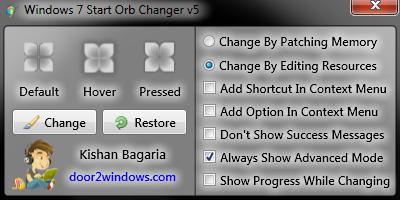
Have you tried not running CCleaner, and rebooting to see if the Orb remains? My first thought was you were somehow clearing the setting. Which option are you using to change? By patching memory, or By editing resources?
Memory Patching - Edits the start orb in memory which doesn't cause any UAC prompts
I use an older version, and it places both an explorer_backup_w7sbc.exe and an explorer_edit_w7sbc.exe in C:\Windows. I believe the Resource editing option in your version would also modify the explorer.exe and make backups. I'm unsure how the Memory patching works? If using the Memory version, then perhaps CCleaner is the culprit, try the resource method?
A Guy
Windows 10 Home x64 INTEL Core i5-750 Quad-Core 3.37GHz HyperX Fury Black Series 8GB (2 x 4GB) 1866Mhz EVGA GeForce GTX 750 Superclocked 1GB 128-Bit... PC/Desktop Windows 10 Home x64 INTEL Core i5-750 Quad-Core 3.37GHz ASUS P7P55D HyperX Fury Black Series 8GB (2 x 4GB) 1866Mhz EVGA GeForce GTX 750 Superclocked 1GB 128-Bit GDDR5 LG 32MA68HY 32" IPS 1920 x 1080 Samsung 840 Evo 120GB, SEAGATE 500GB Barracuda® 7200.12, SATA 3 Gb/s, 7200 RPM, 16MB cache ANTEC TruePower New TP-550, 80 PLUS, 550W ANTEC Three Hundred Illusion COOLER MASTER Hyper 212 Plus, 4 x 120mm 1 x 140mm Noctua's 85 + Mbps Avast Vivaldi
HWIC
Pro User
Thread Starter
used the programs alternate install function and it works now. Thanks for your help though
7 Ultimate 64 bit Service Pack 1 Intel Core 2 Duo P9500 @ 2.53GHz (lower watta... 4.0GB Dual-Channel DDR 2 @ 398MHz (5-5-5-18) 512MB GeForce 9600M GT Sager NP2096 7 Ultimate 64 bit Service Pack 1 Intel Core 2 Duo P9500 @ 2.53GHz (lower wattage chip) JHL 90 (U2E1) 4.0GB Dual-Channel DDR 2 @ 398MHz (5-5-5-18) 512MB GeForce 9600M GT Realtek High Definition Audio Generic PnP Monitor 1680x1050 Hitachi 244GB @ 7200rpm (IDE) nature generic Microsoft Wireless Mobile Mouse 3500 30 megabits down, 5 megabits up 1.)Staples 4-Port USB 2.0 Mobile Hub
Righteous Dude
Guru
VIP
SF Team
You did what specifically?
Windows 10 Home x64 INTEL Core i5-750 Quad-Core 3.37GHz HyperX Fury Black Series 8GB (2 x 4GB) 1866Mhz EVGA GeForce GTX 750 Superclocked 1GB 128-Bit... PC/Desktop Windows 10 Home x64 INTEL Core i5-750 Quad-Core 3.37GHz ASUS P7P55D HyperX Fury Black Series 8GB (2 x 4GB) 1866Mhz EVGA GeForce GTX 750 Superclocked 1GB 128-Bit GDDR5 LG 32MA68HY 32" IPS 1920 x 1080 Samsung 840 Evo 120GB, SEAGATE 500GB Barracuda® 7200.12, SATA 3 Gb/s, 7200 RPM, 16MB cache ANTEC TruePower New TP-550, 80 PLUS, 550W ANTEC Three Hundred Illusion COOLER MASTER Hyper 212 Plus, 4 x 120mm 1 x 140mm Noctua's 85 + Mbps Avast Vivaldi
HWIC
Pro User
Thread Starter
i chose change by editing resources . The first option did not work
7 Ultimate 64 bit Service Pack 1 Intel Core 2 Duo P9500 @ 2.53GHz (lower watta... 4.0GB Dual-Channel DDR 2 @ 398MHz (5-5-5-18) 512MB GeForce 9600M GT Sager NP2096 7 Ultimate 64 bit Service Pack 1 Intel Core 2 Duo P9500 @ 2.53GHz (lower wattage chip) JHL 90 (U2E1) 4.0GB Dual-Channel DDR 2 @ 398MHz (5-5-5-18) 512MB GeForce 9600M GT Realtek High Definition Audio Generic PnP Monitor 1680x1050 Hitachi 244GB @ 7200rpm (IDE) nature generic Microsoft Wireless Mobile Mouse 3500 30 megabits down, 5 megabits up 1.)Staples 4-Port USB 2.0 Mobile Hub
Righteous Dude
Guru
VIP
SF Team
Ahhh, that's what I figured, one of CCleaners settings was wiping it from memory (however that worked, lol). You now have an edited explorer.exe, it shouldn't change
A Guy
Windows 10 Home x64 INTEL Core i5-750 Quad-Core 3.37GHz HyperX Fury Black Series 8GB (2 x 4GB) 1866Mhz EVGA GeForce GTX 750 Superclocked 1GB 128-Bit... PC/Desktop Windows 10 Home x64 INTEL Core i5-750 Quad-Core 3.37GHz ASUS P7P55D HyperX Fury Black Series 8GB (2 x 4GB) 1866Mhz EVGA GeForce GTX 750 Superclocked 1GB 128-Bit GDDR5 LG 32MA68HY 32" IPS 1920 x 1080 Samsung 840 Evo 120GB, SEAGATE 500GB Barracuda® 7200.12, SATA 3 Gb/s, 7200 RPM, 16MB cache ANTEC TruePower New TP-550, 80 PLUS, 550W ANTEC Three Hundred Illusion COOLER MASTER Hyper 212 Plus, 4 x 120mm 1 x 140mm Noctua's 85 + Mbps Avast Vivaldi




 A Guy
A Guy

