Windows 7 start orb

Firestrider

New member
Power User
VIP
Local time
11:02 AM
Messages
333
I for one like the start orb from Windows Vista better than Windows 7. The one in Windows 7 is too flashy and needs to be more subtle.

Is there anyway to change it to what Vista had?
 

My Computer

Computer Manufacturer/Model Number
Intel WBIBX10J
OS
Linux (Debian, Android)
CPU
Intel Core i7 860
Motherboard
Intel DP55WB
Memory
2x 2GB Kingston DDR3-1333
Graphics Card(s)
AMD Radeon HD 5750
Sound Card
Realtek ALC888
Monitor(s) Displays
2x Dell Inc. E248WFP
Screen Resolution
3840x1200
Hard Drives
Intel X25-V
Samsung HD103SJ
PSU
Corsair CX400
Case
Silverstone GD05
Cooling
Stock
Keyboard
Dell Inc. Bluetooth Wireless
Internet Speed
30 Mbps
You need the winload.exe.mui file in the %windir%\system32\en-us folder. I don't have the file since I don't have Vista installed currently, but I'm sure you can find that. Get the file from a Vista installation and replace the one in the 7 folder of the same name. You then need to go to Start -> Run -> msconfig -> Boot tab -> Select Windows 7 -> Check No GUI Boot. When you restart it should look like Vista!
 

My Computer

Computer type
PC/Desktop
OS
7229
You need the winload.exe.mui file in the %windir%\system32\en-us folder. I don't have the file since I don't have Vista installed currently, but I'm sure you can find that. Get the file from a Vista installation and replace the one in the 7 folder of the same name. You then need to go to Start -> Run -> msconfig -> Boot tab -> Select Windows 7 -> Check No GUI Boot. When you restart it should look like Vista!

I think he was looking for the Vista Start Orb not the boot up animation.

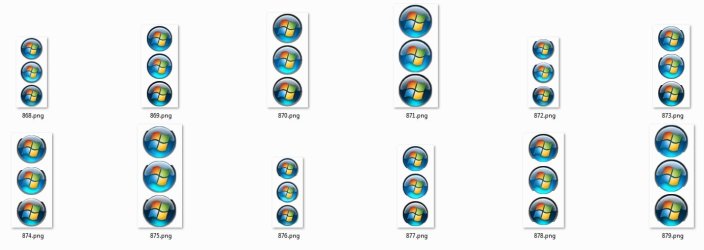
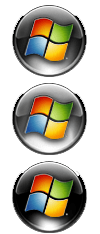
Here are the Vista Start Orbs but they are PNG's and you may have to change them to a Bitmap and change the background colour to black as that's how they are in Windows 7, you will need a program like Restorator to open the explorer.exe and then you will be able to replace the default images, you will also need to take ownership of explorer.exe, if you want some more info then have a look at this thread.

http://www.sevenforums.com/customization/3939-skinning-se7en-custom-start-buttons.html

ORB.jpgaerospace1wj6.png

View attachment Vista Start Orb.zip
 

My Computer

Computer Manufacturer/Model Number
Home Brew
OS
Windows 7 Ultimate Vista Ultimate x64
CPU
Core 2 Duo E8500 3.16Ghz @ 3.8Ghz
Motherboard
eVGA 750i FTW
Memory
2x2Gigs Patriot PC2-6400 LL
Graphics Card(s)
Inno3D GeForce GTX260 216 SP
Monitor(s) Displays
ASUS VW222U 22" 2ms Response time
Screen Resolution
1680x1050
Hard Drives
SATA 150GB
SATA II 250GB
USB IDE 750GB Ext.
PSU
HYTEC 600W & Thermaltake 650W Toughpower Power Exp
Case
Thermaltake Armor LCS (Liquid Cooling System)
Cooling
Liquid Cooling System
Keyboard
Logitech G15 Gaming Keyboard
Mouse
Logitech G9 Gaming Mouse
Thanks for sharing this it helped me customize my windows 8 machine. Since I have classic shell on here. And classic shell will let you put in a custom image. So I simply put in yours due to me being lazy and not wanting to create my own right now.
 

My Computer

Computer type
Laptop
Computer Manufacturer/Model Number
Lenovo
OS
Windows 8.1 64 bit
CPU
intel I3 2300
Motherboard
Unknown
Memory
8GB of DDR3 ram
Graphics Card(s)
intel HD 3000 graphics
Hard Drives
1 250GB mechanical hard drive
Antivirus
bitdefender ultimite 2019
Browser
Firefox
Back
Top