Solved Windows 7 start up problem

amir tava

New member
Member
VIP
Local time
8:07 PM
Messages
210
Location
West Vancouver
hi guys when i boot my pc its shows my motherboard logo two times i tooked a video to show you guys
its shows two times on start up does anyone know how to fix this problem please?
here is a link to my video http://uploaded.net/file/1z1mvat6 please download and tell me how to fix this problem also my motherboard is ASUSTeK Computer INC. P8Z68-V GEN3
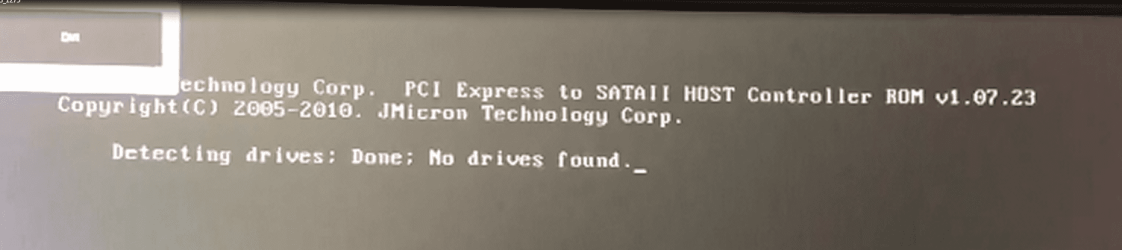
i also get this message on start up Jmicron Technlogy Corp. PCI express to SATAII HOST Controller ROM v1.01.23 Copyright 2005-2010. JMicron Technology Corp. Detecting Drives: done: No drivers found.
but other than this things my windows start fine i don't have any problem i just want my motherboard shows 1 time when i start up my pc so if anyone know how to fix this problem please help me thanks
 

My Computer

Computer type
PC/Desktop
Computer Manufacturer/Model Number
iBUYPOWER Computers
OS
Windows 7 Home Premium x64 SP1
CPU
Intel(R) Core(TM) i5-2500K CPU @ 3.30GHz
Motherboard
ASUSTeK Computer INC. P8Z68-V GEN3
Memory
G.SKILL Sniper Series 8GB DDR3 1866 (PC3 14900)
Graphics Card(s)
ASUS GTX660 TI-DC2O-2GD5
Sound Card
HT | OMEGA Claro Halo
Monitor(s) Displays
ASUS VE247H Black 23.6" 2ms
Screen Resolution
1920 x 1080
Hard Drives
1TB SATAII/128GB SSD
Case
NZXT Guardian921 Gaming Tower
Keyboard
Razer DeathStalker
Mouse
Razer Naga Hex
Internet Speed
96.71
Antivirus
Microsoft Security Essentials
Browser
Google Chrome
Other Info
speaker: Logitech Z506
Laptop: Lenovo y510p
mousepad:Razer Vespula
mic: Logitech 980186-0403 Silver USB Connector USB Desktop Microphone
Hello amir tava,

There is usually an option in the bios to disable full screen logo, you could try disabling that and see how you get on. It usually speeds up the boot time by a couple of seconds too.
 

My Computer

OS
Windows 7 Professional 64 bit
can you tell me how can i disable on bios? im not really good with bios things and will that massage go away?
 

My Computer

Computer type
PC/Desktop
Computer Manufacturer/Model Number
iBUYPOWER Computers
OS
Windows 7 Home Premium x64 SP1
CPU
Intel(R) Core(TM) i5-2500K CPU @ 3.30GHz
Motherboard
ASUSTeK Computer INC. P8Z68-V GEN3
Memory
G.SKILL Sniper Series 8GB DDR3 1866 (PC3 14900)
Graphics Card(s)
ASUS GTX660 TI-DC2O-2GD5
Sound Card
HT | OMEGA Claro Halo
Monitor(s) Displays
ASUS VE247H Black 23.6" 2ms
Screen Resolution
1920 x 1080
Hard Drives
1TB SATAII/128GB SSD
Case
NZXT Guardian921 Gaming Tower
Keyboard
Razer DeathStalker
Mouse
Razer Naga Hex
Internet Speed
96.71
Antivirus
Microsoft Security Essentials
Browser
Google Chrome
Other Info
speaker: Logitech Z506
Laptop: Lenovo y510p
mousepad:Razer Vespula
mic: Logitech 980186-0403 Silver USB Connector USB Desktop Microphone
Hello amir tava,

There is usually an option in the bios to disable full screen logo, you could try disabling that and see how you get on. It usually speeds up the boot time by a couple of seconds too.
can you tell me how can i disable on bios? im not really good with bios things and will that massage go away?
 

My Computer

Computer type
PC/Desktop
Computer Manufacturer/Model Number
iBUYPOWER Computers
OS
Windows 7 Home Premium x64 SP1
CPU
Intel(R) Core(TM) i5-2500K CPU @ 3.30GHz
Motherboard
ASUSTeK Computer INC. P8Z68-V GEN3
Memory
G.SKILL Sniper Series 8GB DDR3 1866 (PC3 14900)
Graphics Card(s)
ASUS GTX660 TI-DC2O-2GD5
Sound Card
HT | OMEGA Claro Halo
Monitor(s) Displays
ASUS VE247H Black 23.6" 2ms
Screen Resolution
1920 x 1080
Hard Drives
1TB SATAII/128GB SSD
Case
NZXT Guardian921 Gaming Tower
Keyboard
Razer DeathStalker
Mouse
Razer Naga Hex
Internet Speed
96.71
Antivirus
Microsoft Security Essentials
Browser
Google Chrome
Other Info
speaker: Logitech Z506
Laptop: Lenovo y510p
mousepad:Razer Vespula
mic: Logitech 980186-0403 Silver USB Connector USB Desktop Microphone
Well to enter the bios you need to keep tapping the delete key as the computer boots up, then once you are in the bios there should be a "Boot" Section, in there you should have a few options and Disable full screen logo should be one of them.
You should not get any logo's coming up at all then and it should boot a little quicker.

To be honest I have had a couple of motherboards where the logo will pop up twice, I have no idea why it does it and I don't think there is a way to only get it to do it once, but you certainly should be able to disable it altogether if you wish.

Paul.
 

My Computer

OS
Windows 7 Professional 64 bit
Well to enter the bios you need to keep tapping the delete key as the computer boots up, then once you are in the bios there should be a "Boot" Section, in there you should have a few options and Disable full screen logo should be one of them.
You should not get any logo's coming up at all then and it should boot a little quicker.

To be honest I have had a couple of motherboards where the logo will pop up twice, I have no idea why it does it and I don't think there is a way to only get it to do it once, but you certainly should be able to disable it altogether if you wish.

Paul.
oh kk well that measgae will go away too or no?
 

My Computer

Computer type
PC/Desktop
Computer Manufacturer/Model Number
iBUYPOWER Computers
OS
Windows 7 Home Premium x64 SP1
CPU
Intel(R) Core(TM) i5-2500K CPU @ 3.30GHz
Motherboard
ASUSTeK Computer INC. P8Z68-V GEN3
Memory
G.SKILL Sniper Series 8GB DDR3 1866 (PC3 14900)
Graphics Card(s)
ASUS GTX660 TI-DC2O-2GD5
Sound Card
HT | OMEGA Claro Halo
Monitor(s) Displays
ASUS VE247H Black 23.6" 2ms
Screen Resolution
1920 x 1080
Hard Drives
1TB SATAII/128GB SSD
Case
NZXT Guardian921 Gaming Tower
Keyboard
Razer DeathStalker
Mouse
Razer Naga Hex
Internet Speed
96.71
Antivirus
Microsoft Security Essentials
Browser
Google Chrome
Other Info
speaker: Logitech Z506
Laptop: Lenovo y510p
mousepad:Razer Vespula
mic: Logitech 980186-0403 Silver USB Connector USB Desktop Microphone
The message is just the PC going through it's checks, I would not worry about that, there is a way of disabling it I think, but I will need to look into that further, I believe if you do disable that then it can cause issues if you have hardware problems in the future. I am not 100% on that though.

Have a look yourself in the boot section in the bios and see what other options it has.
 

My Computer

OS
Windows 7 Professional 64 bit
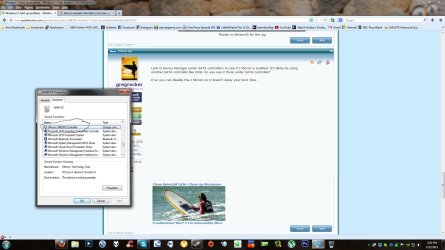
Look in Device Manager under SATA controllers to see if J Micron is enabled. It's likely its using another SATA controller like Intel. Do you see it there under SATA controller?

If so you can disable the J Micron so it doesn't delay your boot time.
 
Look in Device Manager under SATA controllers to see if J Micron is enabled. It's likely its using another SATA controller like Intel. Do you see it there under SATA controller?

If so you can disable the J Micron so it doesn't delay your boot time.
this driver the one in cirlce in picture right? i have an option to disable it
 

Attachments

  • Untitled.jpg
    Untitled.jpg
    164.8 KB · Views: 7

My Computer

Computer type
PC/Desktop
Computer Manufacturer/Model Number
iBUYPOWER Computers
OS
Windows 7 Home Premium x64 SP1
CPU
Intel(R) Core(TM) i5-2500K CPU @ 3.30GHz
Motherboard
ASUSTeK Computer INC. P8Z68-V GEN3
Memory
G.SKILL Sniper Series 8GB DDR3 1866 (PC3 14900)
Graphics Card(s)
ASUS GTX660 TI-DC2O-2GD5
Sound Card
HT | OMEGA Claro Halo
Monitor(s) Displays
ASUS VE247H Black 23.6" 2ms
Screen Resolution
1920 x 1080
Hard Drives
1TB SATAII/128GB SSD
Case
NZXT Guardian921 Gaming Tower
Keyboard
Razer DeathStalker
Mouse
Razer Naga Hex
Internet Speed
96.71
Antivirus
Microsoft Security Essentials
Browser
Google Chrome
Other Info
speaker: Logitech Z506
Laptop: Lenovo y510p
mousepad:Razer Vespula
mic: Logitech 980186-0403 Silver USB Connector USB Desktop Microphone
i disable it but i keep see it on boot up if i uninstall it well that help?
 

My Computer

Computer type
PC/Desktop
Computer Manufacturer/Model Number
iBUYPOWER Computers
OS
Windows 7 Home Premium x64 SP1
CPU
Intel(R) Core(TM) i5-2500K CPU @ 3.30GHz
Motherboard
ASUSTeK Computer INC. P8Z68-V GEN3
Memory
G.SKILL Sniper Series 8GB DDR3 1866 (PC3 14900)
Graphics Card(s)
ASUS GTX660 TI-DC2O-2GD5
Sound Card
HT | OMEGA Claro Halo
Monitor(s) Displays
ASUS VE247H Black 23.6" 2ms
Screen Resolution
1920 x 1080
Hard Drives
1TB SATAII/128GB SSD
Case
NZXT Guardian921 Gaming Tower
Keyboard
Razer DeathStalker
Mouse
Razer Naga Hex
Internet Speed
96.71
Antivirus
Microsoft Security Essentials
Browser
Google Chrome
Other Info
speaker: Logitech Z506
Laptop: Lenovo y510p
mousepad:Razer Vespula
mic: Logitech 980186-0403 Silver USB Connector USB Desktop Microphone
I managed to capture a screenshot of it during your video, it lasts for maybe half a second lol.

I have seen it pop up on many PC's I have had, you could try uninstalling it, does the 0.5 seconds of it bother you that much though?

How did you get on with the logo thing?
 

Attachments

  • pic.PNG
    pic.PNG
    145.1 KB · Views: 4

My Computer

OS
Windows 7 Professional 64 bit
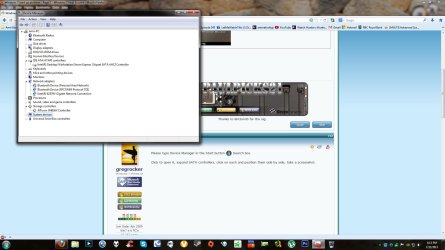
Please type Device Manager in the Start button :orb: Search box.

Click to open it, expand SATA controllers, click on each and position them side by side, take a screenshot.
 
I managed to capture a screenshot of it during your video, it lasts for maybe half a second lol.

I have seen it pop up on many PC's I have had, you could try uninstalling it, does the 0.5 seconds of it bother you that much though?

How did you get on with the logo thing?
lol i unistall that driver i still get that message and i also went to BIOS Setting and went to Boot up option and went to Full Screen Logo and i disabled it no motherboard went on start up but i could still get that message
 

My Computer

Computer type
PC/Desktop
Computer Manufacturer/Model Number
iBUYPOWER Computers
OS
Windows 7 Home Premium x64 SP1
CPU
Intel(R) Core(TM) i5-2500K CPU @ 3.30GHz
Motherboard
ASUSTeK Computer INC. P8Z68-V GEN3
Memory
G.SKILL Sniper Series 8GB DDR3 1866 (PC3 14900)
Graphics Card(s)
ASUS GTX660 TI-DC2O-2GD5
Sound Card
HT | OMEGA Claro Halo
Monitor(s) Displays
ASUS VE247H Black 23.6" 2ms
Screen Resolution
1920 x 1080
Hard Drives
1TB SATAII/128GB SSD
Case
NZXT Guardian921 Gaming Tower
Keyboard
Razer DeathStalker
Mouse
Razer Naga Hex
Internet Speed
96.71
Antivirus
Microsoft Security Essentials
Browser
Google Chrome
Other Info
speaker: Logitech Z506
Laptop: Lenovo y510p
mousepad:Razer Vespula
mic: Logitech 980186-0403 Silver USB Connector USB Desktop Microphone
Please type Device Manager in the Start button :orb: Search box.

Click to open it, expand SATA controllers, click on each and position them side by side, take a screenshot.
there we go
 

Attachments

  • Untitled.jpg
    Untitled.jpg
    147.7 KB · Views: 5

My Computer

Computer type
PC/Desktop
Computer Manufacturer/Model Number
iBUYPOWER Computers
OS
Windows 7 Home Premium x64 SP1
CPU
Intel(R) Core(TM) i5-2500K CPU @ 3.30GHz
Motherboard
ASUSTeK Computer INC. P8Z68-V GEN3
Memory
G.SKILL Sniper Series 8GB DDR3 1866 (PC3 14900)
Graphics Card(s)
ASUS GTX660 TI-DC2O-2GD5
Sound Card
HT | OMEGA Claro Halo
Monitor(s) Displays
ASUS VE247H Black 23.6" 2ms
Screen Resolution
1920 x 1080
Hard Drives
1TB SATAII/128GB SSD
Case
NZXT Guardian921 Gaming Tower
Keyboard
Razer DeathStalker
Mouse
Razer Naga Hex
Internet Speed
96.71
Antivirus
Microsoft Security Essentials
Browser
Google Chrome
Other Info
speaker: Logitech Z506
Laptop: Lenovo y510p
mousepad:Razer Vespula
mic: Logitech 980186-0403 Silver USB Connector USB Desktop Microphone
Then you'll need to disable the J Micron controller in BIOS setup to see if that clears up the BIOS issue.

While there check the BIOS boot settings for Fast Boot and any others.
 
I did not say to uninstall the driver. It will just reinstall it. I said to Disable the J Micron.

Please post back the window that opens when you click on each SATA controller in Device Manager.
im sorry but i dont see ayn SATA Controller
 

My Computer

Computer type
PC/Desktop
Computer Manufacturer/Model Number
iBUYPOWER Computers
OS
Windows 7 Home Premium x64 SP1
CPU
Intel(R) Core(TM) i5-2500K CPU @ 3.30GHz
Motherboard
ASUSTeK Computer INC. P8Z68-V GEN3
Memory
G.SKILL Sniper Series 8GB DDR3 1866 (PC3 14900)
Graphics Card(s)
ASUS GTX660 TI-DC2O-2GD5
Sound Card
HT | OMEGA Claro Halo
Monitor(s) Displays
ASUS VE247H Black 23.6" 2ms
Screen Resolution
1920 x 1080
Hard Drives
1TB SATAII/128GB SSD
Case
NZXT Guardian921 Gaming Tower
Keyboard
Razer DeathStalker
Mouse
Razer Naga Hex
Internet Speed
96.71
Antivirus
Microsoft Security Essentials
Browser
Google Chrome
Other Info
speaker: Logitech Z506
Laptop: Lenovo y510p
mousepad:Razer Vespula
mic: Logitech 980186-0403 Silver USB Connector USB Desktop Microphone
Then you'll need to disable the J Micron controller in BIOS setup to see if that clears up the BIOS issue.

While there check the BIOS boot settings for Fast Boot and any others.
wait im sorry but how do i found J Micron controller in BIOS?
 

My Computer

Computer type
PC/Desktop
Computer Manufacturer/Model Number
iBUYPOWER Computers
OS
Windows 7 Home Premium x64 SP1
CPU
Intel(R) Core(TM) i5-2500K CPU @ 3.30GHz
Motherboard
ASUSTeK Computer INC. P8Z68-V GEN3
Memory
G.SKILL Sniper Series 8GB DDR3 1866 (PC3 14900)
Graphics Card(s)
ASUS GTX660 TI-DC2O-2GD5
Sound Card
HT | OMEGA Claro Halo
Monitor(s) Displays
ASUS VE247H Black 23.6" 2ms
Screen Resolution
1920 x 1080
Hard Drives
1TB SATAII/128GB SSD
Case
NZXT Guardian921 Gaming Tower
Keyboard
Razer DeathStalker
Mouse
Razer Naga Hex
Internet Speed
96.71
Antivirus
Microsoft Security Essentials
Browser
Google Chrome
Other Info
speaker: Logitech Z506
Laptop: Lenovo y510p
mousepad:Razer Vespula
mic: Logitech 980186-0403 Silver USB Connector USB Desktop Microphone
Then you'll need to disable the J Micron controller in BIOS setup to see if that clears up the BIOS issue.

While there check the BIOS boot settings for Fast Boot and any others.
wait im sorry but how do i found J Micron controller in BIOS?

Should be somewhere in the advanced tab, I am sorry I don't know your bios.
 

My Computer

OS
Windows 7 Professional 64 bit
Reboot and look for the key to press to enter BIOS setup.

In BIOS setup go through each tab thoroughly to become familar with the settings. Under boot there should be a Fast Boot option to check its setting. There may be others which govern whether and which controllers are enabled and how they are displayed. If not on the Boot tab, look at the others.

I would also set HDD first device to boot in Boot Order Priority. This can make it a bit faster. Remember to Save any changes.

If you see what you think are other related settings, make note of them and ask back.
 
Reboot and look for the key to press to enter BIOS setup.

In BIOS setup go through each tab thoroughly to become familar with the settings. Under boot there should be a Fast Boot option to check its setting. There may be others which govern whether and which controllers are enabled and how they are displayed. If not on the Boot tab, look at the others.

I would also set HDD first device to boot in Boot Order Priority. This can make it a bit faster. Remember to Save any changes.

If you see what you think are other related settings, make note of them and ask back.
aight so when i saw J Micron controller in BIOS on my bios disable it right ? and thanks for the help
 

My Computer

Computer type
PC/Desktop
Computer Manufacturer/Model Number
iBUYPOWER Computers
OS
Windows 7 Home Premium x64 SP1
CPU
Intel(R) Core(TM) i5-2500K CPU @ 3.30GHz
Motherboard
ASUSTeK Computer INC. P8Z68-V GEN3
Memory
G.SKILL Sniper Series 8GB DDR3 1866 (PC3 14900)
Graphics Card(s)
ASUS GTX660 TI-DC2O-2GD5
Sound Card
HT | OMEGA Claro Halo
Monitor(s) Displays
ASUS VE247H Black 23.6" 2ms
Screen Resolution
1920 x 1080
Hard Drives
1TB SATAII/128GB SSD
Case
NZXT Guardian921 Gaming Tower
Keyboard
Razer DeathStalker
Mouse
Razer Naga Hex
Internet Speed
96.71
Antivirus
Microsoft Security Essentials
Browser
Google Chrome
Other Info
speaker: Logitech Z506
Laptop: Lenovo y510p
mousepad:Razer Vespula
mic: Logitech 980186-0403 Silver USB Connector USB Desktop Microphone
Back
Top