Solved Windows 7 starter ISO for clean install?

curiouscat

New member
Local time
3:28 PM
Messages
17
Hi, I have had my Samsung N150 plus netbook for nearly three years and it's just started running really slowly. I want to do a fresh install of windows 7 starter but my disks are in storage. I have my product key for the starter edition however. I found this post: http://www.sevenforums.com/tutorials/2432-usb-windows-7-installation-key-drive-create.html?ltr=U but I can't find an English 7 starter ISO among the files on the website given.

I would appreciate it if someone could direct me to such a file and also any tips for the cleanest install possible. I'm a newbie.

Thanks.
 

My Computer My Computer

OS
Windows 7 starter 32 bit
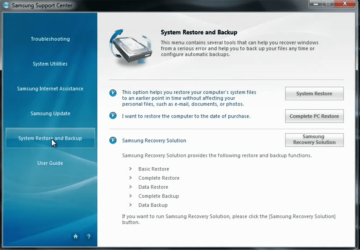
From Windows use Complete PC Restore.

Capture Sam.PNG

From boot use the F4 key.

Capture Sam002.PNG
 

My Computer My Computer

OS
ME/XP/Vista/Win7
Thanks. I don't appear to have it. Installed a trial version of 7 home premium, trial now expired. I can't see how that makes any difference though. Tried searching for 'samsung' and 'complete restore' from the start menu. The only thing I have come up is 'restore this computer to an earlier time.' (haven't got a clean restore date.)
 

My Computer My Computer

OS
Windows 7 starter 32 bit

My Computer My Computer

Computer type
PC/Desktop
Computer Manufacturer/Model Number
Self Built
OS
Win 10 Pro x64
CPU
Intel I5-2500K @3.3GHz
Motherboard
Asrock P67 Extreme4
Memory
16GB G.Skill Ripjaws X (4x4GB)
Graphics Card(s)
EVGA GeForce 750 Ti SC 2GB
Sound Card
ASUS Xonar DG 5.1 Channels 24-bit 96KHz PCI Interface Sound
Monitor(s) Displays
auria eq2367
Screen Resolution
1920 x 1080
Hard Drives
250GB Samsung 850 EVO SSD
1TB WD Blue
1TB Hitachi
PSU
SeaSonic X 650W 80 Plus Gold
Case
Corsair Obsidian 750D
Cooling
Corsair H60, Three 140mm case fans
Keyboard
Logitech Wireless Keyboard K520
Mouse
Logitech Wireless Mouse M310
Internet Speed
Wave Broadband ~ 100 dn 5 up
Antivirus
Windows Defender, Malwarebytes Premium
Browser
Edge, IE11, Chrome
Other Info
Laptop specs: HP g7-1365dx /
CPU: AMD A6-3420M APU with Radeon(tm) HD Graphics /
RAM: Crucial 8Gb (2x4Gb) /
SSD: Crucial M4-CT128M4SSD2 ATA Device/ FW 000F /
GFX: AMD Radeon HD 6520G /
OS: Windows 10 Pro x64
Hi, I have had my Samsung N150 plus netbook for nearly three years and it's just started running really slowly. I want to do a fresh install of windows 7 starter but my disks are in storage. I have my product key for the starter edition however. I found this post: http://www.sevenforums.com/tutorials/2432-usb-windows-7-installation-key-drive-create.html?ltr=U but I can't find an English 7 starter ISO among the files on the website given.

I would appreciate it if someone could direct me to such a file and also any tips for the cleanest install possible. I'm a newbie.

Thanks.
You want english 32bits starter win7?
Windows 7 Home Premium SP1-U ISO
English x86: X17-58996.iso

Download that ISO. Now run eicfg removal tool. Create Windows 7 Universal ISO With All Editions Selection On Install with ei.cfg Removal Utility « My Digital Life to unlock the ISO, so it can be used to install win7 starter as well. Then burn to usb stick and boot from it.
 

My Computer My Computer

Computer type
Laptop
Computer Manufacturer/Model Number
ACER ASPIRE 5742G
OS
Microsoft Windows 7 Home Premium 64-bits 7601 Multiprocessor Free Service Pack 1
CPU
Intel(R) Core(TM) i3 CPU M 370 @ 2.40GHz
Motherboard
Acer Aspire 5742G
Memory
4,00 GB
Graphics Card(s)
ATI Mobility Radeon HD 5400 Series
Sound Card
(1) AMD High Definition Audio Device (2) Realtek High Defi
Screen Resolution
1366 x 768 x 32 bits (4294967296 colors) @ 60 Hz
Hard Drives
WDC WD5000BEVT-22ZAT0
Thanks, won't be able to do it for a week or so but nice to know helps here when I need it. Appreciate it. :-D
 

My Computer My Computer

OS
Windows 7 starter 32 bit
Just typed in my product key and received the message 'product key does not match current sku' I followed the steps provided by kaktussoft. What went wrong?

Thanks
 

My Computer My Computer

OS
Windows 7 starter 32 bit
You should be following the steps in Clean Reinstall - Factory OEM Windows 7
to get a perfect install.

It explains that as long as you are certain you installed the licensed version on the COA sticker, then the problem with key rejection is almost always an incorrect character. B's look like 8's. Triple-check your input.

If you own Basic then you had to unlock all versions using ei.cfg tool. Did you then get a menu to choose Basic during install?
 
If you successfully removed the eicfg you would get a window like this,

then you can choose your version. (Starter, if it's the version listed in your specs)


My Computer My Computer

Computer type
PC/Desktop
Computer Manufacturer/Model Number
Self Built
OS
Win 10 Pro x64
CPU
Intel I5-2500K @3.3GHz
Motherboard
Asrock P67 Extreme4
Memory
16GB G.Skill Ripjaws X (4x4GB)
Graphics Card(s)
EVGA GeForce 750 Ti SC 2GB
Sound Card
ASUS Xonar DG 5.1 Channels 24-bit 96KHz PCI Interface Sound
Monitor(s) Displays
auria eq2367
Screen Resolution
1920 x 1080
Hard Drives
250GB Samsung 850 EVO SSD
1TB WD Blue
1TB Hitachi
PSU
SeaSonic X 650W 80 Plus Gold
Case
Corsair Obsidian 750D
Cooling
Corsair H60, Three 140mm case fans
Keyboard
Logitech Wireless Keyboard K520
Mouse
Logitech Wireless Mouse M310
Internet Speed
Wave Broadband ~ 100 dn 5 up
Antivirus
Windows Defender, Malwarebytes Premium
Browser
Edge, IE11, Chrome
Other Info
Laptop specs: HP g7-1365dx /
CPU: AMD A6-3420M APU with Radeon(tm) HD Graphics /
RAM: Crucial 8Gb (2x4Gb) /
SSD: Crucial M4-CT128M4SSD2 ATA Device/ FW 000F /
GFX: AMD Radeon HD 6520G /
OS: Windows 10 Pro x64
I used the ei.cfg tool and it said ei.cfg removed when I pointed it to ISO but I didn't get an option to choose basic before install. It had home premium along the top. Is there a solution?
 

My Computer My Computer

OS
Windows 7 starter 32 bit
I used the ei.cfg tool and it said ei.cfg removed when I pointed it to ISO but I didn't get an option to choose basic before install. It had home premium along the top. Is there a solution?
Did it show window as explained in #11 ? Did you select the version that you had on the system before reinstall?
 

My Computer My Computer

Computer type
Laptop
Computer Manufacturer/Model Number
ACER ASPIRE 5742G
OS
Microsoft Windows 7 Home Premium 64-bits 7601 Multiprocessor Free Service Pack 1
CPU
Intel(R) Core(TM) i3 CPU M 370 @ 2.40GHz
Motherboard
Acer Aspire 5742G
Memory
4,00 GB
Graphics Card(s)
ATI Mobility Radeon HD 5400 Series
Sound Card
(1) AMD High Definition Audio Device (2) Realtek High Defi
Screen Resolution
1366 x 768 x 32 bits (4294967296 colors) @ 60 Hz
Hard Drives
WDC WD5000BEVT-22ZAT0
If using a flash stick browse into the Sources folder on the stick to make sure ei.cfg is deleted and if not delete it again.

If using a DVD for install you'll need to start over and run the eicfg removal tool on the ISO again, until it confirms in a pop-up box that ei.cfg has been removed. Then burn to DVD using ImgBurn at 4x speed.

Boot the installer, follow the steps for a Clean Reinstall - Factory OEM Windows 7 making sure you don't proceed until you get a menu to choose your licensed version from.
 
Last edited:
I used the ei.cfg tool and it said ei.cfg removed when I pointed it to ISO but I didn't get an option to choose basic before install. It had home premium along the top. Is there a solution?

Just out of curiosity, your first post and your specs say you have Starter, yet in this post you mention Basic, not that big of a deal until you get to the install screen I posted above.

You will get the same message again if you choose the incorrect version for the product key you have.

Greg's post about starting over is your best bet right now.
 

My Computer My Computer

Computer type
PC/Desktop
Computer Manufacturer/Model Number
Self Built
OS
Win 10 Pro x64
CPU
Intel I5-2500K @3.3GHz
Motherboard
Asrock P67 Extreme4
Memory
16GB G.Skill Ripjaws X (4x4GB)
Graphics Card(s)
EVGA GeForce 750 Ti SC 2GB
Sound Card
ASUS Xonar DG 5.1 Channels 24-bit 96KHz PCI Interface Sound
Monitor(s) Displays
auria eq2367
Screen Resolution
1920 x 1080
Hard Drives
250GB Samsung 850 EVO SSD
1TB WD Blue
1TB Hitachi
PSU
SeaSonic X 650W 80 Plus Gold
Case
Corsair Obsidian 750D
Cooling
Corsair H60, Three 140mm case fans
Keyboard
Logitech Wireless Keyboard K520
Mouse
Logitech Wireless Mouse M310
Internet Speed
Wave Broadband ~ 100 dn 5 up
Antivirus
Windows Defender, Malwarebytes Premium
Browser
Edge, IE11, Chrome
Other Info
Laptop specs: HP g7-1365dx /
CPU: AMD A6-3420M APU with Radeon(tm) HD Graphics /
RAM: Crucial 8Gb (2x4Gb) /
SSD: Crucial M4-CT128M4SSD2 ATA Device/ FW 000F /
GFX: AMD Radeon HD 6520G /
OS: Windows 10 Pro x64
Is ei.cfg file really not on usb stick? Look in \Sources folder
 

My Computer My Computer

Computer type
Laptop
Computer Manufacturer/Model Number
ACER ASPIRE 5742G
OS
Microsoft Windows 7 Home Premium 64-bits 7601 Multiprocessor Free Service Pack 1
CPU
Intel(R) Core(TM) i3 CPU M 370 @ 2.40GHz
Motherboard
Acer Aspire 5742G
Memory
4,00 GB
Graphics Card(s)
ATI Mobility Radeon HD 5400 Series
Sound Card
(1) AMD High Definition Audio Device (2) Realtek High Defi
Screen Resolution
1366 x 768 x 32 bits (4294967296 colors) @ 60 Hz
Hard Drives
WDC WD5000BEVT-22ZAT0
Damn formatted and started over before I knew where to look! I have starter edition. Thanks guys keep your fingers crossed
 

My Computer My Computer

OS
Windows 7 starter 32 bit
Deleted efig manually worked. Don't know why the tool didn't work.
Thanks for telling me where to look. :-)
What's the best way to save things as they are now so I never have to start from scratch again?
 

My Computer My Computer

OS
Windows 7 starter 32 bit
Deleted efig manually worked. Don't know why the tool didn't work.
Thanks for telling me where to look. :-)
What's the best way to save things as they are now so I never have to start from scratch again?

Post screenshot of Disk Management please

Do you want to make a backup now?
Look in "device manager". No "other devices"? No exclamation marks? So all drivers are installed/updated? "check for updates" using windows update and install them. (Check again after reboot)

Check "Device Manager" and look for graphics driver... correct driver?
 

My Computer My Computer

Computer type
Laptop
Computer Manufacturer/Model Number
ACER ASPIRE 5742G
OS
Microsoft Windows 7 Home Premium 64-bits 7601 Multiprocessor Free Service Pack 1
CPU
Intel(R) Core(TM) i3 CPU M 370 @ 2.40GHz
Motherboard
Acer Aspire 5742G
Memory
4,00 GB
Graphics Card(s)
ATI Mobility Radeon HD 5400 Series
Sound Card
(1) AMD High Definition Audio Device (2) Realtek High Defi
Screen Resolution
1366 x 768 x 32 bits (4294967296 colors) @ 60 Hz
Hard Drives
WDC WD5000BEVT-22ZAT0
Back
Top