Windows 7 Starter - Start Menu "Default Programs" button

ashperrin

New member
Local time
11:26 PM
Messages
1
Location
England
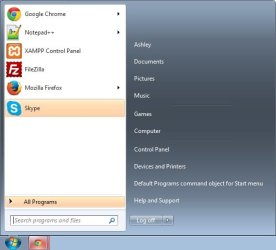
Hi, I recently fixed my laptop from not booting at all. The problem was, I dual booted my Windows 7 Starter with Ubuntu using a partition, I made another partition to try to allocate more memory to my Ubuntu side and I got an error on boot up that said "Error: Unknown filesystem Grub rescue>". I fixed this and deleted the dual boot but now when I boot up into Windows (as this is now the only OS) on my start menu where it used to say "Default Programs" now says "Default Programs command object for Start menu". I can't help but think this has something to do with the huge mistake I made but I was wondering if there is a way I can fix this?

I've attached an image of what I mean in case you don't understand. I hope someone can help me out. It would be greatly appreciated. Thank you.
 

Attachments
  • start_menu.jpg
    start_menu.jpg
    24.5 KB · Views: 20

My Computer

Computer type
Laptop
Computer Manufacturer/Model Number
Acer
OS
Windows 7 Starter

My Computer

Computer type
PC/Desktop
Computer Manufacturer/Model Number
n/a
OS
W7 Ultimate SP1, LM19.2 MATE, W10 Home 1703, W10 Pro 1703 VM, #All 64 bit
CPU
AMD Phenom II x6 1100T, 3.3 GHz
Motherboard
ASUS M4A88T-M/USB3 (AM3)
Memory
12GB DDR3 1333 G-Skill (4GB x 2), G-Skill (2GB x 2)
Graphics Card(s)
NVIDIA GeForce GTX 660
Sound Card
Realtek?
Monitor(s) Displays
Samsung S23B350
Screen Resolution
1920x1080
Hard Drives
WD Green 2TB (SATA), WD Green 3TB (SATA), WD Blue 4TB (SATA), WD Blue 6TB (SATA)
PSU
Cooler Master
Case
Antec GX300 Tower
Cooling
3x Antec TRICOOL 120mm Fans
Mouse
Wired Optical
Internet Speed
DSL
Antivirus
Avast
Browser
Pale Moon (64 bit)
Other Info
2018-12-27 Upgraded HDDs
2015-12-10 Upgraded case, graphics card, storage
2015-08-15 Upgraded motherboard & RAM
2015-07-15 Upgraded LM17.1 to LM17.2

My Computers

System One System Two

  • Computer type
    PC/Desktop
    OS
    7 X64
    CPU
    i5 8400
    Motherboard
    gigabyte b365m ds3h
    Memory
    2x8gb 3200mhz
    Hard Drives
    various
    PSU
    pure power 11 400w cm
    Case
    Coolermaster
    Cooling
    cryorig m9i
  • Computer type
    PC/Desktop
    OS
    7x64
    CPU
    g5400
    Motherboard
    ga b365m ds3h
    Memory
    8gb ddr4 2400
    PSU
    xfx pro 450w
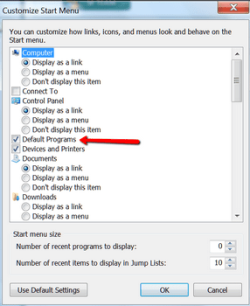
When you right click on the orb . Properties > Start menu tab > customize ==> What does it say here (see picture).
 

Attachments

  • 2014-03-02_2131.png
    2014-03-02_2131.png
    16.9 KB · Views: 8

My Computer

Computer Manufacturer/Model Number
HP, Dell, Gateway, Toshiba - 4 laptops and 2 desktops
OS
Vista, Windows7, Mint Mate, Zorin, Windows 8
CPU
from 1.6GHz Duo to i7
Monitor(s) Displays
2x HP w2207
Hard Drives
5x HDD, 7x SSD, 12x Externals
Keyboard
with trackball - no mices
Mouse
Trackball mice
Internet Speed
DSL 6000
Back
Top