Windows 7 Startup Problems

Chriso

New member
Local time
7:16 AM
Messages
21
I have been having computer problems lately it all started after playing StarCraft 2 beta the other day, I clicked Exit and my computer froze.

So I restarted and it got to the Windows7 loading screen and didn't get any further, so I restarted again and tried to 'Launch Startup Repair' and that failed as well. I eventually got into Startup Repair but I tried to fix problems with startup and that failed, I ended up restoring to about a week ago, restarted and Windows7 loaded fine but was extremely sluggish when doing the most simple tasks. I have tried switching out my RAM with some older RAM I had available and that didn't work, I am currently running an Ubuntu CD I own to type this message.

The only conclusion I have come to is that it might be my harddrive or Windows7 installation as I have removed all unnecessary hardware (soundcard, gfx card)...

Anyone have any suggestions?
 

My Computer

OS
W7 x64/x86 Ultimate + XP Mode; Ubuntu
CPU
AMD ATHLON X2 64 3.0GHz
Motherboard
M2N68-AM Plus
Memory
4GB DDR2 Kingston HyperX
Graphics Card(s)
ATI Radeon 4600 Series
Sound Card
Sound Blaster
Monitor(s) Displays
22" BenQ, 22" Samsung
Screen Resolution
1680x1050, 1920x1080
Hard Drives
WD5000AAKS
WDC6400AAK External
PSU
Gigabyte 600W
Case
Custom
Cooling
OCZ
Internet Speed
ADSL
If you're worried about your hardware you can run diagnostics on it to figure out if there are problems.

Ultimate Boot CD - Overview

Download the CD as an ISO not a zip.
Burn it to disk using Windows or IMGBurn
Insert in Computer & Boot from it

You can now use the memory, hard drive and other diagnostic tools to figure out whether you have a hardware issue. Keep in mind that many of the tools take a considerable amount of time to complete.
 

My Computer

Computer Manufacturer/Model Number
Apple Macbook Pro (April 2009)
OS
W7 Ult. x64 | OS X
CPU
Intel Mobile Core 2 Duo 2.93Ghz [T9800 Penryn]
Motherboard
NVIDIA nForce 730i Rev. B1 [Mac-F2268EC8 (U2E1)]
Memory
4096MB Samsung DDR3 Dual Channel [PC3-8500F 1066Mhz]
Graphics Card(s)
NVIDIA GeForce 9600M GT 512MB [G96M Rev. C1]
Sound Card
SB X-Fi Surround 5.1 USB | Onboard Realtek (Disabled)
Monitor(s) Displays
Acer x223wbd 22" | Apple Anti-Glare 17" (Disabled)
Screen Resolution
{Current} 1440x900 {Acer} 1680x1050 {Apple} 1920x1200
Hard Drives
{Internal}
Seagate Momentus 320GB 2.5" 7200RPM [ST9320421AS]

{Externals}
LaCie 320GB USB 2.0 HDD [301284UR]
LaCie 750GB USB 2.0 FW400 eSATA HDD [301314U]
LaCie 1TB USB 2.0 HDD [301304UR]
PSU
Magsafe
Case
Aluminum/Unibody (MBP52)
Cooling
2 x 6000 RPM Fans
Keyboard
Logitech G-15v2 [PN 920-000379]
Mouse
Logitech G-9 [PN 910-000338]
Internet Speed
12Mbps/2.5Mbps w/ 24Mbps Speed Boost [Comcast]
Other Info
Logitech X-540 Speakers [PN 970223-0122]
Sennheiser PC-151 Headset
I am currently running the Ubuntu CD. I'll try and run some diagnostic tests and see if there's any issues. If not I assume it would be a problem with the Windows 7 installation? Corrupted perhaps?
 

My Computer

OS
W7 x64/x86 Ultimate + XP Mode; Ubuntu
CPU
AMD ATHLON X2 64 3.0GHz
Motherboard
M2N68-AM Plus
Memory
4GB DDR2 Kingston HyperX
Graphics Card(s)
ATI Radeon 4600 Series
Sound Card
Sound Blaster
Monitor(s) Displays
22" BenQ, 22" Samsung
Screen Resolution
1680x1050, 1920x1080
Hard Drives
WD5000AAKS
WDC6400AAK External
PSU
Gigabyte 600W
Case
Custom
Cooling
OCZ
Internet Speed
ADSL
Hello Chriso Welcome to the Se7en Forums!

Are you seeing this on a new or recent build or simply an upgrade on existing hardwares as far as the OS from a previous version? For a system that's been in use for a years a good scan with the drive manufacturer's own diagnostics utility for any bad sectors would be a thought.

If you are ocing at all you may have to trim back a bit and use the auto settings for memory and voltages in the bios. Other then that however you most likely will find this being a software related issue. If you just recently installed as an upgrade over a previous version rather then a clean install the upgrade may have not gone as well as first thought.
 

My Computers

System One System Two

  • Computer type
    PC/Desktop
    Computer Manufacturer/Model Number
    Custom builds = 2
    OS
    W7 Ultimate x64/W10 Pro x64/W11 Pro Triple Boot - Main PC W7 Remote PC Micro ATX W7 Pro x64/W11 Pro
    CPU
    AMD Phenom II X4 975 Deneb 3.6ghz - 965 2nd remote pc
    Motherboard
    Gigabyte GA-790XTA-UD4-Gigabyte GA-880GM-D2H remote pc
    Memory
    Kingston Hyper X DDR3 1600 1.5v 16gb - Hyper X Fury 8gb 2nd
    Graphics Card(s)
    MSI HD Radeon 5750 1gb - MSI HD Radeon 6450 on mini tower
    Sound Card
    Creative Labs X-Fi Xtreme Audio P - Realtek onooard 2nd case
    Monitor(s) Displays
    ASUS VW199T-P 19" HP 2082a Main-HP 2082a 20" remote pc
    Screen Resolution
    Asus 1440x900 - HP 1600x900
    Hard Drives
    WD Black 1TB HD per OS W7, W10, and pending W11 presently on 500gb OS Drive - Pending Triple 1TB HDs for Spanned Storage/backup volume
    Single 2TB external USB enclosure, single 1TB System 7 Host/Boot drive, Pending 8TB external HD for system image b
    PSU
    Corsair 750TX - primary / Corsair CX600 - second
    Case
    Antec 900-2 - SSD compatible / NZXT Vulcan mini tower
    Cooling
    Zalman CNPS9900A
    Keyboard
    AZIO L70 Backlit Letters Gaming - ONN Cordless/USB
    Mouse
    MSI DS200 Programmable, Logitech Cordless
    Internet Speed
    30mbps upgrade - primary hard wired - mini tower usb WiFi
    Antivirus
    GFI VIPRE Internet Security 2014 on W7 2016 beta on W10,
    Browser
    Cyberfox, WaterFox 64bit FF variants, FireFox x64, Pale Moon
    Other Info
    Accomdata fan cooled usb 2.0 PIDE/Sata II, III external enclosure.
    Sambient usb/eSata PATA/Sata II, III external enclosure.
  • Computer type
    PC/Desktop
    System Manufacturer/Model Number
    CUSTOM ASSEMBLY
    OS
    W7 Pro x64/W11 Pro
    CPU
    AMD Deneb 3.6ghz - 965
    Motherboard
    Gigabyte GA-880GM-D2H remote pc
    Memory
    Kingston Hyper X Fury 8gb
    Graphics Card(s)
    MSI HD Radeon 6450 DVI Output
    Sound Card
    Realtek onooard Creative or Other separate PENDING
    Monitor(s) Displays
    VIZIO 32" LCD TV Separate LCD Pending
    Screen Resolution
    1600x1080
    Hard Drives
    WD 500GB OS Host/Boot WD Green 1TB Storage/Backup
    PSU
    Corsair 600W - THERMALTAKE 600W spare case
    Case
    NZXT Vulcan mini tower
    Cooling
    Twin 120mm Top Fans - 240mm Side Cover
    Keyboard
    ONN Cordless/USB Logitech Cordless
    Mouse
    ONN USB/Cordless - Logitech Cordless
    Internet Speed
    DSL 5G
    Browser
    MS Edge, FireFox, WaterFox x64, FireFox Nightly
    Other Info
    OS Testing-Remote Access to Main TeamViewer
The version I have installed is a clean install of Windows Ultimate x64. The version is a genuine copy, and this is the first issue I have had since I installed it 11 months ago...
 

My Computer

OS
W7 x64/x86 Ultimate + XP Mode; Ubuntu
CPU
AMD ATHLON X2 64 3.0GHz
Motherboard
M2N68-AM Plus
Memory
4GB DDR2 Kingston HyperX
Graphics Card(s)
ATI Radeon 4600 Series
Sound Card
Sound Blaster
Monitor(s) Displays
22" BenQ, 22" Samsung
Screen Resolution
1680x1050, 1920x1080
Hard Drives
WD5000AAKS
WDC6400AAK External
PSU
Gigabyte 600W
Case
Custom
Cooling
OCZ
Internet Speed
ADSL
One thing known for causing problems while gaming even when exiting a game session is having any antivirus or other protections active. It wouldn't be quite 11 months unless you are still running the 64bit RC since it's just now turning 10 months for those with TechNet or MSDN subcriptions.

Since the games is in beta form you likely just installed it lately haven't you? A bad or imcomplete installation of the game itself may well explain the problems it generated with your present install of 7. The first thought however would seeing if you are able to boot up is safe mode and look over the startup items in the msconfig if you have added any other programs on lately in addition to the StarCraft 2 beta.

You can also schedule the checkdisk utility to run a scan on the next startup with the chkdsk /r command to see if that will help along with running diagnostics on memory, hard drive, and other things.
 

My Computers

System One System Two

  • Computer type
    PC/Desktop
    Computer Manufacturer/Model Number
    Custom builds = 2
    OS
    W7 Ultimate x64/W10 Pro x64/W11 Pro Triple Boot - Main PC W7 Remote PC Micro ATX W7 Pro x64/W11 Pro
    CPU
    AMD Phenom II X4 975 Deneb 3.6ghz - 965 2nd remote pc
    Motherboard
    Gigabyte GA-790XTA-UD4-Gigabyte GA-880GM-D2H remote pc
    Memory
    Kingston Hyper X DDR3 1600 1.5v 16gb - Hyper X Fury 8gb 2nd
    Graphics Card(s)
    MSI HD Radeon 5750 1gb - MSI HD Radeon 6450 on mini tower
    Sound Card
    Creative Labs X-Fi Xtreme Audio P - Realtek onooard 2nd case
    Monitor(s) Displays
    ASUS VW199T-P 19" HP 2082a Main-HP 2082a 20" remote pc
    Screen Resolution
    Asus 1440x900 - HP 1600x900
    Hard Drives
    WD Black 1TB HD per OS W7, W10, and pending W11 presently on 500gb OS Drive - Pending Triple 1TB HDs for Spanned Storage/backup volume
    Single 2TB external USB enclosure, single 1TB System 7 Host/Boot drive, Pending 8TB external HD for system image b
    PSU
    Corsair 750TX - primary / Corsair CX600 - second
    Case
    Antec 900-2 - SSD compatible / NZXT Vulcan mini tower
    Cooling
    Zalman CNPS9900A
    Keyboard
    AZIO L70 Backlit Letters Gaming - ONN Cordless/USB
    Mouse
    MSI DS200 Programmable, Logitech Cordless
    Internet Speed
    30mbps upgrade - primary hard wired - mini tower usb WiFi
    Antivirus
    GFI VIPRE Internet Security 2014 on W7 2016 beta on W10,
    Browser
    Cyberfox, WaterFox 64bit FF variants, FireFox x64, Pale Moon
    Other Info
    Accomdata fan cooled usb 2.0 PIDE/Sata II, III external enclosure.
    Sambient usb/eSata PATA/Sata II, III external enclosure.
  • Computer type
    PC/Desktop
    System Manufacturer/Model Number
    CUSTOM ASSEMBLY
    OS
    W7 Pro x64/W11 Pro
    CPU
    AMD Deneb 3.6ghz - 965
    Motherboard
    Gigabyte GA-880GM-D2H remote pc
    Memory
    Kingston Hyper X Fury 8gb
    Graphics Card(s)
    MSI HD Radeon 6450 DVI Output
    Sound Card
    Realtek onooard Creative or Other separate PENDING
    Monitor(s) Displays
    VIZIO 32" LCD TV Separate LCD Pending
    Screen Resolution
    1600x1080
    Hard Drives
    WD 500GB OS Host/Boot WD Green 1TB Storage/Backup
    PSU
    Corsair 600W - THERMALTAKE 600W spare case
    Case
    NZXT Vulcan mini tower
    Cooling
    Twin 120mm Top Fans - 240mm Side Cover
    Keyboard
    ONN Cordless/USB Logitech Cordless
    Mouse
    ONN USB/Cordless - Logitech Cordless
    Internet Speed
    DSL 5G
    Browser
    MS Edge, FireFox, WaterFox x64, FireFox Nightly
    Other Info
    OS Testing-Remote Access to Main TeamViewer
The version I have installed is a clean install of Windows Ultimate x64. The version is a genuine copy, and this is the first issue I have had since I installed it 11 months ago...
Just curious... Genuine Ultimate x64 wasn't available 11 months ago, what did you install? ;)
 

My Computer

Computer Manufacturer/Model Number
Home Grown
OS
Windows 7 Ultimate (64)
CPU
i7-2600K
Motherboard
Asus P8P67-M Pro
Memory
G.SKILL Ripjaws X Series 8GB (2 x 4GB)
Graphics Card(s)
ATI 5750
Sound Card
On-Board
Monitor(s) Displays
LG W2486L
Screen Resolution
1920X1080
Hard Drives
Intel X-25M 80 Gig SSD | Intel X-25M 160 Gig SSD | WD Black 500MB - External eSata
PSU
Zalman ZM770-XT 770 Watts
Case
Antec 180 mini
Cooling
Cooler Master V8
Internet Speed
15MB - Cable
Other Info
Sissy OC - 4.6 @ 1.3175 24/7 | 18' Idle - 55' Load
That was a guess, I hosted a House Party and received the Genuine version pretty early.

I have already GParted the Windows partition in Ubuntu, and when I try reinstallation of W7 I still get stuck at the "Starting Windows" screen (prior to installation screens).

Considering I have removed all unnecessary hardware, and the computer runs fine in Ubuntu, I am stuck... I don't understand what else could be causing it?

I even tried resetting my BIOS and playing with power settings in BIOS several times to check if the RAM/CPU was getting enough power to boot properly...
 

My Computer

OS
W7 x64/x86 Ultimate + XP Mode; Ubuntu
CPU
AMD ATHLON X2 64 3.0GHz
Motherboard
M2N68-AM Plus
Memory
4GB DDR2 Kingston HyperX
Graphics Card(s)
ATI Radeon 4600 Series
Sound Card
Sound Blaster
Monitor(s) Displays
22" BenQ, 22" Samsung
Screen Resolution
1680x1050, 1920x1080
Hard Drives
WD5000AAKS
WDC6400AAK External
PSU
Gigabyte 600W
Case
Custom
Cooling
OCZ
Internet Speed
ADSL
In your spec, you list 2 monitors. Have you tried the install with just one connected ?
 

My Computer

Computer type
PC/Desktop
Computer Manufacturer/Model Number
Built them myself, Science Experiments !
OS
Win7 Enterprise, Win7 x86 (Ult 7600), Win7 x64 Ult 7600, TechNet RTM on AMD x64 (2.8Ghz)
CPU
AMD fx8350 4ghz, AMD-32 2400mhz, AMD-64 3200mhz, AMDx64 2.8G
Motherboard
SIS 755, ECS-K8M890M-M (Ult 7600), GigaByte & others
Memory
2gb, 4gb on the Ult 7600, 4gb on Technet RTM, 32gb on FX8350
Graphics Card(s)
Draw my own Graphics, several nVidia cards
Sound Card
on motherboard
Monitor(s) Displays
19" flat scr, 28" I-Inc widescr,22" Emprex Widescr, 23" Acer
Screen Resolution
1280 x 1024, 1440 x 900, 1920 x 1080
Hard Drives
6 pata Ide HD's & 2 Sata HD's
added 80gb external on Ult 7600 computer,
numerous extra 1tb, 2TB, 3Tb SATA HD's
A collection of ext HD Docks w/ HDs
PSU
430w, 550w, 600w, 700, 800, etc
Case
All Generic Full Towers
Cooling
Open Air & a few fans, some w/ colored LEDs
Keyboard
Compaq & Dell recycled from GoodWill
Mouse
Made in China Optical Wired Mouse
Internet Speed
Fast Cable InterNet
Antivirus
AVG Free on 24 different Desktops, NO Problems!
Browser
IE 8 is preferred, but use FireFox sometimes
Other Info
Linksys Routers, switches, & Hubs
Too Many USB Flash Drives to count, Biggest is 64GB !
Eight computers in my home network.
Sixteen computers at my business network.
Linked via TeamViewer !
Lots of old used spare computer parts everywhere!
Yes, I also tried switching cables and using the onboard graphics card.
 

My Computer

OS
W7 x64/x86 Ultimate + XP Mode; Ubuntu
CPU
AMD ATHLON X2 64 3.0GHz
Motherboard
M2N68-AM Plus
Memory
4GB DDR2 Kingston HyperX
Graphics Card(s)
ATI Radeon 4600 Series
Sound Card
Sound Blaster
Monitor(s) Displays
22" BenQ, 22" Samsung
Screen Resolution
1680x1050, 1920x1080
Hard Drives
WD5000AAKS
WDC6400AAK External
PSU
Gigabyte 600W
Case
Custom
Cooling
OCZ
Internet Speed
ADSL

My Computer

Computer type
PC/Desktop
Computer Manufacturer/Model Number
Built them myself, Science Experiments !
OS
Win7 Enterprise, Win7 x86 (Ult 7600), Win7 x64 Ult 7600, TechNet RTM on AMD x64 (2.8Ghz)
CPU
AMD fx8350 4ghz, AMD-32 2400mhz, AMD-64 3200mhz, AMDx64 2.8G
Motherboard
SIS 755, ECS-K8M890M-M (Ult 7600), GigaByte & others
Memory
2gb, 4gb on the Ult 7600, 4gb on Technet RTM, 32gb on FX8350
Graphics Card(s)
Draw my own Graphics, several nVidia cards
Sound Card
on motherboard
Monitor(s) Displays
19" flat scr, 28" I-Inc widescr,22" Emprex Widescr, 23" Acer
Screen Resolution
1280 x 1024, 1440 x 900, 1920 x 1080
Hard Drives
6 pata Ide HD's & 2 Sata HD's
added 80gb external on Ult 7600 computer,
numerous extra 1tb, 2TB, 3Tb SATA HD's
A collection of ext HD Docks w/ HDs
PSU
430w, 550w, 600w, 700, 800, etc
Case
All Generic Full Towers
Cooling
Open Air & a few fans, some w/ colored LEDs
Keyboard
Compaq & Dell recycled from GoodWill
Mouse
Made in China Optical Wired Mouse
Internet Speed
Fast Cable InterNet
Antivirus
AVG Free on 24 different Desktops, NO Problems!
Browser
IE 8 is preferred, but use FireFox sometimes
Other Info
Linksys Routers, switches, & Hubs
Too Many USB Flash Drives to count, Biggest is 64GB !
Eight computers in my home network.
Sixteen computers at my business network.
Linked via TeamViewer !
Lots of old used spare computer parts everywhere!
I have changed my PSU, CPU-Fan, GFX Card, and Sound card since the first installation I never had any problems finding the drivers for these devices however.

I have deleted the partition and I was trying to do a clean install though, so this shouldn't matter. Why would it still be freezing at the Starting Windows installation screen? I'm reading that thread now, thx for posting :)

Sometimes you may have a problem with installing Windows 7 with more than 2 GB of RAM installed on some older motherboards. If you have this problem, then you should install Windows 7 with a maximum of 2GB of RAM installed and add the rest of the RAM after Windows 7 is fully installed. You may need to flash your motherboard BIOS with the latest version to support more RAM like this. (WARNING - DO NOT FLASH THE BIOS if you do not know what you are doing. Please ask for help instead. One mistake can kill your motherboard permanently.)
I have also tried using only 1 stick of 2GB RAM, even though my mobo isn't THAT old.
 

My Computer

OS
W7 x64/x86 Ultimate + XP Mode; Ubuntu
CPU
AMD ATHLON X2 64 3.0GHz
Motherboard
M2N68-AM Plus
Memory
4GB DDR2 Kingston HyperX
Graphics Card(s)
ATI Radeon 4600 Series
Sound Card
Sound Blaster
Monitor(s) Displays
22" BenQ, 22" Samsung
Screen Resolution
1680x1050, 1920x1080
Hard Drives
WD5000AAKS
WDC6400AAK External
PSU
Gigabyte 600W
Case
Custom
Cooling
OCZ
Internet Speed
ADSL
Since you have onboard video, I would take out the GFX card. Try the install that way, to see if it works, then re-install the GFX card after it is stable & updated.
 

My Computer

Computer type
PC/Desktop
Computer Manufacturer/Model Number
Built them myself, Science Experiments !
OS
Win7 Enterprise, Win7 x86 (Ult 7600), Win7 x64 Ult 7600, TechNet RTM on AMD x64 (2.8Ghz)
CPU
AMD fx8350 4ghz, AMD-32 2400mhz, AMD-64 3200mhz, AMDx64 2.8G
Motherboard
SIS 755, ECS-K8M890M-M (Ult 7600), GigaByte & others
Memory
2gb, 4gb on the Ult 7600, 4gb on Technet RTM, 32gb on FX8350
Graphics Card(s)
Draw my own Graphics, several nVidia cards
Sound Card
on motherboard
Monitor(s) Displays
19" flat scr, 28" I-Inc widescr,22" Emprex Widescr, 23" Acer
Screen Resolution
1280 x 1024, 1440 x 900, 1920 x 1080
Hard Drives
6 pata Ide HD's & 2 Sata HD's
added 80gb external on Ult 7600 computer,
numerous extra 1tb, 2TB, 3Tb SATA HD's
A collection of ext HD Docks w/ HDs
PSU
430w, 550w, 600w, 700, 800, etc
Case
All Generic Full Towers
Cooling
Open Air & a few fans, some w/ colored LEDs
Keyboard
Compaq & Dell recycled from GoodWill
Mouse
Made in China Optical Wired Mouse
Internet Speed
Fast Cable InterNet
Antivirus
AVG Free on 24 different Desktops, NO Problems!
Browser
IE 8 is preferred, but use FireFox sometimes
Other Info
Linksys Routers, switches, & Hubs
Too Many USB Flash Drives to count, Biggest is 64GB !
Eight computers in my home network.
Sixteen computers at my business network.
Linked via TeamViewer !
Lots of old used spare computer parts everywhere!
I also tried that.
 

My Computer

OS
W7 x64/x86 Ultimate + XP Mode; Ubuntu
CPU
AMD ATHLON X2 64 3.0GHz
Motherboard
M2N68-AM Plus
Memory
4GB DDR2 Kingston HyperX
Graphics Card(s)
ATI Radeon 4600 Series
Sound Card
Sound Blaster
Monitor(s) Displays
22" BenQ, 22" Samsung
Screen Resolution
1680x1050, 1920x1080
Hard Drives
WD5000AAKS
WDC6400AAK External
PSU
Gigabyte 600W
Case
Custom
Cooling
OCZ
Internet Speed
ADSL
Your hardware profile has certainly seen a large change since 7 was first installed! That didn't prevent a normal boot apparently on that until the beta version of the game unless you discover a hardware problem now just being realized like a bad dimm!
 

My Computers

System One System Two

  • Computer type
    PC/Desktop
    Computer Manufacturer/Model Number
    Custom builds = 2
    OS
    W7 Ultimate x64/W10 Pro x64/W11 Pro Triple Boot - Main PC W7 Remote PC Micro ATX W7 Pro x64/W11 Pro
    CPU
    AMD Phenom II X4 975 Deneb 3.6ghz - 965 2nd remote pc
    Motherboard
    Gigabyte GA-790XTA-UD4-Gigabyte GA-880GM-D2H remote pc
    Memory
    Kingston Hyper X DDR3 1600 1.5v 16gb - Hyper X Fury 8gb 2nd
    Graphics Card(s)
    MSI HD Radeon 5750 1gb - MSI HD Radeon 6450 on mini tower
    Sound Card
    Creative Labs X-Fi Xtreme Audio P - Realtek onooard 2nd case
    Monitor(s) Displays
    ASUS VW199T-P 19" HP 2082a Main-HP 2082a 20" remote pc
    Screen Resolution
    Asus 1440x900 - HP 1600x900
    Hard Drives
    WD Black 1TB HD per OS W7, W10, and pending W11 presently on 500gb OS Drive - Pending Triple 1TB HDs for Spanned Storage/backup volume
    Single 2TB external USB enclosure, single 1TB System 7 Host/Boot drive, Pending 8TB external HD for system image b
    PSU
    Corsair 750TX - primary / Corsair CX600 - second
    Case
    Antec 900-2 - SSD compatible / NZXT Vulcan mini tower
    Cooling
    Zalman CNPS9900A
    Keyboard
    AZIO L70 Backlit Letters Gaming - ONN Cordless/USB
    Mouse
    MSI DS200 Programmable, Logitech Cordless
    Internet Speed
    30mbps upgrade - primary hard wired - mini tower usb WiFi
    Antivirus
    GFI VIPRE Internet Security 2014 on W7 2016 beta on W10,
    Browser
    Cyberfox, WaterFox 64bit FF variants, FireFox x64, Pale Moon
    Other Info
    Accomdata fan cooled usb 2.0 PIDE/Sata II, III external enclosure.
    Sambient usb/eSata PATA/Sata II, III external enclosure.
  • Computer type
    PC/Desktop
    System Manufacturer/Model Number
    CUSTOM ASSEMBLY
    OS
    W7 Pro x64/W11 Pro
    CPU
    AMD Deneb 3.6ghz - 965
    Motherboard
    Gigabyte GA-880GM-D2H remote pc
    Memory
    Kingston Hyper X Fury 8gb
    Graphics Card(s)
    MSI HD Radeon 6450 DVI Output
    Sound Card
    Realtek onooard Creative or Other separate PENDING
    Monitor(s) Displays
    VIZIO 32" LCD TV Separate LCD Pending
    Screen Resolution
    1600x1080
    Hard Drives
    WD 500GB OS Host/Boot WD Green 1TB Storage/Backup
    PSU
    Corsair 600W - THERMALTAKE 600W spare case
    Case
    NZXT Vulcan mini tower
    Cooling
    Twin 120mm Top Fans - 240mm Side Cover
    Keyboard
    ONN Cordless/USB Logitech Cordless
    Mouse
    ONN USB/Cordless - Logitech Cordless
    Internet Speed
    DSL 5G
    Browser
    MS Edge, FireFox, WaterFox x64, FireFox Nightly
    Other Info
    OS Testing-Remote Access to Main TeamViewer
Your hardware profile has certainly seen a large change since 7 was first installed! That didn't prevent a normal boot apparently on that until the beta version of the game unless you discover a hardware problem now just being realized like a bad dimm!
Bad dimm?

I am now sure that it is not the harddrive, since I installed Ubuntu on it fine and am loading from the harddrive (not the live-cd). Which leads me to wonder what hardware that Ubuntu can recognize, cannot be recognized by Windows 7 installer?
 

My Computer

OS
W7 x64/x86 Ultimate + XP Mode; Ubuntu
CPU
AMD ATHLON X2 64 3.0GHz
Motherboard
M2N68-AM Plus
Memory
4GB DDR2 Kingston HyperX
Graphics Card(s)
ATI Radeon 4600 Series
Sound Card
Sound Blaster
Monitor(s) Displays
22" BenQ, 22" Samsung
Screen Resolution
1680x1050, 1920x1080
Hard Drives
WD5000AAKS
WDC6400AAK External
PSU
Gigabyte 600W
Case
Custom
Cooling
OCZ
Internet Speed
ADSL
A bad dimm won't prevent a small distro like ubuntu from going on since that only needs about 256mb if that! Windows is obviously the larger OS with many services to consider requiring a good 1gb for 7 to start with.

Bad dimms will cause any number of problems with installation or simply running a program while booted to the desktop. I would suggest running the memtest option to see if anything comes up on one dimm at a time.
 

My Computers

System One System Two

  • Computer type
    PC/Desktop
    Computer Manufacturer/Model Number
    Custom builds = 2
    OS
    W7 Ultimate x64/W10 Pro x64/W11 Pro Triple Boot - Main PC W7 Remote PC Micro ATX W7 Pro x64/W11 Pro
    CPU
    AMD Phenom II X4 975 Deneb 3.6ghz - 965 2nd remote pc
    Motherboard
    Gigabyte GA-790XTA-UD4-Gigabyte GA-880GM-D2H remote pc
    Memory
    Kingston Hyper X DDR3 1600 1.5v 16gb - Hyper X Fury 8gb 2nd
    Graphics Card(s)
    MSI HD Radeon 5750 1gb - MSI HD Radeon 6450 on mini tower
    Sound Card
    Creative Labs X-Fi Xtreme Audio P - Realtek onooard 2nd case
    Monitor(s) Displays
    ASUS VW199T-P 19" HP 2082a Main-HP 2082a 20" remote pc
    Screen Resolution
    Asus 1440x900 - HP 1600x900
    Hard Drives
    WD Black 1TB HD per OS W7, W10, and pending W11 presently on 500gb OS Drive - Pending Triple 1TB HDs for Spanned Storage/backup volume
    Single 2TB external USB enclosure, single 1TB System 7 Host/Boot drive, Pending 8TB external HD for system image b
    PSU
    Corsair 750TX - primary / Corsair CX600 - second
    Case
    Antec 900-2 - SSD compatible / NZXT Vulcan mini tower
    Cooling
    Zalman CNPS9900A
    Keyboard
    AZIO L70 Backlit Letters Gaming - ONN Cordless/USB
    Mouse
    MSI DS200 Programmable, Logitech Cordless
    Internet Speed
    30mbps upgrade - primary hard wired - mini tower usb WiFi
    Antivirus
    GFI VIPRE Internet Security 2014 on W7 2016 beta on W10,
    Browser
    Cyberfox, WaterFox 64bit FF variants, FireFox x64, Pale Moon
    Other Info
    Accomdata fan cooled usb 2.0 PIDE/Sata II, III external enclosure.
    Sambient usb/eSata PATA/Sata II, III external enclosure.
  • Computer type
    PC/Desktop
    System Manufacturer/Model Number
    CUSTOM ASSEMBLY
    OS
    W7 Pro x64/W11 Pro
    CPU
    AMD Deneb 3.6ghz - 965
    Motherboard
    Gigabyte GA-880GM-D2H remote pc
    Memory
    Kingston Hyper X Fury 8gb
    Graphics Card(s)
    MSI HD Radeon 6450 DVI Output
    Sound Card
    Realtek onooard Creative or Other separate PENDING
    Monitor(s) Displays
    VIZIO 32" LCD TV Separate LCD Pending
    Screen Resolution
    1600x1080
    Hard Drives
    WD 500GB OS Host/Boot WD Green 1TB Storage/Backup
    PSU
    Corsair 600W - THERMALTAKE 600W spare case
    Case
    NZXT Vulcan mini tower
    Cooling
    Twin 120mm Top Fans - 240mm Side Cover
    Keyboard
    ONN Cordless/USB Logitech Cordless
    Mouse
    ONN USB/Cordless - Logitech Cordless
    Internet Speed
    DSL 5G
    Browser
    MS Edge, FireFox, WaterFox x64, FireFox Nightly
    Other Info
    OS Testing-Remote Access to Main TeamViewer
I tried running the Ubuntu memory test and it got to 20% pass before I abandoned it (it took around 3 hours). I am thinking it might be my hard disk, every time I try to open a movie the movie stops playing a part of the way through (it happened 3 times for a file around 350mb). However music plays fine..? Also whenever I go into "Computer" on Ubuntu the hard drive in question sometimes doesn't respond for some time...

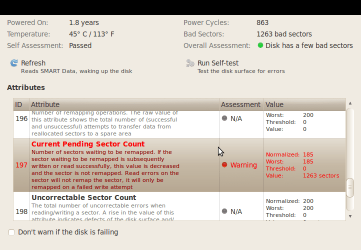
EDIT: Here is a screenshot of a HDD Smart Data... What does it mean?
 

Attachments

  • Screenshot-500 GB Hard Disk (ATA WDC WD5000AAKS-00YGA0) – SMART Data.png
    Screenshot-500 GB Hard Disk (ATA WDC WD5000AAKS-00YGA0) – SMART Data.png
    27.3 KB · Views: 5

My Computer

OS
W7 x64/x86 Ultimate + XP Mode; Ubuntu
CPU
AMD ATHLON X2 64 3.0GHz
Motherboard
M2N68-AM Plus
Memory
4GB DDR2 Kingston HyperX
Graphics Card(s)
ATI Radeon 4600 Series
Sound Card
Sound Blaster
Monitor(s) Displays
22" BenQ, 22" Samsung
Screen Resolution
1680x1050, 1920x1080
Hard Drives
WD5000AAKS
WDC6400AAK External
PSU
Gigabyte 600W
Case
Custom
Cooling
OCZ
Internet Speed
ADSL
I tried a self test and it failed. =(

Is there any way to fix bad sectors? Or is it pretty much buy a new hard drive?
 

My Computer

OS
W7 x64/x86 Ultimate + XP Mode; Ubuntu
CPU
AMD ATHLON X2 64 3.0GHz
Motherboard
M2N68-AM Plus
Memory
4GB DDR2 Kingston HyperX
Graphics Card(s)
ATI Radeon 4600 Series
Sound Card
Sound Blaster
Monitor(s) Displays
22" BenQ, 22" Samsung
Screen Resolution
1680x1050, 1920x1080
Hard Drives
WD5000AAKS
WDC6400AAK External
PSU
Gigabyte 600W
Case
Custom
Cooling
OCZ
Internet Speed
ADSL
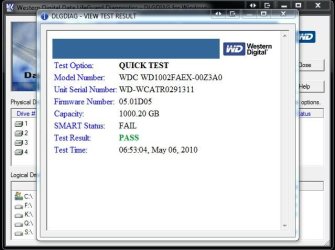
The drive temps are up a little on the warm side from ideal of cource but nothing serious. I noticed from your specs you have WD drives and may want to download the LifeGuard diagnostics tool as well for giving the main drive a good lookover with that since there's some indication of bad sectors.

There's only a certain degree of help tools like checkdisk can do like routing things around bad sectors once found in order to keep things going. Your best option would be backing things in case the drive does need to be replaced. The lower prices seen on drives these days makes it a lot to replace one if you have to!

The main support page you will want to look at for downloads including the diagnostics from the drive manufacturer are seen at WD Support > Downloads > SATA & SAS

Once you select the model series like Caviar SE, Blue, or Green Power for example you arrive at the next page where you select the Data Lifeguard diagnostic for Dos since you are not able to boot into Windows directly. http://support.wdc.com/product/download.asp?groupid=606&sid=30&lang=en

Seems I have to enable Smart Drive monitoring on the new build here! :D
 

Attachments

  • WD Lifeguard Test.jpg
    WD Lifeguard Test.jpg
    47.6 KB · Views: 3

My Computers

System One System Two

  • Computer type
    PC/Desktop
    Computer Manufacturer/Model Number
    Custom builds = 2
    OS
    W7 Ultimate x64/W10 Pro x64/W11 Pro Triple Boot - Main PC W7 Remote PC Micro ATX W7 Pro x64/W11 Pro
    CPU
    AMD Phenom II X4 975 Deneb 3.6ghz - 965 2nd remote pc
    Motherboard
    Gigabyte GA-790XTA-UD4-Gigabyte GA-880GM-D2H remote pc
    Memory
    Kingston Hyper X DDR3 1600 1.5v 16gb - Hyper X Fury 8gb 2nd
    Graphics Card(s)
    MSI HD Radeon 5750 1gb - MSI HD Radeon 6450 on mini tower
    Sound Card
    Creative Labs X-Fi Xtreme Audio P - Realtek onooard 2nd case
    Monitor(s) Displays
    ASUS VW199T-P 19" HP 2082a Main-HP 2082a 20" remote pc
    Screen Resolution
    Asus 1440x900 - HP 1600x900
    Hard Drives
    WD Black 1TB HD per OS W7, W10, and pending W11 presently on 500gb OS Drive - Pending Triple 1TB HDs for Spanned Storage/backup volume
    Single 2TB external USB enclosure, single 1TB System 7 Host/Boot drive, Pending 8TB external HD for system image b
    PSU
    Corsair 750TX - primary / Corsair CX600 - second
    Case
    Antec 900-2 - SSD compatible / NZXT Vulcan mini tower
    Cooling
    Zalman CNPS9900A
    Keyboard
    AZIO L70 Backlit Letters Gaming - ONN Cordless/USB
    Mouse
    MSI DS200 Programmable, Logitech Cordless
    Internet Speed
    30mbps upgrade - primary hard wired - mini tower usb WiFi
    Antivirus
    GFI VIPRE Internet Security 2014 on W7 2016 beta on W10,
    Browser
    Cyberfox, WaterFox 64bit FF variants, FireFox x64, Pale Moon
    Other Info
    Accomdata fan cooled usb 2.0 PIDE/Sata II, III external enclosure.
    Sambient usb/eSata PATA/Sata II, III external enclosure.
  • Computer type
    PC/Desktop
    System Manufacturer/Model Number
    CUSTOM ASSEMBLY
    OS
    W7 Pro x64/W11 Pro
    CPU
    AMD Deneb 3.6ghz - 965
    Motherboard
    Gigabyte GA-880GM-D2H remote pc
    Memory
    Kingston Hyper X Fury 8gb
    Graphics Card(s)
    MSI HD Radeon 6450 DVI Output
    Sound Card
    Realtek onooard Creative or Other separate PENDING
    Monitor(s) Displays
    VIZIO 32" LCD TV Separate LCD Pending
    Screen Resolution
    1600x1080
    Hard Drives
    WD 500GB OS Host/Boot WD Green 1TB Storage/Backup
    PSU
    Corsair 600W - THERMALTAKE 600W spare case
    Case
    NZXT Vulcan mini tower
    Cooling
    Twin 120mm Top Fans - 240mm Side Cover
    Keyboard
    ONN Cordless/USB Logitech Cordless
    Mouse
    ONN USB/Cordless - Logitech Cordless
    Internet Speed
    DSL 5G
    Browser
    MS Edge, FireFox, WaterFox x64, FireFox Nightly
    Other Info
    OS Testing-Remote Access to Main TeamViewer
Back
Top