windows 7 style builder help

m4ksta

New member
Member
Local time
7:54 PM
Messages
37
Location
preston
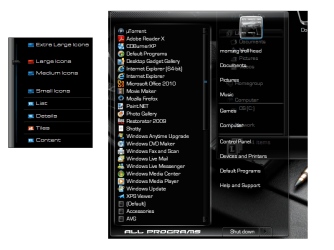
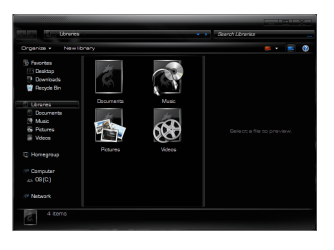
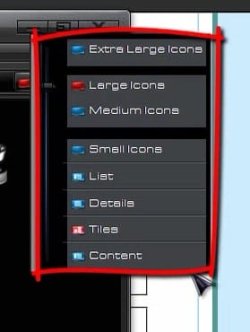
hi, i am new to this forum and would like a little help please. i was trying to locate the gray area in the attached image in wsb but i am not sure if its a image or a fill color. can some1 help?
 

Attachments

  • view menu.jpg
    view menu.jpg
    14.4 KB · Views: 23

My Computer

Computer Manufacturer/Model Number
dell n5030
OS
windows 7 home premium 64bit
CPU
dell
Memory
installed memory(ram)3.00gb
Monitor(s) Displays
1366 768
Hard Drives
283gb
Welcome to the Seven Forums
They are images at:
Toolbars, Headers & Rebar > Toolbars & Headers > Toolbar > Button > Normal

Toolbars, Headers & Rebar > Toolbars & Headers > Toolbar > Button > Hot

Jerry
 

My Computer

Computer type
Laptop
Computer Manufacturer/Model Number
Sager NP9170
OS
Win 7 Pro x64 / Win 10 Pro
CPU
Intel(R) Core(TM) i7-3630QM CPU @ 2.40GHz
Motherboard
CLEVO P170EM
Memory
12 GB
Graphics Card(s)
(1) Intel(R) HD Graphics 4000 (2) NVIDIA GeForce GTX 675M
Sound Card
(1) Realtek High Definition Audio (2) Intel(R) Display Aud
Monitor(s) Displays
17.3
Screen Resolution
1920x1080
Hard Drives
(1) Samsung 860 EVO 500GB(OS) (1) Samsung 860 EVO 500GB(Data)
Keyboard
Backlite
Antivirus
MSE, Malwarebytes Pro
Browser
Firefox
Other Info
DESKTOP: Custom-built.
OS: Win 10 Pro x64.
CASE: Rosewill R5.
CPU: Intel I5 4670K CPU @ 3.40GHz.
CPU COOLER: Cool Master Hyper 212 EVO.
MOTHERBOARD: Asus Z87-A.
MEMORY: Kingston HyperX 2x4 GB.
GPU: Nvidia Geforce 650 TI.
PSU: Corsair TX750.
DRIVES: (1) Samsung 840 120 GB SSD (2) Western Digital blue 500 GB 7200 RPM.
thank you so much i can edit them now.....
 

My Computer

Computer Manufacturer/Model Number
dell n5030
OS
windows 7 home premium 64bit
CPU
dell
Memory
installed memory(ram)3.00gb
Monitor(s) Displays
1366 768
Hard Drives
283gb
all program color help

Welcome to the Seven Forums
They are images at:
Toolbars, Headers & Rebar > Toolbars & Headers > Toolbar > Button > Normal

Toolbars, Headers & Rebar > Toolbars & Headers > Toolbar > Button > Hot

Jerry

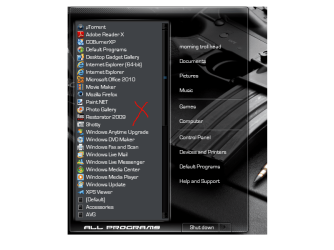
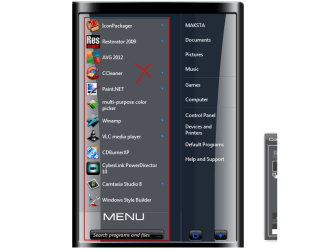
iv been trying for a good few days now to change the color of the red crossed area of all programs any suggestions
 

Attachments

  • Untitled.png
    Untitled.png
    63.6 KB · Views: 12

My Computer

Computer Manufacturer/Model Number
dell n5030
OS
windows 7 home premium 64bit
CPU
dell
Memory
installed memory(ram)3.00gb
Monitor(s) Displays
1366 768
Hard Drives
283gb
iv been trying for a good few days now to change the color of the red crossed area of all programs any suggestions

It should be Explorer & Shell > Explorer > TreeView > Fillcolor:Color

Jerry
 

My Computer

Computer type
Laptop
Computer Manufacturer/Model Number
Sager NP9170
OS
Win 7 Pro x64 / Win 10 Pro
CPU
Intel(R) Core(TM) i7-3630QM CPU @ 2.40GHz
Motherboard
CLEVO P170EM
Memory
12 GB
Graphics Card(s)
(1) Intel(R) HD Graphics 4000 (2) NVIDIA GeForce GTX 675M
Sound Card
(1) Realtek High Definition Audio (2) Intel(R) Display Aud
Monitor(s) Displays
17.3
Screen Resolution
1920x1080
Hard Drives
(1) Samsung 860 EVO 500GB(OS) (1) Samsung 860 EVO 500GB(Data)
Keyboard
Backlite
Antivirus
MSE, Malwarebytes Pro
Browser
Firefox
Other Info
DESKTOP: Custom-built.
OS: Win 10 Pro x64.
CASE: Rosewill R5.
CPU: Intel I5 4670K CPU @ 3.40GHz.
CPU COOLER: Cool Master Hyper 212 EVO.
MOTHERBOARD: Asus Z87-A.
MEMORY: Kingston HyperX 2x4 GB.
GPU: Nvidia Geforce 650 TI.
PSU: Corsair TX750.
DRIVES: (1) Samsung 840 120 GB SSD (2) Western Digital blue 500 GB 7200 RPM.
iv been trying for a good few days now to change the color of the red crossed area of all programs any suggestions

It should be Explorer & Shell > Explorer > TreeView > Fillcolor:Color

Jerry
it does not seem to work in this custom theme, its puzzling me could there be a reason why
 

My Computer

Computer Manufacturer/Model Number
dell n5030
OS
windows 7 home premium 64bit
CPU
dell
Memory
installed memory(ram)3.00gb
Monitor(s) Displays
1366 768
Hard Drives
283gb
See if you have a Fill Color at
Start Menu > Menus > Basic > Hover:TreeView
and
Start Menu > Menus > Basic > KeyBoard:TreeView

Jerry
 

My Computer

Computer type
Laptop
Computer Manufacturer/Model Number
Sager NP9170
OS
Win 7 Pro x64 / Win 10 Pro
CPU
Intel(R) Core(TM) i7-3630QM CPU @ 2.40GHz
Motherboard
CLEVO P170EM
Memory
12 GB
Graphics Card(s)
(1) Intel(R) HD Graphics 4000 (2) NVIDIA GeForce GTX 675M
Sound Card
(1) Realtek High Definition Audio (2) Intel(R) Display Aud
Monitor(s) Displays
17.3
Screen Resolution
1920x1080
Hard Drives
(1) Samsung 860 EVO 500GB(OS) (1) Samsung 860 EVO 500GB(Data)
Keyboard
Backlite
Antivirus
MSE, Malwarebytes Pro
Browser
Firefox
Other Info
DESKTOP: Custom-built.
OS: Win 10 Pro x64.
CASE: Rosewill R5.
CPU: Intel I5 4670K CPU @ 3.40GHz.
CPU COOLER: Cool Master Hyper 212 EVO.
MOTHERBOARD: Asus Z87-A.
MEMORY: Kingston HyperX 2x4 GB.
GPU: Nvidia Geforce 650 TI.
PSU: Corsair TX750.
DRIVES: (1) Samsung 840 120 GB SSD (2) Western Digital blue 500 GB 7200 RPM.
here is the theme

iv been trying for a good few days now to change the color of the red crossed area of all programs any suggestions

It should be Explorer & Shell > Explorer > TreeView > Fillcolor:Color

Jerry
it does not seem to work in this custom theme, its puzzling me could there be a reason why
if you could be so kind and please try and figure it out it would be much appreciated iv tried everything thanks m4ksta.......
 

Attachments

My Computer

Computer Manufacturer/Model Number
dell n5030
OS
windows 7 home premium 64bit
CPU
dell
Memory
installed memory(ram)3.00gb
Monitor(s) Displays
1366 768
Hard Drives
283gb
It's a fill color at
Start Menu > Menus > Aero > Hover:TreeView

Start Menu > Menus > Aero > KeyBoard:TreeView

Jerry
 

My Computer

Computer type
Laptop
Computer Manufacturer/Model Number
Sager NP9170
OS
Win 7 Pro x64 / Win 10 Pro
CPU
Intel(R) Core(TM) i7-3630QM CPU @ 2.40GHz
Motherboard
CLEVO P170EM
Memory
12 GB
Graphics Card(s)
(1) Intel(R) HD Graphics 4000 (2) NVIDIA GeForce GTX 675M
Sound Card
(1) Realtek High Definition Audio (2) Intel(R) Display Aud
Monitor(s) Displays
17.3
Screen Resolution
1920x1080
Hard Drives
(1) Samsung 860 EVO 500GB(OS) (1) Samsung 860 EVO 500GB(Data)
Keyboard
Backlite
Antivirus
MSE, Malwarebytes Pro
Browser
Firefox
Other Info
DESKTOP: Custom-built.
OS: Win 10 Pro x64.
CASE: Rosewill R5.
CPU: Intel I5 4670K CPU @ 3.40GHz.
CPU COOLER: Cool Master Hyper 212 EVO.
MOTHERBOARD: Asus Z87-A.
MEMORY: Kingston HyperX 2x4 GB.
GPU: Nvidia Geforce 650 TI.
PSU: Corsair TX750.
DRIVES: (1) Samsung 840 120 GB SSD (2) Western Digital blue 500 GB 7200 RPM.
It's a fill color at
Start Menu > Menus > Aero > Hover:TreeView

Start Menu > Menus > Aero > KeyBoard:TreeView

Jerry
thank you so much jerry
 

My Computer

Computer Manufacturer/Model Number
dell n5030
OS
windows 7 home premium 64bit
CPU
dell
Memory
installed memory(ram)3.00gb
Monitor(s) Displays
1366 768
Hard Drives
283gb
You're Welcome
 

My Computer

Computer type
Laptop
Computer Manufacturer/Model Number
Sager NP9170
OS
Win 7 Pro x64 / Win 10 Pro
CPU
Intel(R) Core(TM) i7-3630QM CPU @ 2.40GHz
Motherboard
CLEVO P170EM
Memory
12 GB
Graphics Card(s)
(1) Intel(R) HD Graphics 4000 (2) NVIDIA GeForce GTX 675M
Sound Card
(1) Realtek High Definition Audio (2) Intel(R) Display Aud
Monitor(s) Displays
17.3
Screen Resolution
1920x1080
Hard Drives
(1) Samsung 860 EVO 500GB(OS) (1) Samsung 860 EVO 500GB(Data)
Keyboard
Backlite
Antivirus
MSE, Malwarebytes Pro
Browser
Firefox
Other Info
DESKTOP: Custom-built.
OS: Win 10 Pro x64.
CASE: Rosewill R5.
CPU: Intel I5 4670K CPU @ 3.40GHz.
CPU COOLER: Cool Master Hyper 212 EVO.
MOTHERBOARD: Asus Z87-A.
MEMORY: Kingston HyperX 2x4 GB.
GPU: Nvidia Geforce 650 TI.
PSU: Corsair TX750.
DRIVES: (1) Samsung 840 120 GB SSD (2) Western Digital blue 500 GB 7200 RPM.
It's a fill color at
Start Menu > Menus > Aero > Hover:TreeView

Start Menu > Menus > Aero > KeyBoard:TreeView

Jerry
thank you so much jerry
all programs back color and view menu SORTED! what a great forum this is i cant believe iv been messing with my themes,trail and error lol reloading test again and again.....

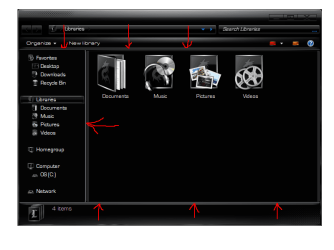
in image 2 there is a gray area around my explorer window and left panel can you please help me with the location of this, then my theme is perfect.......m4ksta......
 

Attachments

  • Untitled.png
    Untitled.png
    51.2 KB · Views: 8
  • gray border.png
    gray border.png
    31 KB · Views: 12

My Computer

Computer Manufacturer/Model Number
dell n5030
OS
windows 7 home premium 64bit
CPU
dell
Memory
installed memory(ram)3.00gb
Monitor(s) Displays
1366 768
Hard Drives
283gb
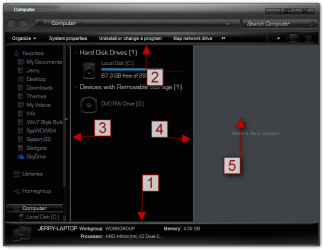
Here you go(look at screenshot)
All of these are images that will need to be edited except #5 it is fill colors.
#1
Explorer & Shell > Explorer > PreviewPane > <1> > <1>

#2
Explorer & Shell > Explorer > CommandModule > <1>

#3
Explorer & Shell > Explorer > PreviewPane > <3>

#4
Explorer & Shell > Explorer > PreviewPane > <4>

#5
Explorer & Shell > Explorer > ReadingPane > Background > the 3 Gradientcolor:color

#5 is the preview pane I added it just in case you wanted to change it.
Jerry
Computer.png
 

My Computer

Computer type
Laptop
Computer Manufacturer/Model Number
Sager NP9170
OS
Win 7 Pro x64 / Win 10 Pro
CPU
Intel(R) Core(TM) i7-3630QM CPU @ 2.40GHz
Motherboard
CLEVO P170EM
Memory
12 GB
Graphics Card(s)
(1) Intel(R) HD Graphics 4000 (2) NVIDIA GeForce GTX 675M
Sound Card
(1) Realtek High Definition Audio (2) Intel(R) Display Aud
Monitor(s) Displays
17.3
Screen Resolution
1920x1080
Hard Drives
(1) Samsung 860 EVO 500GB(OS) (1) Samsung 860 EVO 500GB(Data)
Keyboard
Backlite
Antivirus
MSE, Malwarebytes Pro
Browser
Firefox
Other Info
DESKTOP: Custom-built.
OS: Win 10 Pro x64.
CASE: Rosewill R5.
CPU: Intel I5 4670K CPU @ 3.40GHz.
CPU COOLER: Cool Master Hyper 212 EVO.
MOTHERBOARD: Asus Z87-A.
MEMORY: Kingston HyperX 2x4 GB.
GPU: Nvidia Geforce 650 TI.
PSU: Corsair TX750.
DRIVES: (1) Samsung 840 120 GB SSD (2) Western Digital blue 500 GB 7200 RPM.
Here you go(look at screenshot)
All of these are images that will need to be edited except #5 it is fill colors.
#1
Explorer & Shell > Explorer > PreviewPane > <1> > <1>

#2
Explorer & Shell > Explorer > CommandModule > <1>

#3
Explorer & Shell > Explorer > PreviewPane > <3>

#4
Explorer & Shell > Explorer > PreviewPane > <4>

#5
Explorer & Shell > Explorer > ReadingPane > Background > the 3 Gradientcolor:color

#5 is the preview pane I added it just in case you wanted to change it.
Jerry
View attachment 236889
legend thanks again for the help i really appreciate it.... m4ksta.......
 

Attachments

  • Untitled.png
    Untitled.png
    31.4 KB · Views: 11

My Computer

Computer Manufacturer/Model Number
dell n5030
OS
windows 7 home premium 64bit
CPU
dell
Memory
installed memory(ram)3.00gb
Monitor(s) Displays
1366 768
Hard Drives
283gb
You're welcome
 

My Computer

Computer type
Laptop
Computer Manufacturer/Model Number
Sager NP9170
OS
Win 7 Pro x64 / Win 10 Pro
CPU
Intel(R) Core(TM) i7-3630QM CPU @ 2.40GHz
Motherboard
CLEVO P170EM
Memory
12 GB
Graphics Card(s)
(1) Intel(R) HD Graphics 4000 (2) NVIDIA GeForce GTX 675M
Sound Card
(1) Realtek High Definition Audio (2) Intel(R) Display Aud
Monitor(s) Displays
17.3
Screen Resolution
1920x1080
Hard Drives
(1) Samsung 860 EVO 500GB(OS) (1) Samsung 860 EVO 500GB(Data)
Keyboard
Backlite
Antivirus
MSE, Malwarebytes Pro
Browser
Firefox
Other Info
DESKTOP: Custom-built.
OS: Win 10 Pro x64.
CASE: Rosewill R5.
CPU: Intel I5 4670K CPU @ 3.40GHz.
CPU COOLER: Cool Master Hyper 212 EVO.
MOTHERBOARD: Asus Z87-A.
MEMORY: Kingston HyperX 2x4 GB.
GPU: Nvidia Geforce 650 TI.
PSU: Corsair TX750.
DRIVES: (1) Samsung 840 120 GB SSD (2) Western Digital blue 500 GB 7200 RPM.
You're welcome
alright jerry you ok? i am puzzled on how to removed the transparent area marked x iv tried everything can you help me out please..
 

Attachments

  • Untitled.png
    Untitled.png
    25 KB · Views: 9

My Computer

Computer Manufacturer/Model Number
dell n5030
OS
windows 7 home premium 64bit
CPU
dell
Memory
installed memory(ram)3.00gb
Monitor(s) Displays
1366 768
Hard Drives
283gb
Is this a different theme? If so post a link or the .msstyles.

Jerry
 

My Computer

Computer type
Laptop
Computer Manufacturer/Model Number
Sager NP9170
OS
Win 7 Pro x64 / Win 10 Pro
CPU
Intel(R) Core(TM) i7-3630QM CPU @ 2.40GHz
Motherboard
CLEVO P170EM
Memory
12 GB
Graphics Card(s)
(1) Intel(R) HD Graphics 4000 (2) NVIDIA GeForce GTX 675M
Sound Card
(1) Realtek High Definition Audio (2) Intel(R) Display Aud
Monitor(s) Displays
17.3
Screen Resolution
1920x1080
Hard Drives
(1) Samsung 860 EVO 500GB(OS) (1) Samsung 860 EVO 500GB(Data)
Keyboard
Backlite
Antivirus
MSE, Malwarebytes Pro
Browser
Firefox
Other Info
DESKTOP: Custom-built.
OS: Win 10 Pro x64.
CASE: Rosewill R5.
CPU: Intel I5 4670K CPU @ 3.40GHz.
CPU COOLER: Cool Master Hyper 212 EVO.
MOTHERBOARD: Asus Z87-A.
MEMORY: Kingston HyperX 2x4 GB.
GPU: Nvidia Geforce 650 TI.
PSU: Corsair TX750.
DRIVES: (1) Samsung 840 120 GB SSD (2) Western Digital blue 500 GB 7200 RPM.

Attachments

My Computer

Computer Manufacturer/Model Number
dell n5030
OS
windows 7 home premium 64bit
CPU
dell
Memory
installed memory(ram)3.00gb
Monitor(s) Displays
1366 768
Hard Drives
283gb
Go to
Start Menu > Menus > Aero > ListView and check COMPOSITEDOPAQUE:BOOL
then
Start Menu > Menus > Aero > StartMenuCompositedMFU::ListView
and
Start Menu > Menus > Aero > TopMatchComposited::ListView and uncheck COMPOSITED:BOOL and check COMPOSITEDOPAQUE:BOOL
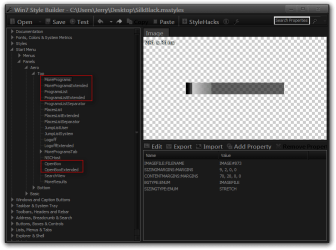
Win7 Style Builder - CUsersJerryDesktopSilkBlack.msstyles.png2.png

Then you'll probably have to edit the images in the locations shown below.

Jerry
3.png
 

My Computer

Computer type
Laptop
Computer Manufacturer/Model Number
Sager NP9170
OS
Win 7 Pro x64 / Win 10 Pro
CPU
Intel(R) Core(TM) i7-3630QM CPU @ 2.40GHz
Motherboard
CLEVO P170EM
Memory
12 GB
Graphics Card(s)
(1) Intel(R) HD Graphics 4000 (2) NVIDIA GeForce GTX 675M
Sound Card
(1) Realtek High Definition Audio (2) Intel(R) Display Aud
Monitor(s) Displays
17.3
Screen Resolution
1920x1080
Hard Drives
(1) Samsung 860 EVO 500GB(OS) (1) Samsung 860 EVO 500GB(Data)
Keyboard
Backlite
Antivirus
MSE, Malwarebytes Pro
Browser
Firefox
Other Info
DESKTOP: Custom-built.
OS: Win 10 Pro x64.
CASE: Rosewill R5.
CPU: Intel I5 4670K CPU @ 3.40GHz.
CPU COOLER: Cool Master Hyper 212 EVO.
MOTHERBOARD: Asus Z87-A.
MEMORY: Kingston HyperX 2x4 GB.
GPU: Nvidia Geforce 650 TI.
PSU: Corsair TX750.
DRIVES: (1) Samsung 840 120 GB SSD (2) Western Digital blue 500 GB 7200 RPM.

My Computer

Computer Manufacturer/Model Number
dell n5030
OS
windows 7 home premium 64bit
CPU
dell
Memory
installed memory(ram)3.00gb
Monitor(s) Displays
1366 768
Hard Drives
283gb
Back
Top