
Solved Windows 7 System Image not finding image files

Can your PE disc project restore an image created with the built in Windows imaging program?

Yes.

If it can, what steps do you take after booting with the PE disc?

I click the MsImageRestore icon under start menu\program files
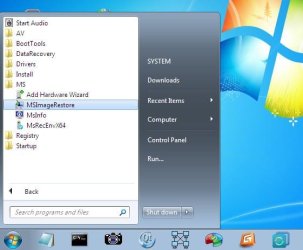
msimagerestore.jpg
 
Last edited:

My Computers My Computers

System One System Two

  • Computer type
    PC/Desktop
    OS
    7 X64
    CPU
    i5 8400
    Motherboard
    gigabyte b365m ds3h
    Memory
    2x8gb 3200mhz
    Hard Drives
    various
    PSU
    pure power 11 400w cm
    Case
    Coolermaster
    Cooling
    cryorig m9i
  • Computer type
    PC/Desktop
    OS
    7x64
    CPU
    g5400
    Motherboard
    ga b365m ds3h
    Memory
    8gb ddr4 2400
    PSU
    xfx pro 450w
Does the build you create change the system it is being built on ie. registry etc?

Also, I don't know if you already have this or would be willing to do it but in my case I do not know about a lot of the tools available on your PE disc. If more of the same info above on how to use the items on the PE disc was available it would definitely help promote the project.

Thanks for taking the time to create it. I will be building the PE disc after I get this thumping 4TB Gold drive replaced:(
 

My Computer My Computer

Computer type
PC/Desktop
Computer Manufacturer/Model Number
Custom
OS
Windows 7 64 bit
CPU
I3-6100
Motherboard
Asus Z170 Pro
Memory
Corsair 16GB
Graphics Card(s)
Intel 530
Hard Drives
Intel 535 240GB SSD
WD 4TB Gold Data Center
Antivirus
MSE
Browser
IE 11
1.
Does the build you create change the system it is being built on ie. registry etc?

No.

2. It includes the exact same MS recovery tools already present in winre ( startup repair, system restore, system image recovery ).

It also includes windows explorer, windows disk management, windows device manager, windows service manager.

It supports usb 3.0 and includes most nic drivers.

I assume people know how to use those standard windows functions.

3. It offers to download and include qtweb ( small web browser) and the well known file recovery program Recuva, and ESET free offline av scanner. It checks if you have installed any of the popular partition managers/ disk imaging programs and if found, it includes those also.

I assume people know how to use their own installed software.

4. There are a couple of small programs included you may not have come across - a gui for dism, and an nt6 repair tool ( basically a boot repair tool ). They should be self explanatory.
 

My Computers My Computers

System One System Two

  • Computer type
    PC/Desktop
    OS
    7 X64
    CPU
    i5 8400
    Motherboard
    gigabyte b365m ds3h
    Memory
    2x8gb 3200mhz
    Hard Drives
    various
    PSU
    pure power 11 400w cm
    Case
    Coolermaster
    Cooling
    cryorig m9i
  • Computer type
    PC/Desktop
    OS
    7x64
    CPU
    g5400
    Motherboard
    ga b365m ds3h
    Memory
    8gb ddr4 2400
    PSU
    xfx pro 450w
So, am I completely hosed if I touched a directory? Is there NO way to get it to see the image files that are obviously there?
 

My Computer My Computer

Computer type
PC/Desktop
Computer Manufacturer/Model Number
Dell
OS
w7 64 bit
You can mount the vhd file and copy out anything you want.


So, am I completely hosed if I touched a directory? Is there NO way to get it to see the image files that are obviously there?
 

My Computers My Computers

System One System Two

  • Computer type
    PC/Desktop
    OS
    7 X64
    CPU
    i5 8400
    Motherboard
    gigabyte b365m ds3h
    Memory
    2x8gb 3200mhz
    Hard Drives
    various
    PSU
    pure power 11 400w cm
    Case
    Coolermaster
    Cooling
    cryorig m9i
  • Computer type
    PC/Desktop
    OS
    7x64
    CPU
    g5400
    Motherboard
    ga b365m ds3h
    Memory
    8gb ddr4 2400
    PSU
    xfx pro 450w
So, yeah, the hard drive is still fine, I just cannot boot. I don't have problem getting to files, I just want to be able to reinstall the image so that the OS will run again. It's hosed.
 

My Computer My Computer

Computer type
PC/Desktop
Computer Manufacturer/Model Number
Dell
OS
w7 64 bit
1.Where is the image

2.Why do you think you can't get to it?
 

My Computers My Computers

System One System Two

  • Computer type
    PC/Desktop
    OS
    7 X64
    CPU
    i5 8400
    Motherboard
    gigabyte b365m ds3h
    Memory
    2x8gb 3200mhz
    Hard Drives
    various
    PSU
    pure power 11 400w cm
    Case
    Coolermaster
    Cooling
    cryorig m9i
  • Computer type
    PC/Desktop
    OS
    7x64
    CPU
    g5400
    Motherboard
    ga b365m ds3h
    Memory
    8gb ddr4 2400
    PSU
    xfx pro 450w
The image is on a NAS and when I point the restore at it, it doesn't find the image.


From what I read here, because I renamed a directory.


So, in the mean time, in a Christmas miracle, the computer actually booted and I made another image (I haven't tested it yet however) I'm thinking that maybe I have a bad disk, but the disk(s) is Raid 1 so I'm a little confused at how I have a bad file when I would expect that the Raid would take care of that.


I know it's a little off topic, but should I replace the hard drive and then take the image on the NAS and install it on the new disk. Will that work?
 

My Computer My Computer

Computer type
PC/Desktop
Computer Manufacturer/Model Number
Dell
OS
w7 64 bit
So, am I completely hosed if I touched a directory? Is there NO way to get it to see the image files that are obviously there?
The built in Windows system imaging is temperamental, there appears to be no rhyme or reason as to why sometimes it cannot see an image that could be restored.

It doesn't make any sense, but I have occasionally found that an 'invisible' image can be made visible again by renaming the WindowsImageBackup folder to WindowsImageBackup.old, creating a new WindowsImageBackupfolder, then copying the image folder from the old one to the new one. If you have renamed the sub folder, change its name back to the name of the PC.


I use Macrium Reflect Free these days, far more reliable.
 

My Computers My Computers

System One System Two

  • Computer type
    Laptop
    Computer Manufacturer/Model Number
    Toshiba satellite C650D
    OS
    Windows 7 Home Premium x64
    CPU
    AMD V120
    Memory
    4GB
    Internet Speed
    150 Mbps
    Antivirus
    MSE
    Browser
    IE11, Edge, Firefox
    Other Info
    I also have W7 Pro on my System Two, and several W7 Hyper-V VMs. My other machines run Windows 10/11. Their specs are in my Ten Forums & Eleven Forum profiles.
  • Computer type
    Laptop
    System Manufacturer/Model Number
    Lenovo Thinkpad T430
    OS
    Windows 7 Pro x64
    CPU
    Intel i5-3320M
    Memory
    8 GB
    Hard Drives
    250GB Samsung SSD 860 EVO
    Antivirus
    MSE
Oh OK, thanks for the recommendation, I will check that out.
 

My Computer My Computer

Computer type
PC/Desktop
Computer Manufacturer/Model Number
Dell
OS
w7 64 bit
Back
Top