Hi all
I have taken a system image of my laptop which had a 160gb hard drive, to a separate external drive, the total used space of the image was only 25gb, I did this as the hard disk was beginning to get bad sectors.
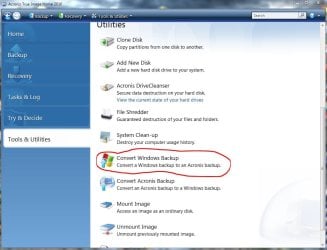
I thought as I did not need 160gb I would buy a 80gb to replace it, and then found after trying several times, and research on the net, you cannot reinstall the system image to a smaller drive than the original (Thanks MS for not making that clear when I did the system image) So now I am stuck, the shop wont take the new 80gb drive back as its been opened, so I am trying to find out if its possible to use the system image I created with another software like Acronis, to put it onto the smaller hard drive.
Any help or advice would be great
Thanks in advance
I have taken a system image of my laptop which had a 160gb hard drive, to a separate external drive, the total used space of the image was only 25gb, I did this as the hard disk was beginning to get bad sectors.
I thought as I did not need 160gb I would buy a 80gb to replace it, and then found after trying several times, and research on the net, you cannot reinstall the system image to a smaller drive than the original (Thanks MS for not making that clear when I did the system image) So now I am stuck, the shop wont take the new 80gb drive back as its been opened, so I am trying to find out if its possible to use the system image I created with another software like Acronis, to put it onto the smaller hard drive.
Any help or advice would be great
Thanks in advance
My Computer
- OS
- windows 7