
Windows 7 taking over 3 min's to reboot

JohnDohe

Banned
Local time
7:17 PM
Messages
60
Hi,

I've got three (3) identical pc's: Acer Veriton M4630G-i7477X
each with 32GB ram. Business level pc's.

Two of them reboot in about 35-40 sec's.

The third one takes about 3.5 min's to reboot.

When it starts booting up, I get this screen:
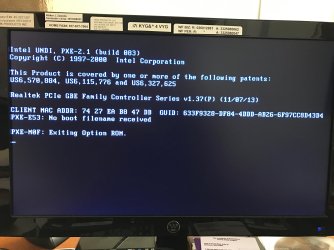
Acer bootup screenshot.jpg

This pc just came back from Acer for a bad HDD; it was still under warranty.

Acer sent it back with its original configuration and installed a new HDD;
the original had a bad sector.

Anyone have any idea why this one pc is taking so long to boot?

Many thanks! :)
 

My Computer My Computer

Computer type
PC/Desktop
Computer Manufacturer/Model Number
Acer
OS
Windows 7 Pro 64 bit
Whenever I saw that it meant the PC was trying to boot from the network.

Check the boot order in the Bios, make sure it`s

1) CD/DVD drive if you have one
2) SSD or hard drive, whichever you use for Windows

Unless it`s supposed to be booting from the network.
 

My Computer My Computer

Computer type
PC/Desktop
Computer Manufacturer/Model Number
Skylake Special #666
OS
Windows 10 Pro x64
CPU
Intel Core i7 6700K
Motherboard
Asus Sabertooth Z170 Mark 1
Memory
GSkill TridentZ RGB 16GB 3600 16-16-16-36
Graphics Card(s)
EVGA GTX 980 Ti SC x2
Sound Card
Realtek High Definition
Monitor(s) Displays
AOC G2460PG
Screen Resolution
1920 x 1080 144Hz
Hard Drives
Samsung 860 Pro 256GB, Seagate Barracuda 4TB x2
PSU
EVGA 1000 P2, EVGA White Custom Braided Cables
Case
Corsair Vengeance C70 Gunmetal Black
Cooling
Corsair H100i v2, Corsair ML120 x2, Thermal Grizzly Kryonaut
Keyboard
Logitech G910 Orion Spectrum
Mouse
Logitech G700s
Internet Speed
Verizon Fios Quantum Gateway 75/75
Antivirus
Windows Defender, Malwarebytes Free 3.8.3
Browser
Chrome
Other Info
Corsair SP120 x4, LG Blu-ray Drive, Durabrand HT-395 100 Watt Dolby Digital Amp, Corsair H2100 Wireless 7.1 Headset
Ok, Ill have a look!

Thanks!
 

My Computer My Computer

Computer type
PC/Desktop
Computer Manufacturer/Model Number
Acer
OS
Windows 7 Pro 64 bit
Well that made a huge difference!

The first thing on the boot options list was:
REALTEK PXE B02 D00

I moved this to the bottom of the list.

Now I'm booting from:
1st: HL-DT-ST DVDRAM GHA2N
2nd: WINDOWS BOOT MANAGER
3rd: REMOVABLE DEVICE
4th: REALTEK PXE B02 D00

Now he reboots are down to less than a minute.

But I'm still getting something I don't understand.

When it boots up, for a second there flashes
"Press Shift + F10" to enter some kind of
RealTek thing.

When I press Shift + F10 I'm taken to this:

View attachment 395593

What is this?

Do I need it?

Can I get rid of it?

Thanks!
 

My Computer My Computer

Computer type
PC/Desktop
Computer Manufacturer/Model Number
Acer
OS
Windows 7 Pro 64 bit
You are still with a option to network boot.
On BIOS:
- Disable 4th: REALTEK PXE B02 D00 boot option
- Look for
LAN PXE Boot Option ROM
Allows you to select whether to enable the legacy option ROM for the LAN controller.
Set to Disabled

As you have other computers that are identical model and they are working well:
- Some BIOS can save / load their configurations as a profile to an external device. I you have this option save from one of the computers that are working well and load it to the problematic one.

or

- Put a good on the side of the problematic and configure BIOS to be the same settings.
 
Last edited:

My Computers My Computers

System One System Two

  • Computer type
    PC/Desktop
    Computer Manufacturer/Model Number
    custom build
    OS
    Windows 7 HP 64
    CPU
    i5 6600K - 800MHz to 4200MHz
    Motherboard
    GA-Z170-HD3P
    Memory
    4+4G GSkill DDR4 3000
    Graphics Card(s)
    IG - Intel 530
    Monitor(s) Displays
    Samsung 226BW
    Screen Resolution
    1680x1050
    Hard Drives
    (1) -1 SM951 – 128GB M.2 AHCI PCIe SSD drive for Windows 7 and Lubuntu
    (2) -1 WD SATA 3 - 1T for Data
    (3) -1 WD SATA 3 - 1T for backup
    PSU
    Thermaltake 450W TR2 gold
    Keyboard
    Old and good Chicony mechanical keyboard
    Mouse
    Logitech mX performance - 9 buttons (had to disable some)
    Internet Speed
    500Mb/s
    Browser
    Firefox 64
    Other Info
    TinyWall firewall
  • Computer type
    Laptop
    System Manufacturer/Model Number
    Asus Q550LF
    OS
    Windows 7 Pro
    CPU
    i7-4500U 800MHz to 3.0GHz
    Motherboard
    Asus Q550LF
    Memory
    (4+4)G DDR3 1600
    Graphics Card(s)
    IG intel 4400 + NVIDIA GeForce GT 745M
    Sound Card
    Realtek
    Monitor(s) Displays
    LG Display LP156WF4-SPH1
    Screen Resolution
    1920 x 1080
    Hard Drives
    BX500 120G SSD for Windows and programs +
    1T HDD for data
    Internet Speed
    500 Mb/s
    Browser
    Firefox
    Other Info
    TinyWall firewall
Back
Top