Windows 7 Taskbar Clock Style

CoolBoyMan

New member
Local time
3:10 PM
Messages
9
I want to change my taskbar clock to this one:


if someone know how to do that please tell me, Thanks..
 

My Computer

OS
Windows 7
Help and support type clock format. I would explain, but in this case easier if you see yourself.
 

My Computer

Computer type
PC/Desktop
Computer Manufacturer/Model Number
Dell XPS 420
OS
Windows 10, Home Clean Install
CPU
Intel Core2 processsor Q8200(2.33Ghz 1333FSB) Quad Core Tech
Motherboard
Dell
Memory
6 gb
Graphics Card(s)
ATI Radeon 256MB HD3650
Sound Card
Intergrated 7.1 Channel Audio
Monitor(s) Displays
Dell SP2009W 20"
Hard Drives
640 GB Serial ATA Hard drive
Cooling
Fan
Keyboard
Dell USB Keyboard
Mouse
Dell Premium Optical USB
Internet Speed
DSL 2.85
you don't understand me
i know how to remove the date from there
but i want to chage the size and the style and the glow like the picture
thank you..
 

My Computer

OS
Windows 7
I thought that you wanted to show milatary time, 15:30 rather than 3;30, and my instructions, to type clock format in the help and support would let you do that. If you want to illuminate, you may have to wait for others to answer.
 

My Computer

Computer type
PC/Desktop
Computer Manufacturer/Model Number
Dell XPS 420
OS
Windows 10, Home Clean Install
CPU
Intel Core2 processsor Q8200(2.33Ghz 1333FSB) Quad Core Tech
Motherboard
Dell
Memory
6 gb
Graphics Card(s)
ATI Radeon 256MB HD3650
Sound Card
Intergrated 7.1 Channel Audio
Monitor(s) Displays
Dell SP2009W 20"
Hard Drives
640 GB Serial ATA Hard drive
Cooling
Fan
Keyboard
Dell USB Keyboard
Mouse
Dell Premium Optical USB
Internet Speed
DSL 2.85
Yes i want to design my clock exactly like in the picture
the size the color illuminate and more
so what forum i need to go for my question?
 

My Computer

OS
Windows 7
CoolBoyMan, Welcome to SevenForums.
Seeing that it is sitting on the left side of the notification area of the taskbar looks like it may be a third party clock. I like the look but haven't seen it before. I will google it for you to see what comes up. You are in the right forum by the way. :D
 

My Computer

Computer Manufacturer/Model Number
Gateway GT5692
OS
Windows 7 Ulti. x64
CPU
AMD Phenom 8450 triple-core 2.10 ghz
Memory
4GB
Graphics Card(s)
ATI Radion HD 3200
Monitor(s) Displays
Gateway FPD1775W
Screen Resolution
1280x720
Hard Drives
465.6613 Gibibytes
thank you very match
and the clock is in the left side because the windows is a heb windows
i see that when i crop the picture
so not sure if this clock is a third party clock
 

My Computer

OS
Windows 7
Cool Boy.. Sorry I was unable to find any help for you. However after looking at your snip of the clock I agree with what Rich was saying that its military time with the date removed and the aero effect is making it look like it glows. Do you have aero enabled on your pc?
Good luck to you!
 

My Computer

Computer Manufacturer/Model Number
Gateway GT5692
OS
Windows 7 Ulti. x64
CPU
AMD Phenom 8450 triple-core 2.10 ghz
Memory
4GB
Graphics Card(s)
ATI Radion HD 3200
Monitor(s) Displays
Gateway FPD1775W
Screen Resolution
1280x720
Hard Drives
465.6613 Gibibytes
Where did you get your picture by the way?
 

My Computer

Computer Manufacturer/Model Number
ASUSTeK Computer INC.
OS
Windows 7 Ultimate 64bit
CPU
Intel Core i5 750
Motherboard
Maximus III Formula
Memory
2 x 4GB Corsair Dominator ddr3 1600mhz dual channel
Graphics Card(s)
XFX 5850
Sound Card
SupremeFX X-Fi
Monitor(s) Displays
Acer G235H
Screen Resolution
1920x1080
Hard Drives
60GB OCZ Vertex SSD
160GB WD Cav Blue
PSU
Silverstone DA650
Case
Bitfenix Shinobi
Cooling
Swiftech Apogee XT
Keyboard
Microsoft X6
Mouse
Razer Salmosa Korean Tournament Ed.
Internet Speed
3 MBPs
so how can i change the color?
look at my clock:
tn2jkqymjm3j.png


i doesn't like it at all
i have a theme that to that but i doesn't know how to change it
i want to change the color to black and change the size like this:

mim3mz3n2ajx.png


and then maybe like you say
the aero effect will make it look like it glows
and yes i have the aero enabled
thank you for your help
 

My Computer

OS
Windows 7
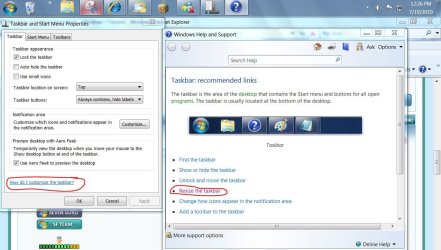
right click taskbar and go to properties... To resize your taskbar
resize taskbar.JPG
 

My Computer

Computer Manufacturer/Model Number
Gateway GT5692
OS
Windows 7 Ulti. x64
CPU
AMD Phenom 8450 triple-core 2.10 ghz
Memory
4GB
Graphics Card(s)
ATI Radion HD 3200
Monitor(s) Displays
Gateway FPD1775W
Screen Resolution
1280x720
Hard Drives
465.6613 Gibibytes
Again you doesn't understand me
its ok, listen
i start again
this is my taskbar:

zwmy1dmxuggj.png


everything is ok except that i want to change the clock and make him biggest
and like you see this clock is black with white glow
i doesn't have any idea how to do that

mim3mz3n2ajx.png


hope you understand now and again thank you very match for your help
 
Last edited:

My Computer

OS
Windows 7
The clock you want, you are posting a picture here. Where did you get the picture? It's likely the system in the picture has a 3rd party theme that is creating that clock. My theme had 2 choices for the clock one is time and date, normal sized, the other was a larger time only. It's something the theme designer changed. A Guy
 

My Computer

Computer type
PC/Desktop
OS
Windows 10 Home x64
CPU
INTEL Core i5-750 Quad-Core 3.37GHz
Motherboard
ASUS P7P55D
Memory
HyperX Fury Black Series 8GB (2 x 4GB) 1866Mhz
Graphics Card(s)
EVGA GeForce GTX 750 Superclocked 1GB 128-Bit GDDR5
Monitor(s) Displays
LG 32MA68HY 32" IPS
Screen Resolution
1920 x 1080
Hard Drives
Samsung 840 Evo 120GB, SEAGATE 500GB Barracuda® 7200.12, SATA 3 Gb/s, 7200 RPM, 16MB cache
PSU
ANTEC TruePower New TP-550, 80 PLUS, 550W
Case
ANTEC Three Hundred Illusion
Cooling
COOLER MASTER Hyper 212 Plus, 4 x 120mm 1 x 140mm Noctua's
Internet Speed
85 + Mbps
Antivirus
Avast
Browser
Vivaldi
To change the clock the way you want it you will have to use Windows Style Builder, and change the size, color and glow with that. What theme are you using?
 

My Computer

Computer type
PC/Desktop
Computer Manufacturer/Model Number
Self built.
OS
Windows 7 RTM 64bit, Windows 8 Pro 64bit
CPU
Intel i5-2500K @ 3.3Ghz
Motherboard
Asus Maximus IV GENE-Z/GEN3
Memory
16GB G.Skill RaptorX 1600MHz DDR3
Graphics Card(s)
N570GTX Twin Frozr III Power Edition
Sound Card
SupremeFX X-Fi 2
Monitor(s) Displays
BenQ XL2420T 120Hz 24 inch gaming monitor, Acer V233H 23 inc
Screen Resolution
1920x1080
Hard Drives
320GB Seagate Barracuda
WD 1TB Black Caviar
2TB WD Green Caviar
Samsung SSD 840 PRO Series
PSU
CoolerMaster Silent Pro Gold 1200WATT 80 Plus Gold
Case
CoolerMaster HAF X RC-942
Cooling
CoolerMaster V6GT Multi-Platform CPU Cooler
Keyboard
Logitech G510 Gaming Keyboard
Mouse
Logitech G700 Gaming Mouse
Antivirus
Norton Internet Security
Browser
Firefox 21
Other Info
Logitech Extreme 3D Pro Gaming Joystick, Logitech G930 Wireless Gaming Headset
To change the clock the way you want it you will have to use Windows Style Builder, and change the size, color and glow with that. What theme are you using?

Ahh, an expert :thumbsup: I was hoping you or Sergio, or Mark or Paulie would see this. I could give him the name of a tool, but there my knowledge ends :D

A Guy
 

My Computer

Computer type
PC/Desktop
OS
Windows 10 Home x64
CPU
INTEL Core i5-750 Quad-Core 3.37GHz
Motherboard
ASUS P7P55D
Memory
HyperX Fury Black Series 8GB (2 x 4GB) 1866Mhz
Graphics Card(s)
EVGA GeForce GTX 750 Superclocked 1GB 128-Bit GDDR5
Monitor(s) Displays
LG 32MA68HY 32" IPS
Screen Resolution
1920 x 1080
Hard Drives
Samsung 840 Evo 120GB, SEAGATE 500GB Barracuda® 7200.12, SATA 3 Gb/s, 7200 RPM, 16MB cache
PSU
ANTEC TruePower New TP-550, 80 PLUS, 550W
Case
ANTEC Three Hundred Illusion
Cooling
COOLER MASTER Hyper 212 Plus, 4 x 120mm 1 x 140mm Noctua's
Internet Speed
85 + Mbps
Antivirus
Avast
Browser
Vivaldi
The clock you want, you are posting a picture here. Where did you get the picture? It's likely the system in the picture has a 3rd party theme that is creating that clock. My theme had 2 choices for the clock one is time and date, normal sized, the other was a larger time only. It's something the theme designer changed. A Guy

what is your theme that make you change the clock?
my theme is soft7 and zest7

To change the clock the way you want it you will have to use Windows Style Builder, and change the size, color and glow with that. What theme are you using?

ok but "A Guy" say that his theme give him the option to change the clock not the Windows Style Builder
so this soft is the only way and the people that have this clock:

mim3mz3n2ajx.png


his using Windows Style Builder ??
 

My Computer

OS
Windows 7

My Computer

Computer type
PC/Desktop
OS
Windows 10 Home x64
CPU
INTEL Core i5-750 Quad-Core 3.37GHz
Motherboard
ASUS P7P55D
Memory
HyperX Fury Black Series 8GB (2 x 4GB) 1866Mhz
Graphics Card(s)
EVGA GeForce GTX 750 Superclocked 1GB 128-Bit GDDR5
Monitor(s) Displays
LG 32MA68HY 32" IPS
Screen Resolution
1920 x 1080
Hard Drives
Samsung 840 Evo 120GB, SEAGATE 500GB Barracuda® 7200.12, SATA 3 Gb/s, 7200 RPM, 16MB cache
PSU
ANTEC TruePower New TP-550, 80 PLUS, 550W
Case
ANTEC Three Hundred Illusion
Cooling
COOLER MASTER Hyper 212 Plus, 4 x 120mm 1 x 140mm Noctua's
Internet Speed
85 + Mbps
Antivirus
Avast
Browser
Vivaldi
Just zip your .msstyle file for the themes you want that clock for and attach them here. I will change the clock for you! ;)
 

My Computer

Computer type
PC/Desktop
Computer Manufacturer/Model Number
Self built.
OS
Windows 7 RTM 64bit, Windows 8 Pro 64bit
CPU
Intel i5-2500K @ 3.3Ghz
Motherboard
Asus Maximus IV GENE-Z/GEN3
Memory
16GB G.Skill RaptorX 1600MHz DDR3
Graphics Card(s)
N570GTX Twin Frozr III Power Edition
Sound Card
SupremeFX X-Fi 2
Monitor(s) Displays
BenQ XL2420T 120Hz 24 inch gaming monitor, Acer V233H 23 inc
Screen Resolution
1920x1080
Hard Drives
320GB Seagate Barracuda
WD 1TB Black Caviar
2TB WD Green Caviar
Samsung SSD 840 PRO Series
PSU
CoolerMaster Silent Pro Gold 1200WATT 80 Plus Gold
Case
CoolerMaster HAF X RC-942
Cooling
CoolerMaster V6GT Multi-Platform CPU Cooler
Keyboard
Logitech G510 Gaming Keyboard
Mouse
Logitech G700 Gaming Mouse
Antivirus
Norton Internet Security
Browser
Firefox 21
Other Info
Logitech Extreme 3D Pro Gaming Joystick, Logitech G930 Wireless Gaming Headset
Back
Top