
Solved Windows 7 taskbar icons

ahmedeissa007

New member
Local time
4:45 PM
Messages
2
Hey,
I have a problem with the taskbar icons on Windows 7 Ultimate x32.
The problem is when I cruise over the icons they appear like this
Untitled.jpg

So, how can I get to view it like a window?


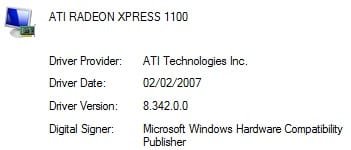
Here's a screenshot of my display adapter
sds.jpg

and a snapshot of my system properties
asasa.jpg

Many Thanks,
 

My Computer

OS
Windows 7 Ultimate x32
Are you using an Aero Theme?

Check your "Personalize" settings.
 

My Computer

Computer type
PC/Desktop
Computer Manufacturer/Model Number
n/a
OS
W7 Ultimate SP1, LM19.2 MATE, W10 Home 1703, W10 Pro 1703 VM, #All 64 bit
CPU
AMD Phenom II x6 1100T, 3.3 GHz
Motherboard
ASUS M4A88T-M/USB3 (AM3)
Memory
12GB DDR3 1333 G-Skill (4GB x 2), G-Skill (2GB x 2)
Graphics Card(s)
NVIDIA GeForce GTX 660
Sound Card
Realtek?
Monitor(s) Displays
Samsung S23B350
Screen Resolution
1920x1080
Hard Drives
WD Green 2TB (SATA), WD Green 3TB (SATA), WD Blue 4TB (SATA), WD Blue 6TB (SATA)
PSU
Cooler Master
Case
Antec GX300 Tower
Cooling
3x Antec TRICOOL 120mm Fans
Mouse
Wired Optical
Internet Speed
DSL
Antivirus
Avast
Browser
Pale Moon (64 bit)
Other Info
2018-12-27 Upgraded HDDs
2015-12-10 Upgraded case, graphics card, storage
2015-08-15 Upgraded motherboard & RAM
2015-07-15 Upgraded LM17.1 to LM17.2
Hello Ahmed Eissa, and welcome to Seven Forums.

It looks like you need to run and update your WEI score to hopefully have Aero available afterwards.

http://www.sevenforums.com/tutorials/263-windows-experience-index-update-refresh-score.html


In addition, double check these as well:
  • You must be have True Color (32 bit) set instead of High Color (16 bit).
  • Using an Aero theme.
  • The desktop composition and Animate controls and elements inside windows options need to be enabled in Visual Effects.
  • The Desktop Window Manager Session Manager and Themes Services need to be set as Started and Automatic.
  • Refresh or update your WEI score. You will need an WEI score minimum of 2.0 in both Graphics & Gaming graphics in order for Aero to be activated.
  • Activate Windows 7.
http://www.sevenforums.com/tutorials/52265-taskbar-thumbnail-previews-enable-disable.html


Hope this helps,
Shawn
 

My Computer

Computer type
PC/Desktop
Computer Manufacturer/Model Number
Self built custom
OS
64-bit Windows 11 Pro for Workstations
CPU
Intel i7-8700K OC'd to 5 GHz
Motherboard
ASUS ROG Maximus XI Formula Z390
Memory
64 GB (4x16GB) G.SKILL TridentZ RGB DDR4 3600 MHz
Graphics Card(s)
ASUS ROG-STRIX-GTX1080TI-O11G-GAMING
Sound Card
Integrated
Monitor(s) Displays
2 x Samsung Odyssey G7 27"
Screen Resolution
2560x1440
Hard Drives
1TB Samsung 990 PRO M.2,
4TB Samsung 990 PRO PRO M.2,
TerraMaster F8 SSD Plus NAS
PSU
Seasonic Prime Titanium 850W
Case
Thermaltake Core P3
Cooling
Corsair Hydro H115i
Keyboard
Logitech wireless K800
Mouse
Logitech MX Master 4
Internet Speed
2 Gb/s Download and 100 Mb/s Upload
Antivirus
Malwarebyte Anti-Malware Premium
Browser
Google Chrome
Other Info
Logitech Z625 speaker system,
Logitech BRIO 4K Pro webcam,
HP Color LaserJet Pro MFP M477fdn,
APC SMART-UPS RT 1000 XL - SURT1000XLI,
Galaxy S23 Plus phone
lehnerus2000,
I was running "Windows 7 basic theme" and now I tried "Windows 7 Aero theme" and bingo the problem is solved.. thanks a million.


and Brink,
Thank you :)
 

My Computer

OS
Windows 7 Ultimate x32
Back
Top