Windows 7 Taskbar

chuckhig

New member
Power User
VIP
Local time
5:39 PM
Messages
186
Location
Adirondack Mountains..upstate New York
Read lots of threads here but no luck so far. I am simply trying to change my taskbar color. Nothing seems to work. Aero seem to be running . I do not get an option when I change colors to fix any problems with it. I am at a loss here. Any help would be appreciated. Thanks. Chuck
 

My Computer

OS
Windows 7 Home Premium 64 bit
Hello.
Change colour like this ?:
a5vjcHq.jpg


Just right click on desktop >Personalize > Window Color >Pick one you like
or you want to get this simple/less resource intensive scheme?:

qbdlHwr.jpg


or you want to get from this scheme to coloured one?
 

My Computer

OS
Windows 7 x64 Pro
After re-applying Windows 7 theme does it look like this? :
XVeEFMW.jpg


If so,to change it's colour do this:
Right click on desktop>Personalize>Window Color>Pick colour>Save changes

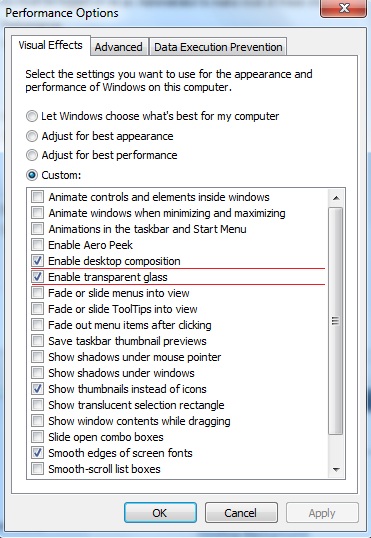
For aero theme to work :
Enable desktop composition needs to be ticked,
Enable transparent glass doesn't need to,you will be still able to change colours but taskbar won't be transparent.
cbjYMDY.jpg

To get this go to :
Control Panel>System and Security>System>(Left side)Advanced system settings>Advanced tab>Performance

But re-applying Windows 7 theme should get you aero theme,you need to change colours manually.
 

My Computer

OS
Windows 7 x64 Pro
Try this :
Start menu >type Troubleshooting>press enter>Appearance and personalization>Aero

Also try this :
Start menu >type Services>find Themes>Startup type>Automatic>Apply
then find Desktop Window Manager Session Manager and do the same.

if none of this work can you share a screen shot of your:
Control Panel\Appearance and Personalization\Personalization window
 

My Computer

OS
Windows 7 x64 Pro
Try applying any Aero theme in Personalization window that must give you an aero theme right away and that option.

But before this go to Services and do what I posted in #6 post (check are settings the same).
 

My Computer

OS
Windows 7 x64 Pro
I just applied the HD black and it works
. I hate it but it is black. So it at least is working. I am now back to my desktop,but still cannot change the taskbar color.
 

My Computer

OS
Windows 7 Home Premium 64 bit
I just applied the HD black and it works
. I hate it but it is black. So it at least is working. I am now back to my desktop,but still cannot change the taskbar color.

So you have transparent glass?
If so to change colour just go to Desktop (right click)>Personalize>Window colour
 

My Computer

OS
Windows 7 x64 Pro
Just ran MS fix it and am told my video card is not compatible. Don't get it. Have a powerful and new nvdia gpu. GTX 970

Have you tried updating your drivers (clean install)?
Update Windows also.

Paste this command in Command prompt:
rundll32.exe Dwmapi.dll,DwmEnableComposition
 
Last edited:

My Computer

OS
Windows 7 x64 Pro
Back
Top