Windows 7 thru IP phone

cpoulos62

New member
Local time
11:42 AM
Messages
7
My work uses IP phones and I am wanting to piggy back my NEW Toshiba Laptop running Windows 7 home off it via a CAT5 to my LAN card.

I know that this is possible as I have other people who are using older Windows OS and it works fine.

When I plus in the CAT 5, it recognizes that the plug in of the cable but I have not internet access. From every feedback I get, it knows it is connected to the internet but something is preventing it from establishing that connection. LAN Status is showing activity but IPv4 connectivity says No Internet access and IPv6 shows No Network access, Media state Enables and a Duration times that is running. BUT speed is at 100Mbps. Details shows the DNS suffix, IPv4 Address, Subnet mask, default gateway, DHCP server, DNS and WINS server IP's.

I believe that the issue is that Windows 7, using a WIRED LAN, wants to connect only thru a Broadband ISP. It asks for a login ID and password.

So, the question is? How do I connect without requiring authentication?

And, could this be related to the known issue with PPPoE in Windows 7?
 

My Computer My Computer

Computer Manufacturer/Model Number
Toshiba T135-S1309
OS
Windows 7
CPU
SU4100
Memory
3
Hi and Welcome to SF.

You can definately hook up your lappt to it. What is the ip address you get when you connect to it?

I have not known any issue with PPPoE on w7.
 

My Computer My Computer

Computer Manufacturer/Model Number
Lenovo ThinkPad T60
OS
Windows 7 Ultimate 64Bit
CPU
GenuineIntel Intel(R) Core(TM) DuoCore T2400 @ 1.83GHz
Motherboard
Intel(R) 82801G (ICH7 Family)
Memory
2.00 GB
Graphics Card(s)
Mobile Intel(R) 945 Express Chipset
Sound Card
SoundMAX Integrated Digital HD Audio
Monitor(s) Displays
ThinkPad Display
Screen Resolution
1400x1050
Hard Drives
100Gb SATA
Keyboard
Standard Keyboard
Mouse
HID-compliant Mouse
Internet Speed
Cable Broadband - 54Mbps
Other Info
Intel(R) PRO/1000 PL Network Connection
11a/b/g Wireless LAN Mini PCI Express Adapter
I believe that the issue is that Windows 7, using a WIRED LAN, wants to connect only thru a Broadband ISP. It asks for a login ID and password.

Not as far as I am aware. In the most basic terms I would rebuild the connection first off, making sure you choose the right parametres for what you're doing - and then I'd check without a firewall running to see if anything alters, should there still be a problem.

Beyond that point then look at the more advanced issues...
 

My Computer My Computer

Computer Manufacturer/Model Number
Custom built machine
OS
W7 x64
CPU
Intel Q9300 2.5Ghz Quad LGA775 (Would like Q9650)
Motherboard
Gigabyte GA-EP45T-UD3R (F6 Bios)
Memory
4Gb OCZ Gold 1,333Mhz
Graphics Card(s)
Palit HD4850 O/C Sonic 512Mb DDR3, Dual DViD's
Sound Card
Azalia to twin Samson 50w Studio Monitors
Monitor(s) Displays
Twin Dell (E-IPS) U2311H 23.6" Screens
Screen Resolution
1920 x 1080 @ 60Hz
Hard Drives
Crucial M4 SSD, archives on twin Western Digital Caviar Black WD2002FAEX, 2TB, 7200rpm HDD's, Samsung Ritemaster CD/DVD Burner...
PSU
OCZ 600w
Case
Lian-Li PC8 acoustifoamed' aluminium tower
Cooling
Scythe 140mm Zipang
Keyboard
Cherry PS/2 custom model
Mouse
Lenovo USB laser "Thinkpad" Mouse
Internet Speed
ADSL2+ @14Mbps downstream & Cat6 Gigabit Ethernet
Antivirus
NOD32
Browser
Opera
Other Info
Silicon Dust HD Homerun Dual FTA (Ethernet) TV Tuners, Dray Tek Vigor 2850Vn router and 8x HP Gigabit Switch. Lian-Li CR26 Card Reader, Canon MF4430 iSensys laser printer/scanner.
I believe that the issue is that Windows 7, using a WIRED LAN, wants to connect only thru a Broadband ISP. It asks for a login ID and password.

Not as far as I am aware. In the most basic terms I would rebuild the connection first off, making sure you choose the right parametres for what you're doing - and then I'd check without a firewall running to see if anything alters, should there still be a problem.

Beyond that point then look at the more advanced issues...


Thanks for the help. How would I rebuild the connection? Is there a delete option?
 

My Computer My Computer

Computer Manufacturer/Model Number
Toshiba T135-S1309
OS
Windows 7
CPU
SU4100
Memory
3
Hi and Welcome to SF.

You can definately hook up your lappt to it. What is the ip address you get when you connect to it?

I have not known any issue with PPPoE on w7.


The IP address for the IPv4 is 136.151.30.109. Gateway 136.151.30.254 and subnet 255.255.255.0.

Does this mean it connects to a network but not to the internet? How can this be fixed?
 

My Computer My Computer

Computer Manufacturer/Model Number
Toshiba T135-S1309
OS
Windows 7
CPU
SU4100
Memory
3
Also, I can't remember if the phone needs to be logged on, is it ?

Well getting on the work LAN and getting internet acces is two different things. you may need to append a DNS suffix to get internet access.

What is showing in your ipconfig?
 

My Computer My Computer

Computer Manufacturer/Model Number
Lenovo ThinkPad T60
OS
Windows 7 Ultimate 64Bit
CPU
GenuineIntel Intel(R) Core(TM) DuoCore T2400 @ 1.83GHz
Motherboard
Intel(R) 82801G (ICH7 Family)
Memory
2.00 GB
Graphics Card(s)
Mobile Intel(R) 945 Express Chipset
Sound Card
SoundMAX Integrated Digital HD Audio
Monitor(s) Displays
ThinkPad Display
Screen Resolution
1400x1050
Hard Drives
100Gb SATA
Keyboard
Standard Keyboard
Mouse
HID-compliant Mouse
Internet Speed
Cable Broadband - 54Mbps
Other Info
Intel(R) PRO/1000 PL Network Connection
11a/b/g Wireless LAN Mini PCI Express Adapter
Also, I can't remember if the phone needs to be logged on, is it ?

Well getting on the work LAN and getting internet acces is two different things. you may need to append a DNS suffix to get internet access.

What is showing in your ipconfig?

Connection specific DNS suffix is verizon.com
 

My Computer My Computer

Computer Manufacturer/Model Number
Toshiba T135-S1309
OS
Windows 7
CPU
SU4100
Memory
3
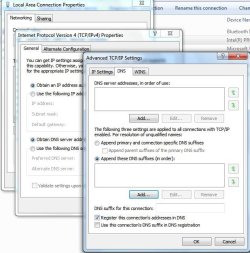
Ok you can try sticking verizon.com, into your DNS setting. Here is the location.

Note: Check if you need to log into the IP Phone as well.
 

Attachments

  • Noname.jpg
    Noname.jpg
    59.8 KB · Views: 72

My Computer My Computer

Computer Manufacturer/Model Number
Lenovo ThinkPad T60
OS
Windows 7 Ultimate 64Bit
CPU
GenuineIntel Intel(R) Core(TM) DuoCore T2400 @ 1.83GHz
Motherboard
Intel(R) 82801G (ICH7 Family)
Memory
2.00 GB
Graphics Card(s)
Mobile Intel(R) 945 Express Chipset
Sound Card
SoundMAX Integrated Digital HD Audio
Monitor(s) Displays
ThinkPad Display
Screen Resolution
1400x1050
Hard Drives
100Gb SATA
Keyboard
Standard Keyboard
Mouse
HID-compliant Mouse
Internet Speed
Cable Broadband - 54Mbps
Other Info
Intel(R) PRO/1000 PL Network Connection
11a/b/g Wireless LAN Mini PCI Express Adapter
Ok you can try sticking verizon.com, into your DNS setting. Here is the location.

Note: Check if you need to log into the IP Phone as well.

I did as you suggested but still does not work. I am on the network for sure but no internet access.

My IP Phone is logged on and does not require any other log in.

I am very confused. Being able to access the network but not the internet. I am sure it is something simple but for the live of me, have no idea what.

My fellow employee does not have any issues. Could it be a Windows 7 problem?
 

My Computer My Computer

Computer Manufacturer/Model Number
Toshiba T135-S1309
OS
Windows 7
CPU
SU4100
Memory
3
Have you tried disabling ipv6?
 

My Computer My Computer

Computer Manufacturer/Model Number
Lenovo ThinkPad T60
OS
Windows 7 Ultimate 64Bit
CPU
GenuineIntel Intel(R) Core(TM) DuoCore T2400 @ 1.83GHz
Motherboard
Intel(R) 82801G (ICH7 Family)
Memory
2.00 GB
Graphics Card(s)
Mobile Intel(R) 945 Express Chipset
Sound Card
SoundMAX Integrated Digital HD Audio
Monitor(s) Displays
ThinkPad Display
Screen Resolution
1400x1050
Hard Drives
100Gb SATA
Keyboard
Standard Keyboard
Mouse
HID-compliant Mouse
Internet Speed
Cable Broadband - 54Mbps
Other Info
Intel(R) PRO/1000 PL Network Connection
11a/b/g Wireless LAN Mini PCI Express Adapter
I am currently linking with the Cisco IP Phone 7961. I just checked the the phone's Network Configuration setting and it doesn't seem like it can be configured rather done at the network admin end. Click Settings, is there a padlock just above the User Preferences, option (Setting padlock)?

One way to find out, test the port with which the phone is connected to, take out the phone's cable and connect your machine to it. See if it works?
 

My Computer My Computer

Computer Manufacturer/Model Number
Lenovo ThinkPad T60
OS
Windows 7 Ultimate 64Bit
CPU
GenuineIntel Intel(R) Core(TM) DuoCore T2400 @ 1.83GHz
Motherboard
Intel(R) 82801G (ICH7 Family)
Memory
2.00 GB
Graphics Card(s)
Mobile Intel(R) 945 Express Chipset
Sound Card
SoundMAX Integrated Digital HD Audio
Monitor(s) Displays
ThinkPad Display
Screen Resolution
1400x1050
Hard Drives
100Gb SATA
Keyboard
Standard Keyboard
Mouse
HID-compliant Mouse
Internet Speed
Cable Broadband - 54Mbps
Other Info
Intel(R) PRO/1000 PL Network Connection
11a/b/g Wireless LAN Mini PCI Express Adapter
I was able to get this working. Woo hoo.

Thanks for all the help.

The resolution required the placement of an autoproxy setting info.
 

My Computer My Computer

Computer Manufacturer/Model Number
Toshiba T135-S1309
OS
Windows 7
CPU
SU4100
Memory
3
Hi Cpoulos62, can you explain what you mean by that. I'm sure your findings could help others down the track.
 

My Computer My Computer

Computer Manufacturer/Model Number
Lenovo ThinkPad T60
OS
Windows 7 Ultimate 64Bit
CPU
GenuineIntel Intel(R) Core(TM) DuoCore T2400 @ 1.83GHz
Motherboard
Intel(R) 82801G (ICH7 Family)
Memory
2.00 GB
Graphics Card(s)
Mobile Intel(R) 945 Express Chipset
Sound Card
SoundMAX Integrated Digital HD Audio
Monitor(s) Displays
ThinkPad Display
Screen Resolution
1400x1050
Hard Drives
100Gb SATA
Keyboard
Standard Keyboard
Mouse
HID-compliant Mouse
Internet Speed
Cable Broadband - 54Mbps
Other Info
Intel(R) PRO/1000 PL Network Connection
11a/b/g Wireless LAN Mini PCI Express Adapter
Back
Top