
windows 7 to windows 3.1 ugh

L0stKeys

New member
Local time
10:05 AM
Messages
17
I don't know where it's best to post this, but since it has to do with the way windows appear this section seems okay.

When I rebooted Windows, it started with an all white screen with black text saying what it usually says. Then it loads I think normally besides graphical anomalies. Explorer windows looks very square and crappy, and so do some other of the more simple programs that I run. Some programs still look sleek and sexy like Chrome and Google Talk. The picture tells the story pretty well really.

I have Windows set to auto-login, so I tried "Log Off" getting a nice pretty window. Logging back in returns the white screen and subsequent issues. I could use a restore point, but I'd prefer to avoid that since I did quite a bit. I batch installed some stuff with Ninite, let Windows Update do some work, and some other stuff since my previous reboot. <I should reboot more obv.> I'm hoping I could just reset something manually and all is well.
:huh: Clarity anyone?? thanks!
 

Attachments
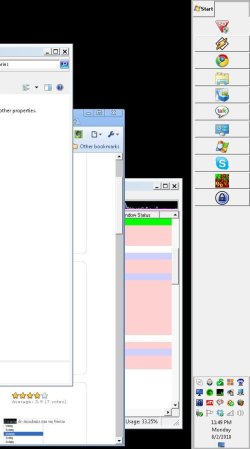
  • windowsack.JPG
    windowsack.JPG
    51.7 KB · Views: 150

My Computer My Computer

Computer Manufacturer/Model Number
Me
OS
Windows 7 Ultimate x64 SP1
CPU
Core i5-2500K 3.3GHz (Sandy Bridge)
Motherboard
ASRock Z68 Professional Gen3
Memory
4GB x 4 G.SKILL DDR3-1600 (F3-12800CL9D-8GBXL)
Graphics Card(s)
Radeon R9 270 X2 Crossfire
Monitor(s) Displays
1x Acer GD235HZ + 2x Acer P235H
Screen Resolution
5760x1080
PSU
SS-760XP platinum
Case
Cooler Master Centurion
Cooling
120mm front, Corsair H60 liquid CPU cooler
Keyboard
MS Natural 4000, Logitech EX110
Mouse
Multiple incl. Logitech Cordless Optical TrackMan trackball
Internet Speed
Cable
Antivirus
Norton Security Suite
Browser
Mostly Chrome
Other Info
ALSO: Gateway - FX6831-03 | OS: Xen Server | CPU: Intel Core i7 860 2.80Ghz Lynnfield | MOBO: H57M01 | MEM: 16GB DDR3 | GPU: Zotac | BOOT: 80GB Intel X25-M | DATA: numerous | PSU: FSP750-80APG | COOLING: 120mm rear, 80mm front || DisplayLink adapters: 2 HP HPNL571AA + Plugable dock
My desk: http://www.biodesk.com/p-5-pro-desk.aspx

My Computer My Computer

Computer Manufacturer/Model Number
ATX Custom Build 2012
OS
Windows 7 Enterprise x64 SP1
CPU
Intel Core i3-2100 @ 3.10GHz
Motherboard
Intel DH67CL desktop ATX
Memory
10 GB DDR3
Graphics Card(s)
Asus EAH5450 series (Radeon)
Monitor(s) Displays
Samsung SyncMaster 226BW, Samsung Syncmaster P2450H
Screen Resolution
226BW: 1680 x 1050 & P2450H: 1920 x 1080
Hard Drives
Western Digital 320 GB sata (boot), Samsung 640 GB sata, Seagate 2 TB sata (data)
PSU
Cooler Master Extreme Power Plus 500W
Case
Thermaltake V3 Black Edition
Cooling
stock cooling with added intake fan
Keyboard
HP Wireless Elite Keyboard Wireless Keyboard
Mouse
Microsoft Touch
Internet Speed
Comcast Cable business class <=18Mb {averages 12Mb}
Other Info
Optical drives: LG SuperMulti Blue, HP DVD 1260T
Other: Kensington Bluetooth Receiver
Network: Buffalo Wireless N USB, DLink N router/DLink Ethernet Switch/DLink Xtreme N wireless bridge
Printer: HP Photosmart Plus, HP Officejet Pro 8600 Plus
PCs: HP dv6-3040us (7 x64 SP1), HP DM4-2165dx (7 x64 SP1), HP Pavilion zv6130us (7 x86), Apple Macbook Air (Lion)
************
more info to add

Switching themes seems to fix the problem. It takes some a few seconds "please wait" switching from my unsaved custom theme to the Aero Themes. There's no waiting changing between those themes, but there's another "please wait" and a reversion to ugliness when I switch back to the original theme.

I guess this means Aero was removed from my original theme?? If so can I put it back easily? How could this have happened? I guess I'll just abandon the old theme...
 

My Computer My Computer

Computer Manufacturer/Model Number
Me
OS
Windows 7 Ultimate x64 SP1
CPU
Core i5-2500K 3.3GHz (Sandy Bridge)
Motherboard
ASRock Z68 Professional Gen3
Memory
4GB x 4 G.SKILL DDR3-1600 (F3-12800CL9D-8GBXL)
Graphics Card(s)
Radeon R9 270 X2 Crossfire
Monitor(s) Displays
1x Acer GD235HZ + 2x Acer P235H
Screen Resolution
5760x1080
PSU
SS-760XP platinum
Case
Cooler Master Centurion
Cooling
120mm front, Corsair H60 liquid CPU cooler
Keyboard
MS Natural 4000, Logitech EX110
Mouse
Multiple incl. Logitech Cordless Optical TrackMan trackball
Internet Speed
Cable
Antivirus
Norton Security Suite
Browser
Mostly Chrome
Other Info
ALSO: Gateway - FX6831-03 | OS: Xen Server | CPU: Intel Core i7 860 2.80Ghz Lynnfield | MOBO: H57M01 | MEM: 16GB DDR3 | GPU: Zotac | BOOT: 80GB Intel X25-M | DATA: numerous | PSU: FSP750-80APG | COOLING: 120mm rear, 80mm front || DisplayLink adapters: 2 HP HPNL571AA + Plugable dock
My desk: http://www.biodesk.com/p-5-pro-desk.aspx
Sometimes custom themes randomly do this without much explanation. Generally if you have the originally downloaded theme and restore it to the C:\Windows\Resources\Themes folder (or wherever it's supposed to be located for your specific theme) and it generally fixes the issue.
 

My Computer My Computer

OS
Windows 7 Ultimate x64 SP1
CPU
Intel Core i3 530 2.93 Ghz Clarkdale
Motherboard
ASRock P55 PRO/USB3 LGA 1156
Memory
4 GB OCZ DDR3 1600 (PC12800) Low Voltage Desktop Memory
Graphics Card(s)
Nvidia GeForce GTX 550 Ti with 1 GB of RAM
Sound Card
Realtek HD ALC892
Monitor(s) Displays
20'' eMachines E202HDbmd Glare Panel Widescreen
Screen Resolution
1600 x 900
Hard Drives
Western Digital 1 TB Caviar Black Edition (7200 RPM) SATA
Hitachi Deskstar 500 GB (7200 RPM) SATA
Samsung SpinPoint 400 GB (7200 RPM) SATA
PSU
Rosewill Xtreme Series RX750-D-B ATX12V v2.2 & EPS12V (750W)
Case
Cooler Master Centurion 534 RC-534-KKN2-GP Mid-Tower
Cooling
Standard Case Fans and Stock CPU Heatsink
Keyboard
Microsoft Wireless Optical Desktop Elite
Mouse
Microsoft Wireless Optical Desktop Elite
Internet Speed
7.1 Mbps Verizon DSL
Back
Top