Windows 7 turns off itself

kenny1999

Banned
Local time
4:42 AM
Messages
76
hi let me be neat. I clean reinstalled windows 7 home premium a few days ago. At first I forgot to turn off hibernation in power management, when the PC was left alone for some time it turned off but it could never be waken up again with any press on keyboard. I couldn't even turn on the PC when I switched off the main wall socket and switched back. The PC was like dead. (No lights at all). Later on, I didn't know why, the PC could be turned on again and boot to Windows.

At first I thought it was about hibernation problem, then I turned off the hibernation (set to NEVER), now the PC does not suddenly turn off after some time BUT it COULD still turn off at random time. Yesterday the whole screen suddenly went black and all lights on the chassis went off again. Lights off, fans off. Once again, it couldn't be turned on (EVEN IF I switched off the main ac and switched on again) , I had tried for a long time but never figured out the reasons.

Then I unplugged the USB of the mouse and keyboards and portable harddrives from the PC, then the computer could be turned on and boot to windows again!

My friends are not computer experts but they guess that it's about the problem of PSU but I don't really agree. It's a decent and 100% authentic Antec PSU which was bought only in late 2013 from a trusted vendor. I don't use any graphic card and CPU was i5 only. I only have one hard drive so I don't think it's the problem of power.

My question is

1. Why it happen? Could anyone help guess? How can I troubleshoot the problem by myself?
2. On the other hand, the speed of my computer has become very abnormal. I am using a quality 100MB high speed broadband but I can't load a random ordinary webpage for hours. I guess it's not the problem of the ISP but my PC

3. After all, do you have any ideas on what I can do now?
 

My Computer

Computer type
PC/Desktop
OS
Microsoft Windows 7 Home Premium 64-bit 7600 Multiprocessor Free
CPU
Intel(R) Core(TM) i5-2400 CPU @ 3.10GHz
Motherboard
ASUSTeK COMPUTER INC. P8B75-M LX PLUS
Memory
8.00 GB
Graphics Card(s)
Intel(R) HD Graphics
Sound Card
Realtek High Definition Audio
Screen Resolution
1680 x 1050 x 32 bits (4294967296 colors) @ 59 Hz
Hard Drives
(1) ST1000DM003-1CH162 (2) Seagate Expansion Desk USB Device
PSU
Antec
Case
Fractal Design Define Mini
Keyboard
Logitech
Internet Speed
100MB/s Hong Kong Broadband
Antivirus
Kaspersky
Browser
IE, Google Chrome

My Computer

Computer type
PC/Desktop
OS
Microsoft Windows 7 Home Premium 64-bit 7601 Multiprocessor Free Service Pack 1
CPU
Intel(R) Core(TM) i7-3770 CPU @ 3.40GHz
Motherboard
ASUSTeK COMPUTER INC. P8H77-M
Memory
8.00 GB
Graphics Card(s)
Intel(R) HD Graphics 4000
Sound Card
On Board
Monitor(s) Displays
Dell 24"
Screen Resolution
1920 x 1080
Hard Drives
(1) INTEL SSDSC2CT180A3 ATA Device (2) ST500DM002-1BD142 ATA Device (3) WDC WD3200AAKS-75L9A0 ATA Device (4) Generic- Compact Flash USB Device (5) Generic- MS/MS-Pro USB Device (6) Generic- SD/MMC USB Device (7) Generic- SM/xD-Picture USB
PSU
500w Corsair
Case
Cooler Master
Cooling
3 Fans
Keyboard
Logitech MK300
Mouse
Logitech WOM
Internet Speed
75Mb
Antivirus
Norton 360
Browser
Firefox, Opera, IE
Sounds like your PC is infected with a virus. What anti virus are you running and is it up to date?
Please complete your system specs so that we can help you more, see here:
http://www.sevenforums.com/tutorials/180324-system-info-see-your-system-specs.html

Kaspersky and Avaxxx (I forget how to spell). I have known for long that EXE files from untrusted site are never opened and I never use crack or patch files and I always use authentic and legal software

Kaspersky and Avaxxx return with 35 threats after scan, but no virus. I think it doesn't make sense. The threats are all HTML files which were websites saved under Yahoo! Domain. I don't think there is any virus or real threats.
 

My Computer

Computer type
PC/Desktop
OS
Microsoft Windows 7 Home Premium 64-bit 7600 Multiprocessor Free
CPU
Intel(R) Core(TM) i5-2400 CPU @ 3.10GHz
Motherboard
ASUSTeK COMPUTER INC. P8B75-M LX PLUS
Memory
8.00 GB
Graphics Card(s)
Intel(R) HD Graphics
Sound Card
Realtek High Definition Audio
Screen Resolution
1680 x 1050 x 32 bits (4294967296 colors) @ 59 Hz
Hard Drives
(1) ST1000DM003-1CH162 (2) Seagate Expansion Desk USB Device
PSU
Antec
Case
Fractal Design Define Mini
Keyboard
Logitech
Internet Speed
100MB/s Hong Kong Broadband
Antivirus
Kaspersky
Browser
IE, Google Chrome
You should never run two A/V programs at the same time, they will clash and cause problems. I would suggest that you delete one of them. Are they both "Paid for " versions?
Please also complete your system specs as I suggested before. We CANNOT help you properly without this information!
 

My Computer

Computer type
PC/Desktop
OS
Microsoft Windows 7 Home Premium 64-bit 7601 Multiprocessor Free Service Pack 1
CPU
Intel(R) Core(TM) i7-3770 CPU @ 3.40GHz
Motherboard
ASUSTeK COMPUTER INC. P8H77-M
Memory
8.00 GB
Graphics Card(s)
Intel(R) HD Graphics 4000
Sound Card
On Board
Monitor(s) Displays
Dell 24"
Screen Resolution
1920 x 1080
Hard Drives
(1) INTEL SSDSC2CT180A3 ATA Device (2) ST500DM002-1BD142 ATA Device (3) WDC WD3200AAKS-75L9A0 ATA Device (4) Generic- Compact Flash USB Device (5) Generic- MS/MS-Pro USB Device (6) Generic- SD/MMC USB Device (7) Generic- SM/xD-Picture USB
PSU
500w Corsair
Case
Cooler Master
Cooling
3 Fans
Keyboard
Logitech MK300
Mouse
Logitech WOM
Internet Speed
75Mb
Antivirus
Norton 360
Browser
Firefox, Opera, IE
a virus will not affect the computers ability to turn on or off. the OP has stated it wont turn on EVEN after unpluged from the mains, this would kill any windows hibernation files and resort the computer to being off.

99.9% of the time virus do nothing other than piss you off or steal your stuff.. its safe to say this is NOT a virus :)

this is almost definitely as stated by your friends a power supply issue.

the reason it doesn't turn back on would be the capacitors still holding charge and thus causing the psu to still think its on, so no matter if you press the power button it wont do anything.

again unplugging it at the wall wont always solve it as if its still holding charge the same affect occours.

for arguments sake check in tbe bios theres no option for usb control in hibernation/sleep, as some bios have a power off and on usb feature.

the only real test is to try a new psu.. it will still be in warranty if you cant borrow one, so sending it back for a replacement is an option and at worst if its not the psu and actually a mobo fault youll still have a snazzy new psu!
 

My Computer

Computer type
PC/Desktop
Computer Manufacturer/Model Number
Built by badgers!!!
OS
Windows 7 Ultimate x64, & Mac OS X 10.9.2
CPU
Intel Core i5 2500k
Motherboard
Asus P8z68 LE
Memory
Corsair Vengence 8gb 1866mhz
Graphics Card(s)
Nvidia GTX 770 OC
Monitor(s) Displays
2x ASUS LED 22" IPS
Screen Resolution
3840x1080
Hard Drives
240GB Crucial M500 SSD
120gb Corsair Force 3 SSD
1TB Western Digital
PSU
Corsair HX650w Modular
Case
Corsair Air 540
Cooling
Corsair H60 Push/Pull
Keyboard
Corsair K70/ Logitech G27 wheel
Mouse
Saitek R.A.T 9
Internet Speed
Too slow!
Other Info
AMD fusion E350N Home server-Windows Home Server 2011 (also made by badgers!)
2011 Macbook 2.4ghz Core2Duo, 4gb ddr3, 120gb Ocz Vertex SSD
a virus will not affect the computers ability to turn on or off. the OP has stated it wont turn on EVEN after unpluged from the mains, this would kill any windows hibernation files and resort the computer to being off.

99.9% of the time virus do nothing other than piss you off or steal your stuff.. its safe to say this is NOT a virus :)

this is almost definitely as stated by your friends a power supply issue.

the reason it doesn't turn back on would be the capacitors still holding charge and thus causing the psu to still think its on, so no matter if you press the power button it wont do anything.

again unplugging it at the wall wont always solve it as if its still holding charge the same affect occours.

for arguments sake check in tbe bios theres no option for usb control in hibernation/sleep, as some bios have a power off and on usb feature.

the only real test is to try a new psu.. it will still be in warranty if you cant borrow one, so sending it back for a replacement is an option and at worst if its not the psu and actually a mobo fault youll still have a snazzy new psu!


I guess PSU the least likely to be the problem. Because when I bought the hardware last year I followed th my friends' advice that I spent the most on PSU, that's Antec 400W. The motherboard is ASUS but a low-end one. The CPU is Intel i5 2400 (Old CPU). Hard drive is Seagate and is new. I don't install any Graphics card at all. The Ram is Kingston.

Sending back the PSU? If PSU is tested to be no problem will they send a new one back to me?

But I guess the problem is the MOBO. I am not sure. Because I once dropped a screwdriver (accidentally) to the MOBO during the computer build
 

My Computer

Computer type
PC/Desktop
OS
Microsoft Windows 7 Home Premium 64-bit 7600 Multiprocessor Free
CPU
Intel(R) Core(TM) i5-2400 CPU @ 3.10GHz
Motherboard
ASUSTeK COMPUTER INC. P8B75-M LX PLUS
Memory
8.00 GB
Graphics Card(s)
Intel(R) HD Graphics
Sound Card
Realtek High Definition Audio
Screen Resolution
1680 x 1050 x 32 bits (4294967296 colors) @ 59 Hz
Hard Drives
(1) ST1000DM003-1CH162 (2) Seagate Expansion Desk USB Device
PSU
Antec
Case
Fractal Design Define Mini
Keyboard
Logitech
Internet Speed
100MB/s Hong Kong Broadband
Antivirus
Kaspersky
Browser
IE, Google Chrome
you could have spent $1000000000000 on a PSU that doesnt mean it wont ever have a fault. things break, nothing is made 100% perfect

is your pc plugged into a surge protection extension? if not then a spike/surge may have damaged it. or it just has on component that has died.

its most likely the psu! if yiu damaged the mobo with dropping the screwdriver (which almost everyone on this forum whos built a pc has probably done the same) would have caused issues from the start if it did cause damage.

infact ask any computer shop and the most returned items will be PSU's as compared to every other component they have a high failure rate (compared to other components thats the key part they dont all fail lol).

if your PSU is still under warranty and you bought it from a decent shop they wont even test it, they will just send you another. and your old one will be shipped to Antec for repair/disposle.

if you are not happy sending it off, buy a super cheap psu on ebay, a 300w will be fine, test it, does it cause the same issues? if yes, throw it in the bin (or not lol) and send off your Antec, if it does still shutdown, youve not wasted much and now have a spare psu for an emergency!
 

My Computer

Computer type
PC/Desktop
Computer Manufacturer/Model Number
Built by badgers!!!
OS
Windows 7 Ultimate x64, & Mac OS X 10.9.2
CPU
Intel Core i5 2500k
Motherboard
Asus P8z68 LE
Memory
Corsair Vengence 8gb 1866mhz
Graphics Card(s)
Nvidia GTX 770 OC
Monitor(s) Displays
2x ASUS LED 22" IPS
Screen Resolution
3840x1080
Hard Drives
240GB Crucial M500 SSD
120gb Corsair Force 3 SSD
1TB Western Digital
PSU
Corsair HX650w Modular
Case
Corsair Air 540
Cooling
Corsair H60 Push/Pull
Keyboard
Corsair K70/ Logitech G27 wheel
Mouse
Saitek R.A.T 9
Internet Speed
Too slow!
Other Info
AMD fusion E350N Home server-Windows Home Server 2011 (also made by badgers!)
2011 Macbook 2.4ghz Core2Duo, 4gb ddr3, 120gb Ocz Vertex SSD
the OP has stated it wont turn on EVEN after unpluged from the mains, this would kill any windows hibernation files and resort the computer to being off.

That's not true, hibernate works even if the power goes out ... that is what it is designed for :geek:
Sleep and hibernation: frequently asked questions

It certainly could be a PSU issue ...

If I had this issue I would check if there is new BIOS version for the motherboard.
I would also check the MB forum to see if others have reported similar problems for this MB ...
Perhaps even a BIOS reset is needed.
If you're overclocking, don't ...
 

My Computer

Computer type
PC/Desktop
Computer Manufacturer/Model Number
home built
OS
Multi-Boot W7_Pro_x64 W8.1_Pro_x64 W10_Pro_x64 +Linux_VMs +Chromium_VM
CPU
AMD Athlon II x4 620
Motherboard
Gigabyte GA-MA785G-UD3H
Memory
6GB GSkill DDR2 800
Graphics Card(s)
AMD 4670 GPU + AMD 4200 IGP
Sound Card
on board Realtek ALC889A
Monitor(s) Displays
RCA 40" LCD TV, Insignia 32" LCD TV, HP 15" LCD monitor
Screen Resolution
1680 x 1050
Hard Drives
OCZ Vertex 3 120GB,
Samsung F3 1TB (3),
Several others - WD, Seagate, Hitachi, ...
PSU
Corsair 500 W
Case
Rosewill mid tower
Cooling
CM 90mm rifle
Keyboard
Gyration wireless, Logitech wireless, Dell USB wired
Mouse
Gyration wireless, Logitech wireless, V7 USB wired
Internet Speed
Spectrum - 100Mbps D / 10Mbps U
Antivirus
Avast, MBAM3, EMET, WinPatrol
Browser
Pale Moon, Firefox, IE
Other Info
2 multi-boot PC's
Mainly HTPC/Office/Gen purpose (no gaming).
Trendnet USB KVM.
LG DVD burner/Blue Ray Player.
Tray system for removable SATA backup drives.

Not currently OCd, under-volted.
I use Hybrid sleep, rarely re-boot or shutdown.

Hauppauge HD-PVR, Avermedia PCIe TV Tuner, Hauppauge PCI TV Tuner.
Is their something wrong with my browser.
I still don't see the OP System Specs as requested twice.
 

My Computer

Computer type
PC/Desktop
Computer Manufacturer/Model Number
Home made Desktop
OS
Windows 10 Pro. 64/ version 1709 Windows 7 Pro/64
CPU
Intel i7-6800K @ 4.3
Motherboard
ASUS X-99 Deluxe II
Memory
Corsair Platinum 16 gig @2400
Graphics Card(s)
EVGA GTX 1070 OC
Monitor(s) Displays
Asus 27" LED LCD/VE278Q
Screen Resolution
1920-1080 or 1280-720 HDMI
Hard Drives
INTEL SSD 730-240 Gb Sata 3.0/
PSU
EVGA Platium 1200W
Case
Phanteks Luxe Tempered Glass 8 fans/ one radiator
Cooling
XSPC/ Water Cooled CPU
Keyboard
Das 4 Professional
Mouse
Logitech M705/MX Anywhere 2-S
Internet Speed
100 mbits
Antivirus
Microsoft Security Essentials/ Malwarebytes Premium 3.0/ SAS
Browser
I.E. 11 default/Firefox/ ISP Time Warner Cable/Spectrum
Other Info
LG BluRay Burner/
Sound system-KLipsch-THX/
Icy Dock ssd Hot Swap bays.
Is their something wrong with my browser.
I still don't see the OP System Specs as requested twice.


Sorry, I have already followed the instruction and filled out the System Specs
 

My Computer

Computer type
PC/Desktop
OS
Microsoft Windows 7 Home Premium 64-bit 7600 Multiprocessor Free
CPU
Intel(R) Core(TM) i5-2400 CPU @ 3.10GHz
Motherboard
ASUSTeK COMPUTER INC. P8B75-M LX PLUS
Memory
8.00 GB
Graphics Card(s)
Intel(R) HD Graphics
Sound Card
Realtek High Definition Audio
Screen Resolution
1680 x 1050 x 32 bits (4294967296 colors) @ 59 Hz
Hard Drives
(1) ST1000DM003-1CH162 (2) Seagate Expansion Desk USB Device
PSU
Antec
Case
Fractal Design Define Mini
Keyboard
Logitech
Internet Speed
100MB/s Hong Kong Broadband
Antivirus
Kaspersky
Browser
IE, Google Chrome
Okay lets go back to your first post.

You state you reinstalled Windows 7. Why, were you trying to fix a problem?
If so what was that problem.
Did you complete all of Windows 7 Updates including SP-1?
If you haven't please do all the updates.
Windows 7 is very good now days finding needed drivers.
Did you have this problem before you reinstalled Windows 7?
Did you activate Windows 7?
Have you removed all but one anti virus program?
More than one anti virus program on the same computer can make things very very slow.

Did you build this system yourself?
It would be nice to know what were the 35 threats found.

As you can see it's step at a time.
 

My Computer

Computer type
PC/Desktop
Computer Manufacturer/Model Number
Home made Desktop
OS
Windows 10 Pro. 64/ version 1709 Windows 7 Pro/64
CPU
Intel i7-6800K @ 4.3
Motherboard
ASUS X-99 Deluxe II
Memory
Corsair Platinum 16 gig @2400
Graphics Card(s)
EVGA GTX 1070 OC
Monitor(s) Displays
Asus 27" LED LCD/VE278Q
Screen Resolution
1920-1080 or 1280-720 HDMI
Hard Drives
INTEL SSD 730-240 Gb Sata 3.0/
PSU
EVGA Platium 1200W
Case
Phanteks Luxe Tempered Glass 8 fans/ one radiator
Cooling
XSPC/ Water Cooled CPU
Keyboard
Das 4 Professional
Mouse
Logitech M705/MX Anywhere 2-S
Internet Speed
100 mbits
Antivirus
Microsoft Security Essentials/ Malwarebytes Premium 3.0/ SAS
Browser
I.E. 11 default/Firefox/ ISP Time Warner Cable/Spectrum
Other Info
LG BluRay Burner/
Sound system-KLipsch-THX/
Icy Dock ssd Hot Swap bays.
Based on the specs entered, it seems to be a "Custom Built / Home Built" PC ...
That info is not in the OP specs ... you can look at my specs "system manufacturer" as an example

Anyway, here is a link to the MB so you can compare your BIOS to what is available, and get a lot more info ...
Motherboards - P8B75-M LX PLUS
 

My Computer

Computer type
PC/Desktop
Computer Manufacturer/Model Number
home built
OS
Multi-Boot W7_Pro_x64 W8.1_Pro_x64 W10_Pro_x64 +Linux_VMs +Chromium_VM
CPU
AMD Athlon II x4 620
Motherboard
Gigabyte GA-MA785G-UD3H
Memory
6GB GSkill DDR2 800
Graphics Card(s)
AMD 4670 GPU + AMD 4200 IGP
Sound Card
on board Realtek ALC889A
Monitor(s) Displays
RCA 40" LCD TV, Insignia 32" LCD TV, HP 15" LCD monitor
Screen Resolution
1680 x 1050
Hard Drives
OCZ Vertex 3 120GB,
Samsung F3 1TB (3),
Several others - WD, Seagate, Hitachi, ...
PSU
Corsair 500 W
Case
Rosewill mid tower
Cooling
CM 90mm rifle
Keyboard
Gyration wireless, Logitech wireless, Dell USB wired
Mouse
Gyration wireless, Logitech wireless, V7 USB wired
Internet Speed
Spectrum - 100Mbps D / 10Mbps U
Antivirus
Avast, MBAM3, EMET, WinPatrol
Browser
Pale Moon, Firefox, IE
Other Info
2 multi-boot PC's
Mainly HTPC/Office/Gen purpose (no gaming).
Trendnet USB KVM.
LG DVD burner/Blue Ray Player.
Tray system for removable SATA backup drives.

Not currently OCd, under-volted.
I use Hybrid sleep, rarely re-boot or shutdown.

Hauppauge HD-PVR, Avermedia PCIe TV Tuner, Hauppauge PCI TV Tuner.
The OP's post #6 would indicate that it is a self built PC!
 

My Computer

Computer type
PC/Desktop
OS
Microsoft Windows 7 Home Premium 64-bit 7601 Multiprocessor Free Service Pack 1
CPU
Intel(R) Core(TM) i7-3770 CPU @ 3.40GHz
Motherboard
ASUSTeK COMPUTER INC. P8H77-M
Memory
8.00 GB
Graphics Card(s)
Intel(R) HD Graphics 4000
Sound Card
On Board
Monitor(s) Displays
Dell 24"
Screen Resolution
1920 x 1080
Hard Drives
(1) INTEL SSDSC2CT180A3 ATA Device (2) ST500DM002-1BD142 ATA Device (3) WDC WD3200AAKS-75L9A0 ATA Device (4) Generic- Compact Flash USB Device (5) Generic- MS/MS-Pro USB Device (6) Generic- SD/MMC USB Device (7) Generic- SM/xD-Picture USB
PSU
500w Corsair
Case
Cooler Master
Cooling
3 Fans
Keyboard
Logitech MK300
Mouse
Logitech WOM
Internet Speed
75Mb
Antivirus
Norton 360
Browser
Firefox, Opera, IE
Good point, as he dropped a screwdriver he was the builder, not someone else !
Rep +1 :)
 

My Computer

Computer type
PC/Desktop
Computer Manufacturer/Model Number
home built
OS
Multi-Boot W7_Pro_x64 W8.1_Pro_x64 W10_Pro_x64 +Linux_VMs +Chromium_VM
CPU
AMD Athlon II x4 620
Motherboard
Gigabyte GA-MA785G-UD3H
Memory
6GB GSkill DDR2 800
Graphics Card(s)
AMD 4670 GPU + AMD 4200 IGP
Sound Card
on board Realtek ALC889A
Monitor(s) Displays
RCA 40" LCD TV, Insignia 32" LCD TV, HP 15" LCD monitor
Screen Resolution
1680 x 1050
Hard Drives
OCZ Vertex 3 120GB,
Samsung F3 1TB (3),
Several others - WD, Seagate, Hitachi, ...
PSU
Corsair 500 W
Case
Rosewill mid tower
Cooling
CM 90mm rifle
Keyboard
Gyration wireless, Logitech wireless, Dell USB wired
Mouse
Gyration wireless, Logitech wireless, V7 USB wired
Internet Speed
Spectrum - 100Mbps D / 10Mbps U
Antivirus
Avast, MBAM3, EMET, WinPatrol
Browser
Pale Moon, Firefox, IE
Other Info
2 multi-boot PC's
Mainly HTPC/Office/Gen purpose (no gaming).
Trendnet USB KVM.
LG DVD burner/Blue Ray Player.
Tray system for removable SATA backup drives.

Not currently OCd, under-volted.
I use Hybrid sleep, rarely re-boot or shutdown.

Hauppauge HD-PVR, Avermedia PCIe TV Tuner, Hauppauge PCI TV Tuner.
Okay lets go back to your first post.

You state you reinstalled Windows 7. Why, were you trying to fix a problem?
If so what was that problem.
Did you complete all of Windows 7 Updates including SP-1?
If you haven't please do all the updates.
Windows 7 is very good now days finding needed drivers.
Did you have this problem before you reinstalled Windows 7?
Did you activate Windows 7?
Have you removed all but one anti virus program?
More than one anti virus program on the same computer can make things very very slow.

Did you build this system yourself?
It would be nice to know what were the 35 threats found.

As you can see it's step at a time.


Hi, I want to take this chance to bring out another problem I encountered BEFORE reinstalling windows 7
I re installed windows because my system hard drive is only partitioned to be 32GB but it has already used up 31.5GB. I think it was VERY ABNORMAL. I don't know if any virus or worm was there trying to occupy my spaces. I don't have Ms Office or Photoshop or any games or any large applications and I ALWAYS clean the cache and temporary files. The computer was with only basic and small applications but I can't figure out why a lot of spaces were occupied. That's why I reinstalled windows 7 because I have no ideas about the problems. Do you have any comments on that? Thank you.


The PC was built in May 2013 and except the CPU (intel i5 2400) all the components were newly bought at that time from trusted vendors in Hong Kong. It was the first time I tried to build a PC on my own and I've gone through a lot of problems and troubleshooting during the build. At that time, I once dropped the screwdriver from low height to the MOBO, but I don't think the MOBO will be that fragile, will it?
Another thing is that when I took out the Intel CPU from old MOBO (which was thrown away) for my new MOBO, one pin on the old MOBO was broken (I don't know if it could also break the pin on the CPU itself)
The harddrive was new too, but sometimes it could produce strong noise and vibration (last for about 30 seconds) I am sure the harddrive is securely mounted.

Except the chassis, which is cheap and obviously bad! Everything should be alright. Fractal Design is a new chassis but I still haven't unbox-ed it now.

I don't know if I have activated Windows 7 already.

The 35 threats as I said, was non-sense from the Antivirus that might be too sensitive. They are all HTML files which was saved by me from Yahoo! News. I don't think it's likely that HTML from official Yahoo! will have any virus or threats.


My Computer

Computer type
PC/Desktop
OS
Microsoft Windows 7 Home Premium 64-bit 7600 Multiprocessor Free
CPU
Intel(R) Core(TM) i5-2400 CPU @ 3.10GHz
Motherboard
ASUSTeK COMPUTER INC. P8B75-M LX PLUS
Memory
8.00 GB
Graphics Card(s)
Intel(R) HD Graphics
Sound Card
Realtek High Definition Audio
Screen Resolution
1680 x 1050 x 32 bits (4294967296 colors) @ 59 Hz
Hard Drives
(1) ST1000DM003-1CH162 (2) Seagate Expansion Desk USB Device
PSU
Antec
Case
Fractal Design Define Mini
Keyboard
Logitech
Internet Speed
100MB/s Hong Kong Broadband
Antivirus
Kaspersky
Browser
IE, Google Chrome
the html files will be seen as a threat as theres whats known as a framer.

a framer or Iframe as theyre know allow access to another off site server, which then can be used for good or bad purposes. in the bad sense it allows the download of virus's.

if your using AVG it flags most things as a framer threat. its quite well documented on their forums.
 

My Computer

Computer type
PC/Desktop
Computer Manufacturer/Model Number
Built by badgers!!!
OS
Windows 7 Ultimate x64, & Mac OS X 10.9.2
CPU
Intel Core i5 2500k
Motherboard
Asus P8z68 LE
Memory
Corsair Vengence 8gb 1866mhz
Graphics Card(s)
Nvidia GTX 770 OC
Monitor(s) Displays
2x ASUS LED 22" IPS
Screen Resolution
3840x1080
Hard Drives
240GB Crucial M500 SSD
120gb Corsair Force 3 SSD
1TB Western Digital
PSU
Corsair HX650w Modular
Case
Corsair Air 540
Cooling
Corsair H60 Push/Pull
Keyboard
Corsair K70/ Logitech G27 wheel
Mouse
Saitek R.A.T 9
Internet Speed
Too slow!
Other Info
AMD fusion E350N Home server-Windows Home Server 2011 (also made by badgers!)
2011 Macbook 2.4ghz Core2Duo, 4gb ddr3, 120gb Ocz Vertex SSD
You do not have to reinstall Windows 7 to increase the C partition size. We have tutorial that will help you do that.
In my opinion 32 gb for C partition is to small.

Do I understand you correctly that you didn't have this problem until you replaced hardware and installed Windows 7 again?

The noisy/vibrating hard drive is very worrisome.
I never hear hear drives over the noise of the fans. When I do something like a defrag I have to touch the hard drive to feel it working and it doesn't venerate at all.

Is the cpu and new motherboard the one shown in your System Specs? If not please correct you System Specs.
Let us know when you System Specs are as they should be.

To answer you question.
Yes a bent pin on the old motherboard could of cause damage to your cpu.

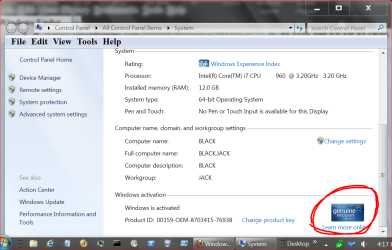
I'm not sure how one doesn't know if Windows 7 is activated or not.
Try this. Use the Windows Flag key and the Pause key at the same time. Look in the lower right corner of the display it should inform you.

Please post one from your computer.

genuine windows.PNG

Now back to the same questions.

1. Have you install all Windows 7 Updates including SP-1?
2. Have you removed all but one anti virus program?
If so which one did you keep.

*** Dropping a screw driver in a computer only indicates that one was in a computer. It does not indicate one built the computer.***
 

My Computer

Computer type
PC/Desktop
Computer Manufacturer/Model Number
Home made Desktop
OS
Windows 10 Pro. 64/ version 1709 Windows 7 Pro/64
CPU
Intel i7-6800K @ 4.3
Motherboard
ASUS X-99 Deluxe II
Memory
Corsair Platinum 16 gig @2400
Graphics Card(s)
EVGA GTX 1070 OC
Monitor(s) Displays
Asus 27" LED LCD/VE278Q
Screen Resolution
1920-1080 or 1280-720 HDMI
Hard Drives
INTEL SSD 730-240 Gb Sata 3.0/
PSU
EVGA Platium 1200W
Case
Phanteks Luxe Tempered Glass 8 fans/ one radiator
Cooling
XSPC/ Water Cooled CPU
Keyboard
Das 4 Professional
Mouse
Logitech M705/MX Anywhere 2-S
Internet Speed
100 mbits
Antivirus
Microsoft Security Essentials/ Malwarebytes Premium 3.0/ SAS
Browser
I.E. 11 default/Firefox/ ISP Time Warner Cable/Spectrum
Other Info
LG BluRay Burner/
Sound system-KLipsch-THX/
Icy Dock ssd Hot Swap bays.
Back
Top