
Windows 7: two search engines!

Kari

An Angry Old Man
Guru
VIP
SF Team
Local time
11:07 PM
Messages
17,473
Location
A Finnish ex-pat in Leipzig, Germany
Have you noticed that a same search in Windows 7 can sometimes give you different results?

Windows 7 actually contains two search engines:
  1. When search is initiated from Start Menu, Libraries window, Users folder or its subfolders or the window showing results of these searches, Windows 7 is searching only the indexed locations.
  2. When you start Search from the Computer window, the root of a local drive or from a local file folder other than Users and its subfolders, Windows 7 uses the second search engine (a.k.a. Grep), and searches also the non-indexed locations.

If you want to test this, do both searches. First, using Start Menu or Libraries Search, do a search and you'll see an instant search taking place, results appearing fast.

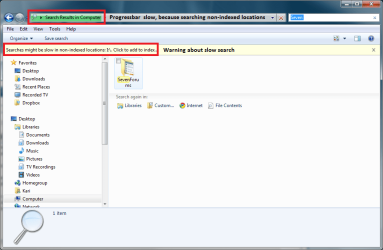
Open then My Computer, a local drive's window or any folder other than Users or its subfolders, and do the same search again. You'll notice two things: first, the progressbar moves slowly, reason being Grep is searching also the non-indexed locations. Second, you even get a warning about slow search (see the attached image).

Conclusion: to get better search results, open for instance My Computer window and search from there, instead of using the Start Menu search.

Thanks to a good friend and colleague for pointing this out to me.

Kari
 

Attachments
  • search_2.PNG
    search_2.PNG
    35.4 KB · Views: 91

My Computer

Computer type
Laptop
Computer Manufacturer/Model Number
HP ENVY 17-1150eg
OS
Windows 10 Pro x64 EN-GB
CPU
1.6 GHz Intel Core i7-720QM Processor
Memory
6 GB
Graphics Card(s)
ATI Mobility Radeon HD 5850 Graphics
Sound Card
Beats sound system with integrated subwoofer
Monitor(s) Displays
17" laptop display, 22" LED and 32" Full HD TV through HDMI
Screen Resolution
1600*900 (1), 1920*1080 (2&3)
Hard Drives
Internal: 2 x 500 GB SATA Hard Disk Drive 7200 rpm
External: 2TB for backups, 3TB USB3 network drive for media
Cooling
As Envy runs a bit warm, I have it on a Cooler Master pad
Keyboard
Logitech diNovo Media Desktop Laser (bluetooth)
Mouse
Logitech Performance Mouse MX
Internet Speed
50/10 Mbps VDSL
Antivirus
Windows Defender 4.3.9431.0
Browser
Maxthon 3.5.2., IE11
I agree!!!!
 

My Computer

Computer Manufacturer/Model Number
Gateway/NV7923u & NV79C52u Laptops
OS
windows 7 professional & ultimate 64bit laptops
CPU
2.27 boost to 2.53 & 2.53 boost to 2.80
Motherboard
Mobile Intel® HM55 Express Chipset ???
Memory
4GB
Graphics Card(s)
Intel® Graphics Media Accelerator HD
Sound Card
realtek High-definition audio support
Monitor(s) Displays
17.3 " HD 1600 x 900
Hard Drives
hatachi Travelstar 5400 500GB & west digital 500GB
Internet Speed
35MB fios
I'm disappointed that you usually have to have the first word correct to get the result you're looking for. For example, a search on a string of 2 or more words. It doesn't seem to search within strings (esp the Start Menu search).
 

My Computer

Computer Manufacturer/Model Number
Dell Inspiron 1520 (Laptop)/ Home (Desktop)
OS
Windows 7 x64 / Same
CPU
Intel Core 2 Duo T7250 / Intel Core i7 930
Motherboard
Intel 945 / Asus P6X58D-E
Memory
4GB / 6GB
Graphics Card(s)
NVIDIA GeForce 8400M GS / ASUS 1GB
Sound Card
Whatever Dell gave me :-( / Onboard
Monitor(s) Displays
15.4" LCD / Crappy CRT
Hard Drives
Seagate 500GB SATA; 7200 RPM / Seagate 1TB SATA; 7200 RPM
PSU
N/A / OCZ Fatal1ty 550W Modular
Case
N/A / Antec 900
Cooling
Air
Mouse
Microsoft Presenter (Bluetooth)
Conclusion: to get better search results, open for instance My Computer window and search from there, instead of using the Start Menu search.

Kari

Sorry, but I absolutely disagree. Grep search sucks. It takes forever to search within file contents. The better solution is to index all the files and folders you are likely to search, and use the start menu search. That way you don't have to remember the file name and the search results appear within a fraction of a second.
 

My Computer

OS
Windows 7 RTM x86
Just to point out, there are not two search engines, it is what is called context aware.
 

My Computer

Computer type
PC/Desktop
Computer Manufacturer/Model Number
Alienware Aurora ALX R4
OS
Windows 10 Pro (x64)
CPU
Intel Core i7-3930K (3.2GHz - 4.5GHz)
Motherboard
Alienware Aurora-R4 x79
Memory
4x Samsung 4GB PC3-12800 DDR3 (16GB 1600MHz)
Graphics Card(s)
Nvidia Geforce GTX 690
Sound Card
SteelSeries Siberia Elite
Monitor(s) Displays
Dell UltraSharp U3011
Screen Resolution
2560x1600
Hard Drives
Samsung 850 Pro 256 GB, Seagate 1TB Desktop Hybrid HDD, 2x Western Digital 4TB Green HDD
PSU
875W Some Dell PSU <.<
Case
Alienware Aurora ALX
Cooling
Custom Liquid Cooling (EK CPU & GPU blocks) dual EK 480RAD
Keyboard
Logitech G710+ Mechanical
Mouse
Logitech G700s
Internet Speed
Verizon Fios (50 mbps average)
Other Info
Server: Intel NUC D54250WYK: i5-4250U, 16GB, 256 GB mSATA, Windows Server 2012 R2
Pezzonovante, what I meant is that Grep searches also the non-indexed locations, so it finds a file when normal doesn't. Ay lkeast on my rigs it's not so slow, either.

Logiearth, the reference to two search engines is directly from Windows 7 Inside Out book by Ed Bott.
 

My Computer

Computer type
Laptop
Computer Manufacturer/Model Number
HP ENVY 17-1150eg
OS
Windows 10 Pro x64 EN-GB
CPU
1.6 GHz Intel Core i7-720QM Processor
Memory
6 GB
Graphics Card(s)
ATI Mobility Radeon HD 5850 Graphics
Sound Card
Beats sound system with integrated subwoofer
Monitor(s) Displays
17" laptop display, 22" LED and 32" Full HD TV through HDMI
Screen Resolution
1600*900 (1), 1920*1080 (2&3)
Hard Drives
Internal: 2 x 500 GB SATA Hard Disk Drive 7200 rpm
External: 2TB for backups, 3TB USB3 network drive for media
Cooling
As Envy runs a bit warm, I have it on a Cooler Master pad
Keyboard
Logitech diNovo Media Desktop Laser (bluetooth)
Mouse
Logitech Performance Mouse MX
Internet Speed
50/10 Mbps VDSL
Antivirus
Windows Defender 4.3.9431.0
Browser
Maxthon 3.5.2., IE11
Back
Top