Solved Windows 7 Ultimate no boot after dynamic disk

royoliver

New member
Local time
1:54 PM
Messages
4
HI everyone, i have having a problem. i tried to convert my hard drive to dynamic disk and now when i restart it gives black screen blinking cursor.
tried to boot through external cd rom, still same thing. help how do i get it to boot
 

My Computer

OS
windows7
HI everyone, i have having a problem. i tried to convert my hard drive to dynamic disk and now when i restart it gives black screen blinking cursor.
tried to boot through external cd rom, still same thing. help how do i get it to boot

Do you know if you succeeded in converting to dynamic?

What was the purpose of converting to dynamic?

You may have to download Partition Wizard bootable disk version 4.22, burn it to a disk, and boot from it-----to see what if anything is left of your hard drive.

https://skydrive.live.com/?cid=b0a22789320e3247&id=B0A22789320E3247!215
 

My Computer

Computer type
PC/Desktop
Computer Manufacturer/Model Number
Ignatz Special; 4 speed manual gearbox; factory air conditioning; one of one
OS
Windows 7 Home Premium SP1, 64-bit
CPU
Intel Skylake i5-6600K, not overclocked
Motherboard
AsRock Z170M Extreme 4, micro ATX
Memory
8 GB HyperX DDR4-2666 (2 x 4 GB)
Graphics Card(s)
none; graphics are integrated on CPU
Sound Card
onboard: Realtek ALC1150; external: USB Behringer UF0-202
Monitor(s) Displays
Dell S2340M 23 inch IPS
Screen Resolution
1600 x 900
Hard Drives
System: Crucial MX100 series SSD, 128 GB;
Data: Samsung Spinpoint 103SJ, 1 TB;
Backup: WD Caviar Green WD30EZRX-00D8PB0, 3 TB
PSU
Rosewill SilentNight 500 watt fanless, semi-modular
Case
Antec Solo II
Cooling
Noctua NH-U12S; Noctua F12 intake, Noctua S12A exhaust
Keyboard
Microsoft 200 6JH-00001 USB
Mouse
Dell or Microsoft optical wired; USB
Antivirus
Microsoft Security Essentials and Malwarebytes Premium
Browser
Pale Moon
Other Info
All fans PWM; speeds at idle: CPU circa 500 rpm; intake circa 600 rpm; exhaust circa 600 rpm; CPU temps 27 idle and 47 C load in a warm room (27 C/81 F) when running Intel Extreme Tuning Utility stress test.
The problem is that you converted your HD to Dynamic which is only meant to be used to span a partition across multiple HD's. Apparently you didn't see the warning message.

The solution to solve this non-destructively is to boot free Partition Wizard CD version 4.2 which is the last one which offers this as a free feature: pw422.zip ISO - Windows Live.

Download the ISO, rightclick to burn it to CD using Windows Image Burner, or use ImgBurn.

Boot CD. You will need to delete the extra partition(s) you created which tipped it to convert to Dynamic before it will convert back to Basic.

Then follow these video steps: How to convert dynamic disk to basic disk with Partition Wizard?
 
ty greg and igna just saw the replies on my laptop.

i went to a friends place, downloaded windows 7 iso file, put it onto usb converted to bootable, and installed windows 7 on c drive after formatting it, left the other drives the way it is. so far so good.

:)
 

My Computer

OS
windows7
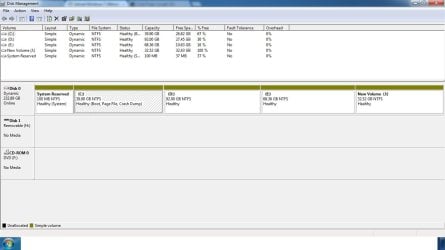
Please post back a screenshot of your maximized Disk Management drive map and listings:

1. Type Disk Management in Start Search box.
2. Open Disk Mgmt. window and maximize it.
3. Type Snipping Tool in Start Search box.
4. Open Snipping Tool, choose Rectangular Snip, draw a box around full map and all listings.
5, Save Snip, attach using paper clip in Reply Box.

Tell us what is on each partition.
 
img

img
 

Attachments

  • disk.jpg
    disk.jpg
    73.3 KB · Views: 44

My Computer

OS
windows7
Hmmm......


All partitions still dynamic.

It seems nothing has changed.
 

My Computer

Computer type
PC/Desktop
Computer Manufacturer/Model Number
Ignatz Special; 4 speed manual gearbox; factory air conditioning; one of one
OS
Windows 7 Home Premium SP1, 64-bit
CPU
Intel Skylake i5-6600K, not overclocked
Motherboard
AsRock Z170M Extreme 4, micro ATX
Memory
8 GB HyperX DDR4-2666 (2 x 4 GB)
Graphics Card(s)
none; graphics are integrated on CPU
Sound Card
onboard: Realtek ALC1150; external: USB Behringer UF0-202
Monitor(s) Displays
Dell S2340M 23 inch IPS
Screen Resolution
1600 x 900
Hard Drives
System: Crucial MX100 series SSD, 128 GB;
Data: Samsung Spinpoint 103SJ, 1 TB;
Backup: WD Caviar Green WD30EZRX-00D8PB0, 3 TB
PSU
Rosewill SilentNight 500 watt fanless, semi-modular
Case
Antec Solo II
Cooling
Noctua NH-U12S; Noctua F12 intake, Noctua S12A exhaust
Keyboard
Microsoft 200 6JH-00001 USB
Mouse
Dell or Microsoft optical wired; USB
Antivirus
Microsoft Security Essentials and Malwarebytes Premium
Browser
Pale Moon
Other Info
All fans PWM; speeds at idle: CPU circa 500 rpm; intake circa 600 rpm; exhaust circa 600 rpm; CPU temps 27 idle and 47 C load in a warm room (27 C/81 F) when running Intel Extreme Tuning Utility stress test.
I gave you the steps to convert your HD back to Basic non-destructively, which have worked for everyone else who has tried them. Try again and this time delete the empty partition J first which caused it to convert to Dynamic.

The problem is that you converted your HD to Dynamic which is only meant to be used to span a partition across multiple HD's. Apparently you didn't see the warning message.

The solution to solve this non-destructively is to boot free Partition Wizard CD version 4.2 which is the last one which offers this as a free feature: pw422.zip ISO - Windows Live.

Download the ISO, rightclick to burn it to CD using Windows Image Burner, or use ImgBurn.

Boot CD. You will need to delete the extra partition(s) you created which tipped it to convert to Dynamic before it will convert back to Basic.

Then follow these video steps: How to convert dynamic disk to basic disk with Partition Wizard?

After conversion to Basic rightclick on E to Modify>Set to Logical, OK. Then rightclick on the deleted J space to Create a New Logical partition, OK, Apply both steps.
 
my main issue was i wasnt able to boot which has been resolved, so is it ok to have the partitions the way it is? the partiton were changed to dynamic by me as i wanted to expand c drive and install windows 8 beta
 

My Computer

OS
windows7
You don't want dynamic disks for any reason as a home user.

You don't need dynamic disks to install Windows 8.

If you want another partition for Windows 8, follow Greg's instructions in post 8.

You need to use 3 primary partitions and as many logical partitions as you need. No dynamic.

Logical partitions exist inside an "extended" partition. Once you have 1 extended partition, you can put 20 logicals inside it if you want. Then install Windows 8 to a logical.

The easiest path for you is delete J and then convert E to logical. Then add more logicals as needed from the space you got back by deleting J.
 

My Computer

Computer type
PC/Desktop
Computer Manufacturer/Model Number
Ignatz Special; 4 speed manual gearbox; factory air conditioning; one of one
OS
Windows 7 Home Premium SP1, 64-bit
CPU
Intel Skylake i5-6600K, not overclocked
Motherboard
AsRock Z170M Extreme 4, micro ATX
Memory
8 GB HyperX DDR4-2666 (2 x 4 GB)
Graphics Card(s)
none; graphics are integrated on CPU
Sound Card
onboard: Realtek ALC1150; external: USB Behringer UF0-202
Monitor(s) Displays
Dell S2340M 23 inch IPS
Screen Resolution
1600 x 900
Hard Drives
System: Crucial MX100 series SSD, 128 GB;
Data: Samsung Spinpoint 103SJ, 1 TB;
Backup: WD Caviar Green WD30EZRX-00D8PB0, 3 TB
PSU
Rosewill SilentNight 500 watt fanless, semi-modular
Case
Antec Solo II
Cooling
Noctua NH-U12S; Noctua F12 intake, Noctua S12A exhaust
Keyboard
Microsoft 200 6JH-00001 USB
Mouse
Dell or Microsoft optical wired; USB
Antivirus
Microsoft Security Essentials and Malwarebytes Premium
Browser
Pale Moon
Other Info
All fans PWM; speeds at idle: CPU circa 500 rpm; intake circa 600 rpm; exhaust circa 600 rpm; CPU temps 27 idle and 47 C load in a warm room (27 C/81 F) when running Intel Extreme Tuning Utility stress test.
Back
Top