Solved Windows 7 Ultimate Virtual XP USB drivers

WaltB32

New member
Member
Local time
11:30 PM
Messages
83
Hi,

Loaded Virtual XP on Windows 7 Ultimate and doing so the program delected all my USB drivers and substituted Virtual USBC drivers which do not recognize my USB ports or attachments.
I tried deleting and reloading the original motherboard drivers for USB 2 and 3 and the
Virtual XP does not regonize them either within device manager. The USB drivers on the
Windows 7 Ultimate work but the Virtual XP does not. Does anyone have a solution for this one.

Thanks,
Walt
 

My Computer

Computer type
PC/Desktop
Computer Manufacturer/Model Number
custom built
OS
Windows 7 64 bit Home Premium
CPU
Intel I7
Motherboard
GA-Z77-DS3H Gigabyte
Memory
Kingston
Graphics Card(s)
Radion
Hard Drives
1 SADA 2 IDE
Antivirus
Norton 360
Browser
Explore 9
Hi Walt.
Virtual XP does not use you motherboard drivers. On virtual XP select Tools Enable enable integration features. The USB should then be loaded from the XP machines USB tab.
 

My Computer

Computer type
PC/Desktop
Computer Manufacturer/Model Number
Bluethunder II
OS
Windows 7 x64 Ultimate and numerous virtual machines
CPU
AMD FX-8350 Vishera 32nm Technology @ 4.2 GHz default
Motherboard
ASUSTeK COMPUTER INC. SABERTOOTH 990FX R2.0 (Socket 942)
Memory
G Skill 32.0GB Dual-Channel DDR3 @ 1204MHz (11-13-13-31)
Graphics Card(s)
EVGA GeForce GTX 960 4GB Super SC ACX 2.0+ with Back Plate
Sound Card
Creative X-Fi Titanium HD Audiophile PCIe
Monitor(s) Displays
LG L227WTG x 3
Screen Resolution
1680 x 1050 16:10
Hard Drives
238GB Samsung850 PRO SATA Disk Device (SSD)
1863GB Seagate ST2000DM 001-1CH164 (SATA)
1397GB Seagate ST1500DL 003-9VT16L(SATA)
466GB Western Digital WDC WD50 03AZEX-00K1GA0 (SATA) x 2
932GB Seagate ST310005 28AS SATA Disk Device (SATA)
PSU
Enermax Revolution87+ 1000 Watts Gold Certified Power Supply
Case
Rocketfish Full Tower
Cooling
Cooler Master Hyper 212 EVO Push Pull 120mm Fans
Keyboard
Logitech K740
Mouse
Logitech G100S Laser LED + Logitech Gamepad F310
Internet Speed
500 mbs down and 30mbs up
Antivirus
Malwarebytes Pro & Avast and MSE on certain Virtual Machines
Browser
Firefox (Main) Chrome, Internet Explorer (Back Up)
Other Info
Logitech X 230 2.1 Stereo System and 5.1 Yamaha RX V2090
B&W DM6 Monitor Speakers + Center and Surround Speakers
Using Mouse Without Borders (Google it)
I'm not sure where that option is can you provide a location.
 

My Computer

Computer type
PC/Desktop
Computer Manufacturer/Model Number
custom built
OS
Windows 7 64 bit Home Premium
CPU
Intel I7
Motherboard
GA-Z77-DS3H Gigabyte
Memory
Kingston
Graphics Card(s)
Radion
Hard Drives
1 SADA 2 IDE
Antivirus
Norton 360
Browser
Explore 9
I found the tools option button but there is nothing which states to activate USBs, when I look at the USB tab it's blank yet I have several attachments to my USB Hub and none are listed.
 

My Computer

Computer type
PC/Desktop
Computer Manufacturer/Model Number
custom built
OS
Windows 7 64 bit Home Premium
CPU
Intel I7
Motherboard
GA-Z77-DS3H Gigabyte
Memory
Kingston
Graphics Card(s)
Radion
Hard Drives
1 SADA 2 IDE
Antivirus
Norton 360
Browser
Explore 9
If I surfed using XP Mode would that be considered to be in a virtual Box?
 

My Computer

Computer type
PC/Desktop
Computer Manufacturer/Model Number
Custom Build
OS
Win 10 Pro 64
CPU
Intel Core i7 960 @3.20 GHz
Motherboard
MSI MS7522
Memory
24.0 GB DDR3
Graphics Card(s)
EVGA GTX 750Ti
Monitor(s) Displays
LG E2341 23 Inch
Screen Resolution
1920x1080
Hard Drives
1TB Western Dgital 1002FAEX-00Y9A0
1TB Hitachi HDS721010CLA322
PSU
700 Watt
Case
Haf 912
Cooling
Fans
Keyboard
Logitech MK710
Mouse
Logitech M705
Internet Speed
Cable
Antivirus
AIS 2015 .10.0.2225
Browser
Firefox 49
Other Info
MalwareBytes Anti-Rootkit utility
You can pull up a browser within the Virtual XP and surf all night long, or you can switch back to Windows 7 and surf the whole day.
 

My Computer

Computer type
PC/Desktop
Computer Manufacturer/Model Number
custom built
OS
Windows 7 64 bit Home Premium
CPU
Intel I7
Motherboard
GA-Z77-DS3H Gigabyte
Memory
Kingston
Graphics Card(s)
Radion
Hard Drives
1 SADA 2 IDE
Antivirus
Norton 360
Browser
Explore 9
How to see the USB drive

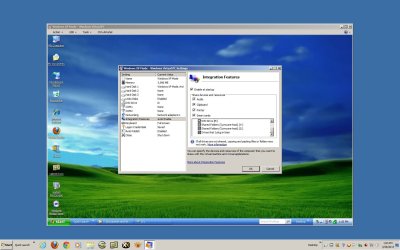
OH here goes. I took some screen shots from virtual XP I have running on a virtual windows 7 machine I have.
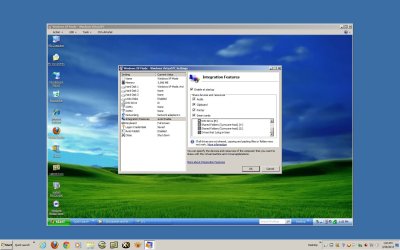
Intergration features.jpg
Make sure Integration is enabled from Tools menu in window mode only.
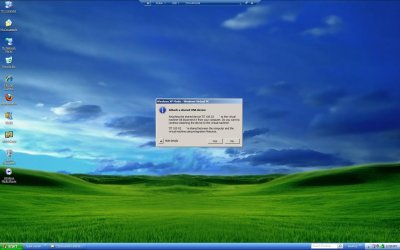
XP VM.JPG
Click the USB tab and enable the USB drive (you make have to remove and replace the drive for windows to see it).
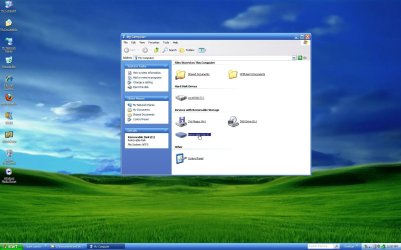
ScreenShot001.jpg
It will appear in explorer and you can copy files to and from.
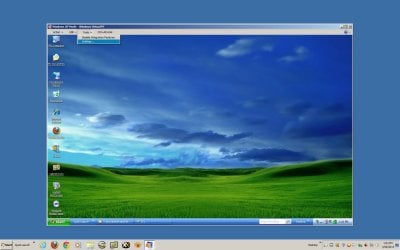
ScreenShot002.jpg
Tools only shows in the window mode.
 

Attachments

  • Windows 7 showing XP in Window.jpg
    Windows 7 showing XP in Window.jpg
    106 KB · Views: 11

My Computer

Computer type
PC/Desktop
Computer Manufacturer/Model Number
Bluethunder II
OS
Windows 7 x64 Ultimate and numerous virtual machines
CPU
AMD FX-8350 Vishera 32nm Technology @ 4.2 GHz default
Motherboard
ASUSTeK COMPUTER INC. SABERTOOTH 990FX R2.0 (Socket 942)
Memory
G Skill 32.0GB Dual-Channel DDR3 @ 1204MHz (11-13-13-31)
Graphics Card(s)
EVGA GeForce GTX 960 4GB Super SC ACX 2.0+ with Back Plate
Sound Card
Creative X-Fi Titanium HD Audiophile PCIe
Monitor(s) Displays
LG L227WTG x 3
Screen Resolution
1680 x 1050 16:10
Hard Drives
238GB Samsung850 PRO SATA Disk Device (SSD)
1863GB Seagate ST2000DM 001-1CH164 (SATA)
1397GB Seagate ST1500DL 003-9VT16L(SATA)
466GB Western Digital WDC WD50 03AZEX-00K1GA0 (SATA) x 2
932GB Seagate ST310005 28AS SATA Disk Device (SATA)
PSU
Enermax Revolution87+ 1000 Watts Gold Certified Power Supply
Case
Rocketfish Full Tower
Cooling
Cooler Master Hyper 212 EVO Push Pull 120mm Fans
Keyboard
Logitech K740
Mouse
Logitech G100S Laser LED + Logitech Gamepad F310
Internet Speed
500 mbs down and 30mbs up
Antivirus
Malwarebytes Pro & Avast and MSE on certain Virtual Machines
Browser
Firefox (Main) Chrome, Internet Explorer (Back Up)
Other Info
Logitech X 230 2.1 Stereo System and 5.1 Yamaha RX V2090
B&W DM6 Monitor Speakers + Center and Surround Speakers
Using Mouse Without Borders (Google it)
I am just curious that if I am in Xp mode surfing and happen to catch some nasty stuff can it get out of the VM?
 

My Computer

Computer type
PC/Desktop
Computer Manufacturer/Model Number
Custom Build
OS
Win 10 Pro 64
CPU
Intel Core i7 960 @3.20 GHz
Motherboard
MSI MS7522
Memory
24.0 GB DDR3
Graphics Card(s)
EVGA GTX 750Ti
Monitor(s) Displays
LG E2341 23 Inch
Screen Resolution
1920x1080
Hard Drives
1TB Western Dgital 1002FAEX-00Y9A0
1TB Hitachi HDS721010CLA322
PSU
700 Watt
Case
Haf 912
Cooling
Fans
Keyboard
Logitech MK710
Mouse
Logitech M705
Internet Speed
Cable
Antivirus
AIS 2015 .10.0.2225
Browser
Firefox 49
Other Info
MalwareBytes Anti-Rootkit utility
I opened integration and it’s auto enabled. Then I clicked on USB TAB in windows mode and I get ( No device found) and that’s as far as I can take it. All the USB on the Win 7 Ultimate side are working and visible in device manager and printers and devices, all drivers are working.


I also can't attach the pictures of the word doc I have to show this the attach option is not working.
How do I attach a photo of this to our post?
 

My Computer

Computer type
PC/Desktop
Computer Manufacturer/Model Number
custom built
OS
Windows 7 64 bit Home Premium
CPU
Intel I7
Motherboard
GA-Z77-DS3H Gigabyte
Memory
Kingston
Graphics Card(s)
Radion
Hard Drives
1 SADA 2 IDE
Antivirus
Norton 360
Browser
Explore 9
Gary if you go surfing at night there is always a posibility of a Great White Shark giving you some nasty stuff.
 

My Computer

Computer type
PC/Desktop
Computer Manufacturer/Model Number
custom built
OS
Windows 7 64 bit Home Premium
CPU
Intel I7
Motherboard
GA-Z77-DS3H Gigabyte
Memory
Kingston
Graphics Card(s)
Radion
Hard Drives
1 SADA 2 IDE
Antivirus
Norton 360
Browser
Explore 9
Gary if you go surfing at night there is always a posibility of a Great White Shark giving you some nasty stuff.

Would you please not answer in riddles? I have a sandbox in AIS and nothing can get out of that, I was wondering if a VM is the same.
 

My Computer

Computer type
PC/Desktop
Computer Manufacturer/Model Number
Custom Build
OS
Win 10 Pro 64
CPU
Intel Core i7 960 @3.20 GHz
Motherboard
MSI MS7522
Memory
24.0 GB DDR3
Graphics Card(s)
EVGA GTX 750Ti
Monitor(s) Displays
LG E2341 23 Inch
Screen Resolution
1920x1080
Hard Drives
1TB Western Dgital 1002FAEX-00Y9A0
1TB Hitachi HDS721010CLA322
PSU
700 Watt
Case
Haf 912
Cooling
Fans
Keyboard
Logitech MK710
Mouse
Logitech M705
Internet Speed
Cable
Antivirus
AIS 2015 .10.0.2225
Browser
Firefox 49
Other Info
MalwareBytes Anti-Rootkit utility
I opened integration and it’s auto enabled. Then I clicked on USB TAB in windows mode and I get ( No device found) and that’s as far as I can take it. All the USB on the Win 7 Ultimate side are working and visible in device manager and printers and devices, all drivers are working.


I also can't attach the pictures of the word doc I have to show this the attach option is not working.
How do I attach a photo of this to our post?
Try plugging in the USB drive once you have the Virtual machine up and running. What is it you are trying to see? A flash drive? Other devices need to be shared.
A quick Google etc of the site will give your answers to sharing printers, scanners etc.
For how to upload a screenshot or file, read here
 

My Computer

Computer type
PC/Desktop
Computer Manufacturer/Model Number
Bluethunder II
OS
Windows 7 x64 Ultimate and numerous virtual machines
CPU
AMD FX-8350 Vishera 32nm Technology @ 4.2 GHz default
Motherboard
ASUSTeK COMPUTER INC. SABERTOOTH 990FX R2.0 (Socket 942)
Memory
G Skill 32.0GB Dual-Channel DDR3 @ 1204MHz (11-13-13-31)
Graphics Card(s)
EVGA GeForce GTX 960 4GB Super SC ACX 2.0+ with Back Plate
Sound Card
Creative X-Fi Titanium HD Audiophile PCIe
Monitor(s) Displays
LG L227WTG x 3
Screen Resolution
1680 x 1050 16:10
Hard Drives
238GB Samsung850 PRO SATA Disk Device (SSD)
1863GB Seagate ST2000DM 001-1CH164 (SATA)
1397GB Seagate ST1500DL 003-9VT16L(SATA)
466GB Western Digital WDC WD50 03AZEX-00K1GA0 (SATA) x 2
932GB Seagate ST310005 28AS SATA Disk Device (SATA)
PSU
Enermax Revolution87+ 1000 Watts Gold Certified Power Supply
Case
Rocketfish Full Tower
Cooling
Cooler Master Hyper 212 EVO Push Pull 120mm Fans
Keyboard
Logitech K740
Mouse
Logitech G100S Laser LED + Logitech Gamepad F310
Internet Speed
500 mbs down and 30mbs up
Antivirus
Malwarebytes Pro & Avast and MSE on certain Virtual Machines
Browser
Firefox (Main) Chrome, Internet Explorer (Back Up)
Other Info
Logitech X 230 2.1 Stereo System and 5.1 Yamaha RX V2090
B&W DM6 Monitor Speakers + Center and Surround Speakers
Using Mouse Without Borders (Google it)
Gary if you go surfing at night there is always a posibility of a Great White Shark giving you some nasty stuff.

Would you please not answer in riddles? I have a sandbox in AIS and nothing can get out of that, I was wondering if a VM is the same.
Gary, a virtual machine is to be thought of as a real PC. It needs its own firewall and virus protection if connected to the wild. Yes if it gets infected it can spread acrooss the whole network depending on the virus or malware.
 

My Computer

Computer type
PC/Desktop
Computer Manufacturer/Model Number
Bluethunder II
OS
Windows 7 x64 Ultimate and numerous virtual machines
CPU
AMD FX-8350 Vishera 32nm Technology @ 4.2 GHz default
Motherboard
ASUSTeK COMPUTER INC. SABERTOOTH 990FX R2.0 (Socket 942)
Memory
G Skill 32.0GB Dual-Channel DDR3 @ 1204MHz (11-13-13-31)
Graphics Card(s)
EVGA GeForce GTX 960 4GB Super SC ACX 2.0+ with Back Plate
Sound Card
Creative X-Fi Titanium HD Audiophile PCIe
Monitor(s) Displays
LG L227WTG x 3
Screen Resolution
1680 x 1050 16:10
Hard Drives
238GB Samsung850 PRO SATA Disk Device (SSD)
1863GB Seagate ST2000DM 001-1CH164 (SATA)
1397GB Seagate ST1500DL 003-9VT16L(SATA)
466GB Western Digital WDC WD50 03AZEX-00K1GA0 (SATA) x 2
932GB Seagate ST310005 28AS SATA Disk Device (SATA)
PSU
Enermax Revolution87+ 1000 Watts Gold Certified Power Supply
Case
Rocketfish Full Tower
Cooling
Cooler Master Hyper 212 EVO Push Pull 120mm Fans
Keyboard
Logitech K740
Mouse
Logitech G100S Laser LED + Logitech Gamepad F310
Internet Speed
500 mbs down and 30mbs up
Antivirus
Malwarebytes Pro & Avast and MSE on certain Virtual Machines
Browser
Firefox (Main) Chrome, Internet Explorer (Back Up)
Other Info
Logitech X 230 2.1 Stereo System and 5.1 Yamaha RX V2090
B&W DM6 Monitor Speakers + Center and Surround Speakers
Using Mouse Without Borders (Google it)
Gary I don't have enough info on that since I'm new to Virtual XP, but if you go to MS updates and load on all the security features and SP3 and you use a good AV program with AdWare and Spybot it may be all you need, for home computing if your on a large Network your company should cover your files with a strong encrypted security system. If you run two AV systems you may be able to pick up on a Trojan that the other missed.
 

My Computer

Computer type
PC/Desktop
Computer Manufacturer/Model Number
custom built
OS
Windows 7 64 bit Home Premium
CPU
Intel I7
Motherboard
GA-Z77-DS3H Gigabyte
Memory
Kingston
Graphics Card(s)
Radion
Hard Drives
1 SADA 2 IDE
Antivirus
Norton 360
Browser
Explore 9
I plug in flash drives, printers, a muti USB port, and I tried loading into USB 2.0 and USB 3.0 ports on the back of the computer nothing shows up on the USB TAB. I went to Gygabit downloads and they have a app for XP USB block and unblock which didn't work. When I load the USB device I hear the connection, see it and use it on Windows 7 Ultimate but it's not there in XP.
 
Last edited:

My Computer

Computer type
PC/Desktop
Computer Manufacturer/Model Number
custom built
OS
Windows 7 64 bit Home Premium
CPU
Intel I7
Motherboard
GA-Z77-DS3H Gigabyte
Memory
Kingston
Graphics Card(s)
Radion
Hard Drives
1 SADA 2 IDE
Antivirus
Norton 360
Browser
Explore 9
Here are the views on the USB
 

Attachments

My Computer

Computer type
PC/Desktop
Computer Manufacturer/Model Number
custom built
OS
Windows 7 64 bit Home Premium
CPU
Intel I7
Motherboard
GA-Z77-DS3H Gigabyte
Memory
Kingston
Graphics Card(s)
Radion
Hard Drives
1 SADA 2 IDE
Antivirus
Norton 360
Browser
Explore 9
Gary if you go surfing at night there is always a posibility of a Great White Shark giving you some nasty stuff.

Would you please not answer in riddles? I have a sandbox in AIS and nothing can get out of that, I was wondering if a VM is the same.
Gary, a virtual machine is to be thought of as a real PC. It needs its own firewall and virus protection if connected to the wild. Yes if it gets infected it can spread acrooss the whole network depending on the virus or malware.

Thank you mine does I just wanted to be sure.
 

My Computer

Computer type
PC/Desktop
Computer Manufacturer/Model Number
Custom Build
OS
Win 10 Pro 64
CPU
Intel Core i7 960 @3.20 GHz
Motherboard
MSI MS7522
Memory
24.0 GB DDR3
Graphics Card(s)
EVGA GTX 750Ti
Monitor(s) Displays
LG E2341 23 Inch
Screen Resolution
1920x1080
Hard Drives
1TB Western Dgital 1002FAEX-00Y9A0
1TB Hitachi HDS721010CLA322
PSU
700 Watt
Case
Haf 912
Cooling
Fans
Keyboard
Logitech MK710
Mouse
Logitech M705
Internet Speed
Cable
Antivirus
AIS 2015 .10.0.2225
Browser
Firefox 49
Other Info
MalwareBytes Anti-Rootkit utility
On the integration tab scroll down and make sure Devices I plug in is checked. It is NOT by default.
 

Attachments

  • Intergration features.jpg
    Intergration features.jpg
    134.9 KB · Views: 5

My Computer

Computer type
PC/Desktop
Computer Manufacturer/Model Number
Bluethunder II
OS
Windows 7 x64 Ultimate and numerous virtual machines
CPU
AMD FX-8350 Vishera 32nm Technology @ 4.2 GHz default
Motherboard
ASUSTeK COMPUTER INC. SABERTOOTH 990FX R2.0 (Socket 942)
Memory
G Skill 32.0GB Dual-Channel DDR3 @ 1204MHz (11-13-13-31)
Graphics Card(s)
EVGA GeForce GTX 960 4GB Super SC ACX 2.0+ with Back Plate
Sound Card
Creative X-Fi Titanium HD Audiophile PCIe
Monitor(s) Displays
LG L227WTG x 3
Screen Resolution
1680 x 1050 16:10
Hard Drives
238GB Samsung850 PRO SATA Disk Device (SSD)
1863GB Seagate ST2000DM 001-1CH164 (SATA)
1397GB Seagate ST1500DL 003-9VT16L(SATA)
466GB Western Digital WDC WD50 03AZEX-00K1GA0 (SATA) x 2
932GB Seagate ST310005 28AS SATA Disk Device (SATA)
PSU
Enermax Revolution87+ 1000 Watts Gold Certified Power Supply
Case
Rocketfish Full Tower
Cooling
Cooler Master Hyper 212 EVO Push Pull 120mm Fans
Keyboard
Logitech K740
Mouse
Logitech G100S Laser LED + Logitech Gamepad F310
Internet Speed
500 mbs down and 30mbs up
Antivirus
Malwarebytes Pro & Avast and MSE on certain Virtual Machines
Browser
Firefox (Main) Chrome, Internet Explorer (Back Up)
Other Info
Logitech X 230 2.1 Stereo System and 5.1 Yamaha RX V2090
B&W DM6 Monitor Speakers + Center and Surround Speakers
Using Mouse Without Borders (Google it)
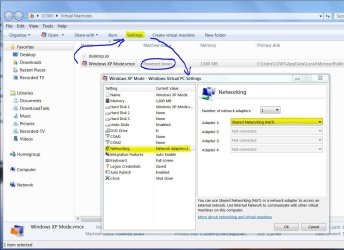
Yes Tony, that is correct but you can't change those settings while the VM-XP machine is running. They have to be set when the VM is down through the Settings screen.
 

Attachments

  • XP VM - Settings.JPG
    XP VM - Settings.JPG
    124.3 KB · Views: 4

My Computer

Computer type
PC/Desktop
Computer Manufacturer/Model Number
Built 2/11/2011
OS
Windows 7 Pro-x64
CPU
i7-2600 3.4GHz - 3.8GHz Turbo
Motherboard
Intel DH67BL-B3
Memory
8Gb - 2x4GB, Muskin 991770 PC3-1333
Graphics Card(s)
Integrated Intel HD 2000
Sound Card
Integrated Intel 10.1 HD, RealTek ALC892
Monitor(s) Displays
Asus LCD VH222H, Haier HL24XSL2a
Screen Resolution
1920x1080, 1920x1080
Hard Drives
Crucial SSD C300-128Gb,
Western Digital WD5002AALX - 500Gb,
Western Digital WD7501AALS - 750Gb
PSU
Seasonic 650W 80+ Gold Modular
Case
Rosewill Defender
Cooling
Stock CPU, Four 120mm case fans, PCH fan added
Keyboard
Logitech EX100 Y-RBH94 Wireless
Mouse
Logitech EX100 M-RCE95 Wireless
Internet Speed
3.0/1.5 Mbs
Antivirus
Microsoft Security Essentials
Browser
Microsoft Internet Explorer 11
Other Info
Antec Veris Premier-Multimedia IR Station,
Cyber Accoustics-3602 Speakers,
AFT XM-5U Card Reader,
Hauppauge TV-HVR-2250,
Sony LX300 USB Turntable
I'll try that now. Also just refreshed all the motherboard drivers on the Windows 7 Ultimate side and when I tried to install them on the VXP side they are blocked with a JBrowser.exe file message, I also checked within windows and registry and there is no referance to this JBrowser.exe file being hidden or visible.
 

My Computer

Computer type
PC/Desktop
Computer Manufacturer/Model Number
custom built
OS
Windows 7 64 bit Home Premium
CPU
Intel I7
Motherboard
GA-Z77-DS3H Gigabyte
Memory
Kingston
Graphics Card(s)
Radion
Hard Drives
1 SADA 2 IDE
Antivirus
Norton 360
Browser
Explore 9
Back
Top