
Windows 7 unable to Access file server on Windows Server 2000

lma

New member
Local time
9:53 PM
Messages
2
Hello,

I have a problem to access file server on Windows Server 2000 from a Windows 7 PC. For your information, due to some reasons, both Windows 7 and Windows Server 2000 are in different domain.

I have tried all suggested solutions which are :
i. to unchecked both attributes in 'Network Security : Minimum session security for NTLM SSP based (including secure RPC)' for both clients and server.
ii. to apply 'Send LM & NTLM - use NTLMv2 session security if negotiated' in 'Network Security : LAN Manager authentication level'
iii. to make sure the time setting for both Windows 7 and Windows Server 2000 are the same.

But still, i couldn't access the file server. In fact, each time I entered domain\username to authenticate, it will give out this message :
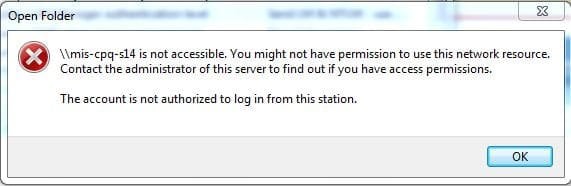
prob2.JPG

Since I am kinda new to this troubleshooting things, it would be great if someone can tell me why does this happening. Is it because of the different domain?

thanks in advance.
 

My Computer My Computer

Computer type
PC/Desktop
OS
Windows 7 Pro
To connect to the server you would need to enter the credentials of the domain user on the server that would have access. For example if the domain was 'home' with a user 'Josh' then I would put:

home\Josh

As the username. If you want to get advanced you could try and form a trust with the other domain in active directory so that the other domain has permission to access the server

Josh :)
 

My Computer My Computer

Computer type
PC/Desktop
Computer Manufacturer/Model Number
Custom Built
OS
Windows 7 Professional x64 SP1 ; Windows Server 2012 R2 Standard
CPU
Intel Core i5 2400 @ 3.10GHz
Motherboard
Foxconn H67MP-S/-V/H67MP
Memory
8.0GB DDR3 @ 665MHz (2GBx4)
Graphics Card(s)
AMD Radeon HD 6870
Sound Card
Realtek High Definition Audio
Monitor(s) Displays
AOC 2243W & SMB1930NW
Screen Resolution
1440x900 & 1920x1080
Hard Drives
977GB Seagate ST31000524AS ATA Drive (SATA)
250GB WD iSCSI attached Drive
PSU
750W Gaming PSU
Case
Novatech Night
Cooling
Fan
Keyboard
Dell Standard PS/2 Keyboard
Mouse
R.A.T 07 Gaming Mouse
Internet Speed
Download: 10 Mbps Ping: 30ms Upload: 0.81 Mbps
Browser
Google Chrome
Other Info
Optiarc DVD RW AD-5260S ATA Device
thank you for the suggestion. but before that, may i ask if only connection between Windows 7 and Windows Server 2000 that requires trust relationship since the Windows Server 2000 can be accessed from Windows XP without any problem even though they are also in different domain.
 

My Computer My Computer

Computer type
PC/Desktop
OS
Windows 7 Pro
Not quite sure what you mean, you only make trusts between active directory domain controllers. Not on windows client devices.

Josh :)
 

My Computer My Computer

Computer type
PC/Desktop
Computer Manufacturer/Model Number
Custom Built
OS
Windows 7 Professional x64 SP1 ; Windows Server 2012 R2 Standard
CPU
Intel Core i5 2400 @ 3.10GHz
Motherboard
Foxconn H67MP-S/-V/H67MP
Memory
8.0GB DDR3 @ 665MHz (2GBx4)
Graphics Card(s)
AMD Radeon HD 6870
Sound Card
Realtek High Definition Audio
Monitor(s) Displays
AOC 2243W & SMB1930NW
Screen Resolution
1440x900 & 1920x1080
Hard Drives
977GB Seagate ST31000524AS ATA Drive (SATA)
250GB WD iSCSI attached Drive
PSU
750W Gaming PSU
Case
Novatech Night
Cooling
Fan
Keyboard
Dell Standard PS/2 Keyboard
Mouse
R.A.T 07 Gaming Mouse
Internet Speed
Download: 10 Mbps Ping: 30ms Upload: 0.81 Mbps
Browser
Google Chrome
Other Info
Optiarc DVD RW AD-5260S ATA Device
Hmmm the NTLM and encryption adjustments should have this working.

From what I have read the time, date and the country settings have to match between the client and server, and the time settings need to be down to the second sometimes which is ridiculous but has worked in the past, and they both may need to be in the same time zone as well, this according to many different sources.

I can't believe all the similar complaints so it may be just one last fine adjustment to get this working.

It may also help to add the same DNS server IP's that the server is using to the IPv4 properties of the Windows 7 machine.

You might try using one of the other LAN Manager settings for NTLM like > Set to Send LM & NTLM responses only
 

My Computer My Computer

Computer type
PC/Desktop
Computer Manufacturer/Model Number
Home built
OS
Windows 7 Ult, Windows 8.1 Pro,
CPU
Q9650-4.275GHz, E8600 4.5GHz, E6750-3.8GHz
Motherboard
Evga 780i FTW
Memory
G.Skill PC2 9600 1200Mhz 5 5 5 15 2T
Graphics Card(s)
GTX480
Sound Card
Asus Xonar D2
Monitor(s) Displays
HannsG
Screen Resolution
1680X1050
Hard Drives
GSkill Phoenix Pro 120GB SSD
PSU
ThermalTake Toughpower 1000Watt modular
Case
ThermalTake XaserV
Cooling
Xigmatek S1283
Keyboard
Logitech G15
Mouse
Logitech G9
Internet Speed
T1
Back
Top