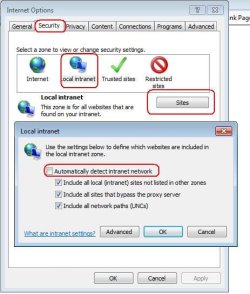
Very strange issue here that I can't for the life of me find any information on. Anyways, we have users unintentionally installing Chrome because it is now sneakily packaged with an Adobe update. Problem is we use a software that accesses databases on our servers via UNC Paths. Chrome does NOT like UNC Paths. After uninstalling Chrome and setting IE back as the default UNC Paths are still broken.....they just do not want to open up in IE as they are supposed to.
Does anyone know where I could set IE to be the default to open UNC Paths? I cant find any documentation as to where that setting would be. Also, I already re-associated EVERY file type that was set to Chrome to IE.....still no joy.
Does anyone know where I could set IE to be the default to open UNC Paths? I cant find any documentation as to where that setting would be. Also, I already re-associated EVERY file type that was set to Chrome to IE.....still no joy.
My Computer
- Computer Manufacturer/Model Number
- Custom
- OS
- Windows 8 Professional
- CPU
- AMD Phenom II X6
- Motherboard
- ASUS
- Memory
- 8 GB
- Graphics Card(s)
- XFX ATI Radeon 4890
- Monitor(s) Displays
- Dual 22" LCD
- Screen Resolution
- 1680x1050
- Hard Drives
- PC Drives
HD0 = Crucial SSD 128gb Sata III
HD1 = 300gb (Seagate Barracuda)
NAS
HD0 = 1.5TB (Maxtor) Raid1
HD1 = 1.5TB (Maxtor) Raid1
HD2 = 1TB (Segate) Raid5
HD3 = 1TB (Segate) Raid5
HD4 = 1TB (Segate) Raid5
HD5 = 1TB (Segate) Raid5
- PSU
- 750 watt
- Mouse
- Razr Mamba
- Internet Speed
- 50 down 35 up FIOS