Windows 7 Update 28/4/2010 problem

Manutjee

New member
Local time
7:49 AM
Messages
33
Location
The Netherlands
Hi guys!

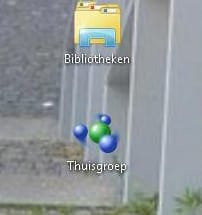
I did an update and after that two maps are shown on my main page: Library and Homegroup. I cannot delete them or put them somewhere else. Why not? Is there a way to do that?

Here is a screenshot attached:
 

Attachments

  • Untitled-1.jpg
    Untitled-1.jpg
    34.2 KB · Views: 273

My Computer

OS
Windows 7
Do you know how many updates you got that day? If you can't find a way to remove them, can you restore back before the updates? Can you remove the updates?

I got several updates on the 28th, but I have an x64 system.

The Windows Explorer icon is normally pinned to the taskbar. I assume you still have that one. Maybe try unpinning it to see if anything changes. Does the link work?

On the Homegroup one, are you a member of a Homegroup. Maybe leaving the group would help.

Can you check its properties and see any information about it that might help?

 

My Computer

Computer Manufacturer/Model Number
Homebuilt
OS
Windows 7 x64
CPU
i7-2600K
Motherboard
Asus P8Z77-v Pro
Memory
8 G
Graphics Card(s)
GTX 480
Sound Card
Onboard
Monitor(s) Displays
LG W2753V
Screen Resolution
1920x1080
Hard Drives
Crucial M4 128 G SSD
As far as I know I cannot delete them... I reinstalled my computer yesterday and did an update (of course) and it's still on. I've no idea what to do know. I just don't know what the use is of the library-thingy 'cause I already have my Documents folder, ghehe!
 

My Computer

OS
Windows 7
Back
Top