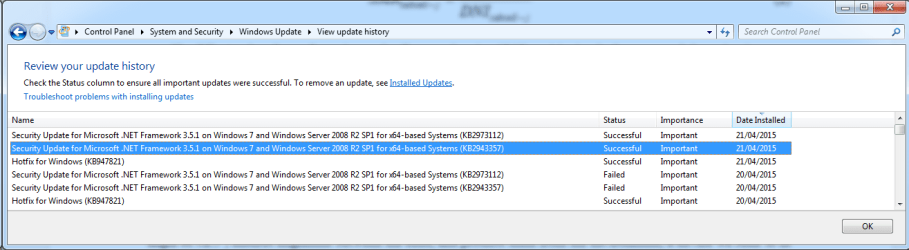
Summary:
Seconds executed: 614
 Found 57 errors
  CSI Manifest All Zeros Total count: 37
  CBS MUM Corrupt Total count: 10
  CBS Catalog Corrupt Total count: 10
Unavailable repair files:
 winsxs\manifests\msil_system.runtime.serialization.resources_b77a5c561934e089_6.1.7601.22733_en-us_787b5545d9776103.manifest
 winsxs\manifests\msil_smdiagnostics.resources_b77a5c561934e089_6.1.7601.18523_en-us_496526973f1e68f2.manifest
 winsxs\manifests\amd64_microsoft-windows-wcfcorecomp.resources_31bf3856ad364e35_6.1.7601.22733_en-us_ff634b2369479517.manifest
 winsxs\manifests\msil_system.runtime.serialization_b77a5c561934e089_6.1.7601.22733_none_bff6ca10b626f70a.manifest
 winsxs\manifests\msil_system.identitymodel_b77a5c561934e089_6.1.7601.18523_none_f1b7e3b500b0dd75.manifest
 winsxs\manifests\amd64_infocard.resources_b77a5c561934e089_6.1.7601.18523_en-us_1c3528fb3f63ae97.manifest
 winsxs\manifests\amd64_microsoft-windows-wpfcorecomp.resources_31bf3856ad364e35_6.1.7601.18523_en-us_102e1681a6f8daa0.manifest
 winsxs\manifests\msil_system.servicemodel.washosting_b77a5c561934e089_6.1.7601.22733_none_7b9fe117b7a77077.manifest
 winsxs\manifests\msil_smsvchost.resources_b03f5f7f11d50a3a_6.1.7601.22733_en-us_b2b27b25e379631c.manifest
 winsxs\manifests\msil_system.servicemodel_b77a5c561934e089_6.1.7601.22733_none_627b1e3960ee4846.manifest
 winsxs\manifests\msil_smsvchost.resources_b03f5f7f11d50a3a_6.1.7601.18523_en-us_c97f21bfc9d2e96e.manifest
 winsxs\manifests\amd64_microsoft.transactions.bridge.dtc_b03f5f7f11d50a3a_6.1.7601.18523_none_7bd502773b0e2c7b.manifest
 winsxs\manifests\msil_system.servicemodel.resources_b77a5c561934e089_6.1.7601.22733_en-us_0f4b4b63d0545797.manifest
 winsxs\manifests\msil_microsoft.transacti..ridge.dtc.resources_b03f5f7f11d50a3a_6.1.7601.22733_en-us_ee690b9c8991e0b1.manifest
 winsxs\manifests\amd64_infocard.resources_b77a5c561934e089_6.1.7601.22733_en-us_05688261590a2845.manifest
 winsxs\manifests\msil_system.identitymodel.resources_b77a5c561934e089_6.1.7601.18523_en-us_d834c775e8e8bf5a.manifest
 winsxs\manifests\msil_system.servicemodel_b77a5c561934e089_6.1.7601.18523_none_7947c4d34747ce98.manifest
 winsxs\manifests\amd64_infocard_b77a5c561934e089_6.1.7601.22733_none_416efebeda587c2c.manifest
 winsxs\manifests\msil_system.servicemodel.ref_b77a5c561934e089_6.1.7601.22733_none_29f6a06ce8fccf4d.manifest
 winsxs\manifests\msil_smdiagnostics_b77a5c561934e089_6.1.7601.18523_none_72efc8f96ca487c3.manifest
 winsxs\manifests\msil_system.identitymodel_b77a5c561934e089_6.1.7601.22733_none_daeb3d1b1a575723.manifest
 winsxs\manifests\msil_smsvchost_b03f5f7f11d50a3a_6.1.7601.22733_none_cfea951b2aba8a29.manifest
 winsxs\manifests\msil_system.runtime.serialization.resources_b77a5c561934e089_6.1.7601.18523_en-us_8f47fbdfbfd0e755.manifest
 winsxs\manifests\msil_smdiagnostics_b77a5c561934e089_6.1.7601.22733_none_5c23225f864b0171.manifest
 winsxs\manifests\msil_smdiagnostics.resources_b77a5c561934e089_6.1.7601.22733_en-us_32987ffd58c4e2a0.manifest
 winsxs\manifests\msil_system.runtime.serialization.ref_b77a5c561934e089_6.1.7601.18523_none_a6803b1074d97c29.manifest
 winsxs\manifests\amd64_microsoft-windows-wpfcorecomp.resources_31bf3856ad364e35_6.1.7601.22733_en-us_10ace546c01e9382.manifest
 winsxs\manifests\msil_system.runtime.serialization_b77a5c561934e089_6.1.7601.18523_none_d6c370aa9c807d5c.manifest
 winsxs\manifests\amd64_microsoft-windows-wcfcorecomp.resources_31bf3856ad364e35_6.1.7601.18523_en-us_fee47c5e5021dc35.manifest
 winsxs\manifests\msil_smsvchost_b03f5f7f11d50a3a_6.1.7601.18523_none_e6b73bb51114107b.manifest
 winsxs\manifests\msil_system.identitymodel.resources_b77a5c561934e089_6.1.7601.22733_en-us_c16820dc028f3908.manifest
 winsxs\manifests\amd64_infocard_b77a5c561934e089_6.1.7601.18523_none_583ba558c0b2027e.manifest
 winsxs\manifests\msil_microsoft.transacti..ridge.dtc.resources_b03f5f7f11d50a3a_6.1.7601.18523_en-us_0535b2366feb6703.manifest
 winsxs\manifests\msil_system.servicemodel.washosting_b77a5c561934e089_6.1.7601.18523_none_926c87b19e00f6c9.manifest
 winsxs\manifests\msil_system.runtime.serialization.ref_b77a5c561934e089_6.1.7601.22733_none_8fb394768e7ff5d7.manifest
 winsxs\manifests\msil_system.servicemodel.resources_b77a5c561934e089_6.1.7601.18523_en-us_2617f1fdb6addde9.manifest
 winsxs\manifests\msil_system.servicemodel.ref_b77a5c561934e089_6.1.7601.18523_none_40c34706cf56559f.manifest
 servicing\packages\Package_100_for_KB2943357~31bf3856ad364e35~amd64~~6.1.1.3.mum
 servicing\packages\Package_100_for_KB2943357~31bf3856ad364e35~amd64~~6.1.1.3.mum
 servicing\packages\Package_5_for_KB2943357~31bf3856ad364e35~amd64~~6.1.1.3.mum
 servicing\packages\Package_5_for_KB2943357~31bf3856ad364e35~amd64~~6.1.1.3.mum
 servicing\packages\Package_6_for_KB2943357~31bf3856ad364e35~amd64~~6.1.1.3.mum
 servicing\packages\Package_6_for_KB2943357~31bf3856ad364e35~amd64~~6.1.1.3.mum
 servicing\packages\Package_7_for_KB2943357~31bf3856ad364e35~amd64~~6.1.1.3.mum
 servicing\packages\Package_7_for_KB2943357~31bf3856ad364e35~amd64~~6.1.1.3.mum
 servicing\packages\Package_8_for_KB2943357~31bf3856ad364e35~amd64~~6.1.1.3.mum
 servicing\packages\Package_8_for_KB2943357~31bf3856ad364e35~amd64~~6.1.1.3.mum
 servicing\packages\Package_97_for_KB2943357~31bf3856ad364e35~amd64~~6.1.1.3.mum
 servicing\packages\Package_97_for_KB2943357~31bf3856ad364e35~amd64~~6.1.1.3.mum
 servicing\packages\Package_98_for_KB2943357~31bf3856ad364e35~amd64~~6.1.1.3.mum
 servicing\packages\Package_98_for_KB2943357~31bf3856ad364e35~amd64~~6.1.1.3.mum
 servicing\packages\Package_99_for_KB2943357~31bf3856ad364e35~amd64~~6.1.1.3.mum
 servicing\packages\Package_99_for_KB2943357~31bf3856ad364e35~amd64~~6.1.1.3.mum
 servicing\packages\Package_for_KB2943357_SP1~31bf3856ad364e35~amd64~~6.1.1.3.mum
 servicing\packages\Package_for_KB2943357_SP1~31bf3856ad364e35~amd64~~6.1.1.3.mum
 servicing\packages\Package_for_KB2943357~31bf3856ad364e35~amd64~~6.1.1.3.mum
 servicing\packages\Package_for_KB2943357~31bf3856ad364e35~amd64~~6.1.1.3.mum