Windows 7 update problem

calvinstein

New member
Local time
11:48 PM
Messages
8
I have window's 7 running on my pc: core2quad 2.4G 4Gb ram. It was working fine until an update happened. It downloaded automatically and when i started up the computer the other day it ran the update before the logon screen. It said that it was installing/configuring components up to 75% then it said failure and that it was reverting back to old files. After that it restarted. This keeps happening over and over except for when i start pressing keys and clicking the mouse during the update process. That's the only time I can get through to the logon screen and run it normally.

I'd like some advice on how I can either: 1.) disable these updates before the logon screen and just use the old files or 2.) fix the problem and hopefully upgrade it properly.

Many thanks in advance to whoever can help.

:D
 

My Computer

OS
Windows XP, Vista, & Ubuntu
Hello Welcome to SevenForums,
Start/all programs/wnidows update/. leftpane update history. find problem update and delete or rollback. good luck with your problem lm
 

My Computer

Computer Manufacturer/Model Number
Gateway GT5692
OS
Windows 7 Ulti. x64
CPU
AMD Phenom 8450 triple-core 2.10 ghz
Memory
4GB
Graphics Card(s)
ATI Radion HD 3200
Monitor(s) Displays
Gateway FPD1775W
Screen Resolution
1280x720
Hard Drives
465.6613 Gibibytes
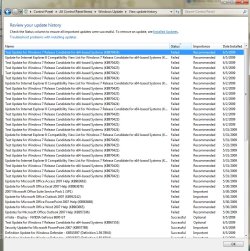
thanks so much for the help. I'm gonna try this out. But I've attached the screenshot of the windows update window report. Pls. see.
 

Attachments

  • win7updateerror.jpg
    win7updateerror.jpg
    215.4 KB · Views: 312

My Computer

OS
Windows XP, Vista, & Ubuntu
Calvin, That sure looks a mess, the most problem is the test updates from ms, Thoose are only recomended you don't need to install them you need to find a setting that says let me choose what and when to install updates.
 

My Computer

Computer Manufacturer/Model Number
Gateway GT5692
OS
Windows 7 Ulti. x64
CPU
AMD Phenom 8450 triple-core 2.10 ghz
Memory
4GB
Graphics Card(s)
ATI Radion HD 3200
Monitor(s) Displays
Gateway FPD1775W
Screen Resolution
1280x720
Hard Drives
465.6613 Gibibytes
Hi myzr7, thanks so much. It worked. The update doesn't install anymore. Well I guess this thread is solved. in a way. But I'd still like to ask if anyone else knows why I'm getting errors with those updates. Im guessing these are drivers-since they refer to the processor. I'm posting my specs just in case it does have something to do with them:

Intel DP35Dp motherboard
Intel Quad Core 2.4ghz
4GB ram 800mhz
1.3TB HD (separated, 2X500GB(seagate), 1X120seagate IDE, 1X160 Samsung, 1X40maxtor)
Nvidia 8600GT 512mb
additional firewire PCI card
pinnacle PCTV 9400(old)
logitech webcam
Genius multimedia keyboard/mouse
graphire wacom tablet
Samsung lightscribe DVD RW drive

I have a strong feeling that it's got something to do with hardware.

Anyway, thanks again to everyone.
 

My Computer

OS
Windows XP, Vista, & Ubuntu
update faill

calvinstein

Hey

You you the failures all started happening right after you updated the nvidia driver. Everything since then has had problems right?

Ken
 

My Computer

Computer Manufacturer/Model Number
HP Pavillion dv-7 1005 Tx
OS
Win 8 Release candidate 8400
CPU
[email protected]
Memory
4 gigs
Graphics Card(s)
Nvidia 9600M
Sound Card
HD built-in
Monitor(s) Displays
17" Wxga
Screen Resolution
1440x900
Cooling
none
Internet Speed
45Mb down 5Mb up
Calvin, Glad that you have had some success with your problems, I agree with Ken take a look at where in the list the fails started happing. Also is that Copy of Office activated? I have do not have office so I have not got those updates and am just supposing that may be a place to look also. .. lm
 

My Computer

Computer Manufacturer/Model Number
Gateway GT5692
OS
Windows 7 Ulti. x64
CPU
AMD Phenom 8450 triple-core 2.10 ghz
Memory
4GB
Graphics Card(s)
ATI Radion HD 3200
Monitor(s) Displays
Gateway FPD1775W
Screen Resolution
1280x720
Hard Drives
465.6613 Gibibytes
It's probably the Test update from microsoft that did it. Those are meant to cause problems more or less so microsoft can get info about how w7 is dealing with it.
 

My Computer

OS
7264x64/7260x86
I experienced the same thing although my video driver failure was a 9800gt nvidia driver update. I then experienced failures in the RPC service, followed by the update service, and last but not least errors from sqmapi.dll and so on. Finally had to reinstall Win7. I hid the nvidia update and have not experienced any system failures since. LOL and holding my breath. Glad to hear that you got yours going again without having to re-install.
 

My Computer

Computer Manufacturer/Model Number
Systemax N2000 Gaming PC
OS
Windows 7 Ultimate x64
CPU
Q6600 @2.4ghz (G0 stepping)
Motherboard
XFX nforce 680i LT
Memory
8 gb OCZ vista essential sli PC-6400
Graphics Card(s)
Dual 9800gt in SLI mode
Sound Card
Integrated 8.1 High Definition Audio
Monitor(s) Displays
Dual Sceptre x246w 24 inch monitors
Screen Resolution
1920 x 1200 each monitor
Hard Drives
500 GB SATA II / 7500 rpm
PSU
Cooler Master Real Power Pro 1250W
Case
N2000 server tower
Cooling
Thermaltake Bigwater 760 is
Keyboard
MS Intelitype 6000 v2.0
Mouse
MS Intelipoint 6000
Internet Speed
Wi-power 1.5GB up / 512k down
Other Info
Windows 7 Ultimate x64, Windows 7 Pro x64, Windows Home Premium X86, Windows XP pro, Windows Home Server x86, Ubuntu 10.4 x86 and x64, Ubuntu server 10.4, SQL Server 2005, MySQL 5.0
Back
Top