Windows 7 update problem

Just married

New member
Member
VIP
Local time
5:30 AM
Messages
96
I am using Windows 7 Pro. I believe that windows update is a fine tool, however for the past 4 days or so after a series of updates, every time I turn it off at night or anytime then turn it back the next day or 2 hours later it gets past my boot password then up comes a message: "Windows is configuring Windows update then just below that it says 0% completed then below that Do Not turn off your computer" 5 to 8 minutes later the computer goes ahead and boots, the 0% never changes, it just goes on into windows. The last four times I have shut the computer off I get 4 updates.

This has never occured before, I have allways let windows update do it's job. This is getting a bit boring. Does anyone have a solution.
 

My Computer

Computer Manufacturer/Model Number
assemble my own
OS
Windows 7 Pro 64 bit
CPU
AMD
Motherboard
ASUS
Memory
6GB
Graphics Card(s)
ON BOARD
Sound Card
ON BOARD
Monitor(s) Displays
HP FALT SCREEN 21"
Hard Drives
ONE 1.5TB, ONE .5TB
PSU
500w
Case
NEW TO FIT
Cooling
WGAT CANE WUTG CASE
Same thing has been happening with my Windows 7 Ultimate system for the last 3 days. Each time I shut it down it goes through the "4 updates" ritual and each time I fire it up it says "Configuring Windows Update....Do not turn off your computer" for 2-3 minutes before loading the system. Otherwise the system appears to be functioning normally.
 

My Computer

OS
Windows 7 64-bit
and again...,

...I am having the same problems in fact this latest is the third attempt.

4 updates are downloaded in the usual manner then when turning on the computer again either later on or a day or so after and I get the message that the Update Installation has failed . the PC is reverting then it closes down.

First time I have ever experienced this sort of issue:confused: and ideas or is it a MS problem?
 

My Computer

Computer Manufacturer/Model Number
Custom Built
OS
Windows 7 Pro 64-Bit
CPU
INTEL Pentium D950 (2x3.4GHZ) 800mhz FSB/2 x 2MB Cache
Motherboard
ASUS P5WD2 Premuim: Dual Core DDR2, 16VGA - 3 PCI/2 PCI-EX
Memory
4GB DDR2-533 PC4200
Graphics Card(s)
ATI Radeon HD3800 Series
Sound Card
Realtek ALC882D 8 Channel
Monitor(s) Displays
No1 = ACER P223w / No2 = ACER A1751
Hard Drives
Main 250GB Weston Digital 5400rpm (XP sp3)
Back-Up 750GB Weston Digital 'Caviar Green' 7400rpm
Windows7 64Bit on a separate 750mb Weston Digital
PSU
Silent 500 Watts + 120mm Fan
Cooling
2x120mm case fans, 100mm CPU fan
Keyboard
Logitec LX710
Mouse
Logitec Laser
Internet Speed
4.8Mbps
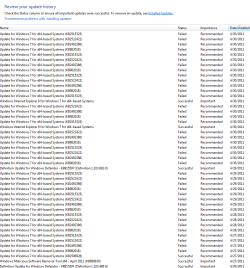
I had the same problems. Went to Windows update under Programmes and the same 4 updates were offered there. This way they installed without a problem. Looking at the update history I saw the same updates marked with 'failed'.
Hope this helps.
 

My Computer

Computer Manufacturer/Model Number
Built to order
OS
win 7 64b ultimate
CPU
i7
Motherboard
asus
Memory
6Gb
Graphics Card(s)
260 gtx
Sound Card
on board
Monitor(s) Displays
nec isp 23iwmi
Screen Resolution
1920 * 1080
Hard Drives
1 320 gb
2 1 Tb
PSU
cooler master
Case
cooler master
Cooling
Zalman 9900
Keyboard
chery
Mouse
microsoft
Internet Speed
adsl
Same here.

repeated attempts to update with repeated failed logs.

And, it seems to correlate with very poop performance of my W7pro64bitOS. Driving me nuts?
 

Attachments

  • failed update.PNG
    failed update.PNG
    20.5 KB · Views: 303

My Computer

OS
7 pro 64bit SP1
CPU
Intel core 2 extreme [email protected]
Memory
8
Graphics Card(s)
NVIDIA Quadro 3700
Hard Drives
128Gb SSD (OS)
300Gb 7200
I went into Windows Update and found that the update ending in '18' and three others had failed for five consecutive days. I selected all the updates EXCEPT '18' and then ran updated with success. Rebooted and went through the manual step again just for '18' and it, too, was successful.
 

My Computer

Computer Manufacturer/Model Number
AVA Direct
OS
Windows 7 64 bit Home Premium
CPU
i7-930
Motherboard
Asus P6X58D-E
Memory
Corsair 12 GB
Graphics Card(s)
Nvidia 250 GTS
Sound Card
onboard
Monitor(s) Displays
NEC 2490
Screen Resolution
1920x 1280
Hard Drives
Samsung F3 1TB x2
Seagate 500GB
PSU
Seasonic 650
Case
Antec 300
Cooling
Scythe Mugen Rev B
Keyboard
MS Natural Ergonomic 4000 v1.0
Mouse
Logitech Wheelman
Internet Speed
Cable
I went into Windows Update and found that the update ending in '18' and three others had failed for five consecutive days. I selected all the updates EXCEPT '18' and then ran updated with success. Rebooted and went through the manual step again just for '18' and it, too, was successful.

That worked for me and solved the problem. Thank you and the others who contributed to this thread. So that I can learn from the experience: how did you work out that this is the correct order to install these updates ?
 
Last edited:

My Computer

OS
Windows 7 64-bit
i had the same problem with the 4 updates not completing installation. found an alternate solution after googling the error code.

found a post that reccommended doing a 'clean' restart by running msconfig, selecting the 'services' tab, hiding all the microsoft services via the provided tick box, then disabling the remainder & rebooting. ran windows update, all installed fine, ran msconfig again and set the startup back to normal & rebooted again..
 

My Computer

Computer type
PC/Desktop
Computer Manufacturer/Model Number
Custom build Nanu by 3SX
OS
Win 7 ultimate x64 sp1
CPU
Intel i7 4 core 3770k ivy bridge o/c to 4.2ghz
Motherboard
Asus p8z77-i Deluxe
Memory
16 GB
Graphics Card(s)
Nvidia geforce GTX650
Sound Card
Realtek on mb
Monitor(s) Displays
24in. lcd/led
Screen Resolution
1920x1080
Hard Drives
128GB Kingston SSD
500GB seagate maximus xt hybrid
500GB hitachi HD
500GB external WD Passport usb3
PSU
Silverstone 450 watt
Case
Silverstone FT03 Black Fortress
Cooling
Water cooler
Keyboard
Logitech wireless kbd/mouse mk300
Mouse
Logitech wireless kbd/mouse mk300
Internet Speed
8mb adsl (actuall speed is around 6mb)
Other Info
Asus DSL-N55U wireless router
SONY BC-5850H 6X BLURAY writer
OUTPOST Security Suite
I went into Windows Update and found that the update ending in '18' and three others had failed for five consecutive days. I selected all the updates EXCEPT '18' and then ran updated with success. Rebooted and went through the manual step again just for '18' and it, too, was successful.


Thanks for this and I have exactly the same issue with ****18 with 25/22/86 being the others that had failed along with MS VisualC++ 2008 Service Pack 1 Redistributable Package (giving it the full title).

I followed the advice given and have at long last managed to get them all installed. I just have Explorer9 which 'Failed' but I don't want anyway.

Grateful thanks to all who responded.
 

My Computer

Computer Manufacturer/Model Number
Custom Built
OS
Windows 7 Pro 64-Bit
CPU
INTEL Pentium D950 (2x3.4GHZ) 800mhz FSB/2 x 2MB Cache
Motherboard
ASUS P5WD2 Premuim: Dual Core DDR2, 16VGA - 3 PCI/2 PCI-EX
Memory
4GB DDR2-533 PC4200
Graphics Card(s)
ATI Radeon HD3800 Series
Sound Card
Realtek ALC882D 8 Channel
Monitor(s) Displays
No1 = ACER P223w / No2 = ACER A1751
Hard Drives
Main 250GB Weston Digital 5400rpm (XP sp3)
Back-Up 750GB Weston Digital 'Caviar Green' 7400rpm
Windows7 64Bit on a separate 750mb Weston Digital
PSU
Silent 500 Watts + 120mm Fan
Cooling
2x120mm case fans, 100mm CPU fan
Keyboard
Logitec LX710
Mouse
Logitec Laser
Internet Speed
4.8Mbps
Update failure

Hi All

I also had the same problem.

I applied the updates one at a time, this involved two restarts, all were successful.

Perhaps I was just lucky, or maybe there is a conflict between updates.

Abedrax
 

My Computer

OS
windows 7 ultimate 64 bit
CPU
Intel Celeron E3300 2.5GHz Dual core
Motherboard
ASUS P5G41C-M LX
Memory
4GB DDR3
Graphics Card(s)
Onboard Intel G41 Express Chipset
Monitor(s) Displays
AOC 2219 22" WS
Screen Resolution
1680 x 1050
Hard Drives
Maxtor 500GB sata
Seagate 500GB Ext
Internet Speed
20MG
Had the same problem. Had to update one at a time.
 

My Computer

Computer type
Laptop
Computer Manufacturer/Model Number
Dell Latitude E6530
OS
Windows 7 64bit
CPU
Intel I7-3520 2.90 GHz
Memory
4 GB
Graphics Card(s)
nVidia NVS 5200M
windows update problem

The reply by Carolyn solved my problem with Windows update. Following hat lead led me to over 20 attempts to update two updates Used the built in troublshooter that fixed the problem the updates then went just fine. I have learned something, for me who recently truned 39 for the 42nd time.
 

My Computer

Computer Manufacturer/Model Number
assemble my own
OS
Windows 7 Pro 64 bit
CPU
AMD
Motherboard
ASUS
Memory
6GB
Graphics Card(s)
ON BOARD
Sound Card
ON BOARD
Monitor(s) Displays
HP FALT SCREEN 21"
Hard Drives
ONE 1.5TB, ONE .5TB
PSU
500w
Case
NEW TO FIT
Cooling
WGAT CANE WUTG CASE
Glad to hear that you were able to get that sorted :)
 

My Computer

Computer Manufacturer/Model Number
Dell Studio 15
OS
Windows 7 Ultimate 64 bit
Back
Top