Solved Windows 7 Update Problem

offgrid

New member
Local time
1:07 PM
Messages
9
Hello, I have recently done a re-install of Windows 7 on my laptop. When I try to check for updates I get the error message that windows cannot check for updates as service is not running. I have no luck in Task Manager trying to see if I can start this process, and the recommended restart doesn't help either.
This happened one other time but I can't recall how I resolved it?
Can this process be started from the CLI ? All help appreciated.
 

Attachments

  • capture 26 12.PNG
    capture 26 12.PNG
    15.8 KB · Views: 32

My Computer

Computer type
Laptop
Computer Manufacturer/Model Number
Lenovo
OS
Windows 7 Home Professional 64 bit
Memory
4 GB
Hard Drives
320 GB HDD
Browser
Opera
Hi offgrid-

Go to Control Panel, Administrative Tools

Click on Services

Select the Windows Updater and click on Restart this service.

Does that help?
 

My Computer

Computer type
Laptop
Computer Manufacturer/Model Number
Dell M6500 Precision Work Station
OS
Windows 7 Pro SP1 64 bit
Memory
8 GB
Screen Resolution
1920x
Internet Speed
30 Mbps
Antivirus
Norton Security
Browser
IE 11
Hi offgrid-

Go to Control Panel, Administrative Tools

Click on Services

Select the Windows Updater and click on Restart this service.

Does that help?

Thank you for the response, unfortunately this doesn't seem to work either. I followed the steps as outlined but still get the same error message.
I am still wondering if it can be started from the command line?
Or is there a repair tool that someone has experience with that may work?
 

My Computer

Computer type
Laptop
Computer Manufacturer/Model Number
Lenovo
OS
Windows 7 Home Professional 64 bit
Memory
4 GB
Hard Drives
320 GB HDD
Browser
Opera
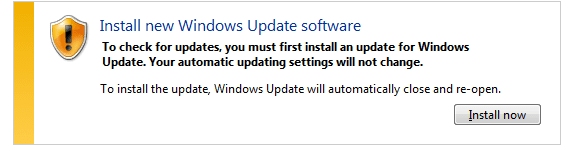
Update, I downloaded the Complete Internet repair Tool and ran it. Now the update service is running however I now get this message. When I try to download this update I only get another error message.
 

Attachments

  • Capture.PNG
    Capture.PNG
    14.5 KB · Views: 24

My Computer

Computer type
Laptop
Computer Manufacturer/Model Number
Lenovo
OS
Windows 7 Home Professional 64 bit
Memory
4 GB
Hard Drives
320 GB HDD
Browser
Opera
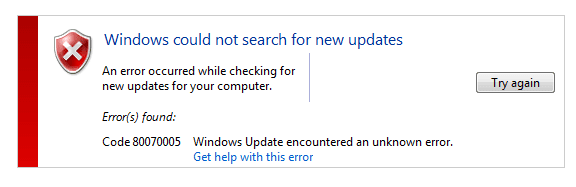
Here is the error message. All help appreciated.
 

Attachments

  • Capture02.PNG
    Capture02.PNG
    14.6 KB · Views: 23

My Computer

Computer type
Laptop
Computer Manufacturer/Model Number
Lenovo
OS
Windows 7 Home Professional 64 bit
Memory
4 GB
Hard Drives
320 GB HDD
Browser
Opera
I found this possible solution from Microsoft-

1. Download and install SubInACL from the Microsoft Download Center http://www.microsoft.com/download/en/details.aspx?displaylang=en&id=23510
2. Open Notepad (Click Start, type Notepad, and then press Enter)
3. Copy and paste the following text into Notepad

Set OSBIT=32
IF exist "%ProgramFiles(x86)%" set OSBIT=64
set RUNNINGDIR=%ProgramFiles%
IF %OSBIT% == 64 set RUNNINGDIR=%ProgramFiles(x86)%
subinacl /subkeyreg "HKEY_LOCAL_MACHINE\SOFTWARE\Microsoft\Windows\CurrentVersion\Component Based Servicing" /grant="nt service\trustedinstaller"=f

4. Close Notepad, and make sure you save it. When you save the text, make sure that you set
Save as Type to “All Files (*.*)”. Very important! The file name needs end with .CMD. For example: fix.cmd. Lastly, when you save the file, make sure you save it at a location where it will be easy for you to find.
5. Right click on the file that you just saved in step #4, and select “Run as Adminstrator”
 

My Computer

Computer type
Laptop
Computer Manufacturer/Model Number
Dell M6500 Precision Work Station
OS
Windows 7 Pro SP1 64 bit
Memory
8 GB
Screen Resolution
1920x
Internet Speed
30 Mbps
Antivirus
Norton Security
Browser
IE 11
offgrid. The message you got in your Post #1 is typical of a AuthCab problem not updating. To fix the problem follow these directions exactly.

"Windows update cannot currently check for updates, because the service is not running, You may need to restart your computer".

This is exactly the message you get when the AuthCab has expired. Doing the following seems to fix it:

Open Windows Update & see when the last update was installed in Update History

The date on the computer has to be reset & to do that follow this:

To reset the date on the computer Right Click on the Clock at bottom RH corner of the screen, select Change Date & Time Settings, when that opens click on the Internet Time tab, Then select Change Settings, then untick Synchronise with Internet Time Server, be sure to tick OK, then select the Date & Time tab, Then select Change Date & Time & set the date back about 1 day before the last Update listed in Update History.

Then reboot the computer & then run Check for Updates in Windows Update, it should update to the new date. In some cases you may need to try an earlier or later date if it doesn't work.

Then reboot, reset Internet time Synch, change computer date to today's date, re run Check for Updates in Windows Update & it should check for Updates & came back with Windows is up to date, with the latest updates installed.

This method should retain all your Update History as well.

>
The reason for this procedure, is that Windows accesses an AuthCab during the start-up procedure that Authorises access to the Windows Update download site.

By running the repair I listed above, resetting the computer date & rebooting provides access to Update site at which MS have now reset the expiry of that AuthCab which gets installed on your computer, so it can now download & install Updates. Of course it is then necessary to reset the date on the computer & re run Check for Updates to bring it completely up to date.

 

My Computer

Computer type
PC/Desktop
Computer Manufacturer/Model Number
Self built using existing case
OS
Windows 7 Home Premium 64 bit sp1
CPU
Intel i5 3570 3.4Ghz Ivy Bridge SKT 1155 quad core
Motherboard
Gigabyte Z77-HD3 SKT 1155 2xSata 3, 4x USB 3.0
Memory
G-Skill Rip Jaws 16Gb (8x2) DDR3 -1600 PC3 12800 CL 10 red
Graphics Card(s)
Gigabyte NVIDIA GT610 1Gb DDR3 810/1200 PCI-E 2.0 Silent
Sound Card
NVIDIA High Definition & Realtech High Definition Audio
Monitor(s) Displays
2 x Philips 226V4L 16:9 aspect ratio
Screen Resolution
1920 x 1080 HD
Hard Drives
Samsung 840 Pro 256gb SSD, SATA 3.
Hitachi Touro Portable 1tb, USB 3.0 HDD used for image b/ups.
PSU
Corsair VS450
Case
Codeng
Cooling
PSU fan & CPU fan
Keyboard
Logitech
Mouse
Logitech Wireless trackball M570
Internet Speed
Wireless 3G. 3mg down & 550kb up.
Antivirus
Bitdefender Internet Security 2020
Browser
Opera (Current Version) & Firefox
Other Info
MS Office 2013 Pro. Davis weather station software. MGE Nova 600 avr UPS.
@ Ranger4
Thank you for the very informative and helpful post, much appreciated.

Edit; This explanation makes a lot of sense, since my install disk is the original set of 3 that came with the machine.
 

My Computer

Computer type
Laptop
Computer Manufacturer/Model Number
Lenovo
OS
Windows 7 Home Professional 64 bit
Memory
4 GB
Hard Drives
320 GB HDD
Browser
Opera
@ wither 2, Thank you for this, I haven't tried it as a shutdown and restart seems to have cured the problem, after running the
Complete internet repair tool. Not sure exactly what worked but it is now updating.
 

My Computer

Computer type
Laptop
Computer Manufacturer/Model Number
Lenovo
OS
Windows 7 Home Professional 64 bit
Memory
4 GB
Hard Drives
320 GB HDD
Browser
Opera
Did that fix the problem?.
 

My Computer

Computer type
PC/Desktop
Computer Manufacturer/Model Number
Self built using existing case
OS
Windows 7 Home Premium 64 bit sp1
CPU
Intel i5 3570 3.4Ghz Ivy Bridge SKT 1155 quad core
Motherboard
Gigabyte Z77-HD3 SKT 1155 2xSata 3, 4x USB 3.0
Memory
G-Skill Rip Jaws 16Gb (8x2) DDR3 -1600 PC3 12800 CL 10 red
Graphics Card(s)
Gigabyte NVIDIA GT610 1Gb DDR3 810/1200 PCI-E 2.0 Silent
Sound Card
NVIDIA High Definition & Realtech High Definition Audio
Monitor(s) Displays
2 x Philips 226V4L 16:9 aspect ratio
Screen Resolution
1920 x 1080 HD
Hard Drives
Samsung 840 Pro 256gb SSD, SATA 3.
Hitachi Touro Portable 1tb, USB 3.0 HDD used for image b/ups.
PSU
Corsair VS450
Case
Codeng
Cooling
PSU fan & CPU fan
Keyboard
Logitech
Mouse
Logitech Wireless trackball M570
Internet Speed
Wireless 3G. 3mg down & 550kb up.
Antivirus
Bitdefender Internet Security 2020
Browser
Opera (Current Version) & Firefox
Other Info
MS Office 2013 Pro. Davis weather station software. MGE Nova 600 avr UPS.
Did that fix the problem?.

I actually never had to use it, I ran the Complete internet repair tool and after a shutdown and restart it seems to be working. It has downloaded and installed 11 or 12 updates. Not sure why or how or what actually cured it??:cool:
 

My Computer

Computer type
Laptop
Computer Manufacturer/Model Number
Lenovo
OS
Windows 7 Home Professional 64 bit
Memory
4 GB
Hard Drives
320 GB HDD
Browser
Opera
Back
Top