Solved Windows 7 Update Problems

themorus

New member
Member
Local time
4:38 PM
Messages
64
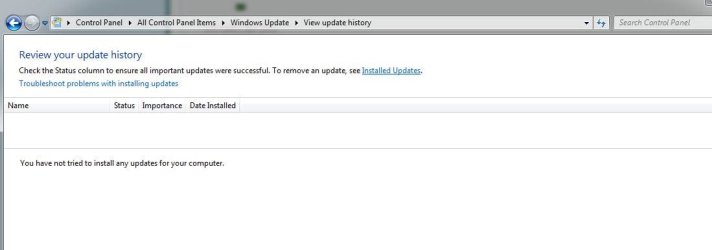
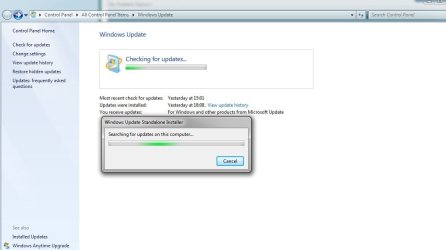
3 days now checking for updates and nothing, I even reinstalled a reinstall and again nothing. When I run a standalone update it hangs for hours searching for updates for PC.

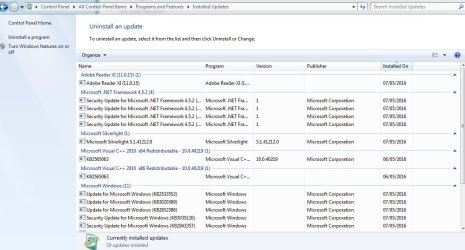
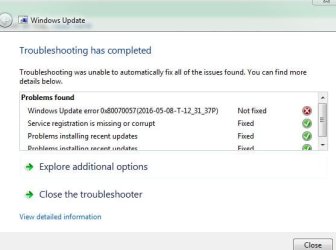
My windows 7 will not update it's been hanging searching for updates on a clean install for 3 days so I ran the windows diagnostic update utility and below is what it came back with, any ideas?
 

Attachments
  • Windows.JPG
    Windows.JPG
    49.1 KB · Views: 2
  • Windows 1.JPG
    Windows 1.JPG
    31.7 KB · Views: 1
  • Windows 2.JPG
    Windows 2.JPG
    99.8 KB · Views: 1
  • Windows 3.JPG
    Windows 3.JPG
    31.6 KB · Views: 30
Last edited by a moderator:

My Computer

Computer type
PC/Desktop
Computer Manufacturer/Model Number
Asus
OS
10 Pro and 8.1 Home
CPU
Intel® Core™i5 Quad Core Processor i5-4570 (3.2GHz) 6M
Motherboard
ASUS® H81M-PLUS: Micro-ATX, LG1150, USB 3.0, SATA 6GBs
Memory
8GB KINGSTON HYPER-X FURY DUAL-DDR3 1600MHz, X.M.P
Graphics Card(s)
1GB AMD RADEON™ R7 250 DDR5 - DVI,HDMI,VGA - DX® 11
Sound Card
ONBOARD 6 CHANNEL (5.1) HIGH DEF AUDIO
Monitor(s) Displays
Samsung
Screen Resolution
1920x1080 pixels
Hard Drives
2 240GB KINGSTON V300 SSD, SATA 6 Gb (450MB/R, 450MB/W)
Hitachi HDS721050CLA360 SCSI Disk Device
PSU
CORSAIR 350W VS SERIES™ VS-350 POWER SUPPLY
Case
PCS DEFENSOR 7203B BLACK CASE
Cooling
INTEL STANDARD CPU COOLER
Keyboard
LOGITECH K200
Mouse
LOGITECH M180
Internet Speed
250mbs
Antivirus
Emsisoft
Browser
Chrome 64bit

My Computer

Computer type
PC/Desktop
Computer Manufacturer/Model Number
Custom assembled by me :}
OS
Win-7-Pro64bit 7-H-Prem-64bit
CPU
i7-5930K 2nd i9-9940x both water blocked VRM's too
Motherboard
ASUS SABERTOOTH X99 2nd ASUS x299 Apex
Memory
Trident-z 3200C14 2nd Trident-z 3600C16
Graphics Card(s)
EVGA 1080ti ftw3 2nd Titan Xp both water blocked
Sound Card
Built-in Realtek
Monitor(s) Displays
1-AOC G2460PG 24"G-Sync 144Hz/ 2nd 1-ASUS VG248QE 24" 144Hz
Screen Resolution
1920 x 1080 144Hz
Hard Drives
2-Samsung M.2 Evo & Evo Plus
2-Samsung 850 EVO 500GB SSD's/ 3-2.5 W.D. Black 1tb-&3-1tb/3-3.5 WD Black 1tb hdd's
PSU
EVGA SuperNOVA 1000-P2 2nd 1200-P2
Case
2-Corsair Obsidian Series 450D Black ATX Mid Tower
Cooling
Custom water loops
Keyboard
Logitech G710+/ 2nd Logitech G910
Mouse
2-RedDragon M901 Perdition 16400 dpi Gaming mouse = wired
Internet Speed
Comcast Ping 19ms 89.31mbps download speed 6.12mbps upload
Antivirus
Malwarebytes Pro/ Superantispyware Pro
Browser
FireFox & Pale moon
Other Info
2nd ASUS X299 Apex/Intel i9-9940x with Custom water loop/7H-Prem-x64/Corsair 450D case/Ram Trident-z 3600C16 4x8gb / Samsung970Evo plus 500gb SSD/Dual ssd EZ swap evo/PSU EVGA SuperNova 1200w-P2 80+Platinum/GPU Titan Xp /8-ML-140 on push-pull on 2-280GTX rads
Sorry for some reason this thread got mixed up with another but feel free to read below if it helps!

The first thing could be to try running scandisk, checking your HDD or RAM for errors using Windows or alternative software and then maybe looking at some of the suggestions below.

From your screenshots it looks like you installed updates yesterday but have you tried following my suggestions in my third post or those of any of the other contributors? I don't think you need to reinstall Windows again but just keep trying and you will get there. Much of what I needed was in this link which I didn't actually initially read properly: https://www.winhelp.us/reinstall-windows-update.html

I noticed that you don't appear to have the latest Windows update agent (unless this is missing from your screenshot). Why not try two things first:
Install the relevant package from here: https://support.microsoft.com/en-us/kb/949104 Then run this: https://support.microsoft.com/en-us/gp/windows-update-issues/en-us or if you are patient just go through bit by bit what I did in my third post or what is suggested in the first link on this post.

As well as frequently restarting Windows when prompted when Windows Update is running and your wifi connection is on, disconnect wifi and see if new updates come up as this worked for me. It may also help to experiment with Windows update settings until you get a result. There is not always a logic to this as you can see. There may possibly be issues of low bandwidth. Get back to us with some feedback, hopefully positive!

P.S. I am taking for granted that your Windows 7 edition has SP1 already installed. I also noticed that you have an Asus motherboard so it is worth your reading this article: Microsoft half-bricks Asus Windows 7 PCs with UEFI boot glitch • The Register

If you are on automatic updates it may be something to do with Windows 10 upgrade which you should block using GWX Control Panel: Ultimate Outsider - Software Downloads
 
Last edited:

My Computer

Computer type
PC/Desktop
OS
Windows 7 HP & Pro 64 bit

My Computer

Computer type
PC/Desktop
Computer Manufacturer/Model Number
Asus
OS
10 Pro and 8.1 Home
CPU
Intel® Core™i5 Quad Core Processor i5-4570 (3.2GHz) 6M
Motherboard
ASUS® H81M-PLUS: Micro-ATX, LG1150, USB 3.0, SATA 6GBs
Memory
8GB KINGSTON HYPER-X FURY DUAL-DDR3 1600MHz, X.M.P
Graphics Card(s)
1GB AMD RADEON™ R7 250 DDR5 - DVI,HDMI,VGA - DX® 11
Sound Card
ONBOARD 6 CHANNEL (5.1) HIGH DEF AUDIO
Monitor(s) Displays
Samsung
Screen Resolution
1920x1080 pixels
Hard Drives
2 240GB KINGSTON V300 SSD, SATA 6 Gb (450MB/R, 450MB/W)
Hitachi HDS721050CLA360 SCSI Disk Device
PSU
CORSAIR 350W VS SERIES™ VS-350 POWER SUPPLY
Case
PCS DEFENSOR 7203B BLACK CASE
Cooling
INTEL STANDARD CPU COOLER
Keyboard
LOGITECH K200
Mouse
LOGITECH M180
Internet Speed
250mbs
Antivirus
Emsisoft
Browser
Chrome 64bit
Sorry for some reason this thread got mixed up with another but feel free to read below if it helps!

The first thing could be to try running scandisk, checking your HDD or RAM for errors using Windows or alternative software and then maybe looking at some of the suggestions below.

From your screenshots it looks like you installed updates yesterday but have you tried following my suggestions in my third post or those of any of the other contributors? I don't think you need to reinstall Windows again but just keep trying and you will get there. Much of what I needed was in this link which I didn't actually initially read properly: https://www.winhelp.us/reinstall-windows-update.html

I noticed that you don't appear to have the latest Windows update agent (unless this is missing from your screenshot). Why not try two things first:
Install the relevant package from here: https://support.microsoft.com/en-us/kb/949104 Then run this: https://support.microsoft.com/en-us/gp/windows-update-issues/en-us or if you are patient just go through bit by bit what I did in my third post or what is suggested in the first link on this post.

As well as frequently restarting Windows when prompted when Windows Update is running and your wifi connection is on, disconnect wifi and see if new updates come up as this worked for me. It may also help to experiment with Windows update settings until you get a result. There is not always a logic to this as you can see. There may possibly be issues of low bandwidth. Get back to us with some feedback, hopefully positive!

P.S. I am taking for granted that your Windows 7 edition has SP1 already installed. I also noticed that you have an Asus motherboard so it is worth your reading this article: Microsoft half-bricks Asus Windows 7 PCs with UEFI boot glitch • The Register

If you are on automatic updates it may be something to do with Windows 10 upgrade which you should block using GWX Control Panel: Ultimate Outsider - Software Downloads
Thanks for the help.
 

My Computer

Computer type
PC/Desktop
Computer Manufacturer/Model Number
Asus
OS
10 Pro and 8.1 Home
CPU
Intel® Core™i5 Quad Core Processor i5-4570 (3.2GHz) 6M
Motherboard
ASUS® H81M-PLUS: Micro-ATX, LG1150, USB 3.0, SATA 6GBs
Memory
8GB KINGSTON HYPER-X FURY DUAL-DDR3 1600MHz, X.M.P
Graphics Card(s)
1GB AMD RADEON™ R7 250 DDR5 - DVI,HDMI,VGA - DX® 11
Sound Card
ONBOARD 6 CHANNEL (5.1) HIGH DEF AUDIO
Monitor(s) Displays
Samsung
Screen Resolution
1920x1080 pixels
Hard Drives
2 240GB KINGSTON V300 SSD, SATA 6 Gb (450MB/R, 450MB/W)
Hitachi HDS721050CLA360 SCSI Disk Device
PSU
CORSAIR 350W VS SERIES™ VS-350 POWER SUPPLY
Case
PCS DEFENSOR 7203B BLACK CASE
Cooling
INTEL STANDARD CPU COOLER
Keyboard
LOGITECH K200
Mouse
LOGITECH M180
Internet Speed
250mbs
Antivirus
Emsisoft
Browser
Chrome 64bit
Hi,
Very good thanks for the update :)
Cheers.
 

My Computer

Computer type
PC/Desktop
Computer Manufacturer/Model Number
Custom assembled by me :}
OS
Win-7-Pro64bit 7-H-Prem-64bit
CPU
i7-5930K 2nd i9-9940x both water blocked VRM's too
Motherboard
ASUS SABERTOOTH X99 2nd ASUS x299 Apex
Memory
Trident-z 3200C14 2nd Trident-z 3600C16
Graphics Card(s)
EVGA 1080ti ftw3 2nd Titan Xp both water blocked
Sound Card
Built-in Realtek
Monitor(s) Displays
1-AOC G2460PG 24"G-Sync 144Hz/ 2nd 1-ASUS VG248QE 24" 144Hz
Screen Resolution
1920 x 1080 144Hz
Hard Drives
2-Samsung M.2 Evo & Evo Plus
2-Samsung 850 EVO 500GB SSD's/ 3-2.5 W.D. Black 1tb-&3-1tb/3-3.5 WD Black 1tb hdd's
PSU
EVGA SuperNOVA 1000-P2 2nd 1200-P2
Case
2-Corsair Obsidian Series 450D Black ATX Mid Tower
Cooling
Custom water loops
Keyboard
Logitech G710+/ 2nd Logitech G910
Mouse
2-RedDragon M901 Perdition 16400 dpi Gaming mouse = wired
Internet Speed
Comcast Ping 19ms 89.31mbps download speed 6.12mbps upload
Antivirus
Malwarebytes Pro/ Superantispyware Pro
Browser
FireFox & Pale moon
Other Info
2nd ASUS X299 Apex/Intel i9-9940x with Custom water loop/7H-Prem-x64/Corsair 450D case/Ram Trident-z 3600C16 4x8gb / Samsung970Evo plus 500gb SSD/Dual ssd EZ swap evo/PSU EVGA SuperNova 1200w-P2 80+Platinum/GPU Titan Xp /8-ML-140 on push-pull on 2-280GTX rads
Back
Top