
Hi
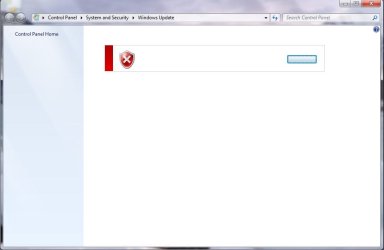
The Windows 7 Update screen is nearly blank and unusable.
I have attached an screen shot of the window as this is the easiest way to show the error.
I have searched the internet and tried a couple of fixes including a Microsoft Fix in bot Normal and Agressive mode, plus re-registering 3 files as suggested on another site.
If anyone has an idea how to resolve this I would appreciate your input.
Oh, I suppose this is important:
The actual copy of Windows 7 is French, as the laptop was purchased in France. the version of windows is Windows 7 Home Premium 64 Bit. I have used Vistalizator to install the English language pack using the Internal Mode for installation. The installed didn't work the first time, so installed in Safe Mode, which worked. I have uninstalled the english Pack and then reinstalled it with windows running normally. The install completed without any problems.
Windows Update works fine if i swap back to French, but this is not really what I want to do everytime.
The Windows 7 Update screen is nearly blank and unusable.
I have attached an screen shot of the window as this is the easiest way to show the error.
I have searched the internet and tried a couple of fixes including a Microsoft Fix in bot Normal and Agressive mode, plus re-registering 3 files as suggested on another site.
If anyone has an idea how to resolve this I would appreciate your input.
Oh, I suppose this is important:
The actual copy of Windows 7 is French, as the laptop was purchased in France. the version of windows is Windows 7 Home Premium 64 Bit. I have used Vistalizator to install the English language pack using the Internal Mode for installation. The installed didn't work the first time, so installed in Safe Mode, which worked. I have uninstalled the english Pack and then reinstalled it with windows running normally. The install completed without any problems.
Windows Update works fine if i swap back to French, but this is not really what I want to do everytime.
Attachments
My Computer
- OS
- Windows 7
