Solved Windows 7 updates broken

BelGarion

New member
Local time
6:31 AM
Messages
35
Greetings. So, here is the story. Two days ago the house lost power. Something got messed up in the system and I backed up and am attempting to reinstall Windows 7. It installs, boots up, and I start on the upgrades. Sp 1 first, though oddly twice, a 13mb file, reboot, then a 87mb file, reboot, then all it shows are the Dec updates, once those are in, the Update Agent upgrades itself to 7.6.7600. 320 and after the reboot it breaks. Search for new updates, installing updates if it searches for installed updates, etc sit there doing nothing. For hours, maybe forever if I let it. Tried everything I can find, like setting my DNS to 8.8.8.8 and 8.8.4.4. Nothing has worked, can't even uninstall the update agent, it isn't listed in the Uninstall Updates list. Anyone know what is broken?
 

My Computer

Computer Manufacturer/Model Number
Self built
OS
Windows 7 x64
CPU
AMD Athlon 64 X2 3000+
Motherboard
Asus Crosshair II
Memory
4gb
Graphics Card(s)
nVidia 8600 GTS
Sound Card
SoundBlaster X-Fi Titanium
Monitor(s) Displays
LG L192WS 19" 16:10 1440x900 max
Hard Drives
Seagate 2Tb
Seagate 600gb
Go to Services - Windows Update - Manual.
Reboot

Download KB3172605
Install KB3172605
Reboot
Go to Services - Windows Update - Enable.
 

My Computers

System One System Two

  • Computer type
    PC/Desktop
    Computer Manufacturer/Model Number
    custom build
    OS
    Windows 7 HP 64
    CPU
    i5 6600K - 800MHz to 4200MHz
    Motherboard
    GA-Z170-HD3P
    Memory
    4+4G GSkill DDR4 3000
    Graphics Card(s)
    IG - Intel 530
    Monitor(s) Displays
    Samsung 226BW
    Screen Resolution
    1680x1050
    Hard Drives
    (1) -1 SM951 – 128GB M.2 AHCI PCIe SSD drive for Windows 7 and Lubuntu
    (2) -1 WD SATA 3 - 1T for Data
    (3) -1 WD SATA 3 - 1T for backup
    PSU
    Thermaltake 450W TR2 gold
    Keyboard
    Old and good Chicony mechanical keyboard
    Mouse
    Logitech mX performance - 9 buttons (had to disable some)
    Internet Speed
    500Mb/s
    Browser
    Firefox 64
    Other Info
    TinyWall firewall
  • Computer type
    Laptop
    System Manufacturer/Model Number
    Asus Q550LF
    OS
    Windows 7 Pro
    CPU
    i7-4500U 800MHz to 3.0GHz
    Motherboard
    Asus Q550LF
    Memory
    (4+4)G DDR3 1600
    Graphics Card(s)
    IG intel 4400 + NVIDIA GeForce GT 745M
    Sound Card
    Realtek
    Monitor(s) Displays
    LG Display LP156WF4-SPH1
    Screen Resolution
    1920 x 1080
    Hard Drives
    BX500 120G SSD for Windows and programs +
    1T HDD for data
    Internet Speed
    500 Mb/s
    Browser
    Firefox
    Other Info
    TinyWall firewall
Ok, and when I go to install KB3172605 it says it's not applicable to your computer and it restarts the Windows Update service even though it's still set to Manual. Oh and the file name is Windows6.1-KB3172605-x64.msu, so it is for my OS, Win 7 x64.
 
Last edited:

My Computer

Computer Manufacturer/Model Number
Self built
OS
Windows 7 x64
CPU
AMD Athlon 64 X2 3000+
Motherboard
Asus Crosshair II
Memory
4gb
Graphics Card(s)
nVidia 8600 GTS
Sound Card
SoundBlaster X-Fi Titanium
Monitor(s) Displays
LG L192WS 19" 16:10 1440x900 max
Hard Drives
Seagate 2Tb
Seagate 600gb
There are 2 updates to install, read reply #2 here. And I`ve never had to stop the service I just installed the 2 updates after a freash install and windows update works perfectly.

Windows Update will not update and I've tried multiple fixes

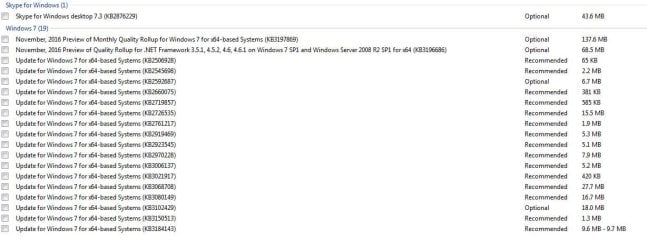
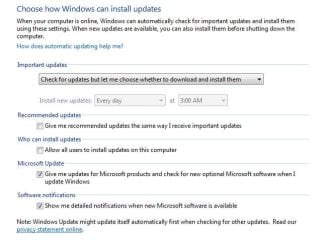
Here are some useless updates you can hide, and have your settings like this.
 

Attachments

  • Updates to avoid.JPG
    Updates to avoid.JPG
    80.4 KB · Views: 0
  • Windows Update Settings W7.JPG
    Windows Update Settings W7.JPG
    46.5 KB · Views: 16

My Computer

Computer type
PC/Desktop
Computer Manufacturer/Model Number
Skylake Special #666
OS
Windows 10 Pro x64
CPU
Intel Core i7 6700K
Motherboard
Asus Sabertooth Z170 Mark 1
Memory
GSkill TridentZ RGB 16GB 3600 16-16-16-36
Graphics Card(s)
EVGA GTX 980 Ti SC x2
Sound Card
Realtek High Definition
Monitor(s) Displays
AOC G2460PG
Screen Resolution
1920 x 1080 144Hz
Hard Drives
Samsung 860 Pro 256GB, Seagate Barracuda 4TB x2
PSU
EVGA 1000 P2, EVGA White Custom Braided Cables
Case
Corsair Vengeance C70 Gunmetal Black
Cooling
Corsair H100i v2, Corsair ML120 x2, Thermal Grizzly Kryonaut
Keyboard
Logitech G910 Orion Spectrum
Mouse
Logitech G700s
Internet Speed
Verizon Fios Quantum Gateway 75/75
Antivirus
Windows Defender, Malwarebytes Free 3.8.3
Browser
Chrome
Other Info
Corsair SP120 x4, LG Blu-ray Drive, Durabrand HT-395 100 Watt Dolby Digital Amp, Corsair H2100 Wireless 7.1 Headset
Ok, so, running though the fixes, installing KB3020369 did let me install KB3172605, but even after the final reset of Windows Update like the post said to do (Option 3), nope, even though I see the window in the picture meaning Windows Update got reset, it's still hanging there not doing anything when I click "Check for Updates", just the green bar sweeping left to right endlessly, and I just checked, Windows Update service is Started and it reset itself to Automatic (Delayed Start).

Spoke too soon, it just popped up with 144 important updates. Wee! I'll mark this solved if this manages to get updated completely. But, initially, thank you all!

Edit: Ok, so I will leave this as "Solved" since the problem here is solved, it updated just fine, started to pull stuff off the back up and the original problem, and why I reinstalled, returned. Explorer.exe froze up viewing the files, for several minutes. Someone in the Performance board said they had the same issue and it was a failing drive. So I have SeaTools running on the two Seagate drives (I got 4 drives, 3 data, one boot, two Seagate two Western Digital). Hopefully, if it is a failing drive, I'll find it so I can replace it. >.< Thanks again all for helping me get Windows Update working. I've typed out the instructions into a .txt file and saved that into the backup stuff so if it happens again I can fix it. >.<
 
Last edited:

My Computer

Computer Manufacturer/Model Number
Self built
OS
Windows 7 x64
CPU
AMD Athlon 64 X2 3000+
Motherboard
Asus Crosshair II
Memory
4gb
Graphics Card(s)
nVidia 8600 GTS
Sound Card
SoundBlaster X-Fi Titanium
Monitor(s) Displays
LG L192WS 19" 16:10 1440x900 max
Hard Drives
Seagate 2Tb
Seagate 600gb
Back
Top