
Hi,
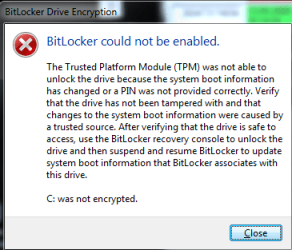
I upgraded my Vista to Windows 7. Turned off Bitlocker before upgrading. When I finally had Windows 7 on my computer I tried to turn on bitlocker again. It was not possible, so I decrypted the drive. Then I tried to encrypt the drive again but on reboot I got the attached message. Windows boots normally to the desktop but the drive is not encrypted. Anyone there who knows what to do to get bitlocker working again?
Thanks and greetings
Henning
I upgraded my Vista to Windows 7. Turned off Bitlocker before upgrading. When I finally had Windows 7 on my computer I tried to turn on bitlocker again. It was not possible, so I decrypted the drive. Then I tried to encrypt the drive again but on reboot I got the attached message. Windows boots normally to the desktop but the drive is not encrypted. Anyone there who knows what to do to get bitlocker working again?
Thanks and greetings
Henning
Attachments
My Computer
- OS
- Windows 7
