Windows 7 Upgrade & Partiioned Drive
Gregrocker,
I have a legit MS Windows 7 Upgrade Home Premium with key code.
I installed Vista first on my new HD because I thought I had to. And nothing in my W7 product lit or MS on-line suppoort say anything about the upgrade disc being bootable as a clean install (wish they had more documentation). After reading more on the subject it appears my assumptions were wrong. Even Dell Support helped me with the process, and never suggested I could do a clean install instead. Once I had a clean updated Vista OS with SP1 I ran the W7 Upgrade my choices were to run it as an 'Upgrade' or 'Custom' install. I never saw an option for a 'Clean' install. Being a novice at this, and not knowing what features I might lose with 'Custom', I went the 'Upgrade' route.
At this point, after two days of running W7 updates, drvier updates for computer & peripherals, loading copied user files ..., and copying a full image (Acronis) to an external drive, I'd rather not start over.
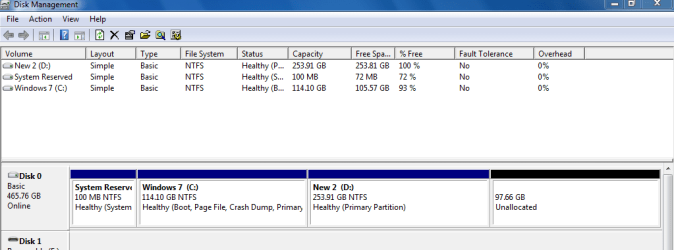
Thanks for the instructions on keeping the partion. Keep in mind I'm a newbee. I've labeled my partion "System Reserved", changed it to 'Primary', and given it 'Active' status. I can see all this stuff in Control Panel>Computer Management>Disk Management; a .png file should be attached. I've printed the tutorial for running 'Start-Up Repair' 3 times, but there are serious warnnings and I want to be cautious. Is there anything else I should know?
You'll see one other problem I have with drives. I installed a WD 1Tb MyBook Essential for backing up user files and the HD image. This is an external drive connected by USB port. For some reason it is also marked as a 'primary drive', appears so in Hard Disk Drives in Windows Explorer, as well as a bootable drive in paralell with the internal drive when I boot up, hit F12, and look at the boot sequence. If I start the computer with the the USB cable connected to the external drive Windows won't start, probably because it sees two drives as first priority, so it stalls. If I start the computer with the USB cable disconnected then start-up goes fine. I then plug the USB cable back in, and drive is recognized/added again as a primary drive. How do I get the My Book to be seen as an external drive?
I'm really in new territory here - out of my comfort zone. Respect your advice.