Solved Windows 7 - upgrade from Home Premium to Professional

My Computers My Computers

  • At a glance

    7 X64i5 84002x8gb 3200mhz
    Computer type
    PC/Desktop
    OS
    7 X64
    CPU
    i5 8400
    Motherboard
    gigabyte b365m ds3h
    Memory
    2x8gb 3200mhz
    Hard Drives
    various
    PSU
    pure power 11 400w cm
    Case
    Coolermaster
    Cooling
    cryorig m9i
  • At a glance

    7x64g54008gb ddr4 2400
    Computer type
    PC/Desktop
    OS
    7x64
    CPU
    g5400
    Motherboard
    ga b365m ds3h
    Memory
    8gb ddr4 2400
    PSU
    xfx pro 450w
It is like magic.
 

My Computers My Computers

  • At a glance

    7 X64i5 84002x8gb 3200mhz
    Computer type
    PC/Desktop
    OS
    7 X64
    CPU
    i5 8400
    Motherboard
    gigabyte b365m ds3h
    Memory
    2x8gb 3200mhz
    Hard Drives
    various
    PSU
    pure power 11 400w cm
    Case
    Coolermaster
    Cooling
    cryorig m9i
  • At a glance

    7x64g54008gb ddr4 2400
    Computer type
    PC/Desktop
    OS
    7x64
    CPU
    g5400
    Motherboard
    ga b365m ds3h
    Memory
    8gb ddr4 2400
    PSU
    xfx pro 450w
This is what mine shows

View attachment 411098

Aye, that's what mine looked like too... I should have just left everything alone, but I changed it to "Normal startup", which apparently means 'delete the OS and make the system unusable'.

Anyway, I've booted to my original W7HE disk, but left the other disk mounted, and the partition table appears to be fine, 'Disk Management' window shows System (J:) as System,Active,Primary Partition... it just isn't bootable.
 

My Computer My Computer

At a glance

Windows 7 Professional 64bitIntel Core i7-3820 (Sandybridge-E) OC to 4GHz32GB PC3-12800NVidia GTX 1070 ti, 8GB GDDR5
Computer type
PC/Desktop
Computer Manufacturer/Model Number
iBuyPower custom build
OS
Windows 7 Professional 64bit
CPU
Intel Core i7-3820 (Sandybridge-E) OC to 4GHz
Motherboard
Gigabyte X79-UP4
Memory
32GB PC3-12800
Graphics Card(s)
NVidia GTX 1070 ti, 8GB GDDR5
Monitor(s) Displays
HP ZR30w 30"
Screen Resolution
2560x1600
Hard Drives
WDC WD2003FZEX-00Z4SA0 - 2TB
OCZ-VERTEX4 256GB
NVMe Samsung SSD 950 512GB
PSU
Corsair TX750
Cooling
Corsair H50
Antivirus
Avast
Browser
Pale Moon
Other Info
System Temperatures during game:
CPUs 40C - 50C
GPU about 55C

My Computer My Computer

At a glance

Windows 7 Professional 64bitIntel Core i7-3820 (Sandybridge-E) OC to 4GHz32GB PC3-12800NVidia GTX 1070 ti, 8GB GDDR5
Computer type
PC/Desktop
Computer Manufacturer/Model Number
iBuyPower custom build
OS
Windows 7 Professional 64bit
CPU
Intel Core i7-3820 (Sandybridge-E) OC to 4GHz
Motherboard
Gigabyte X79-UP4
Memory
32GB PC3-12800
Graphics Card(s)
NVidia GTX 1070 ti, 8GB GDDR5
Monitor(s) Displays
HP ZR30w 30"
Screen Resolution
2560x1600
Hard Drives
WDC WD2003FZEX-00Z4SA0 - 2TB
OCZ-VERTEX4 256GB
NVMe Samsung SSD 950 512GB
PSU
Corsair TX750
Cooling
Corsair H50
Antivirus
Avast
Browser
Pale Moon
Other Info
System Temperatures during game:
CPUs 40C - 50C
GPU about 55C
If you have a win7 dvd/iso file which includes SP1, you can easily change it to all editions media.

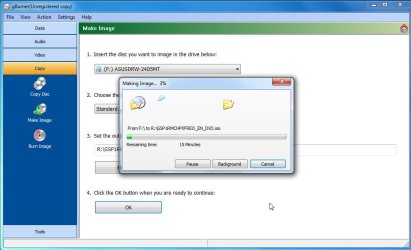
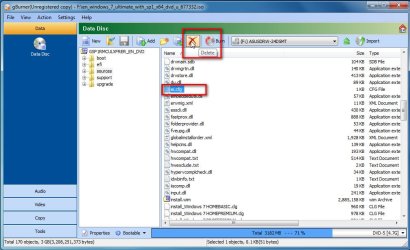
You can't delete the sources\ei.cfg file directly from a dvd, so create an iso from the dvd using something like gburner ( which is a fully functional trial for 30 days). Then delete the ei.cfg from the new iso. Then burn the new iso to dvd/bootable usb stick.
Please clarify one thing about this process? Is this actually going to give me a repair disk? Or will it just be a re-install disk? I don't really want to re-install; if it comes to that, I'd rather fall back on re-duping my existing W7HP disk, then upgrade to Professional, like I did last week...
 

My Computer My Computer

At a glance

Windows 7 Professional 64bitIntel Core i7-3820 (Sandybridge-E) OC to 4GHz32GB PC3-12800NVidia GTX 1070 ti, 8GB GDDR5
Computer type
PC/Desktop
Computer Manufacturer/Model Number
iBuyPower custom build
OS
Windows 7 Professional 64bit
CPU
Intel Core i7-3820 (Sandybridge-E) OC to 4GHz
Motherboard
Gigabyte X79-UP4
Memory
32GB PC3-12800
Graphics Card(s)
NVidia GTX 1070 ti, 8GB GDDR5
Monitor(s) Displays
HP ZR30w 30"
Screen Resolution
2560x1600
Hard Drives
WDC WD2003FZEX-00Z4SA0 - 2TB
OCZ-VERTEX4 256GB
NVMe Samsung SSD 950 512GB
PSU
Corsair TX750
Cooling
Corsair H50
Antivirus
Avast
Browser
Pale Moon
Other Info
System Temperatures during game:
CPUs 40C - 50C
GPU about 55C
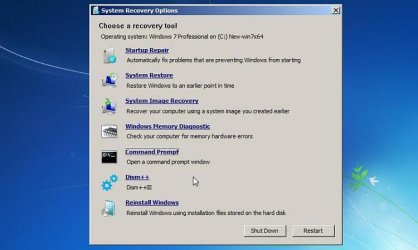
A "repair disc " is usually taken to mean the microsoft system recovery options, they are included in the installation media.

When you see the install now window, click "repair my computer" at the bottom left of the "Install Now" window and the standard system recovery options will appear.

For example I have added dism++ to this one, the others are the standard "system recovery options" which you can get at from the installation media by selecting "repair my computer"

Sys-rec-opt-dism++.jpg


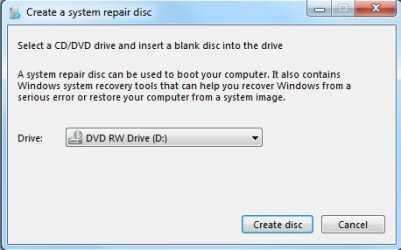
You could also "create a system repair disc" from within a running windows installation by typing recdisc in start search box. It includes the same system recovery options, but unlike the installation media - it does not include the installation files and it does not support efi boot.

recdisc2.jpg


If you are talking about a "repair install", that can only be done from within a running operating system and requires the full installation media
 
Last edited:

My Computers My Computers

  • At a glance

    7 X64i5 84002x8gb 3200mhz
    Computer type
    PC/Desktop
    OS
    7 X64
    CPU
    i5 8400
    Motherboard
    gigabyte b365m ds3h
    Memory
    2x8gb 3200mhz
    Hard Drives
    various
    PSU
    pure power 11 400w cm
    Case
    Coolermaster
    Cooling
    cryorig m9i
  • At a glance

    7x64g54008gb ddr4 2400
    Computer type
    PC/Desktop
    OS
    7x64
    CPU
    g5400
    Motherboard
    ga b365m ds3h
    Memory
    8gb ddr4 2400
    PSU
    xfx pro 450w
Okay, here's how I finally dealt with this.
Essentially, the solutions suggested here appeared to be just as complex as the original method that I first used for this update, so I just repeated that.
That means I deleted/re-partitioned the new drive, cloned my existing W7HP hdd to the new SSD (using AOMEI Backupper Pro), booted to new drive, ran the Windows Anytime Upgrade which I got from eBay, and that was that.

The AOMEI cloning operation takes about 3-4 hours, but it is a 'start it and walk away' operation, and it Just Works (tm).

My only concern was whether I would have any problem using the MS product key for the Anytime Upgrade a second time, but it was no problem at all.

Thank you all for your advice and suggestions; even though I went with a different method, reading all of these discussions made me more aware of the process that I was going through, as well as presenting options in the future, if needed.

Thank you all very much !!
 

My Computer My Computer

At a glance

Windows 7 Professional 64bitIntel Core i7-3820 (Sandybridge-E) OC to 4GHz32GB PC3-12800NVidia GTX 1070 ti, 8GB GDDR5
Computer type
PC/Desktop
Computer Manufacturer/Model Number
iBuyPower custom build
OS
Windows 7 Professional 64bit
CPU
Intel Core i7-3820 (Sandybridge-E) OC to 4GHz
Motherboard
Gigabyte X79-UP4
Memory
32GB PC3-12800
Graphics Card(s)
NVidia GTX 1070 ti, 8GB GDDR5
Monitor(s) Displays
HP ZR30w 30"
Screen Resolution
2560x1600
Hard Drives
WDC WD2003FZEX-00Z4SA0 - 2TB
OCZ-VERTEX4 256GB
NVMe Samsung SSD 950 512GB
PSU
Corsair TX750
Cooling
Corsair H50
Antivirus
Avast
Browser
Pale Moon
Other Info
System Temperatures during game:
CPUs 40C - 50C
GPU about 55C
To do a clean install using a upgrade license you don't need to install HB or HP then upgrade.
Get a Win 7 SP1 installation disk or iso. Delete the ei.cfg to make it universal (HB, HP, Pro and Ultimate).
When installing, select Pro and when asked, insert the upgrade key.
 

My Computers My Computers

  • At a glance

    Windows 7 HP 64i5 6600K - 800MHz to 4200MHz4+4G GSkill DDR4 3000IG - Intel 530
    Computer type
    PC/Desktop
    Computer Manufacturer/Model Number
    custom build
    OS
    Windows 7 HP 64
    CPU
    i5 6600K - 800MHz to 4200MHz
    Motherboard
    GA-Z170-HD3P
    Memory
    4+4G GSkill DDR4 3000
    Graphics Card(s)
    IG - Intel 530
    Monitor(s) Displays
    Samsung 226BW
    Screen Resolution
    1680x1050
    Hard Drives
    (1) -1 SM951 – 128GB M.2 AHCI PCIe SSD drive for Windows 7 and Lubuntu
    (2) -1 WD SATA 3 - 1T for Data
    (3) -1 WD SATA 3 - 1T for backup
    PSU
    Thermaltake 450W TR2 gold
    Keyboard
    Old and good Chicony mechanical keyboard
    Mouse
    Logitech mX performance - 9 buttons (had to disable some)
    Internet Speed
    500Mb/s
    Browser
    Firefox 64
    Other Info
    TinyWall firewall
  • At a glance

    Windows 7 Proi7-4500U 800MHz to 3.0GHz(4+4)G DDR3 1600IG intel 4400 + NVIDIA GeForce GT 745M
    Computer type
    Laptop
    System Manufacturer/Model Number
    Asus Q550LF
    OS
    Windows 7 Pro
    CPU
    i7-4500U 800MHz to 3.0GHz
    Motherboard
    Asus Q550LF
    Memory
    (4+4)G DDR3 1600
    Graphics Card(s)
    IG intel 4400 + NVIDIA GeForce GT 745M
    Sound Card
    Realtek
    Monitor(s) Displays
    LG Display LP156WF4-SPH1
    Screen Resolution
    1920 x 1080
    Hard Drives
    BX500 120G SSD for Windows and programs +
    1T HDD for data
    Internet Speed
    500 Mb/s
    Browser
    Firefox
    Other Info
    TinyWall firewall
Been through the ei.cfg delete explanation already.


Quote: Originally Posted by SIW2
If you have a win7 dvd/iso file which includes SP1, you can easily change it to all editions media.

You can't delete the sources\ei.cfg file directly from a dvd, so create an iso from the dvd using something like gburner ( which is a fully functional trial for 30 days). Then delete the ei.cfg from the new iso. Then burn the new iso to dvd/bootable usb stick.
 

My Computers My Computers

  • At a glance

    7 X64i5 84002x8gb 3200mhz
    Computer type
    PC/Desktop
    OS
    7 X64
    CPU
    i5 8400
    Motherboard
    gigabyte b365m ds3h
    Memory
    2x8gb 3200mhz
    Hard Drives
    various
    PSU
    pure power 11 400w cm
    Case
    Coolermaster
    Cooling
    cryorig m9i
  • At a glance

    7x64g54008gb ddr4 2400
    Computer type
    PC/Desktop
    OS
    7x64
    CPU
    g5400
    Motherboard
    ga b365m ds3h
    Memory
    8gb ddr4 2400
    PSU
    xfx pro 450w
SIW2, I've seen your nice explanation on how to create the universal Win 7 SP1 installation disk.

My intention was to clarify that you can use the upgrade key to directly install without the need to have a previous version on the disk.
 

My Computers My Computers

  • At a glance

    Windows 7 HP 64i5 6600K - 800MHz to 4200MHz4+4G GSkill DDR4 3000IG - Intel 530
    Computer type
    PC/Desktop
    Computer Manufacturer/Model Number
    custom build
    OS
    Windows 7 HP 64
    CPU
    i5 6600K - 800MHz to 4200MHz
    Motherboard
    GA-Z170-HD3P
    Memory
    4+4G GSkill DDR4 3000
    Graphics Card(s)
    IG - Intel 530
    Monitor(s) Displays
    Samsung 226BW
    Screen Resolution
    1680x1050
    Hard Drives
    (1) -1 SM951 – 128GB M.2 AHCI PCIe SSD drive for Windows 7 and Lubuntu
    (2) -1 WD SATA 3 - 1T for Data
    (3) -1 WD SATA 3 - 1T for backup
    PSU
    Thermaltake 450W TR2 gold
    Keyboard
    Old and good Chicony mechanical keyboard
    Mouse
    Logitech mX performance - 9 buttons (had to disable some)
    Internet Speed
    500Mb/s
    Browser
    Firefox 64
    Other Info
    TinyWall firewall
  • At a glance

    Windows 7 Proi7-4500U 800MHz to 3.0GHz(4+4)G DDR3 1600IG intel 4400 + NVIDIA GeForce GT 745M
    Computer type
    Laptop
    System Manufacturer/Model Number
    Asus Q550LF
    OS
    Windows 7 Pro
    CPU
    i7-4500U 800MHz to 3.0GHz
    Motherboard
    Asus Q550LF
    Memory
    (4+4)G DDR3 1600
    Graphics Card(s)
    IG intel 4400 + NVIDIA GeForce GT 745M
    Sound Card
    Realtek
    Monitor(s) Displays
    LG Display LP156WF4-SPH1
    Screen Resolution
    1920 x 1080
    Hard Drives
    BX500 120G SSD for Windows and programs +
    1T HDD for data
    Internet Speed
    500 Mb/s
    Browser
    Firefox
    Other Info
    TinyWall firewall
To do a clean install using a upgrade license you don't need to install HB or HP then upgrade.
Get a Win 7 SP1 installation disk or iso. Delete the ei.cfg to make it universal (HB, HP, Pro and Ultimate).
When installing, select Pro and when asked, insert the upgrade key.

A core issue for me here, was that I did *not* want to do a clean install; I have 7 years of history on this machine, I *really* didn't want to flush it all!! I just wanted to upgrade to Win7 Pro so I could access the 32GB of RAM that I already had installed in the machine !!
 

My Computer My Computer

At a glance

Windows 7 Professional 64bitIntel Core i7-3820 (Sandybridge-E) OC to 4GHz32GB PC3-12800NVidia GTX 1070 ti, 8GB GDDR5
Computer type
PC/Desktop
Computer Manufacturer/Model Number
iBuyPower custom build
OS
Windows 7 Professional 64bit
CPU
Intel Core i7-3820 (Sandybridge-E) OC to 4GHz
Motherboard
Gigabyte X79-UP4
Memory
32GB PC3-12800
Graphics Card(s)
NVidia GTX 1070 ti, 8GB GDDR5
Monitor(s) Displays
HP ZR30w 30"
Screen Resolution
2560x1600
Hard Drives
WDC WD2003FZEX-00Z4SA0 - 2TB
OCZ-VERTEX4 256GB
NVMe Samsung SSD 950 512GB
PSU
Corsair TX750
Cooling
Corsair H50
Antivirus
Avast
Browser
Pale Moon
Other Info
System Temperatures during game:
CPUs 40C - 50C
GPU about 55C
Back
Top