
The amount of information pouring out of Redmond these days about Windows 7 is unprecedented, and so is the level of enthusiasm. In a frantic attempt to make sense of it all, Maximum PC has been releasing our ongoing Feature Focus series, which hopefully, has helped you determine wither upgrading to Windows 7 is worth it for you. Once you made that decision however, or buy a new PC that’s upgrade eligible, do you know exactly what you’re getting? Can I upgrade from Windows XP? Do I need to buy the same product edition when upgrading? Can I go from 32 bit to 64 bit? These are just a few of the many questions we seek to answer after the jump.

Can I Buy the Windows 7 Upgrade Edition For Use With Windows XP or 2000?
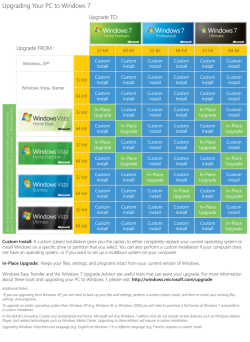
Yes, but there’s a catch. Only Windows Vista users will be able to do an in-place upgrade. This means that Windows XP or 2000 users will be forced to do a clean install. Maximum PC readers are generally technical enough to know that this is a good idea anyway, but if your planning on upgrading PCs for friends and family, bring a USB hard drive and be prepared to stay awhile.
I Only See One Version of Each Edition. Am I Getting the 32 or 64 Bit Version?
All retail editions of Windows 7 will ship with both the 32 & 64 bit DVDs. This is a huge improvement over Vista where users would need to order additional disks manually from Microsoft. Users who purchase Windows 7 digitally through the Microsoft store will be allowed to choose which version they want prior to starting the download.
How will I know if my Processor Supports the 64 Bit Edition?
Download and run GRC’s SecurAble processor testing application. The download is only about 100k, and like everything from GRC, doesn’t require an install. SecurAble will quickly tell you if your processor supports 64 Bit instructions, and if you will be able to use the coveted XP Mode found in Windows 7 professional. Just make sure it says Yes in the Hardware Virtualization field, and your good to go!
Can I Buy the Windows 7 Upgrade Edition For Use With Windows XP or 2000?
Yes, but there’s a catch. Only Windows Vista users will be able to do an in-place upgrade. This means that Windows XP or 2000 users will be forced to do a clean install. Maximum PC readers are generally technical enough to know that this is a good idea anyway, but if your planning on upgrading PCs for friends and family, bring a USB hard drive and be prepared to stay awhile.
I Only See One Version of Each Edition. Am I Getting the 32 or 64 Bit Version?
All retail editions of Windows 7 will ship with both the 32 & 64 bit DVDs. This is a huge improvement over Vista where users would need to order additional disks manually from Microsoft. Users who purchase Windows 7 digitally through the Microsoft store will be allowed to choose which version they want prior to starting the download.
How will I know if my Processor Supports the 64 Bit Edition?
Download and run GRC’s SecurAble processor testing application. The download is only about 100k, and like everything from GRC, doesn’t require an install. SecurAble will quickly tell you if your processor supports 64 Bit instructions, and if you will be able to use the coveted XP Mode found in Windows 7 professional. Just make sure it says Yes in the Hardware Virtualization field, and your good to go!
Attachments
Last edited:
My Computer
At a glance
Win 7
- OS
- Win 7


