

There are still doubts about what the possible and legal upgrade paths are for Windows 7.
Below I tried to compile some information in a way which I hope will be helpful.
Thanks to my friend Kari for his valuable contribution
Any other additions or comments are much welcome
Definitions:
1) Upgrade: to move from Windows XP or Windows Vista to Windows 7
2) Custom or Clean Install: wipes the previous installation and install Windows 7 anew. Does not preserve user files
3) In-Place Upgrade: upgrades from specific versions of Vista to specific versions of Windows 7, preserving user files and programs.
4) Upgrade version: Windows 7 license for those who own a valid license of XP or Vista
5) Full retail version: Windows 7 license to install on any PC, independent of previous installations or ownership. Can be reinstalled on other computers (when activated the previous installation is no longer valid)
6) Full OEM version :Windows 7 license to install on one PC, independent of previous installations. Can only be re-installed on same computer and hardware setup
Upgrade paths
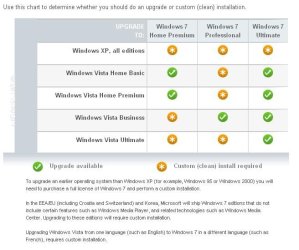
The chart below shows in what situations one can perform an in-place upgrade (e.g. from Vista Business to Windows 7 Professional) without the need to migrate files or programs, and the situations when one needs to do a Custom (Clean) Install and replace the data in the target disc. This is the case for all Windows XP owners or Windows Vista Starter. In this case you will need to migrate your personal files and reinstall your programs in a separate process. I recommend to use Windows Easy Transfer for this, this program will organize your files per user making the migration easier.
Source: Windows 7 Upgrade Considerations
References and additional Info:
http://www.sevenforums.com/tutorials/1649-clean-install-windows-7-a.html
http://www.sevenforums.com/tutorials/20146-custom-install-windows-7-a.html
http://www.sevenforums.com/tutorials/1818-upgrade-install-windows-7-a.html
http://www.sevenforums.com/installation-setup/44793-simple-guide-successful-place-upgrade.html
FAQs:
Q.: I have a Home Premium version of Vista and want to migrate to the Professional version of Windows 7. Do I have to buy a full version?
A.: No. If you own a valid Vista license you are eligible to using an Upgrade Version of Windows 7. In this scenario you will need to do a Custom (Clean) install
Q.: I have Windows Vista Business but I don’t need all those features. I intend to migrate to Windows 7 Home Premium. I don’t want to buy the expensive Full Version to perform a version downgrade. Do I have to?
A.: No. If you own a valid Vista license you are eligible to using an Upgrade Version of Windows 7, independent of what versions you are coming from or migrating to. In this scenario you will need to perform a Custom (Clean) install
Q.: I built a computer and want to install Windows 7. I read that you can use an Upgrade disc to install on a blank hard drive. Am I allowed to do that?
A.: If you own a previous version of Vista or XP, even if it is installed in that machine or not, you are entitled to use the Upgrade version. You will need to stop using that license after installing Windows 7
If you do not own a previous license, it is technically possible to install Windows 7 in a blank drive from the Upgrade disc, but is it not legal, it is a violation of Windows 7 EULA.
Reference: http://www.sevenforums.com/tutorial...version.html?filter[3]=Installation and Setup
Q.: I have Windows Vista Ultimate 32-bits and want to migrate to Windows 7 Ultimate 64-bits. Do I need to do a Clean install or can I perform an in-place upgrade?
A.: A Clean Install is required when migrating from 32 to 64 bits or vice-versa, independent of the initial and target versions,.
Q.: Is there a way to perform an In-Place upgrade for situations where the upgrade path does not allow it? For example, from Windows Vista Home Premium to Windows 7 Professional
A.: Yes, you can do that by changing installation files on the Windows 7 package. Only recommended for experienced users and you will be on your own, Microsoft does not support this (although it is not illegal)
Q.: The Windows XP I am running was an upgrade from Windows 2000. Am I allowed to upgrade to Windows 7?
A.: Yes. Your upgraded XP is a valid Windows License.
Q.: I am running the RC, can I upgrade that to the commercial version with an upgrade disc?
A.: Technically yes, the RC will be recognized as a previous OS and the install process will proceed. On the other hand, the RC is a free evaluation version and does not qualify as a valid license for upgrade. You need to have a valid license not to violate the EULA, even if not installed (e.g. the valid Vista or XP you had before installing the RC). More information can be found on this tutorial: http://www.sevenforums.com/tutorials/31402-clean-install-upgrade-windows-7-version.html
Q.: I recently bought a computer that came with Vista installed. Will I get a free upgrade to Windows 7?
A.: Please contact the manufacturer. It depends on what they were offering when you bought the computer. Here is the list of participating manufacturers, according to Microsoft: Windows: Windows 7 Upgrade Option
Q.: I bought a retail version of Vista on or after June 26, 2009, I heard I can upgrade it for free, is that correct?
A.: If you acquire a qualifying Windows Vista retail packaged product between June 26, 2009 and January 31, 2010 you are eligible to receive the corresponding Microsoft Windows 7 product upgrade for the cost of shipping and handling ($9.99). Please allow 6-8 weeks (pending inventory availability). Here is how to order it: https://om2.one.microsoft.com/opa/V...-ac70-438f-9304-4bd05de66415&LocaleCode=en-us
Q.: I installed and activated the 32-bit version of Windows 7 which came in the retail box. I don’t want to use that, I want the 64-bit version. Can I remove that and install the 64-bit version and legally activate it?
A.: The key allows you to install one instance of either x86 or x64. Since you wiped the x86 you will have one other instance (tks to Garysgold for the info)
Additional References:
Please make sure to read these excellent tutorials regarding installation and setup:
http://www.sevenforums.com/tutorials/?filter[3]=Installation%20and%20Setup
This blog gives a good pictorial explanation of the allowed upgrade paths:
Microsoft SMB Community Blog : Regardless of what any hack says, a Windows 7 Upgrade is an Upgrade. What you need to know.
Below I tried to compile some information in a way which I hope will be helpful.
Thanks to my friend Kari for his valuable contribution
Any other additions or comments are much welcome
Definitions:
1) Upgrade: to move from Windows XP or Windows Vista to Windows 7
2) Custom or Clean Install: wipes the previous installation and install Windows 7 anew. Does not preserve user files
3) In-Place Upgrade: upgrades from specific versions of Vista to specific versions of Windows 7, preserving user files and programs.
4) Upgrade version: Windows 7 license for those who own a valid license of XP or Vista
5) Full retail version: Windows 7 license to install on any PC, independent of previous installations or ownership. Can be reinstalled on other computers (when activated the previous installation is no longer valid)
6) Full OEM version :Windows 7 license to install on one PC, independent of previous installations. Can only be re-installed on same computer and hardware setup
Upgrade paths
The chart below shows in what situations one can perform an in-place upgrade (e.g. from Vista Business to Windows 7 Professional) without the need to migrate files or programs, and the situations when one needs to do a Custom (Clean) Install and replace the data in the target disc. This is the case for all Windows XP owners or Windows Vista Starter. In this case you will need to migrate your personal files and reinstall your programs in a separate process. I recommend to use Windows Easy Transfer for this, this program will organize your files per user making the migration easier.
Source: Windows 7 Upgrade Considerations
References and additional Info:
http://www.sevenforums.com/tutorials/1649-clean-install-windows-7-a.html
http://www.sevenforums.com/tutorials/20146-custom-install-windows-7-a.html
http://www.sevenforums.com/tutorials/1818-upgrade-install-windows-7-a.html
http://www.sevenforums.com/installation-setup/44793-simple-guide-successful-place-upgrade.html
FAQs:
Q.: I have a Home Premium version of Vista and want to migrate to the Professional version of Windows 7. Do I have to buy a full version?
A.: No. If you own a valid Vista license you are eligible to using an Upgrade Version of Windows 7. In this scenario you will need to do a Custom (Clean) install
Q.: I have Windows Vista Business but I don’t need all those features. I intend to migrate to Windows 7 Home Premium. I don’t want to buy the expensive Full Version to perform a version downgrade. Do I have to?
A.: No. If you own a valid Vista license you are eligible to using an Upgrade Version of Windows 7, independent of what versions you are coming from or migrating to. In this scenario you will need to perform a Custom (Clean) install
Q.: I built a computer and want to install Windows 7. I read that you can use an Upgrade disc to install on a blank hard drive. Am I allowed to do that?
A.: If you own a previous version of Vista or XP, even if it is installed in that machine or not, you are entitled to use the Upgrade version. You will need to stop using that license after installing Windows 7
If you do not own a previous license, it is technically possible to install Windows 7 in a blank drive from the Upgrade disc, but is it not legal, it is a violation of Windows 7 EULA.
Reference: http://www.sevenforums.com/tutorial...version.html?filter[3]=Installation and Setup
Q.: I have Windows Vista Ultimate 32-bits and want to migrate to Windows 7 Ultimate 64-bits. Do I need to do a Clean install or can I perform an in-place upgrade?
A.: A Clean Install is required when migrating from 32 to 64 bits or vice-versa, independent of the initial and target versions,.
Q.: Is there a way to perform an In-Place upgrade for situations where the upgrade path does not allow it? For example, from Windows Vista Home Premium to Windows 7 Professional
A.: Yes, you can do that by changing installation files on the Windows 7 package. Only recommended for experienced users and you will be on your own, Microsoft does not support this (although it is not illegal)
Q.: The Windows XP I am running was an upgrade from Windows 2000. Am I allowed to upgrade to Windows 7?
A.: Yes. Your upgraded XP is a valid Windows License.
Q.: I am running the RC, can I upgrade that to the commercial version with an upgrade disc?
A.: Technically yes, the RC will be recognized as a previous OS and the install process will proceed. On the other hand, the RC is a free evaluation version and does not qualify as a valid license for upgrade. You need to have a valid license not to violate the EULA, even if not installed (e.g. the valid Vista or XP you had before installing the RC). More information can be found on this tutorial: http://www.sevenforums.com/tutorials/31402-clean-install-upgrade-windows-7-version.html
Q.: I recently bought a computer that came with Vista installed. Will I get a free upgrade to Windows 7?
A.: Please contact the manufacturer. It depends on what they were offering when you bought the computer. Here is the list of participating manufacturers, according to Microsoft: Windows: Windows 7 Upgrade Option
Q.: I bought a retail version of Vista on or after June 26, 2009, I heard I can upgrade it for free, is that correct?
A.: If you acquire a qualifying Windows Vista retail packaged product between June 26, 2009 and January 31, 2010 you are eligible to receive the corresponding Microsoft Windows 7 product upgrade for the cost of shipping and handling ($9.99). Please allow 6-8 weeks (pending inventory availability). Here is how to order it: https://om2.one.microsoft.com/opa/V...-ac70-438f-9304-4bd05de66415&LocaleCode=en-us
Q.: I installed and activated the 32-bit version of Windows 7 which came in the retail box. I don’t want to use that, I want the 64-bit version. Can I remove that and install the 64-bit version and legally activate it?
A.: The key allows you to install one instance of either x86 or x64. Since you wiped the x86 you will have one other instance (tks to Garysgold for the info)
Additional References:
Please make sure to read these excellent tutorials regarding installation and setup:
http://www.sevenforums.com/tutorials/?filter[3]=Installation%20and%20Setup
This blog gives a good pictorial explanation of the allowed upgrade paths:
Microsoft SMB Community Blog : Regardless of what any hack says, a Windows 7 Upgrade is an Upgrade. What you need to know.
Last edited:
My Computer
- Computer Manufacturer/Model Number
- Wally, Innc.
- OS
- Windows 7 x64 finally!
- CPU
- AMD Athlon II X2 240
- Motherboard
- Biostar TA790GX XE
- Memory
- OCZ Platinum 4GB DDR2 1066 (will not work past 800MHz)
- Graphics Card(s)
- MSI R4670-MD1G Radeon HD 4670 1GB 128-bit GDDR3
- Sound Card
- ATI High Definition Audio Device Realtek ALC888
- Monitor(s) Displays
- HP w19e
- Screen Resolution
- 1440x900
- Hard Drives
- Western Digital Caviar Green WD5000AADS 500GB SATA
Western Digital Caviar Blue WD5000AAKS 500GB SATA
- PSU
- Athena Power Micro ATX 400W
- Case
- HEC 6T 6T10BB Black MicroATX Mini Tower
- Cooling
- stock
- Keyboard
- wired, many keys
- Mouse
- HP wireless, 2 buttons, 1 wheel
- Internet Speed
- DSL 2Mb (recently getting 1.65M!)


