

justme
New member
- Local time
- 2:37 AM
- Messages
- 12
Hi there .
I own a USB Drive ... Dane-Elec 16GB . I have a big problem with the USB on Windows 7 .
This USB have a password protect system and he need to create a virtual floppy drive so i can open the password program in order to get access to the USB .
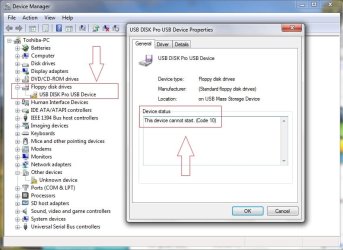
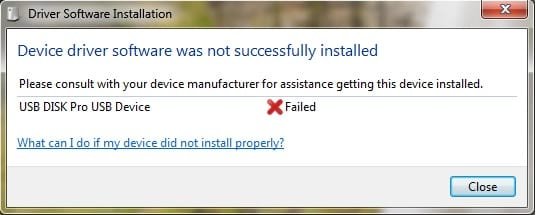
My problem is that Windows 7 can`t install the virtual floppy drive . I have Windows Vista Ultimate SP1 as my second OS and the USB works perfect . Same on Windows XP . The only problem is here on Windows 7 . I used Windows updates to get the drivers but still not working .
By the way , if i run W. Vista and disable the password protection then in Windows 7 i can see my USB drive but i need the protection for my USB so if anyone know how to solve it please tell me .
You will see 2 pics here with my problem .
Thanks
[EDIT] Forgot to mention that i have the latest drivers for the USB even if i make the update from Device Manager i get the next message :
"Windows has determined the driver software for your device is up to date.
USB FloppyDisk Drive"
I own a USB Drive ... Dane-Elec 16GB . I have a big problem with the USB on Windows 7 .
This USB have a password protect system and he need to create a virtual floppy drive so i can open the password program in order to get access to the USB .
My problem is that Windows 7 can`t install the virtual floppy drive . I have Windows Vista Ultimate SP1 as my second OS and the USB works perfect . Same on Windows XP . The only problem is here on Windows 7 . I used Windows updates to get the drivers but still not working .
By the way , if i run W. Vista and disable the password protection then in Windows 7 i can see my USB drive but i need the protection for my USB so if anyone know how to solve it please tell me .
You will see 2 pics here with my problem .
Thanks
[EDIT] Forgot to mention that i have the latest drivers for the USB even if i make the update from Device Manager i get the next message :
"Windows has determined the driver software for your device is up to date.
USB FloppyDisk Drive"
Attachments
My Computer
- OS
- MultiBoot : Windows 7 Ultimate , Windows Vista Ultimate SP1
 All I did was to insert the USB on Windows Vista and deactivate the password protect so I can use it on Windows 7 . Now I have a new USB with 32GB
  and I used TrueCrypt to put password protect on it and it is working on any Windows .