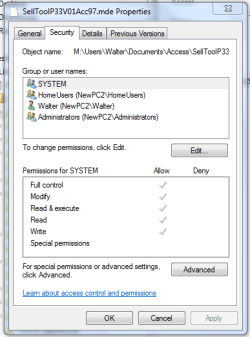
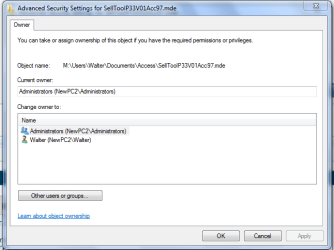
I have been grappling with my attempts to use batch files to perform selective backup to an external hard-drive. I also have been unable to backup my Quicken data file. Each time I visit a folder I find in "read-only". Then I proceed to change it from "Read-Only". When I return I find it still set "read-Only". I also tried to modify account privileges to allow me to change file attributes. None of this worked. What can be done so I can operate as administrator (with full privileges) to (1) allow me to write and/or change a file / folder ; and (2) to keep the OS from asking me each time if I want to do something?
At this point, if I could have purchased a pc with XP I never would have gone to Win 7. I thought MS fixed all the annoying problems extant in Vista?
I still have a problem getting my other networked PC (running Vista) to be able to access the printers physically connected to my Win 7 machine.
First, folders always have the readonly flag set. It's always been that way it's actually used to mark that te folder has or is set to be customized. XP was the same way.
BUT, are these files from a folder or drive that was from an older install of windows? OIf so then they belong to a different user. You need to "Take Ownership" of the folders to get full permissions on them for yourself. THis may help http://www.sevenforums.com/tutorials/1911-take-ownership-shortcut.html
It's also possible that quicken itself is locking the file down so "users" don't accidentally delete it. Though you should be able to back it up with read only permissions anyway, so I'm not sure /exactly/ what's going on... Try looking at the advanced permissions and see what user does own the file...
My Computer
Computer Manufacturer/Model Number
Scratch built
OS
Windows 7 x64 Ultimate
CPU
i7 960
Motherboard
Asus P6X58D
Memory
12 Gig Corsair Dominator
Graphics Card(s)
Nvidia 480
Sound Card
Maudio Delta 44 + breakout box
Monitor(s) Displays
Dell UltraSharp U2410 24in and Samsung 21 dual monitors
I have not no. Tons of peopl ehere have, I tend to go into the advanced permissions and edit them as I need to when it comes up which isn't very often. That was just the easiest way generally to get the job done
I could write a step by step to do it by hand but would have to wait till I get home and get on my 7 box.
My Computer
Computer Manufacturer/Model Number
Scratch built
OS
Windows 7 x64 Ultimate
CPU
i7 960
Motherboard
Asus P6X58D
Memory
12 Gig Corsair Dominator
Graphics Card(s)
Nvidia 480
Sound Card
Maudio Delta 44 + breakout box
Monitor(s) Displays
Dell UltraSharp U2410 24in and Samsung 21 dual monitors