hi.. can i just ask how to change wallpaper in acer aspire windows 7? it's my first using windows 7 so i'm really not familiar with it. hope you could answer asap.
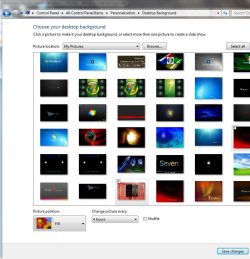
Right click on Desktop :ar: then click on Personalize :ar: Choose a theme :ar: Then at bottom Click on Desktop Background Slide Show :ar: Put check marks on picture you want to include. rb: if only one picture check only one pic rb:
Choose Picture position drop down menu to decide how you want it to fit your screen rb:
Then if you have multiple pictures for the background slide show checked. :ar:
you need to the Change picture every: drop down menu to select how often you want the background picture to change rb: 10 secs up to 1 day rb:
If you want random changing pictures put a check mark in Shuffle :ar: If rotating each pic after each other, one at a time, leave Shuffle unchecked ! rb:
Make sure you click on Save Changes at the bottom to exit rb:
Attachments
desktop_Background.JPG
77.6 KB
· Views: 260
My Computer
Computer type
PC/Desktop
Computer Manufacturer/Model Number
Built them myself, Science Experiments !
OS
Win7 Enterprise, Win7 x86 (Ult 7600), Win7 x64 Ult 7600, TechNet RTM on AMD x64 (2.8Ghz)
6 pata Ide HD's & 2 Sata HD's
added 80gb external on Ult 7600 computer,
numerous extra 1tb, 2TB, 3Tb SATA HD's
A collection of ext HD Docks w/ HDs
PSU
430w, 550w, 600w, 700, 800, etc
Case
All Generic Full Towers
Cooling
Open Air & a few fans, some w/ colored LEDs
Keyboard
Compaq & Dell recycled from GoodWill
Mouse
Made in China Optical Wired Mouse
Internet Speed
Fast Cable InterNet
Antivirus
AVG Free on 24 different Desktops, NO Problems!
Browser
IE 8 is preferred, but use FireFox sometimes
Other Info
Linksys Routers, switches, & Hubs
Too Many USB Flash Drives to count, Biggest is 64GB !
Eight computers in my home network.
Sixteen computers at my business network.
Linked via TeamViewer !
Lots of old used spare computer parts everywhere!






 rb: if only one picture check only one pic