Windows 7 WiFi

andreicek

New member
Local time
5:05 AM
Messages
14
Location
Zagreb, Croatia
Hi all,
I have installed the Windows 7 and all of the driver needed. I tried to connect to my WiFi network. I am able to see all the other networks but mine. Well there is a network called "Other Network" but when I click it it askes me the SSID of the network then I enter the network name, and after it checks something it says "Windows was not able to connect to CRNI.HOME", while CRNI.HOME beeing the SSID of my network. What I am doing wrong, is this problem with my router, or with Win 7?

TNX,
Andrei :geek:

P.S. Here is the pic of what I am seeing: Twitpic - Share photos on Twitter
 

My Computer

Computer Manufacturer/Model Number
TOSHIBA Satellite M65-S9092
OS
Windows 7 Ultimate OEM
CPU
Intel Pentium M 2.00 GHz
Memory
1 GB
Graphics Card(s)
ATI MOBILITY RADEON X600 SE
Sound Card
Relatek AC97 Audio
Screen Resolution
1440 x 900
Hard Drives
TOSHIBA MK1032GAX - 120 GB
WD 2500BEV - 250 GB
Internet Speed
5 Mbps
Hi all,
I have installed the Windows 7 and all of the driver needed. I tried to connect to my WiFi network. I am able to see all the other networks but mine. Well there is a network called "Other Network" but when I click it it askes me the SSID of the network then I enter the network name, and after it checks something it says "Windows was not able to connect to CRNI.HOME", while CRNI.HOME beeing the SSID of my network. What I am doing wrong, is this problem with my router, or with Win 7?

TNX,
Andrei :geek:

P.S. Here is the pic of what I am seeing: Twitpic - Share photos on Twitter

Andrei

First turn off passwords, firewalls, and anti virus. see of you connect. if so add firewall and av back if it still works its probably your router setup

Let us know if we can help

Ken
 

My Computer

Computer Manufacturer/Model Number
HP Pavillion dv-7 1005 Tx
OS
Win 8 Release candidate 8400
CPU
[email protected]
Memory
4 gigs
Graphics Card(s)
Nvidia 9600M
Sound Card
HD built-in
Monitor(s) Displays
17" Wxga
Screen Resolution
1440x900
Cooling
none
Internet Speed
45Mb down 5Mb up
Solved!

Well it seams that I have been always entering a wrong SSID... But I still don't understand why I have to enter it. The all other networks have their SSID...
 

My Computer

Computer Manufacturer/Model Number
TOSHIBA Satellite M65-S9092
OS
Windows 7 Ultimate OEM
CPU
Intel Pentium M 2.00 GHz
Memory
1 GB
Graphics Card(s)
ATI MOBILITY RADEON X600 SE
Sound Card
Relatek AC97 Audio
Screen Resolution
1440 x 900
Hard Drives
TOSHIBA MK1032GAX - 120 GB
WD 2500BEV - 250 GB
Internet Speed
5 Mbps
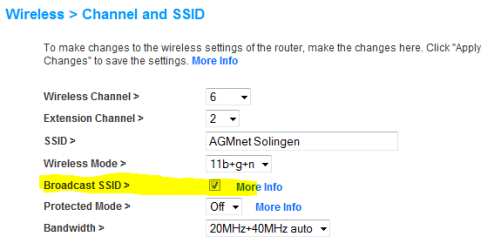
Have you hidden the SSID from router settings? It is an extra safety measure, allowing you to connect only if you know the name of the network. Most routers today have this option, in my Belkin router it is called Broadcast SSID. If I untick the checkbox, computers are able to join only when the right SSID is given. See the image:

SSID.PNG

Kari
 

My Computer

Computer type
Laptop
Computer Manufacturer/Model Number
HP ENVY 17-1150eg
OS
Windows 10 Pro x64 EN-GB
CPU
1.6 GHz Intel Core i7-720QM Processor
Memory
6 GB
Graphics Card(s)
ATI Mobility Radeon HD 5850 Graphics
Sound Card
Beats sound system with integrated subwoofer
Monitor(s) Displays
17" laptop display, 22" LED and 32" Full HD TV through HDMI
Screen Resolution
1600*900 (1), 1920*1080 (2&3)
Hard Drives
Internal: 2 x 500 GB SATA Hard Disk Drive 7200 rpm
External: 2TB for backups, 3TB USB3 network drive for media
Cooling
As Envy runs a bit warm, I have it on a Cooler Master pad
Keyboard
Logitech diNovo Media Desktop Laser (bluetooth)
Mouse
Logitech Performance Mouse MX
Internet Speed
50/10 Mbps VDSL
Antivirus
Windows Defender 4.3.9431.0
Browser
Maxthon 3.5.2., IE11
No it seeams that was a router problem. I called my provider and they send me a new router that is working just fine.
 

My Computer

Computer Manufacturer/Model Number
TOSHIBA Satellite M65-S9092
OS
Windows 7 Ultimate OEM
CPU
Intel Pentium M 2.00 GHz
Memory
1 GB
Graphics Card(s)
ATI MOBILITY RADEON X600 SE
Sound Card
Relatek AC97 Audio
Screen Resolution
1440 x 900
Hard Drives
TOSHIBA MK1032GAX - 120 GB
WD 2500BEV - 250 GB
Internet Speed
5 Mbps
No it seeams that was a router problem. I called my provider and they send me a new router that is working just fine.

Did you have the ssid broadcast off?

It mat be a coincidence that upgrading to 7 and your router malfunction happened at the same time....but...

The new router by default probably doesnt broadcast it and thats why you can see it.
 

My Computer

Computer Manufacturer/Model Number
Toshiba U405-S2826
OS
Windows 7 Professional, Vista Ultimate, Xp Professional
CPU
Intel Core 2 Duo 1.8ghz
Memory
4Gb Kingston
Hard Drives
250GB 5200RPm
Back
Top