
Windows 7 will not boot after automatic updates.

Parrothead

New member
Local time
7:34 PM
Messages
15
Hello,
I'm running a Dell XPS 420 that was upgraded from Vista to Windows 7 Home Premium 32 bit in Feb-2011. It had been running fine until recently when the automatic updates prevented it from booting and forced me to restore to an earlier point. I'd run the updates manually and all would be well. On July 3 some automatic updates came down and crashed my computer. I finally restored and got back in to normal mode. I tried to run the updates and the computer locked up. I've used the repair disk and was able to get back in to safe mode with networking. I ran CHKDSK /R with no problems. I also ran sfc /scannow without a problem, but it still would not boot. The systems screen didn't show that Windows was activated. Now the machine won't boot into any mode. Any help would be much appreciated.

Thanks,
Randy
 

My Computer

Computer type
PC/Desktop
Computer Manufacturer/Model Number
Dell XPS 420
OS
Windows 7 Home Premium Upgrade 32bit
Hello,
I'm running a Dell XPS 420 that was upgraded from Vista to Windows 7 Home Premium 32 bit in Feb-2011. It had been running fine until recently when the automatic updates prevented it from booting and forced me to restore to an earlier point. I'd run the updates manually and all would be well. On July 3 some automatic updates came down and crashed my computer. I finally restored and got back in to normal mode. I tried to run the updates and the computer locked up. I've used the repair disk and was able to get back in to safe mode with networking. I ran CHKDSK /R with no problems. I also ran sfc /scannow without a problem, but it still would not boot. The systems screen didn't show that Windows was activated. Now the machine won't boot into any mode. Any help would be much appreciated.

Thanks,
Randy

The following link should be beneficial;

http://www.sevenforums.com/tutorials/219533-troubleshooting-windows-7-failure-boot.html

HTH
 

My Computer

Computer type
PC/Desktop
Computer Manufacturer/Model Number
Custom Built
OS
Windows 7 Professional x64
CPU
Intel i5 quad processor
Motherboard
DP67BG
Memory
16 GB
Graphics Card(s)
Radeon HD 5770
Sound Card
Realtek High Definition Audio
Monitor(s) Displays
Samsung SyncMaster
Screen Resolution
1920X1080
Hard Drives
WD 2TB (SATA Internal)
WD 1TB (USB External)
PSU
Corsair GS800
Case
Tower (Generic)
Cooling
3 Internal Fans
Keyboard
MS Wireless
Mouse
MS Optical Wired
Internet Speed
54 mbps
Antivirus
Emsisoft
Browser
IE-Version 9, Palemoon-Version 24.2.0
Thanks for the link.

I'm finally able to run Windows 7 in safe mode with networking.

I loaded Malwarebytes but it would not run.

I tried to install Windows Defender but it will not run in safe mode.

CHKDSK ran with no issues or problems.

SFC /SCANNOW ran with no issues or problems.

Currently downloading the Windows 7 Home Premium x86 SP1 U (media refresh) X17-58996.iso.

Randy
 

My Computer

Computer type
PC/Desktop
Computer Manufacturer/Model Number
Dell XPS 420
OS
Windows 7 Home Premium Upgrade 32bit
Attached is a copy of the CBS log file.

Thanks,
Randy
 

My Computer

Computer type
PC/Desktop
Computer Manufacturer/Model Number
Dell XPS 420
OS
Windows 7 Home Premium Upgrade 32bit
Windows Defender is run from Boot disk or stick which is what you may need to do if MBAM is being repeatedly blocked from running. Try again.

Then if necessary run Defender and one other bootable AV scans from CD. You'll know they are bootable and not run from Safe Mode because they say Bootable. ;)

Continue with repair steps or rescue your files and do a perfect reinstall.
 
Defender downloads as an .exe file, not an .iso. The .exe will not run in safe mode.
 

My Computer

Computer type
PC/Desktop
Computer Manufacturer/Model Number
Dell XPS 420
OS
Windows 7 Home Premium Upgrade 32bit
Can you post back a screenshot of Disk Management - Post a Screen Capture Image so we can check your configuration is correct?

The solution for Windows Updates causing no-start is always System Restore so I would focus on that now. If it won't work sufficiently from Safe Mode then switch to the WIn7 installation media provided in the tutorial you're working from or System Repair Disk .

If Safe Mode will not cooperate on this or other steps then you'll likely need to switch to the bootable tools in Troubleshooting Windows 7 Failure to Start to check for infection and do the other repairs satisfactorily.
 
Unable to run Defender. I downloaded a bootable virus scan file from Norton Utilities Support, which is my virus software. Upon reboot Windows will not start in any mode. using the Windows Repair Disk now to get back in. When/if I get in I'll send the screenshot.

Thanks for your help.
 

My Computer

Computer type
PC/Desktop
Computer Manufacturer/Model Number
Dell XPS 420
OS
Windows 7 Home Premium Upgrade 32bit
There's a good chance Norton is your problem. We resolve problems here regularly by uninstalling it.

I'm amazed that people still use such monstrous bloatware on a featherlight OS. It's like trying to pull a semi trailer with a Lexus.
 
Also, no restore points shown under System Restore. Is there a way to get these back using the command prompt?
 

My Computer

Computer type
PC/Desktop
Computer Manufacturer/Model Number
Dell XPS 420
OS
Windows 7 Home Premium Upgrade 32bit
System Repair on the recovery disk says it found no problems, yet Windows still won't boot up in any mode. Getting ready to try the clean install.
 

My Computer

Computer type
PC/Desktop
Computer Manufacturer/Model Number
Dell XPS 420
OS
Windows 7 Home Premium Upgrade 32bit
If you will follow these same steps, tools and methods in Clean Reinstall - Factory OEM Windows 7
then you will get and keep a perfect install for as long as you do.

Pay close attention to the tools recommended which work best in tens of thousands of installs we've helped with here, so another expensive mistake like Norton is not made.

Then preserve your perfect install with a backup image so you never have to reinstall again.
 
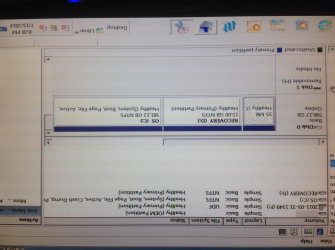
I was finally able to get back into safe mode. Attached is a screen shot of my disk map.
 

Attachments

  • image.jpg
    image.jpg
    630.3 KB · Views: 3

My Computer

Computer type
PC/Desktop
Computer Manufacturer/Model Number
Dell XPS 420
OS
Windows 7 Home Premium Upgrade 32bit
Is it possible the Active flag was moved from recovery to C? Try moving it to Recovery to do 3 Repairs. If that fails I'd reinstall deleting all partitions after backing up everything covered in Reinstall tutorial.
 
How do I move the active flag to make the repairs?
 

My Computer

Computer type
PC/Desktop
Computer Manufacturer/Model Number
Dell XPS 420
OS
Windows 7 Home Premium Upgrade 32bit
It's in Troubleshooting Failure to Start link below.

I am flying to Europe now about to go over sea so someone else will need to help you for next 24 hours.
 
Back
Top