
windows 7 will not boot and/or login when adding hard drives

whatttupG

New member
Local time
6:25 AM
Messages
30
this is the second round for me on this, the O/S gets lost when you add drives to the system, for what its worth, it freezes at /windows/system32/classpnp.sys when using safemode to try and boot in

at first i thought it was related to my add in card and array, but i just proved that wrong tonight by adding a single hdd via a regular old SATA cable.. same result, win7 sits there hung up permanently at the glowing flag.. i was going to take the blame for this, but its obviously a bug in 7

so anyone have a cure for this, so far the only trick i came up with is putting the PC to sleep (hibernate perhaps a better term) and sneaking the drive cable back in... when the computer wakes, it finds the new drive and popups up that half convenient, half retarded 'what do i do' box... its a hard drive, do nothing ok?? but that will let me use the drive until i reboot, then kaput...

so, this is a boot bug, i have no idea why, its the first problem i have had in 7 which until now, i really loved, so can you guys think of anything??

please help???
 

My Computer My Computer

Computer Manufacturer/Model Number
built.. not bought ;)
OS
windows 7 64 bit pro
CPU
athlon 64 x2 4400
Motherboard
asus a8n-sli premium
Memory
2Gb
Graphics Card(s)
nVidia 7800 GT something
Sound Card
onboard junk
Monitor(s) Displays
24"
Screen Resolution
1920 x 1200
Hard Drives
all hdd are SATA
WD 320 caviar black (boot)
4 Seagate 250's in raid 5 on promise TX4310 (big data)
Seagate 320 (extra triple backup data for pics)
PSU
550w from china i'm sure
Case
antec aluminum buzzbox
Cooling
umm... fans?
Keyboard
Logitech with annoying as !%^* enhanced F keys
Mouse
MX1000
Internet Speed
LOL
Other Info
Promise SX-150 raid card (only supported until XP...)
Promise TX4310 raid card (only bought because of the above)
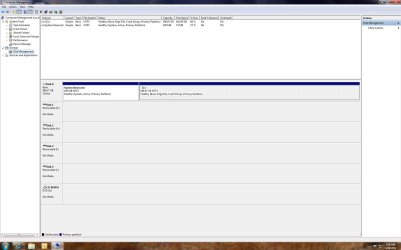
Please post back a screenshot of your maximized full Disk Mgmt drive map and listings, using Snipping Tool in Start Menu.
 
here you go, hope it helps... thx!!
 

Attachments

  • Capture.JPG
    Capture.JPG
    137 KB · Views: 79

My Computer My Computer

Computer Manufacturer/Model Number
built.. not bought ;)
OS
windows 7 64 bit pro
CPU
athlon 64 x2 4400
Motherboard
asus a8n-sli premium
Memory
2Gb
Graphics Card(s)
nVidia 7800 GT something
Sound Card
onboard junk
Monitor(s) Displays
24"
Screen Resolution
1920 x 1200
Hard Drives
all hdd are SATA
WD 320 caviar black (boot)
4 Seagate 250's in raid 5 on promise TX4310 (big data)
Seagate 320 (extra triple backup data for pics)
PSU
550w from china i'm sure
Case
antec aluminum buzzbox
Cooling
umm... fans?
Keyboard
Logitech with annoying as !%^* enhanced F keys
Mouse
MX1000
Internet Speed
LOL
Other Info
Promise SX-150 raid card (only supported until XP...)
Promise TX4310 raid card (only bought because of the above)
Try resetting the CMOS: Clear CMOS - 3 Ways to Clear the CMOS - Reset BIOS

It would be helpful to see Disk Management with the other HD's attached to see if they have System Active flag which might be blocking the boot. In this case you could move the data off to wipe or format.

If that doesn't help try plugging the System HD into another port to see how it reacts to other hD's being then added. Be sure to set it first to Boot in BIOS setup.

While you're at it, boot System Recovery Options to run Startup Repair to see if it finds any issues. You'd likely only want to do more repairs (including a Repair Install) if there are other performance problems with Win7.
 
i'm extremely sure its not a bios issue, i can see them all just fine in that POST, also, all drives in question have been run on this motherboard already... in XP

there was never a conflcit then, only going to win7.. in that move, i pulled all the volumes except the C drive pictured in the snippet i posted, and installed there.. that drive was factory new.. the issues came up as i started adding drives, first was the promise RAID, and i misdiagnosed that i think, as a problem with hardware or driver compatible whatever RAID related drama, and that was not the case... then i added another single hdd just to see, and sure enough it does the same thing so, like i said, i'm really sure its a win7 thing, and pretty sure it has something to do with the fact that both drives i added, were bootable at one time.

i would post a disk manager shot of all the drives mounted, however thats why i'm here.. thats where i get stuck, as putting either of two drives on freezed me at the starting windows glowing flag logo screen... now i believe i worked out a trick to mount the RAID so i'm going to try that now, and maybe i'll attach hdd #3 at teh same time just to see if my trick will bring that in.. seems to me if i get it up and logged in once, i might be good to go, as somehow that gets some logical assignment to stick, and win7 is no longer lost

i'll see how that goes here.. i'll post back after

thx
 

My Computer My Computer

Computer Manufacturer/Model Number
built.. not bought ;)
OS
windows 7 64 bit pro
CPU
athlon 64 x2 4400
Motherboard
asus a8n-sli premium
Memory
2Gb
Graphics Card(s)
nVidia 7800 GT something
Sound Card
onboard junk
Monitor(s) Displays
24"
Screen Resolution
1920 x 1200
Hard Drives
all hdd are SATA
WD 320 caviar black (boot)
4 Seagate 250's in raid 5 on promise TX4310 (big data)
Seagate 320 (extra triple backup data for pics)
PSU
550w from china i'm sure
Case
antec aluminum buzzbox
Cooling
umm... fans?
Keyboard
Logitech with annoying as !%^* enhanced F keys
Mouse
MX1000
Internet Speed
LOL
Other Info
Promise SX-150 raid card (only supported until XP...)
Promise TX4310 raid card (only bought because of the above)
Just for a try, attach the new drive, boot into the boot options menu, select the windows 7 drive to boot from. If that works go to disk management and assign the new drive a different drive letter. While there post a screenshot of disk management.
 

My Computers My Computers

System One System Two

  • Computer type
    PC/Desktop
    Computer Manufacturer/Model Number
    ALWAYS UNDER CONSTRUCTION
    OS
    Windows 11 Pro
    CPU
    Ryzen 9 5900X
    Motherboard
    Asus X570 Crosshair Viii Hero
    Memory
    32GB G Skill DDR4-3600
    Graphics Card(s)
    EVGA RTX 3080 FTW 3 Ultra
    Sound Card
    On Board/Sennheiser PC37X Headset
    Monitor(s) Displays
    3 X Asus 27"
    Screen Resolution
    2560x1440
    Hard Drives
    2 X 1 TB NVME drives
    PSU
    EVGA 850
    Case
    Phanteks Eclipse P400A
    Cooling
    EVGA 280 AIO
    Keyboard
    Logitech G510s/ Logitech G13
    Mouse
    Logitech G502
    Internet Speed
    24/1
    Antivirus
    ESET/MBAM Pro/SAS Pro
    Browser
    Chrome/ Firefox/ Edge
  • Computer type
    Laptop
    System Manufacturer/Model Number
    Dell 16 Plus
    OS
    Windows 11 Pro
    CPU
    Intel Ultra 9 288V
    Memory
    32 GB LPDDR5X 8533
    Monitor(s) Displays
    16" Mini-LED HDR600 Touch 90 Hz
    Screen Resolution
    2560X1600
    Hard Drives
    1 TB NVME
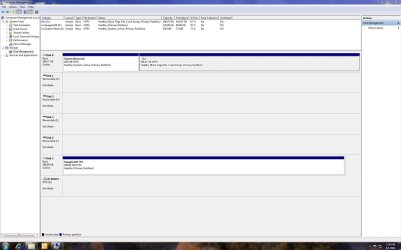
ugh... this is infuriating... got the other lone hdd up, now the raid won't add in.. i went thru the bios, it see's all the drives when attached, i placed the appropriate drive first, the other hdd second, and the raid array third.. just does not seem like the bios is my issue, plus the screen i freeze at is the win7 splash, and that has only ever been on one drive, so how can it be booting elsewhere.. dunno.. here's a picture, i'm at a loss for win7 at this point, adding the array just pisses it off, if anyone has any ideas please lmk...
 

Attachments

  • Capture2.JPG
    Capture2.JPG
    147.6 KB · Views: 24

My Computer My Computer

Computer Manufacturer/Model Number
built.. not bought ;)
OS
windows 7 64 bit pro
CPU
athlon 64 x2 4400
Motherboard
asus a8n-sli premium
Memory
2Gb
Graphics Card(s)
nVidia 7800 GT something
Sound Card
onboard junk
Monitor(s) Displays
24"
Screen Resolution
1920 x 1200
Hard Drives
all hdd are SATA
WD 320 caviar black (boot)
4 Seagate 250's in raid 5 on promise TX4310 (big data)
Seagate 320 (extra triple backup data for pics)
PSU
550w from china i'm sure
Case
antec aluminum buzzbox
Cooling
umm... fans?
Keyboard
Logitech with annoying as !%^* enhanced F keys
Mouse
MX1000
Internet Speed
LOL
Other Info
Promise SX-150 raid card (only supported until XP...)
Promise TX4310 raid card (only bought because of the above)
If your MB is the one listed in your specs, I just looked it up and it does not show support for windows 7. The latest bios I found was in 2007, and it was a beta bios. Perhaps your issue lies in there somehow. It does show support for Vista and XP though.
 

My Computers My Computers

System One System Two

  • Computer type
    PC/Desktop
    Computer Manufacturer/Model Number
    ALWAYS UNDER CONSTRUCTION
    OS
    Windows 11 Pro
    CPU
    Ryzen 9 5900X
    Motherboard
    Asus X570 Crosshair Viii Hero
    Memory
    32GB G Skill DDR4-3600
    Graphics Card(s)
    EVGA RTX 3080 FTW 3 Ultra
    Sound Card
    On Board/Sennheiser PC37X Headset
    Monitor(s) Displays
    3 X Asus 27"
    Screen Resolution
    2560x1440
    Hard Drives
    2 X 1 TB NVME drives
    PSU
    EVGA 850
    Case
    Phanteks Eclipse P400A
    Cooling
    EVGA 280 AIO
    Keyboard
    Logitech G510s/ Logitech G13
    Mouse
    Logitech G502
    Internet Speed
    24/1
    Antivirus
    ESET/MBAM Pro/SAS Pro
    Browser
    Chrome/ Firefox/ Edge
  • Computer type
    Laptop
    System Manufacturer/Model Number
    Dell 16 Plus
    OS
    Windows 11 Pro
    CPU
    Intel Ultra 9 288V
    Memory
    32 GB LPDDR5X 8533
    Monitor(s) Displays
    16" Mini-LED HDR600 Touch 90 Hz
    Screen Resolution
    2560X1600
    Hard Drives
    1 TB NVME
well it runs 7 pretty well, other than the drama of mounting my old array... but i see your point, it's not a recent build by any stretch, this is circa 2005 equipment

the bios on ths mobo would be from the winXP section, but i'm not sure which exact one off hand, guess i'll note that next time it fly's by, but i was on XP until last year when i got the bright idea to go x64

anyways, just for the sake of hardware, i pulled the drives off the card and mounted it in anyway.. it reports no array found as expected, but win7 booted in no problem, so i dont think i have a hardware issue on my hands.. seems there is something on the array that win7 hates, because i remove the array, and my problem goes away.. maybe there is some system flag set there as mentioned already, but this is a bummer as i have a mountain of stuff on that volume i'd like to keep
 

My Computer My Computer

Computer Manufacturer/Model Number
built.. not bought ;)
OS
windows 7 64 bit pro
CPU
athlon 64 x2 4400
Motherboard
asus a8n-sli premium
Memory
2Gb
Graphics Card(s)
nVidia 7800 GT something
Sound Card
onboard junk
Monitor(s) Displays
24"
Screen Resolution
1920 x 1200
Hard Drives
all hdd are SATA
WD 320 caviar black (boot)
4 Seagate 250's in raid 5 on promise TX4310 (big data)
Seagate 320 (extra triple backup data for pics)
PSU
550w from china i'm sure
Case
antec aluminum buzzbox
Cooling
umm... fans?
Keyboard
Logitech with annoying as !%^* enhanced F keys
Mouse
MX1000
Internet Speed
LOL
Other Info
Promise SX-150 raid card (only supported until XP...)
Promise TX4310 raid card (only bought because of the above)
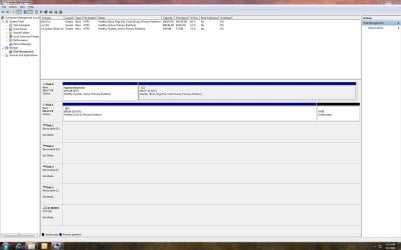
well the hacking continues... i attached 3/4 of the array and boom, i'm in... can anyone tell me how to look at teh boot sector, or whatever would be read first by an o/s trying to boot in, this has to be where the issue is, pulling one of the hdd seems to have done something

here is disk mgr, i have since pulled the P drive just to simplify... thx!!
 

Attachments

  • Capture3.JPG
    Capture3.JPG
    150.3 KB · Views: 20

My Computer My Computer

Computer Manufacturer/Model Number
built.. not bought ;)
OS
windows 7 64 bit pro
CPU
athlon 64 x2 4400
Motherboard
asus a8n-sli premium
Memory
2Gb
Graphics Card(s)
nVidia 7800 GT something
Sound Card
onboard junk
Monitor(s) Displays
24"
Screen Resolution
1920 x 1200
Hard Drives
all hdd are SATA
WD 320 caviar black (boot)
4 Seagate 250's in raid 5 on promise TX4310 (big data)
Seagate 320 (extra triple backup data for pics)
PSU
550w from china i'm sure
Case
antec aluminum buzzbox
Cooling
umm... fans?
Keyboard
Logitech with annoying as !%^* enhanced F keys
Mouse
MX1000
Internet Speed
LOL
Other Info
Promise SX-150 raid card (only supported until XP...)
Promise TX4310 raid card (only bought because of the above)
do the hdd's have jumper pins and if so are they in the correct place?

also are they showing in the bios as being present or not?

the bios may also have hdd set to raid or some such..without knowing whats there i'm just taking a guess.
 

My Computer My Computer

Computer Manufacturer/Model Number
.
OS
.
CPU
.
Motherboard
.
Memory
.
Graphics Card(s)
.
Monitor(s) Displays
.
Screen Resolution
.
Hard Drives
.
PSU
.
Case
.
Cooling
.
Keyboard
.
Mouse
.
Internet Speed
.
Other Info
.
You can download the Parted Magic iso file and burn it to a CD. Boot from the CD and there is a tool in the program that will show the contents of the System reserved partition. Or, if windows will let you, assign a drive letter to the system reserved and it will allow you to look inside. But I would strongly suggest that you not bother the files inside. If you do that be sure to remove the drive letter before you reboot or windows will not boot. I'm not familiar with raid so don't know if this would work. WHS would be the one to ask. Download Free Macrium Reflect, rebuild the array and take a system image of the array. Macrium uses XML for the image, which can then be mounted. Once mounted you may be able to restore the info to individual disks.
 

My Computers My Computers

System One System Two

  • Computer type
    PC/Desktop
    Computer Manufacturer/Model Number
    ALWAYS UNDER CONSTRUCTION
    OS
    Windows 11 Pro
    CPU
    Ryzen 9 5900X
    Motherboard
    Asus X570 Crosshair Viii Hero
    Memory
    32GB G Skill DDR4-3600
    Graphics Card(s)
    EVGA RTX 3080 FTW 3 Ultra
    Sound Card
    On Board/Sennheiser PC37X Headset
    Monitor(s) Displays
    3 X Asus 27"
    Screen Resolution
    2560x1440
    Hard Drives
    2 X 1 TB NVME drives
    PSU
    EVGA 850
    Case
    Phanteks Eclipse P400A
    Cooling
    EVGA 280 AIO
    Keyboard
    Logitech G510s/ Logitech G13
    Mouse
    Logitech G502
    Internet Speed
    24/1
    Antivirus
    ESET/MBAM Pro/SAS Pro
    Browser
    Chrome/ Firefox/ Edge
  • Computer type
    Laptop
    System Manufacturer/Model Number
    Dell 16 Plus
    OS
    Windows 11 Pro
    CPU
    Intel Ultra 9 288V
    Memory
    32 GB LPDDR5X 8533
    Monitor(s) Displays
    16" Mini-LED HDR600 Touch 90 Hz
    Screen Resolution
    2560X1600
    Hard Drives
    1 TB NVME
do the hdd's have jumper pins and if so are they in the correct place?

also are they showing in the bios as being present or not?

the bios may also have hdd set to raid or some such..without knowing whats there i'm just taking a guess.

BIOS is great, its all normal there, everything shows good, everything POST's right

jumpers yes but none of it is set.. and it was all working once wired as is.. the mobo has onboard RAID, but its disabled, the RAID in question is an add-in card on the bus in a PCI slot, the 4 hdd for it are all SATA ports on the card itself, and that logic is stored in the array (as far as the card is concerned) so the drive sequence and all that is read in when the array comes up... if you skip the card, neither the BIOS or windows see's those drives in any fashion
 

My Computer My Computer

Computer Manufacturer/Model Number
built.. not bought ;)
OS
windows 7 64 bit pro
CPU
athlon 64 x2 4400
Motherboard
asus a8n-sli premium
Memory
2Gb
Graphics Card(s)
nVidia 7800 GT something
Sound Card
onboard junk
Monitor(s) Displays
24"
Screen Resolution
1920 x 1200
Hard Drives
all hdd are SATA
WD 320 caviar black (boot)
4 Seagate 250's in raid 5 on promise TX4310 (big data)
Seagate 320 (extra triple backup data for pics)
PSU
550w from china i'm sure
Case
antec aluminum buzzbox
Cooling
umm... fans?
Keyboard
Logitech with annoying as !%^* enhanced F keys
Mouse
MX1000
Internet Speed
LOL
Other Info
Promise SX-150 raid card (only supported until XP...)
Promise TX4310 raid card (only bought because of the above)
You can download the Parted Magic iso file and burn it to a CD. Boot from the CD and there is a tool in the program that will show the contents of the System reserved partition. Or, if windows will let you, assign a drive letter to the system reserved and it will allow you to look inside. But I would strongly suggest that you not bother the files inside. If you do that be sure to remove the drive letter before you reboot or windows will not boot. I'm not familiar with raid so don't know if this would work. WHS would be the one to ask. Download Free Macrium Reflect, rebuild the array and take a system image of the array. Macrium uses XML for the image, which can then be mounted. Once mounted you may be able to restore the info to individual disks.


hmm... yeah, i'm not crazy about playing with the install like that either, but i would like to see whats inside the E: drive, in case there is something there that is my culprit

well my h4x0r5 got me in again today, and honestly, i've had it up to 'here' with defeat on this, its killing me... i have 25k digital pictures at about 38 Gb to copy out, and 27k files in mp3 and music videos, at about 164 Gb, so i'm going to copy that across to the C drive and not reboot until thats done

will lookup those software titles you offered, will probably not take action yet though, i have some copying to do :D

thx to all who offered and still open to input for sure
 

My Computer My Computer

Computer Manufacturer/Model Number
built.. not bought ;)
OS
windows 7 64 bit pro
CPU
athlon 64 x2 4400
Motherboard
asus a8n-sli premium
Memory
2Gb
Graphics Card(s)
nVidia 7800 GT something
Sound Card
onboard junk
Monitor(s) Displays
24"
Screen Resolution
1920 x 1200
Hard Drives
all hdd are SATA
WD 320 caviar black (boot)
4 Seagate 250's in raid 5 on promise TX4310 (big data)
Seagate 320 (extra triple backup data for pics)
PSU
550w from china i'm sure
Case
antec aluminum buzzbox
Cooling
umm... fans?
Keyboard
Logitech with annoying as !%^* enhanced F keys
Mouse
MX1000
Internet Speed
LOL
Other Info
Promise SX-150 raid card (only supported until XP...)
Promise TX4310 raid card (only bought because of the above)
[off topic]

congrats to our armed forced on hunting down and finishing the job on OBL, the world is now a better place

and on a related side note, looks like ole GWB was right all along... 'magine that!!

[/off topic]
 

My Computer My Computer

Computer Manufacturer/Model Number
built.. not bought ;)
OS
windows 7 64 bit pro
CPU
athlon 64 x2 4400
Motherboard
asus a8n-sli premium
Memory
2Gb
Graphics Card(s)
nVidia 7800 GT something
Sound Card
onboard junk
Monitor(s) Displays
24"
Screen Resolution
1920 x 1200
Hard Drives
all hdd are SATA
WD 320 caviar black (boot)
4 Seagate 250's in raid 5 on promise TX4310 (big data)
Seagate 320 (extra triple backup data for pics)
PSU
550w from china i'm sure
Case
antec aluminum buzzbox
Cooling
umm... fans?
Keyboard
Logitech with annoying as !%^* enhanced F keys
Mouse
MX1000
Internet Speed
LOL
Other Info
Promise SX-150 raid card (only supported until XP...)
Promise TX4310 raid card (only bought because of the above)
Back
Top