Windows 7 will not let me access my 3TB external HDD anymore :(

jbroaf

New member
Local time
8:49 PM
Messages
32
Hello,

I have been working with this HDD for almost a year now and have not had any problems with it till today.

I unplugged it from my computer earlier and now when i plug it back in it goes through the normal "Installing device drivers.....device drivers installed" but after all of that it does not show up in "My Computer" under HDDs but it shows up in "Devices and Printers"

The device in question is a Seagate Go Flex 3TB external HDD with a dock. Again..it's been working fine for a year but won't come up after i unplugged it today. I have A TON of stuff on the lil bugger and am not in too big of a hurry to leave it for scrap...any assistance would be greatly appreciated.
 

My Computer My Computer

At a glance

Windows 7 64 Home
OS
Windows 7 64 Home
Hello and welcome to the forums, jbroaf!

Can you take a snapshot of your disk management window with the problematic drive plugged in by following the instructions below?

(all credits for the following posting style go to the Seven Master,
karlsnooks http://www.sevenforums.com/member.php?u=9230
)


HOW TO POST A SNAPSHOT OF DISK MANAGEMENT DISPLAY


Run disk management:
WIN | type DISKMGMT.MSC | ENTER

(This method gives you a display without the unneeded navigation pane.)
(WIN=key with Microsoft logo on top.)


Maximize the output of Disk Management:

ALT-Spacebar key combo | X key (selects Maximize) |
Drag the field separators (such as between Status and Capacity) to show entire field.


Make a snapshot:
WIN | type SNIPPING | ENTER | New
Drag the cursor around the area you want to snip.
File | Save as | select save location and name | Save


Post the snapshot:

http://www.sevenforums.com/tutorials/9733-screenshots-files-upload-post-seven-forums.html

Thanks in advance!
 

My Computer My Computer

At a glance

Windows 7 x64 Professional SP1Intel C2D T9550 2.66 GHz @ 2.793 GHz (Thanks ...8 GB DDR3ATI MOBILITY RADEON 4670
Computer Manufacturer/Model Number
DELL SXPS 1640
OS
Windows 7 x64 Professional SP1
CPU
Intel C2D T9550 2.66 GHz @ 2.793 GHz (Thanks ThrottleStop!!)
Motherboard
Intel PM45
Memory
8 GB DDR3
Graphics Card(s)
ATI MOBILITY RADEON 4670
Sound Card
CREATIVE XFI AUDIO NOTEBOOK
Monitor(s) Displays
16.1 WLED
Screen Resolution
1920x1080
Hard Drives
Seagate ST9500420AS 500GB (465GiBi) 7200 RPM Drive

External Drives:-
2 TB WD Essentials x 3
1 TB WD Mybook Gen 1
1 TB WD Mybook Gen 2
1 TB Seagate
1 TB Seagate
320 GB WD Scorpio Black (enclosed)
PSU
90W Dell Power Brick
Case
Dell Chassis
Cooling
Coolermaster Cooling Pad
Keyboard
Built-in backlighted Keyboard
Mouse
Logitech Wireless Mini Mouse
Internet Speed
4/0.5
I'm sitting here waiting on the window to populate with all of the info...it's taking it's happy little time. :rolleyes:

I'll be glad when i get this solved...this computer is due for a fresh start anyways....
 

My Computer My Computer

At a glance

Windows 7 64 Home
OS
Windows 7 64 Home
I'm sitting here waiting on the window to populate with all of the info...it's taking it's happy little time. :rolleyes:

I'll be glad when i get this solved...this computer is due for a fresh start anyways....


Take your time, we're not going anywhere!
 

My Computer My Computer

At a glance

Windows 7 x64 Professional SP1Intel C2D T9550 2.66 GHz @ 2.793 GHz (Thanks ...8 GB DDR3ATI MOBILITY RADEON 4670
Computer Manufacturer/Model Number
DELL SXPS 1640
OS
Windows 7 x64 Professional SP1
CPU
Intel C2D T9550 2.66 GHz @ 2.793 GHz (Thanks ThrottleStop!!)
Motherboard
Intel PM45
Memory
8 GB DDR3
Graphics Card(s)
ATI MOBILITY RADEON 4670
Sound Card
CREATIVE XFI AUDIO NOTEBOOK
Monitor(s) Displays
16.1 WLED
Screen Resolution
1920x1080
Hard Drives
Seagate ST9500420AS 500GB (465GiBi) 7200 RPM Drive

External Drives:-
2 TB WD Essentials x 3
1 TB WD Mybook Gen 1
1 TB WD Mybook Gen 2
1 TB Seagate
1 TB Seagate
320 GB WD Scorpio Black (enclosed)
PSU
90W Dell Power Brick
Case
Dell Chassis
Cooling
Coolermaster Cooling Pad
Keyboard
Built-in backlighted Keyboard
Mouse
Logitech Wireless Mini Mouse
Internet Speed
4/0.5
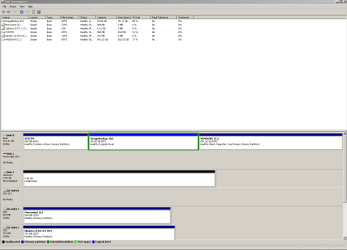
Now i REALLLLY don't like where this is going....Disk 2 gave me an error when it finally loaded. Since i didn't recognize the disk i checked the properties and it's the Seagate 3TB...
 

Attachments

  • dskmgmt_snapshot.PNG
    dskmgmt_snapshot.PNG
    17.5 KB · Views: 74

My Computer My Computer

At a glance

Windows 7 64 Home
OS
Windows 7 64 Home
Yep, it looks like that disk may be busted/damaged...

Firstly, the Windows doesn't even recognise it's correct size (3.86 GB?), and secondly it's unallocated..

Do you remember the error that Windows spit out for that Disk?

If the disk contains important data that you can't afford to lose, i'd recommend you look into Data recovery software like Easeus's Data recovery wizard amongst others..

http://www.easeus.com/datarecoverywizard/download.htm
 

My Computer My Computer

At a glance

Windows 7 x64 Professional SP1Intel C2D T9550 2.66 GHz @ 2.793 GHz (Thanks ...8 GB DDR3ATI MOBILITY RADEON 4670
Computer Manufacturer/Model Number
DELL SXPS 1640
OS
Windows 7 x64 Professional SP1
CPU
Intel C2D T9550 2.66 GHz @ 2.793 GHz (Thanks ThrottleStop!!)
Motherboard
Intel PM45
Memory
8 GB DDR3
Graphics Card(s)
ATI MOBILITY RADEON 4670
Sound Card
CREATIVE XFI AUDIO NOTEBOOK
Monitor(s) Displays
16.1 WLED
Screen Resolution
1920x1080
Hard Drives
Seagate ST9500420AS 500GB (465GiBi) 7200 RPM Drive

External Drives:-
2 TB WD Essentials x 3
1 TB WD Mybook Gen 1
1 TB WD Mybook Gen 2
1 TB Seagate
1 TB Seagate
320 GB WD Scorpio Black (enclosed)
PSU
90W Dell Power Brick
Case
Dell Chassis
Cooling
Coolermaster Cooling Pad
Keyboard
Built-in backlighted Keyboard
Mouse
Logitech Wireless Mini Mouse
Internet Speed
4/0.5
It said that disk two needed to be initialized before it could be properly shown or something like that...it gave me two choices...MBR (Master Boot Record) and GUIP (Or something like it....Never seen it before). It said that the GUIP was for larger partitions so I chose the GUIP on a hunch that "disk 2" was my 3TB...
 

My Computer My Computer

At a glance

Windows 7 64 Home
OS
Windows 7 64 Home
It said that disk two needed to be initialized before it could be properly shown or something like that...it gave me two choices...MBR (Master Boot Record) and GUIP (Or something like it....Never seen it before). It said that the GUIP was for larger partitions so I chose the GUIP on a hunch that "disk 2" was my 3TB...

Proceed with caution, if the next step involves any form of formatting... to do not proceed unless you're sure you can handle the possibility of data loss
 

My Computer My Computer

At a glance

Windows 7 x64 Professional SP1Intel C2D T9550 2.66 GHz @ 2.793 GHz (Thanks ...8 GB DDR3ATI MOBILITY RADEON 4670
Computer Manufacturer/Model Number
DELL SXPS 1640
OS
Windows 7 x64 Professional SP1
CPU
Intel C2D T9550 2.66 GHz @ 2.793 GHz (Thanks ThrottleStop!!)
Motherboard
Intel PM45
Memory
8 GB DDR3
Graphics Card(s)
ATI MOBILITY RADEON 4670
Sound Card
CREATIVE XFI AUDIO NOTEBOOK
Monitor(s) Displays
16.1 WLED
Screen Resolution
1920x1080
Hard Drives
Seagate ST9500420AS 500GB (465GiBi) 7200 RPM Drive

External Drives:-
2 TB WD Essentials x 3
1 TB WD Mybook Gen 1
1 TB WD Mybook Gen 2
1 TB Seagate
1 TB Seagate
320 GB WD Scorpio Black (enclosed)
PSU
90W Dell Power Brick
Case
Dell Chassis
Cooling
Coolermaster Cooling Pad
Keyboard
Built-in backlighted Keyboard
Mouse
Logitech Wireless Mini Mouse
Internet Speed
4/0.5
It wasn't formatting...I'm fairly well versed in computers but this passes me...once i chose the GUIP it came to the screenshot that i attached... and we can see that "disk 2" is still not initialized...
 

My Computer My Computer

At a glance

Windows 7 64 Home
OS
Windows 7 64 Home
It wasn't formatting...I'm fairly well versed in computers but this passes me...once i chose the GUIP it came to the screenshot that i attached... and we can see that "disk 2" is still not initialized...

Referring to what i've mentioned before in my previous post, It's highly like that your drive has become corrupted or is suffering from hardware damage.

All the usual windows based hard disk diagnostics are out of the window because we can't get the drive to initialize to be read by Windows so in this case we'll need to use manufacturer tools:-

SeaTools | Seagate

Download this for your OS, and try to perform the instructions from this page:-

How to use SeaTools for Windows
 

My Computer My Computer

At a glance

Windows 7 x64 Professional SP1Intel C2D T9550 2.66 GHz @ 2.793 GHz (Thanks ...8 GB DDR3ATI MOBILITY RADEON 4670
Computer Manufacturer/Model Number
DELL SXPS 1640
OS
Windows 7 x64 Professional SP1
CPU
Intel C2D T9550 2.66 GHz @ 2.793 GHz (Thanks ThrottleStop!!)
Motherboard
Intel PM45
Memory
8 GB DDR3
Graphics Card(s)
ATI MOBILITY RADEON 4670
Sound Card
CREATIVE XFI AUDIO NOTEBOOK
Monitor(s) Displays
16.1 WLED
Screen Resolution
1920x1080
Hard Drives
Seagate ST9500420AS 500GB (465GiBi) 7200 RPM Drive

External Drives:-
2 TB WD Essentials x 3
1 TB WD Mybook Gen 1
1 TB WD Mybook Gen 2
1 TB Seagate
1 TB Seagate
320 GB WD Scorpio Black (enclosed)
PSU
90W Dell Power Brick
Case
Dell Chassis
Cooling
Coolermaster Cooling Pad
Keyboard
Built-in backlighted Keyboard
Mouse
Logitech Wireless Mini Mouse
Internet Speed
4/0.5
Alrighty then...game on. Whether or not this works I want to say thank you for your quick response and your assistance. I'll follow this to the letter and let you know what happens. :D
 

My Computer My Computer

At a glance

Windows 7 64 Home
OS
Windows 7 64 Home
Not a problem mate, that's what we're here for.
 

My Computer My Computer

At a glance

Windows 7 x64 Professional SP1Intel C2D T9550 2.66 GHz @ 2.793 GHz (Thanks ...8 GB DDR3ATI MOBILITY RADEON 4670
Computer Manufacturer/Model Number
DELL SXPS 1640
OS
Windows 7 x64 Professional SP1
CPU
Intel C2D T9550 2.66 GHz @ 2.793 GHz (Thanks ThrottleStop!!)
Motherboard
Intel PM45
Memory
8 GB DDR3
Graphics Card(s)
ATI MOBILITY RADEON 4670
Sound Card
CREATIVE XFI AUDIO NOTEBOOK
Monitor(s) Displays
16.1 WLED
Screen Resolution
1920x1080
Hard Drives
Seagate ST9500420AS 500GB (465GiBi) 7200 RPM Drive

External Drives:-
2 TB WD Essentials x 3
1 TB WD Mybook Gen 1
1 TB WD Mybook Gen 2
1 TB Seagate
1 TB Seagate
320 GB WD Scorpio Black (enclosed)
PSU
90W Dell Power Brick
Case
Dell Chassis
Cooling
Coolermaster Cooling Pad
Keyboard
Built-in backlighted Keyboard
Mouse
Logitech Wireless Mini Mouse
Internet Speed
4/0.5
Ok...so I downloaded SeaTools and ran the program...after "looking for compatible devices" for about 10-15mins my entire system shut down. I rebooted and again tried to start the program with the same results...much quicker this time though...so when my computer was booting up this time I told it to go into safe mode and IMMEDIATELY after I hit enter to make the selection for safe mode my computer died again....I'm currently on my laptop...

Forgive me if I'm mistaken....but that wasn't supposed to happen.... >.<
 

My Computer My Computer

At a glance

Windows 7 64 Home
OS
Windows 7 64 Home
Oh dear me,

That definitely wasn't supposed to happen.. I don't see how seatools can flummox your system like that. Unplug that problematic drive from your computer and try to reboot again?

EDIT:- Scratch that, unplug all unnecessary devices from your desktop (extra USB devices, drives etc, except for your input devices) and reboot
 

My Computer My Computer

At a glance

Windows 7 x64 Professional SP1Intel C2D T9550 2.66 GHz @ 2.793 GHz (Thanks ...8 GB DDR3ATI MOBILITY RADEON 4670
Computer Manufacturer/Model Number
DELL SXPS 1640
OS
Windows 7 x64 Professional SP1
CPU
Intel C2D T9550 2.66 GHz @ 2.793 GHz (Thanks ThrottleStop!!)
Motherboard
Intel PM45
Memory
8 GB DDR3
Graphics Card(s)
ATI MOBILITY RADEON 4670
Sound Card
CREATIVE XFI AUDIO NOTEBOOK
Monitor(s) Displays
16.1 WLED
Screen Resolution
1920x1080
Hard Drives
Seagate ST9500420AS 500GB (465GiBi) 7200 RPM Drive

External Drives:-
2 TB WD Essentials x 3
1 TB WD Mybook Gen 1
1 TB WD Mybook Gen 2
1 TB Seagate
1 TB Seagate
320 GB WD Scorpio Black (enclosed)
PSU
90W Dell Power Brick
Case
Dell Chassis
Cooling
Coolermaster Cooling Pad
Keyboard
Built-in backlighted Keyboard
Mouse
Logitech Wireless Mini Mouse
Internet Speed
4/0.5
About data recovery and such...the link you posted above to Easus...have you used that software before and is there a good chance that it will work?

I have no problem dropping an additional $70 to fix this...
 

My Computer My Computer

At a glance

Windows 7 64 Home
OS
Windows 7 64 Home
About data recovery and such...the link you posted above to Easus...have you used that software before and is there a good chance that it will work?

I have no problem dropping an additional $70 to fix this...

To be honest, it's sort of the go to software the gurus recommend on this forum (at least the free version (home)) to recover vital data.. The free version has limits on recoverable data amounts obviously

Personally, I haven't used it myself. I never had the need to so far, I use Acronis True Image Home and Disk Director to handle my drives and clone/image them but they're both obviously pointless in this particular scenario.

Did you manage to get your desktop up and running again?

EDIT:-

I forgot to mention there are some other alternatives as well if you're so inclined.

http://www.easeus.com/partition-recovery/

http://www.piriform.com/recuva
 

My Computer My Computer

At a glance

Windows 7 x64 Professional SP1Intel C2D T9550 2.66 GHz @ 2.793 GHz (Thanks ...8 GB DDR3ATI MOBILITY RADEON 4670
Computer Manufacturer/Model Number
DELL SXPS 1640
OS
Windows 7 x64 Professional SP1
CPU
Intel C2D T9550 2.66 GHz @ 2.793 GHz (Thanks ThrottleStop!!)
Motherboard
Intel PM45
Memory
8 GB DDR3
Graphics Card(s)
ATI MOBILITY RADEON 4670
Sound Card
CREATIVE XFI AUDIO NOTEBOOK
Monitor(s) Displays
16.1 WLED
Screen Resolution
1920x1080
Hard Drives
Seagate ST9500420AS 500GB (465GiBi) 7200 RPM Drive

External Drives:-
2 TB WD Essentials x 3
1 TB WD Mybook Gen 1
1 TB WD Mybook Gen 2
1 TB Seagate
1 TB Seagate
320 GB WD Scorpio Black (enclosed)
PSU
90W Dell Power Brick
Case
Dell Chassis
Cooling
Coolermaster Cooling Pad
Keyboard
Built-in backlighted Keyboard
Mouse
Logitech Wireless Mini Mouse
Internet Speed
4/0.5
Yes I did. Funny...it's asking me if i want to install new software for one of the features of the broken drive >.<

I was reading on someone else's thread and they were able to hook their drive to another computer and it worked...dare i try this with my laptop?

There would be no way to recover ALL of the material I want off of there but i could at least get some of the harder to replace items and try to recover the rest later...
 

My Computer My Computer

At a glance

Windows 7 64 Home
OS
Windows 7 64 Home
Yes I did. Funny...it's asking me if i want to install new software for one of the features of the broken drive >.<

I was reading on someone else's thread and they were able to hook their drive to another computer and it worked...dare i try this with my laptop?

There would be no way to recover ALL of the material I want off of there but i could at least get some of the harder to replace items and try to recover the rest later...

Ah yes, that's another thing you can try. Also consider the alternative software i linked to in my previous post for your perusal.
 

My Computer My Computer

At a glance

Windows 7 x64 Professional SP1Intel C2D T9550 2.66 GHz @ 2.793 GHz (Thanks ...8 GB DDR3ATI MOBILITY RADEON 4670
Computer Manufacturer/Model Number
DELL SXPS 1640
OS
Windows 7 x64 Professional SP1
CPU
Intel C2D T9550 2.66 GHz @ 2.793 GHz (Thanks ThrottleStop!!)
Motherboard
Intel PM45
Memory
8 GB DDR3
Graphics Card(s)
ATI MOBILITY RADEON 4670
Sound Card
CREATIVE XFI AUDIO NOTEBOOK
Monitor(s) Displays
16.1 WLED
Screen Resolution
1920x1080
Hard Drives
Seagate ST9500420AS 500GB (465GiBi) 7200 RPM Drive

External Drives:-
2 TB WD Essentials x 3
1 TB WD Mybook Gen 1
1 TB WD Mybook Gen 2
1 TB Seagate
1 TB Seagate
320 GB WD Scorpio Black (enclosed)
PSU
90W Dell Power Brick
Case
Dell Chassis
Cooling
Coolermaster Cooling Pad
Keyboard
Built-in backlighted Keyboard
Mouse
Logitech Wireless Mini Mouse
Internet Speed
4/0.5
On my desktop again. Of note...the windows recovery program gave the boot to SeaTools. It's no longer installed on my computer.

I'm going to try to briefly plug up to my laptop. I took a look at your suggestions, but since this isn't exactly deleted anything yet i don't think it will do me any good.

If switching machines doesn't work then I'll go with one of the three programs you suggested. I don't know how this will go but at this point I'm needing to go to sleep for work. This will be the last thing i try before leaving this for tomorrow.

--EDIT--

Hooked it up to a buddies computer and it just sat there.... going to look into warranty info tomorrow and also the software selections you gave me above...If you think of anything else I'll be watching this thread tomorrow. Thanks for all of your help.
 
Last edited:

My Computer My Computer

At a glance

Windows 7 64 Home
OS
Windows 7 64 Home
All the best with your recovery mate, it's always mortifying to have our 'babies' get sick like this....
 

My Computer My Computer

At a glance

Windows 7 x64 Professional SP1Intel C2D T9550 2.66 GHz @ 2.793 GHz (Thanks ...8 GB DDR3ATI MOBILITY RADEON 4670
Computer Manufacturer/Model Number
DELL SXPS 1640
OS
Windows 7 x64 Professional SP1
CPU
Intel C2D T9550 2.66 GHz @ 2.793 GHz (Thanks ThrottleStop!!)
Motherboard
Intel PM45
Memory
8 GB DDR3
Graphics Card(s)
ATI MOBILITY RADEON 4670
Sound Card
CREATIVE XFI AUDIO NOTEBOOK
Monitor(s) Displays
16.1 WLED
Screen Resolution
1920x1080
Hard Drives
Seagate ST9500420AS 500GB (465GiBi) 7200 RPM Drive

External Drives:-
2 TB WD Essentials x 3
1 TB WD Mybook Gen 1
1 TB WD Mybook Gen 2
1 TB Seagate
1 TB Seagate
320 GB WD Scorpio Black (enclosed)
PSU
90W Dell Power Brick
Case
Dell Chassis
Cooling
Coolermaster Cooling Pad
Keyboard
Built-in backlighted Keyboard
Mouse
Logitech Wireless Mini Mouse
Internet Speed
4/0.5
Back
Top