
Some windows in our Windows 7 are chopped off and don't display all the contents completely
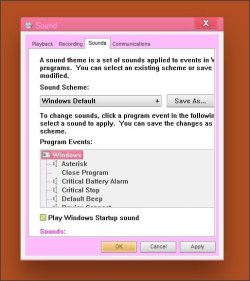
The picture below is an example. It's the window to change the system sounds (right click on Desktop->Personalize->Sounds). What our Windows7 is showing is incomplete, the window can't be resized, and there is no scroll bar, no way to use the arrow keys to move around.... which makes it basically impossible to use it.
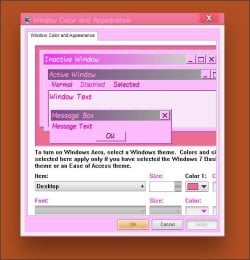
(Update: I also included a picture of the "Window Color and Appearance" dialog box from the personalization... it also is similarly chopped off).
I'm not sure which of Windows 7 windows are affected or why. Some work, some are incomplete: So far, I've noticed that Sound and Disk Cleaner are incomplete, but most others - including Windows Explorer - are complete.
It all worked before, but we've been customizing lots of things in our Windows 7 - themes, sounds, icons, colors, fonts. I tried resetting different things, but no luck.
I'd prefer to not have to reinstall, as I'd love to keep all the customization that we've made on it.
Any suggestions how to fix it?
Thanks.
The picture below is an example. It's the window to change the system sounds (right click on Desktop->Personalize->Sounds). What our Windows7 is showing is incomplete, the window can't be resized, and there is no scroll bar, no way to use the arrow keys to move around.... which makes it basically impossible to use it.
(Update: I also included a picture of the "Window Color and Appearance" dialog box from the personalization... it also is similarly chopped off).
I'm not sure which of Windows 7 windows are affected or why. Some work, some are incomplete: So far, I've noticed that Sound and Disk Cleaner are incomplete, but most others - including Windows Explorer - are complete.
It all worked before, but we've been customizing lots of things in our Windows 7 - themes, sounds, icons, colors, fonts. I tried resetting different things, but no luck.
I'd prefer to not have to reinstall, as I'd love to keep all the customization that we've made on it.
Any suggestions how to fix it?
Thanks.
Attachments
Last edited:
My Computer
- Computer type
- PC/Desktop
- Computer Manufacturer/Model Number
- Acer
- OS
- Windows 7 Home Premium 64bit


 . But unfortunately, there was no luck with this. I changed the default fonts back to the Windows standard as you show in your guide, and I re-set all the fonts in the Windows Color-->Advanced fonts dialog box... but it still has problems displaying correctly. I thought maybe it's a problem with the video driver, but I'm not sure why it would only affect Windows in that case. So I guess the only choice is reinstalling Windows 7.